vlln/plugin-registry
DSH 插件生态基建:薄控制台(浏览器面板管理官方 repository 插件,0 patch)+ make-dsh-plugin skill 官方插件开发引导
Listed
55
Market
Bundle verified
Preview
What it does
Ecosystem infrastructure: a thin browser console for managing official repository plugins (zero patches) plus a make-dsh-plugin skill for guided plugin development.
Best for
- DSH users who want a browser panel for installing, updating, enabling, disabling, and removing profile plugins.
- Plugin authors building official bundle or plain Cordis plugins with guided format selection and verification practices.
- Teams managing both bundle-layer entries and non-bundle insert rows from one interface.
Not ideal for
- Non-DSH plugin ecosystems, because the console and development guidance target DSH profile mechanisms.
- Users seeking a replacement plugin runtime; it manages install state while DSH itself defines how plugins run.
- Legacy repository-plugin workflows, because that official mechanism was removed and external plugins now use profile bundles or Cordis insert rows.
README
plugin-registry
中文 | English
DSH plugin ecosystem infrastructure: thin console + official plugin development guide
Browser panel managing a profile’s plugin install state (bundle layer stack + insert rows + enable/disable), zero patches;
the make-dsh-plugin skill guides developers in writing official-format plugins.
Pivot (2026-08): Official 0809 added a repository plugin mechanism (
.dsh-plugin) covering ~95% of the old mechanism; this repo is now a thin console + plugin development spec and guidance (old patches/CLI/panel removed). Since 0811 the repository-plugins mechanism is gone (vendor/loader/src/repository.ts); external plugins install via the web profile only: bundles (dsh.bundle) joindsh.profile.bundles; non-bundles (plain cordis packages) mount via insert rows incordis.patch.yml(live via HMR). Full assessment: official 0809 coverage.
Positioning
DeepSeek Harness’s official mechanisms define “what a plugin is and how it runs”; this repository adds two things (panel structure: console README; guidance: below):
-
Thin console (
packages/plugin/console) — browser panel managing a profile’s plugin install state + 4 agent tools -
Development spec and guidance —
make-dsh-pluginskill + cookbook for creating official bundle/cordis plugins
Ecosystem relationships (who can do what)
Official DSH (DeepSeek Harness)      plugin runtime + profile bundle mechanism (no repo mechanism since 0811)
   │
   ├── Official plugins (bundle)     loop / task-status / navbar etc. — `dsh plugin --profile web add` install into profile layer stack
   ├── Third-party plugins (bundle/plain)  standalone GitHub repos or npm packages — bundles enter the layer stack; plain plugins use insert rows (live)
   │
   └── This repository (plugin-registry)  ① thin console: browser panel + agent tools for install-state management
                                         ② make-dsh-plugin skill + cookbook: guides third-party plugin development
Plugin forms and install paths: plugin type comparison; install examples: examples.
Thin console

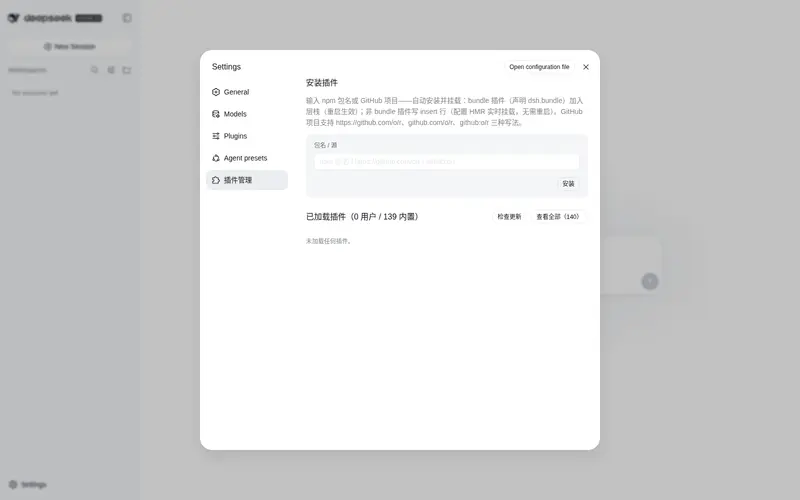
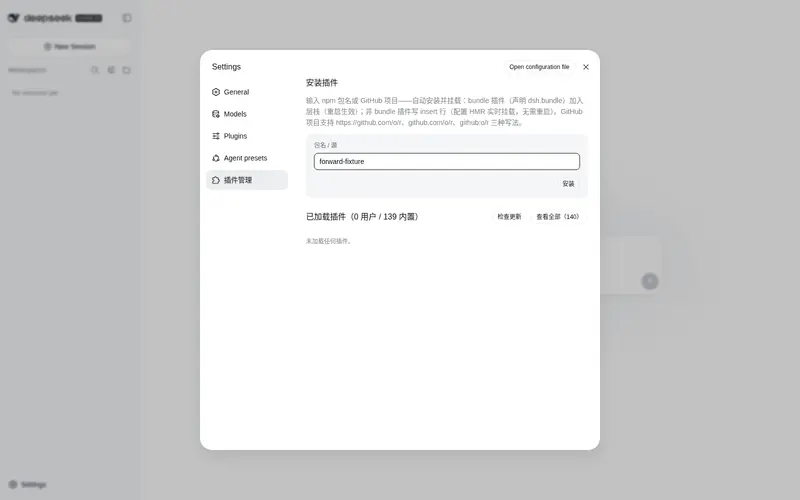
The settings page’s “Plugin Management” panel manages a profile’s plugin install state: install area (single entry — npm package name or GitHub project (https://github.com/o/r / github.com/o/r / github:o/r, URL auto-normalized) — automatic pnpm add; bundles enter the layer stack, non-bundles get insert rows) + loaded area (version check/update, disabled toggle, bundle uninstall).
Installation
Option 1: git source, direct install (recommended, one line)
dsh plugin --profile web add "github:vlln/plugin-registry#main&path:/packages/plugin/console"
Build artifacts are committed (git source skips the build); one command installs directly (~15 s).
Option 2: npm source
dsh plugin --profile web add @vlln/plugin-console@0.1.0
Option 3: local directory (source available)
git clone https://github.com/vlln/plugin-registry
cd plugin-registry/packages/plugin/console
dsh plugin --profile web add .   # artifacts are committed, no build needed; the current dir is the bundle package dir (dsh anchors . to an absolute path)
Refresh the web page after mounting — the “Plugin Management” panel appears on the settings page.
Agent Skills
| Skill | Purpose |
|---|---|
| make-dsh-plugin | Create official bundle / cordis plugins: pick a form (skill package / MCP / Node tool / with UI) → declare dsh.bundle or plain apply → install-and-verify discipline. Details in references/; reference implementation: packages/plugin/console
|
Before you start developing (pitfalls we’ve hit)
Key pitfalls (official packages not yet published, Node-half changes need a restart, host CSS overrides, etc.) and the full list: skill references/gotchas — read before developing.
Documentation
- Plugin type comparison — bundle vs plain cordis plugins: development/distribution/installation/management dimensions + how to choose
- Official 0809 coverage assessment — official mechanism coverage, pivot decision (0811 repository removal: CHANGELOG)
- Thin console design — design of unified installation-state management
- Historical mechanism docs (archived after the pivot): architecture (old), creating a plugin (old), manifest format (old), creating a repository-plugin (old), etc.
- Changelog / Roadmap
License
MIT License. See LICENSE.
Frequently Asked QuestionsFAQ
Use the verified command dsh plugin --profile default add github:vlln/plugin-registry in a DSH-enabled shell. The command resolves the public package metadata and keeps the plugin attached to the catalog identity shown on this page.
Compatibility follows the bundle and profile status shown above. If a profile is not detected, keep the plugin disabled there and check the repository documentation before enabling it in production.
The GitHub link and activity metadata are the source of truth for releases and maintenance. Revisit this page after a new release to confirm the catalog has observed the latest version.