wanshichenguang/dsh-tool-vision
DSH plugin: image_describe (识图) tool over the DashScope OpenAI-compatible vision API (qwen3.7-flash). Bring your own DASHSCOPE_API_KEY.
Listed
1
Vision
Bundle verified
Preview
What it does
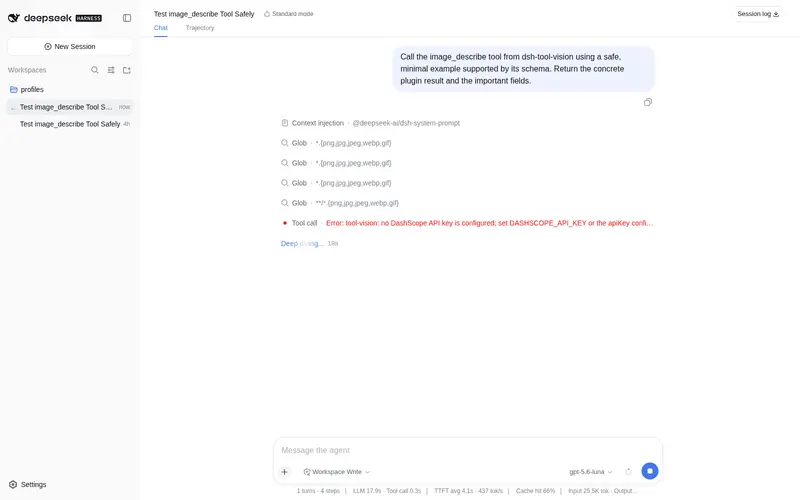
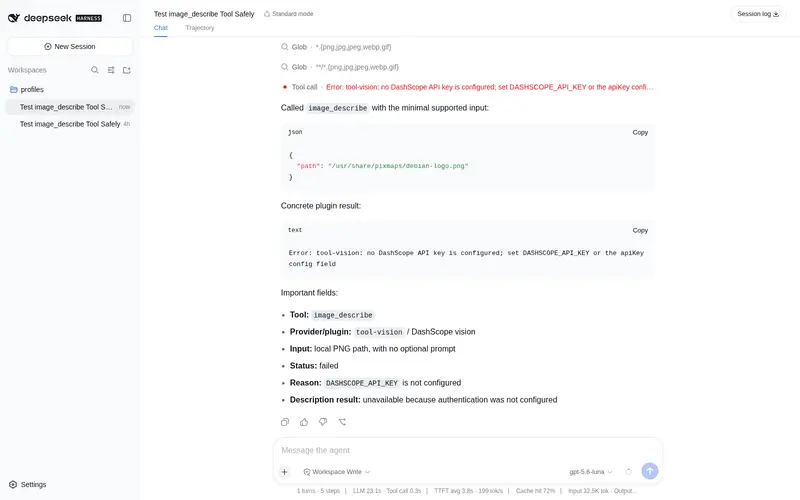
Adds an image_describe tool backed by the DashScope OpenAI-compatible vision API; on text-only sessions, pasted images are stored as local paths for the model and rendered inline in the chat transcript.
Best for
- Text-only DSH sessions that need to inspect pasted or dropped images through a tool.
- Agents that need descriptions or focused answers about local image files.
- DashScope users who want inline transcript rendering while the model receives a readable local image path.
Not ideal for
- Deployments without a DashScope API key; the tool registers but fails when invoked.
- Teams requiring a vision provider other than the DashScope OpenAI-compatible endpoint.
- Images above the configured 20 MiB default per-image limit.
- Deployments requiring per-call approval unless they add a separate `tools/pre-execute` policy.
README
dsh-tool-vision
| English | 中文 |
A DeepSeek Harness plugin: the model-facing image_describe(识图) tool. It reads a local image file and asks the DashScope OpenAI-compatible API (qwen3.7-flash) to describe it or answer a focused question.
Works in every agent preset: the bundle patch inserts the tool at the host plane, so every session sees it in the tool catalog.
Install
dsh plugin --profile web add dsh-tool-vision
Restart dsh web (or install it from the Plugin Market with one click). The tool appears as image_describe in the model’s tool catalog.
Paste bridge
On the web surface, pasting or dropping an image into the composer while the
session’s model is text-only (positively confirmed from provider
metadata) uploads each draft image to the plugin’s host route, releases the
draft, and appends [image: <path>] text to the prompt before sending — so
the request never trips the host’s image admission, and the model can read
the file with image_describe. Vision-capable or unknown models keep the
native intake (the image attaches inline, unchanged).
The uploaded copies live in the harness data home ($DSH_HOME/media, default
~/.dsh/media) under the same naming convention as the harness’s own
image-to-path conversion.
The sent message also renders the images back inside its user row in the transcript: a
conversation node matches the [image: <path>] markers in the user message
and displays the copies served by the host route while hiding those transport
markers from the visual bubble. The stored path text remains unchanged for the
text-only model.
API key
The plugin ships no key. Set the key in the environment that starts DSH:
DASHSCOPE_API_KEY=sk-xxxx
You can also pass it per-row in cordis.patch.yml:
- id: tool-vision
  name: 'dsh-tool-vision'
  config:
    apiKey: sk-xxxx
Without a key the tool registers normally and fails with VISION_NO_API_KEY on use, naming the fix.
Tool
| Tool | Args | Behavior |
|---|---|---|
image_describe |
path (string), prompt (string, optional) |
Resolves the image (absolute path, or relative to the workspace), sends it as a base64 data URL plus the prompt to POST {baseUrl}/chat/completions, and returns the assistant text. Omitting prompt uses defaultPrompt (a complete content description). |
Config
| Key | Default | Meaning |
|---|---|---|
baseUrl |
https://dashscope.aliyuncs.com/compatible-mode/v1 |
DashScope OpenAI-compatible endpoint. |
apiKey |
DASHSCOPE_API_KEY environment variable |
DashScope API key; an explicit config value wins over the environment. |
model |
qwen3.7-flash |
Vision model id. |
defaultPrompt |
请详细描述这张图片的内容:画面主体、关键细节、文字信息(如有)、布局与结构。 | Instruction used when a call omits prompt. |
timeoutMs |
120000 |
Cooperative tool-call timeout budget (ms). |
maxImageBytes |
20971520 |
Cap on one image’s byte size. |
maxOutputChars |
65536 |
Cap on the returned description text. |
Security
- No credentials ship with the package; the key stays in your environment or profile config.
- The HTTP client sets
redirect: 'error': the configured endpoint receives the credential, and a redirect fails the call instead of forwarding the key or the image to another origin. - The image bytes go only to the configured endpoint.
Known Limitations and Deferred Work
- Single provider, single request shape — the tool targets the DashScope OpenAI-compatible endpoint only; a provider-selection seam is deferred until a second vision backend needs the same schema.
-
No vision-specific permission policy — the tool executes without requesting
ctx.approval; a deployment that needs confirmation must add atools/pre-executepolicy.
License
MIT
Frequently Asked QuestionsFAQ
Use the verified command dsh plugin --profile default add github:wanshichenguang/dsh-tool-vision in a DSH-enabled shell. The command resolves the public package metadata and keeps the plugin attached to the catalog identity shown on this page.
Compatibility follows the bundle and profile status shown above. If a profile is not detected, keep the plugin disabled there and check the repository documentation before enabling it in production.
The GitHub link and activity metadata are the source of truth for releases and maintenance. Revisit this page after a new release to confirm the catalog has observed the latest version.