welsione/dsh-mmx-bridge
一个工具 = MiniMax 全部多模态能力:DSH 纯文本模型看图/画图/生视频/说话/唱歌/翻唱/搜索/查额度 | One mmx_bridge tool = all MiniMax multimodal (VLM/image/video/speech/music/cover/search/quota) for DeepSeek Harness (DSH)
Listed
4
Tools
Bundle verified
Preview
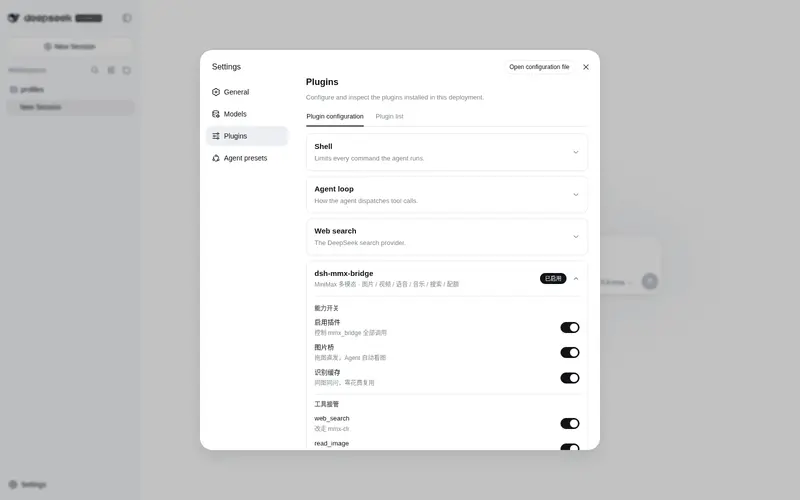
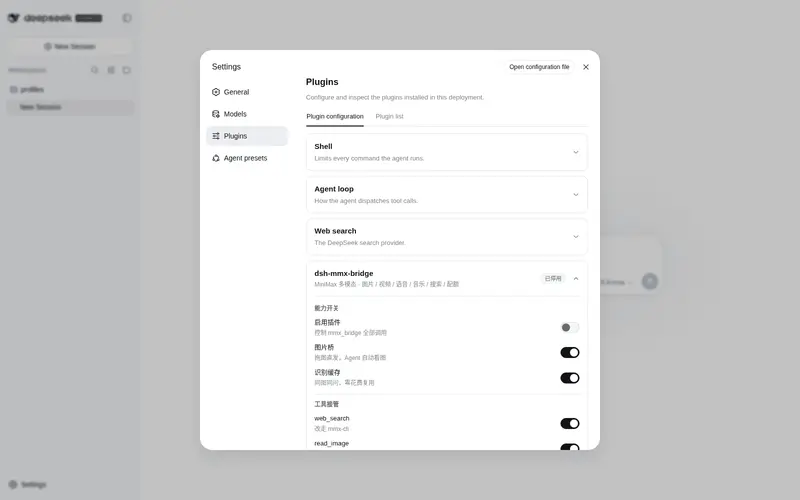
What it does
MiniMax multimodal bridge: one `mmx_bridge` tool covers image understanding/generation, video, TTS, music, cover, web search and quota; optional `web_search`/`read_image` takeover; inline players/image previews right in the Web GUI (npm: `dsh-mmx-bridge`).
Best for
- DSH users who want a text-only model to handle image understanding, image or video generation, speech, music, covers, and web search through one tool.
- Web GUI workflows that benefit from inline previews and playback of generated images, audio, and video.
- MiniMax users who want optional `web_search` or `read_image` takeover and quota checks inside DSH.
Not ideal for
- Environments without `mmx-cli`, MiniMax authentication, or a valid applicable plan.
- DSH versions earlier than `0.1.0-rc.7`, or systems below Node.js 18.
- Latency-sensitive video workflows that cannot tolerate MiniMax queue delays during peak periods.
README

dsh-mmx-bridge
一个工具 = MiniMax 全部多模态能力。 让 DeepSeek Harness(DSH)的纯文本模型直接看图、画图、生成视频、说话、唱歌、翻唱、搜索、查额度。







English · 简体中文
为什么需要这个?
DSH 默认只支持纯文本对话——看不了图、画不了画、说不了话、做不了视频。dsh-mmx-bridge 通过一个 mmx_bridge 工具接入 MiniMax 全栈多模态模型,一次安装,8 种能力即开即用:
v1.0.5 起:拖图直接发送,AI 就能识别——输入零改动。 拖入/粘贴图片后正常发送:你的消息(图片+提示词)在会话里原样显示,一个字节都不改。插件在背后做两件事:消息进入会话时被核心放行;发给 LLM 前,把图片落盘到临时目录(默认
/tmp/mmx-out/)并替换为「图片地址+本地路径」文本——Agent 收到地址后自动调用read_image/mmx_bridge(describe)查看图片。你感知不到中间过程:图片放进输入框,AI 就能看到它。可在设置页「插件配置」关闭该行为。

快速开始
前置条件
一条命令安装
dsh plugin --profile web add dsh-mmx-bridge
⚠️ npm 不通?改用
dsh plugin --profile web add github:welsione/dsh-mmx-bridge
安装后重启 dsh(服务端 ESM 缓存不热替换),再刷新 Web GUI 即可使用。详见 AGENT.md。
让 Agent 帮你装(复制给 Agent 的提示词)
帮我安装 DSH 插件 dsh-mmx-bridge(仓库 https://github.com/welsione/dsh-mmx-bridge ):

执行 `dsh plugin --profile web add dsh-mmx-bridge` 装到 web GUI profile;npm 拉不动就改用 `dsh plugin --profile web add github:welsione/dsh-mmx-bridge`。装完验证插件已挂载,并提醒我重启 dsh(设置页管理卡片需重启才生效)。
卸载
dsh plugin --profile web rm dsh-mmx-bridge
效果展示
| 图片生成 | 语音合成 |
|---|---|
 |
 |
| 图像识别(VLM 描述) | 插件配置页 |
|---|---|
 |
 |
架构
用户对话 → DSH Agent → mmx_bridge 工具 → mmx-cli → MiniMax API
                                                  ↓
                                            /mmx-files/ 同源服务
                                            (图片预览 / 音视频播放器)
- 零 npm 运行时依赖:仅使用 Node.js 内置模块
-
同源产物服务:生成的文件经
/mmx-files/路径直接内嵌在对话中,支持 Range 请求 - Web GUI 增强:图片预览、音频/视频播放器、设置页管理卡片自动加载
兼容性
| 项目 | 说明 |
|---|---|
| DSH 版本 | 0.1.0-rc.7+(Web GUI profile) |
| 运行时依赖 | 零 npm 依赖(Node 内置模块) |
| 外部依赖 | mmx-cli(工具调用时) |
| OS | macOS / Linux / Windows(需 Node.js 18+) |
常见问题
Frequently Asked QuestionsFAQ
Use the verified command dsh plugin --profile default add github:welsione/dsh-mmx-bridge in a DSH-enabled shell. The command resolves the public package metadata and keeps the plugin attached to the catalog identity shown on this page.
Compatibility follows the bundle and profile status shown above. If a profile is not detected, keep the plugin disabled there and check the repository documentation before enabling it in production.
The GitHub link and activity metadata are the source of truth for releases and maintenance. Revisit this page after a new release to confirm the catalog has observed the latest version.