WJNCT55555/dsh-web-preview-float
为DSH提供预览-代码两个悬浮窗
Listed
2
Ui
Bundle verified
Preview
What it does
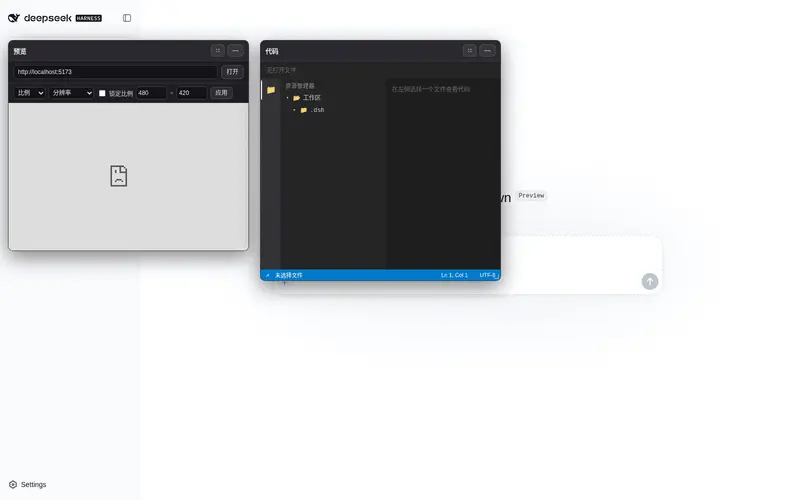
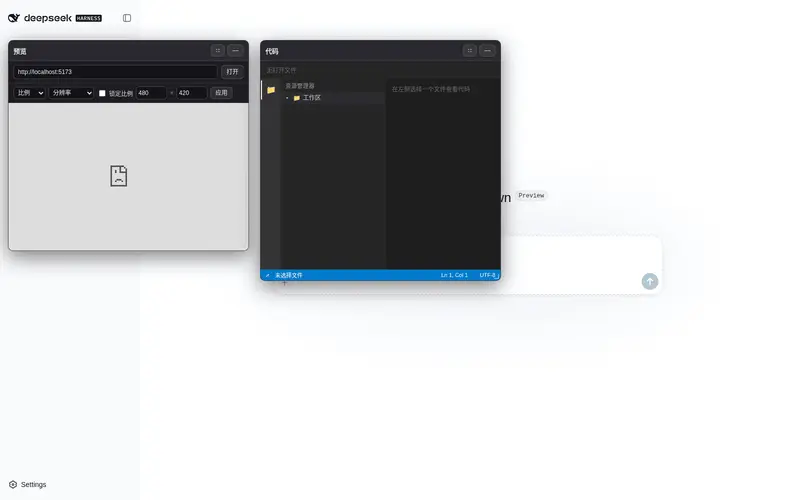
Google AI Studio-style floating preview for the Web UI: a draggable/resizable iframe preview with aspect-ratio and resolution presets, plus a VS Code-style code window with direct editing, confirmed writes, and session-log recording.
Best for
- Web developers who want to inspect a running project beside their DSH conversation.
- Responsive UI work that benefits from aspect-ratio and resolution presets in a resizable iframe.
- Users who want to browse and directly edit workspace files with confirmation and session-log recording.
Not ideal for
- Projects without a browser-accessible development server or pages that cannot be embedded in an iframe.
- Code-review workflows that require syntax highlighting; the documented editor displays plain text.
- Editing binary files, files over 256 KB for viewing, or writes over 1 MB.
- Users who need window positions and sizes to persist after a refresh.
README
dsh-web-preview-float
DeepSeek Harness(DSH)Web UI 的悬浮预览插件:两个独立、可拖拽、可拉伸、可缩小的悬浮窗,让你在等待模型回复或改代码时实时预览项目,类似 Google AI Studio。
-
预览窗:
<iframe>直连项目 dev server,URL 自动从项目package.json脚本探测(Vite→5173、Next/CRA→3000、Astro→4321,可手改)。 - 代码窗:工作区文件树 + 只读代码预览(懒加载目录,点文件看内容)。
只依赖官方扩展点(ctx.webServer / ctx.fs / ctx.sandboxPolicy + 自包含 DOM portal),不改 DSH 核心,因此可作为独立插件发布、被 dsh-plugin 生态收录。
安装
作为 profile 的 patch 层安装(DSH 官方插件市场 / bundle 机制):
# 该插件自带的 cordis.patch.yml 会插入这一行
- id: dsh-web-preview-float
  name: '@dsh-external/dsh-web-preview-float'
安装后重启 dsh web,浏览器里会出现两个悬浮窗。
开发
pnpm install
pnpm run typecheck
pnpm run test
pnpm run build      # 产出 lib/index.js(node 半)+ lib/client.js(浏览器半)
@deepseek-ai/cordis是 vendored 包、不在 npm 上,本地开发请把package.json里devDependencies的link:指向你的 harness checkout 的vendor/cordis。
结构
src/index.ts            # node 半:/__web_preview_float_fs 路由(list/read/dev)
src/invariant.ts        # invariant companion
src/client/index.tsx    # 浏览器半:挂载两个悬浮窗到 document.body
src/client/FloatingWindow.tsx  # 拖拽/拉伸/缩小
src/client/PreviewWindow.tsx   # 预览窗(iframe)
src/client/CodeWindow.tsx      # 代码窗(文件树 + 代码)
src/client/CodeView.tsx        # 文件树 + 代码阅读器
dsh.plugin.json         # 插件清单
cordis.patch.yml        # profile patch 层
说明
- 预览窗支持常用宽幅比预设(16:9 / 4:3 / 3:2 / 21:9 与手机竖屏 9:16 / 9:18 / 9:19.5),可选「锁定比例」让手动拉伸保持比例,也可直接输入宽×高自定义;另有常用分辨率预设(1920×1080 / 1366×768 / 390×844 等),一键把窗口放大到指定分辨率(超出屏幕时自动缩放适配)。
- 代码窗采用接近 VS Code 的布局:编辑器标签页、活动栏(可开关资源管理器)、文件树侧栏、带行号的可编辑编辑器 + 状态栏(Ln/Col、语言、UTF-8)。
- 代码窗可直接编辑:点「编辑」进入编辑态,改完后点「保存」(或 Ctrl+S)弹出确认框;确认后写入文件,并作为
web-preview/code-edit会话事件记录到 DSH 日志;「取消」保留草稿,「还原」丢弃修改。 - 两个悬浮窗标题栏都有放大/还原按钮(⛶ 一键放大到贴合屏幕);最小化成胶囊后也可直接拖动。
- 二进制/超大文件(>256KB)会提示「文件过大」;写操作限制在 1MB 内。
- 语法高亮未做(纯文本显示),后续可加 shiki。
- 悬浮窗位置/大小状态在内存中,刷新后回到默认位置。
License
Frequently Asked QuestionsFAQ
Use the verified command dsh plugin --profile default add github:WJNCT55555/dsh-web-preview-float in a DSH-enabled shell. The command resolves the public package metadata and keeps the plugin attached to the catalog identity shown on this page.
Compatibility follows the bundle and profile status shown above. If a profile is not detected, keep the plugin disabled there and check the repository documentation before enabling it in production.
The GitHub link and activity metadata are the source of truth for releases and maintenance. Revisit this page after a new release to confirm the catalog has observed the latest version.