wulusai2333/mimo-vision
DeepSeek Harness (DSH) native plugin — describe_image tool: a vision bridge (image → mimo-v2.5 → text description) over the ctx.fs / ctx.credentials seams
Listed
1
Vision
Bundle verified
Preview
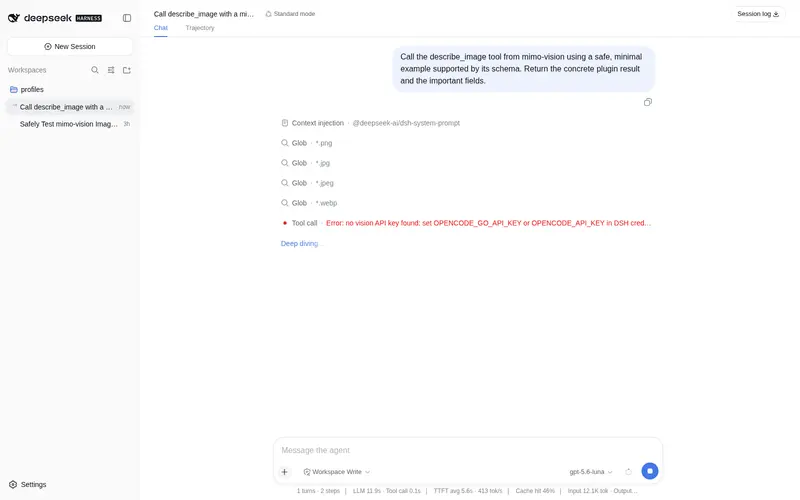
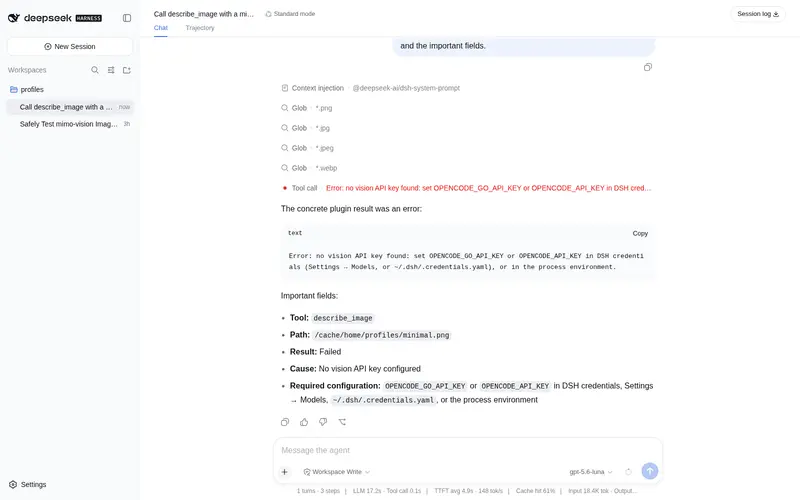
What it does
`describe_image` tool: a vision bridge that sends images to mimo-v2.5 through the opencode Zen API (credential `OPENCODE_GO_API_KEY`, free route first with paid fallback) and returns text descriptions for text-only models, with native passthrough and ImageMagick transcoding of SVG/TIFF/HEIC formats.
Best for
- Text-only DSH models that need image content converted into a textual description.
- Workflows using PNG, JPEG, GIF, WebP, or BMP images that can be sent natively to mimo-v2.5.
- Users with ImageMagick who need SVG, TIFF, HEIC, PSD, ICO, EXR, JP2, JXL, or AVIF transcoded before analysis.
- Deployments that can provide OPENCODE_GO_API_KEY or OPENCODE_API_KEY and want free-route-first routing with optional paid fallback.
Not ideal for
- Workflows that need native visual reasoning by the main model rather than a returned text description.
- Requests without a usable OpenCode API credential.
- Non-native formats on systems without ImageMagick; these return an explicit error.
- Images larger than the documented 20 MiB read cap, or security policies that forbid transcoding through the system temporary directory outside the ctx.fs sandbox.
README
mimo-vision · Native vision plugin for DSH
| English | 中文 |
mimo-vision is a native plugin for DeepSeek Harness (DSH), package name mimo-vision. It registers a describe_image tool that sends an image to a mimo-v2.5-series multimodal model and returns the text description to the main model — a “vision bridge” built for main models (e.g. deepseek-v4-flash) that have no vision input of their own.
It is not a standalone process: it is a first-class citizen of DSH’s “everything is a plugin” model. apply does exactly one thing — registers the capability as a first-class dsh tool. Dependencies, files, credentials, and subprocesses all go through dsh’s defined capability seams; uninstalling cleans up cleanly.
Implementation paradigm: a direct landing of DSH’s native plugin primitives
-
Registration is reversible by construction:
apply(ctx)contains a singlectx.tools.register(defineTool(...)).register()returns a disposer; when the plugin fiber disposes, the tool is unregistered and its schema is automatically withdrawn from the system prompt. There is no leftover cleanup code — clean uninstall is a structural guarantee, not hand-written cleanup. -
injectdeclares dependencies:export const inject = ['tools', 'fs', 'credentials']follows the pure Cordis effect spec — activation only happens once the seams are in place.ctx.get('subprocess')intranscode.tsis an optional capability with a default fallback, used at execution time, not activation time. This is “declared dependencies”, not “probed dependencies”. -
All capabilities go through dsh seams: file reads use
ctx.fs.resolve/stat/readBytes+ctx.emit('fs/observed'); credentials usectx.credentials.resolve(credentialRef(...))with no hand-rolled parsing; subprocess (transcoding) usesctx.subprocess. The one exception: transcode temp files are written vianode:fsto the system temp directory (see Known Limitations below). - Uninstallable / composable: uninstall is pure — the disposer runs and everything is reclaimed: no disk writes, no timers, no long-lived connections to manually wind down.
Tool
| Tool | Arguments | Description |
|---|---|---|
describe_image |
path (required), question (optional) |
Describes an image file and returns text |
Supported image formats:
- Sent natively: PNG / JPEG / GIF / WebP / BMP (all verified decodable by the vision model)
-
Auto-transcoded: SVG / TIFF (
.tif) / HEIC (.heif) / PSD / ICO / EXR / JP2 / JXL / AVIF — when ImageMagick is installed locally, these are transcoded to PNG before sending, downscaled to a ≤2048px long edge (saves tokens) - Any other extension, or a transcode-format when ImageMagick is not installed, returns an explicit error (never sent silently)
Usage example (tell the model): Use describe_image to describe D:\photos\cat.png, focusing on what breed of cat it is.
How it works
-
Key resolution:
ctx.credentials.resolvetakes the first non-empty ofOPENCODE_GO_API_KEY→OPENCODE_API_KEY(DSH credential layering: process env >~/.dsh/.credentials.yaml>.env). -
Read the image:
ctx.fs.resolve(relative paths resolve against the session workspace cwd) →ctx.fs.readBytes(20 MiB cap); non-native formats (SVG/TIFF/HEIC…) are transcoded to PNG via ImageMagick (through thectx.subprocessseam) and downscaled to a 2048px long edge → base64. -
Routing: the free Zen route (
mimo-v2.5-free) is tried first; on failure (non-2xx / timeout) it falls back to the paid Go route (mimo-v2.5) once per request;allowPaid: falsedisables the paid fallback.
Design decisions are documented in adr/0002-dsh-native-plugin.md (which supersedes the earlier MCP approach, ADR-0001).
Quick install (npm-installed DSH, recommended)
For
npx @deepseek-ai/dsh webor a globally installed DSH. The repo ships prebuilt artifacts (lib/index.js) — no build toolchain required.
Prerequisite: Node ^22.19 || >=24, and DSH already able to start.
Step 0 · Install and activate (one command)
mimo-vision declares dsh.bundle (see the dsh field in package.json), so dsh plugin add reconciles it as a bundle layer of the profile — installing the package, mounting the layer, and activating the tool happen in one step:
# from the npm registry (recommended once this package is published)
dsh plugin --profile web add mimo-vision

# from GitHub (source install, prebuilt lib/)
dsh plugin --profile web add github:wulusai2333/mimo-vision
If the repo is not on its default branch, use
github:wulusai2333/mimo-vision#<branch-or-tag>. This path relies on the dependency closure that DSH maintains in~/.dsh/profiles/node_modules(symlinking all@deepseek-ai/*seams to the dsh install tree), so the plugin’s runtimeimport "@deepseek-ai/dsh-tools"etc. resolves to the same instance DSH uses — singleton-safe,register()/injectsemantics unchanged. GitHub-source installs require this repo to commit a prebuiltlib/(kept in sync withsrc/): pnpm installs the source withlib/included, no build runs, noallowBuildsneeded.
Frequently Asked QuestionsFAQ
Use the verified command dsh plugin --profile default add github:wulusai2333/mimo-vision in a DSH-enabled shell. The command resolves the public package metadata and keeps the plugin attached to the catalog identity shown on this page.
Compatibility follows the bundle and profile status shown above. If a profile is not detected, keep the plugin disabled there and check the repository documentation before enabling it in production.
The GitHub link and activity metadata are the source of truth for releases and maintenance. Revisit this page after a new release to confirm the catalog has observed the latest version.