XanthanL/dsh-plugin-uisfx
DSH plugin: semantic UI sound effects powered by uisfx dsh 语义化音效插件:任务开始/成功/失败、按钮反馈,设置页即时试听,12 种音色包,支持其他插件调用。
Listed
3
Voice
Bundle verified
Preview
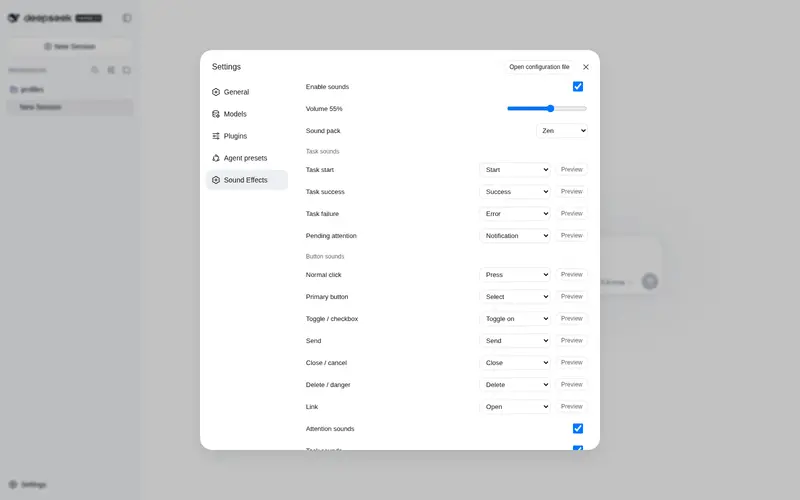
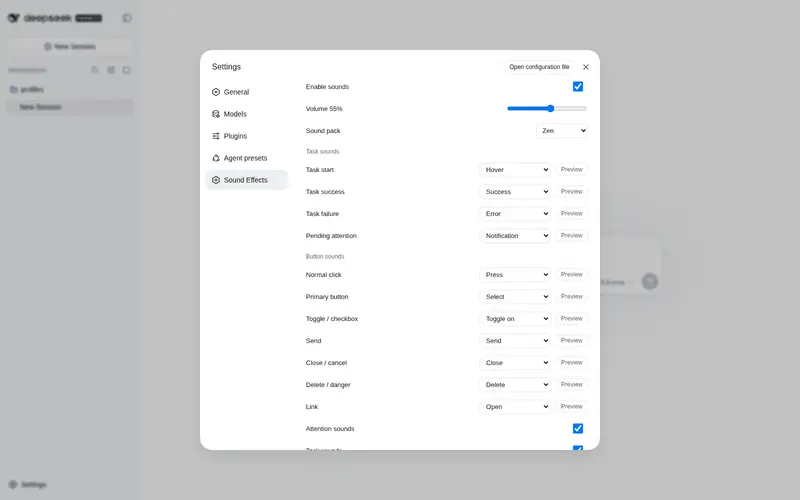
What it does
Semantic UI sound effects powered by uisfx: task start/success/failure and per-button cues, settings UI with instant preview, 12 sound packs, Host-persisted preferences, and `ctx.uisfx` service for other plugins.
Best for
- Users who benefit from audible task start, success, failure, pending, and button feedback in the DSH Web UI.
- Users who want configurable sound packs, per-scenario cues, volume controls, and instant previews with persisted preferences.
- Plugin developers who want to trigger shared semantic sounds through `ctx.uisfx`.
Not ideal for
- Silent, shared-office, accessibility, or automation environments where UI sounds add little value or are undesirable.
- Users needing completion alerts for background sessions; documented task sounds cover only the current session.
- Users requiring custom uploaded audio or per-scenario sound packs; both are roadmap items.
- Environments where no user gesture can unlock browser audio playback.
README
🔊 dsh-plugin-uisfx
一个 dsh 插件:把 uisfx 的语义化 UI 音效带进 DeepSeek Harness。 任务开始 / 成功 / 失败、按钮点击,全都可以在设置页里按情景挑选音效,并即时试听。






它解决什么
dsh 默认几乎没有反馈音。任务跑完了?失败了吗?按钮有没有点中?只能靠眼睛确认。
dsh-plugin-uisfx 提供一套语义化音效系统:
- 任务音:开始、成功、失败、待处理提醒
- 按钮音:不同按钮类型对应不同音效
- 全局音色包:uisfx 的 12 种音色,一键切换整体风格
- 按情景挑 cue:每个情景独立选择,旁边有试听按钮
-
持久化:设置写入
settings.yaml,重启不丢
界面预览

快速开始
已发布到 npm:dsh-plugin-uisfx
dsh plugin --profile web add dsh-plugin-uisfx
# 重启 dsh web
固定版本安装:
dsh plugin --profile web add dsh-plugin-uisfx@0.1.0
然后打开 设置 → 音效。
需要 dsh
0.1.0-rc.6。已与dsh-better-sidebar、@dsh-external/dsh-navbar同装验证。
功能一览
| 功能 | 说明 |
|---|---|
| 🎚 全局音色包 | uisfx 12 种音色(zen / studio / scifi / soft …),一键切换 |
| 🎯 情景映射 | 11 个情景各自映射一个 cue,默认已经配好 |
| ▶ 即时试听 | 设置页每个情景旁都有试听按钮,不用保存就能听 |
| 🔔 任务反馈 | 当前会话运行开始/成功/失败/待处理,自动触发 |
| 🖱 按钮反馈 | 自动识别发送/删除/开关/链接/主要按钮等 |
| 💾 持久化 |
settings.yaml 的 dsh-plugin-uisfx namespace,重启不丢 |
| 🔌 服务化 | 暴露 ctx.uisfx,其他插件可调用 |
默认情景映射
| 情景 | cue | 触发场景 |
|---|---|---|
task.start |
start |
agent 开始运行 |
task.success |
success |
任务正常结束 |
task.failure |
error |
任务失败 |
task.pending |
notification |
出现待处理交互 |
click.normal |
press |
普通按钮 |
click.primary |
select |
主要/强调按钮 |
click.toggle |
toggle-on |
开关、checkbox |
click.send |
send |
发送/提交 |
click.close |
close |
关闭/取消 |
click.danger |
delete |
删除/危险操作 |
click.link |
open |
链接 |
默认音色包:zen(安静、纸感、木质感,适合长时间使用)。
12 种音色包
| 包 | 风格 | 适合 |
|---|---|---|
minimal |
干练、精确 | 生产力工具 |
soft |
圆润、温暖 | 移动端 / 友好产品 |
glass |
明亮、清脆 | 媒体 / 金融 |
arcade |
像素风 | 游戏化 |
mechanical |
机械、硬朗 | 开发工具 |
organic |
木头 / 水声 | 教育 / 儿童 |
dreamy |
空灵、慢速 | 创意工具 |
scifi |
全息、数字感 | AI 工具 |
rubber |
弹性、俏皮 | 休闲产品 |
cinematic |
深沉、大片感 | 媒体 / 游戏 |
studio |
克制、精准 | 音视频 / AI 创作 |
zen |
纸、木、风铃 | 专注 / 阅读 / 默认 |
完整试听:https://uisfx.com
设置项
| 设置 | 默认值 | 说明 |
|---|---|---|
enabled |
true |
总开关 |
volume |
0.55 |
音量 0-1 |
pack |
zen |
全局音色包 |
taskSounds |
true |
任务音总开关 |
clickSounds |
true |
按钮音总开关 |
attentionSounds |
true |
待处理提醒音开关 |
mapping.* |
见上表 | 每个情景的 cue |
所有设置都写入 Host settings.yaml:
dsh-plugin-uisfx:
  enabled: true
  volume: 0.55
  pack: zen
服务 API
其他 dsh 插件可以这样触发音效:
// 按情景播放
ctx.uisfx.play('task.success')
ctx.uisfx.play('click.send')
ctx.uisfx.play('task.start')

// 直接播放某个 cue
ctx.uisfx.playCue('achievement')
ctx.uisfx.playCue('reward')

// 设置页试听
ctx.uisfx.preview('success')

// 读取/修改设置
ctx.uisfx.getPrefs()
ctx.uisfx.setPack('studio')
ctx.uisfx.setVolume(0.5)
可用 cue 共 78 个,来自 uisfx:
hover / press / select / toggle-on / send / success / error / complete / achievement / …
技术架构
- 零音频文件:内嵌 uisfx 0.4.0 Web Audio 合成运行时,无网络请求
- 懒加载:第一次用户手势时才创建播放器,符合浏览器 autoplay 策略
-
任务观察:订阅
ctx.sessions.binding(current).session,监听running/pending/lastAgentError - 按钮分类:全局 pointerdown 分类器,按语义映射到 cue
-
设置持久化:插件自带
/uisfx/api/settingsAPI,写入 Host settings
常见问题
没声音?
- 设置 → 音效 → 确认「启用音效」打开
- 浏览器可能拦截自动播放:先点一下页面任意位置
- 检查系统音量和 dsh 音量滑杆
任务结束没有成功/失败音?
- 插件只播当前会话的任务音
- 确认设置里「任务音」开关打开
- 失败判定依赖
lastAgentError或turn-error节点
为什么点击音和任务音会同时响?
正常情况下不会。若同时安装过旧版临时集成,请恢复官方 ui-theme / ui-conversation 文件。
本地开发
git clone https://github.com/<your-name>/dsh-plugin-uisfx.git
cd dsh-plugin-uisfx
pnpm install
pnpm build      # 生成 lib/client.js / lib/index.js
pnpm check      # 语法检查
使用独立 dev profile 验证,避免重启正在使用的 web:
dsh plugin --profile dev add ./dsh-plugin-uisfx
dsh --profile dev web --port 3090
浏览器调试入口:
window.__dshUISFX()          // uisfx player
window.__dshUISFXDebug()     // 当前 prefs
Roadmap
- 任务音 + 按钮音 + 设置页 + 持久化
- 12 音色包 / 78 cue 全量可选
- 后台会话完成提醒
- hover / drag / 分栏拖拽音
- 每个情景独立音色包
- 自定义音频文件上传
License
- 本插件:MIT
- 内嵌 uisfx runtime:MIT,版权归 Yuki Capital,见
NOTICE和vendor/uisfx-0.4.0.js
相关项目
- uisfx — 本插件使用的开源音效系统
- DSH-better-sidebar — 强大的 dsh 侧边栏插件
- dsh-navbar — 对话节点导航条
如果这个插件对你有用,欢迎点个 ⭐,并给仓库加上 dsh-plugin topic。
Frequently Asked QuestionsFAQ
Use the verified command dsh plugin --profile default add github:XanthanL/dsh-plugin-uisfx in a DSH-enabled shell. The command resolves the public package metadata and keeps the plugin attached to the catalog identity shown on this page.
Compatibility follows the bundle and profile status shown above. If a profile is not detected, keep the plugin disabled there and check the repository documentation before enabling it in production.
The GitHub link and activity metadata are the source of truth for releases and maintenance. Revisit this page after a new release to confirm the catalog has observed the latest version.