xiajiajun516/dsh-config-manager
Backup / export / import / migrate your DeepSeek Harness (DSH) configuration - dual-face Cordis plugin (host engine + Web UI). One-click restore on any machine.
Listed
3
Tools
Bundle verified
Preview
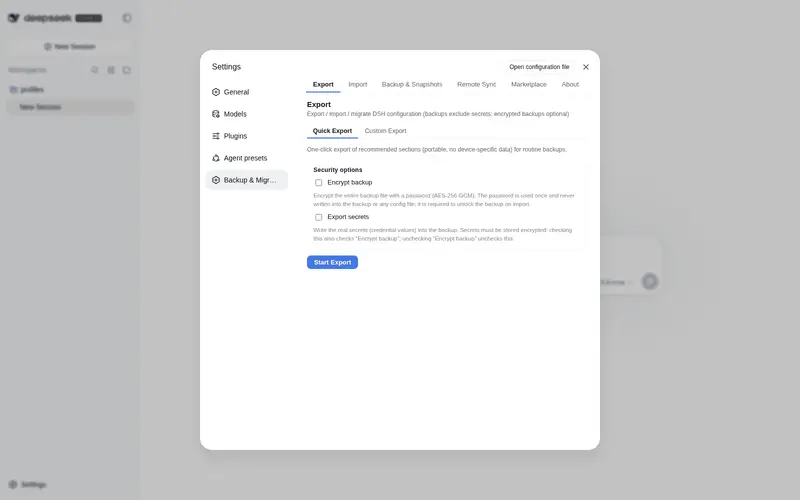
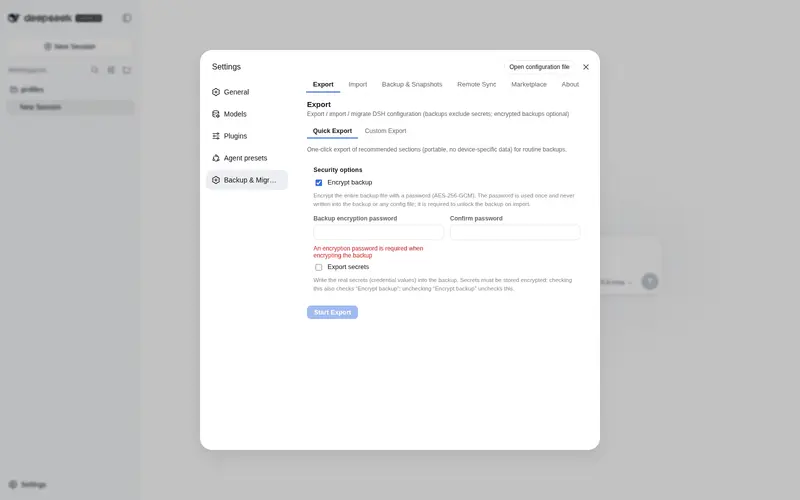
What it does
One-click backup, export, import and migration of a whole DSH config: settings, plugins, MCP, skills and workspaces. Secrets are excluded by default and, if you opt in, are AES-256-GCM encrypted rather than written in the clear; imports preview first and auto-backup with rollback, profiles hold multiple setups, and remote sync pushes portable config through a private Git repo with secrets excluded.
Best for
- Users migrating a complete DSH configuration between machines with an import preview and rollback protection.
- People maintaining separate work and personal DSH setups through profiles.
- Teams syncing portable, secret-free configuration through a private Git repository.
Not ideal for
- Migration of browser-resident UI state such as task-board data or panel widths.
- Users expecting per-project `AGENTS.md` or `CLAUDE.md` files to migrate with global DSH configuration.
- Unattended cross-machine secret migration without retaining the encrypted-backup password or re-entering excluded credentials.
README
🎒 DSH Config Manager
Pack up your DSH configuration and take it anywhere — restore your whole environment on a new machine with one click.
What is this? 🤔
DSH is your AI assistant workbench — it holds your settings: model configs, plugins, skills, workspaces…
DSH Config Manager is its “moving service”:
┌──────────────┐   ① one-click    ┌─────────────────┐   ② one-click    ┌──────────────┐
│  Machine A    │ ──── export ───► │ dsh-config.zip   │ ──── import ───► │  Machine B    │
│  my config    │                  │   (one file)     │                  │  all restored │
└──────────────┘                  └─────────────────┘                  └──────────────┘
⚠️ Security first: no secrets (API Key / Token / Password) are exported by default. See Security.
✨ Highlights
| Icon | Feature | In one line |
|---|---|---|
| 🚀 | One-click Export | Package your recommended config into a ZIP |
| 📦 | One-click Import | Restore your environment on another machine |
| 👀 | Preview before import | Full preview first — never touches your config silently |
| ⚔️ | Conflict handling | Keep Current / Use Imported — you decide |
| 🗺️ | Path auto-mapping | Detects dead absolute paths and lets you remap them |
| 🔒 | Secret safety | API Keys are not exported by default — non-encrypted imports ask you to re-enter; encrypted backups restore them with the password |
| ↩️ | Automatic rollback | Failed import restores everything automatically |
| 📸 | Snapshot restore | Undo an import: whole-file restore + uninstall added plugins (CLI & GUI) |
| 🔄 | Remote Sync | Push/pull portable config via Git private repo or WebDAV (secrets never sync) |
| 🗂️ | Profiles | Save multiple setups (Work / Personal) and switch anytime |
| 🌐 | Bilingual UI | Interface, reports and error details follow the DSH app language (中文 / English) |
📸 Screenshots
| Export | Import Preview |
|---|---|
 |
 |
| Snapshot Restore | Remote Sync |
|---|---|
 |
 |
🔄 How it works?
Export (pack it up)
Read your config → strip secrets (safe) → build manifest → compute checksums → pack into ZIP
Import (restore the environment)
Every step confirms and backs up first — it never modifies your config directly:
Select ZIP → validate file → check integrity → check schema → compatibility check
    → scan contents → build import plan → preview & confirm
    → auto-backup current config → apply → validate → done
                      │
                      └─ failed midway? → automatically restored (rollback)
📥 Installation
It’s a standard DSH plugin — two steps:
# ① Install the plugin
dsh plugin --profile web add dsh-config-manager@latest --config.auto-install-peers=false

# ② Restart DSH (a "Backup & Migration" entry appears in Settings)
💡 Just copy-paste the command:
--config.auto-install-peers=falseskips a few DSH core packages that aren’t on the public registry yet (the DSH runtime provides them), and@latestensures you get the newest build.🐛
@latestinstalled an old version? That’s pnpm 11’sminimumReleaseAgesupply-chain policy, not a cache issue: versions published less than ~30 days ago are excluded from resolution until whitelisted. Two fixes:
- Install an exact version once (it auto-whitelists, then
@latestworks):dsh plugin --profile web add dsh-config-manager@0.1.8 --config.auto-install-peers=false- Or disable the age gate with a one-liner (adds
minimumReleaseAge: 0at the top of the profile’spnpm-workspace.yaml):$f = "$env:USERPROFILE\.dsh\profiles\web\pnpm-workspace.yaml" $c = Get-Content $f -Raw if ($c -notmatch '(?m)^minimumReleaseAge:') { Set-Content -LiteralPath $f -Value ("minimumReleaseAge: 0`n" + $c) -Encoding utf8 Write-Output "Added minimumReleaseAge: 0" } else { Write-Output "Already present, nothing to do" }
🚀 Quick start (3-minute tour)
Machine A (export)
  1. Open DSH → Settings → "Backup & Migration"
  2. Click "Export Configuration" → choose "Quick Export"
  3. You get dsh-config-2026-08-14.zip (the report confirms no secrets inside)

Copy the ZIP to Machine B (import)
  1. Open DSH → "Backup & Migration" → "Import Configuration"
  2. Select the ZIP → wait for analysis → review the "Import Preview"
  3. Path issues? → choose new paths (batch mapping supported)
  4. Conflicts? → choose Keep Current / Use Imported
  5. Confirm import → wait
  6. Re-enter any missing API Keys as prompted
  7. ✅ Settings / plugins / MCP / skills / workspace / global instructions (AGENTS.md) are back
🧩 Features
📤 Export (two modes)
| Mode | Description |
|---|---|
| Quick Export (recommended) | One-click: settings / UI / models / plugins / MCP / skills / agent presets / global instructions (AGENTS.md) / workspaces… |
| Custom Export | Tick the categories you want |
Output:
dsh-config-<date>.zipwith manifest + per-category data + SHA-256 checksums.
📥 Import (safe flow)
- Nothing is written before confirmation — analyze & preview are zero-write
- Backup before applying — the target config is snapshotted automatically
- Automatic rollback on failure — full rollback or skip-and-continue, your choice
👀 Import Preview (dry run)
Shown fully before importing:
✓ 18 settings will be updated    ✓ 6 plugins already installed
⚠ 2 plugins need installation    ⚠ 3 secrets need re-entry
⚠ 1 path needs mapping           ⚠ 2 conflicts need attention
⚔️ Conflict handling
When the target already has a same-named item, you choose:
| Option | Meaning |
|---|---|
| Keep Current | Leave the target’s config untouched |
| Use Imported | Overwrite with the backup’s value |
Note: a “decide later / review” option is intentionally not offered — an undecided conflict would block the import from proceeding. Every conflict must be resolved before continuing.
🗺️ Path mapping
C:\Users\alice\projects doesn’t exist on the new machine? The plugin:
- Detects the dead absolute paths automatically
- Lets you pick new paths
- Supports batch prefix mapping (
C:\Users\alice\→/Users/bob/in one shot)
🔒 Secrets
| Scenario | Behavior |
|---|---|
| Default backup | No secret values at all — only records which keys are needed |
| Encrypted backup (explicit opt-in) | scrypt + AES-256-GCM, random salt & IV per export; secrets never leave as plaintext, and the password is never written to the file |
| Encrypted backup import | The export-time password is required: enter → verify → credentials are restored; no password, no import |
| After non-encrypted import | “3 secrets need re-entry” — values stay in memory only |
🔄 Remote Sync (Git / WebDAV)
Push / pull your portable config between machines through either of two channels — usage is identical except for the transport itself:
| Git private repo | WebDAV | |
|---|---|---|
| Endpoint | repoUrl |
webdav.url |
| Credentials | auth token in DSH credentials (DSH_CONFIG_MANAGER_SYNC_TOKEN) |
username stored in the config (echoed in the UI); password never synced / never logged — DSH credentials DSH_CONFIG_MANAGER_SYNC_WEBDAV_PASSWORD
|
-
Same snapshot retention for both channels: only the newest 10 snapshots are kept on the remote (
MAX_REMOTE_SNAPSHOTS=10); older ones are deleted automatically. - Switching channels starts fresh: Git and WebDAV do not share snapshots or a common ancestor. When you switch transport, sync begins again from the new remote’s empty baseline — push a fresh snapshot first.
-
WebDAV auth uses HTTP Basic: the
usernameis stored in the config and may be echoed back into the UI, while thepasswordis read live from the DSH credentials slotDSH_CONFIG_MANAGER_SYNC_WEBDAV_PASSWORD— it never appears in any sync file or log. - Plugins auto-install: when pulling diffs, plugins that are new in the backup are installed automatically on confirm — no manual per-item ticking in the diff list. Only version-conflict plugins still ask you to pick “Keep Current / Use Imported”.
🗂️ Profiles
Save multiple configurations (Work / Personal) and switch anytime; switching includes preview + auto-backup + rollback.
📸 Snapshot restore (undo an import)
Every import creates a safety snapshot first. If something feels off afterwards, restore the target back to its pre-import state:
| Action | What it does |
|---|---|
| Whole-file restore | settings.yaml / settings.json / cordis.patch.yml blobs are written back to $DSH_HOME; files that didn’t exist at snapshot time but appeared after import are removed |
| Plugin uninstall | Plugins added during import are removed via the official dsh plugin remove (baseline comparison; old snapshots without a baseline only get a hint) |
| File compensation | skills / agentPresets / agentInstructions / pluginFiles / sessions blobs are written back to their original paths |
| Credentials | DSH never reads credential values back — you get a manual re-entry hint instead |
GUI: Settings → “Backup & Migration” → Snapshots & Restore tab → pick a snapshot → preview the plan (dry-run, zero writes) → confirm.
🚨 CLI — the first line of defense when DSH is broken
The GUI lives inside DSH — it can’t help you if DSH won’t start. The dsh-config-manager CLI is completely independent of the DSH runtime (pure Node + the core engine, zero @deepseek-ai/* imports — it runs even when the DSH peer packages are broken or missing). That makes it your first rescue tool when the config is corrupted, the GUI won’t boot, or you changed machines and need to bring an environment back.
It is a standalone npm tool, installed separately from the plugin. Install it once on any machine that might need rescuing:
# --omit=peer: the offline CLI only needs js-yaml, not the DSH peer packages
npm install -g dsh-config-manager@latest --omit=peer
⚠️ Installing/updating the plugin (
dsh plugin --profile web add ...) only enables the GUI — it does not create thedsh-config-managercommand. Run the install command above, then any of the commands below.
All commands (also shown by dsh-config-manager help):
dsh-config-manager help                                        # list all commands & options
dsh-config-manager snapshots [--data-dir <dir>]                # list snapshots (newest first)
dsh-config-manager restore [--id <id>] [--dry-run]
                           [--profile <name>] [--settings <path>]
dsh-config-manager reinstall [--version <v>] [--yes] [--list]
                             [--wipe-config] [--dry-run]       # one-click reinstall of DSH itself
reinstall — rescue when DSH is broken. It reinstalls the @deepseek-ai/dsh launcher across platforms (uses the right command per OS: PowerShell on Windows, bash on Unix). By default it reinstalls the launcher + clears global caches; interactively it asks which dangerous clean-up items to include (settings / plugins / session data & credentials) — those are not selected by default, and any destructive choice requires a second confirmation by typing YES before anything runs. Before wiping any ~/.dsh data it makes an emergency backup at .reinstall-backup (the snapshots/ folder is deliberately never touched).
# see the selectable clean-up items
dsh-config-manager reinstall --list

# interactive: pick items, confirm, then reinstall DSH
dsh-config-manager reinstall

# non-interactive: everything checked, skip confirmation
dsh-config-manager reinstall --yes

# wipe config data too (equivalent to checking all data items) — interactive confirm still required
dsh-config-manager reinstall --wipe-config

# preview the exact plan without running anything
dsh-config-manager reinstall --dry-run
Snapshot restore. List and restore the safety snapshots (offline — the restore engine is part of the CLI, so it works whether or not DSH can start):
dsh-config-manager snapshots                                  # list snapshots (newest first)
dsh-config-manager restore --dry-run                          # preview the plan (zero writes)
dsh-config-manager restore --id <snapshot-id>                 # execute (current files are backed up first)
Every overwrite/delete is first copied to <snapshotDir>/pre-restore/ so you can manually change your mind. Exit code is 1 if any action failed; the report honestly lists restored / removedPlugins / manualHints / failed / skipped.
A typical rescue flow when DSH won’t start: ① dsh-config-manager reinstall to bring the launcher back (plus any clean-up), ② dsh web to start DSH again, ③ re-add the plugin from the registry, and ④ pull a snapshot from the remote repo (or run dsh-config-manager restore) to bring your config back. The CLI works at every step regardless of DSH’s health.
🛡️ Security
- The default backup contains no secret values — a hard invariant, enforced at export
- Not exported by default: API Keys / passwords / tokens / cookies / sessions / device unique ID / logs & cache / plugin binaries
- A ZIP is untrusted input: defends against Zip Slip, malicious paths, zip bombs, corrupt archives — any trigger rejects the whole file
- Logs are fully redacted — secret values never reach logs
- Encrypted backup (explicit opt-in): secrets are exported only as scrypt + AES-256-GCM ciphertext — random salt & IV per export, never plaintext; the password lives in memory only
🤝 Compatibility
| Status | Meaning |
|---|---|
| ✅ Excellent | Same platform, complete sections, supported schema |
| 👍 Good | Backup from an older DSH |
| ⚠️ Partial | Cross-platform / missing sections / backup newer than target |
| ❌ Unsupported | Schema beyond the supported range (cannot import) |
❓ FAQ
Q: Will my API Key be in the backup? Not by default. The default backup never contains any secret value — only records which keys you’ll need to re-enter. If you explicitly choose an encrypted backup, secrets are included, but only as scrypt + AES-256-GCM ciphertext (random salt & IV per export) — never plaintext.
Q: Will importing overwrite my existing config? Not silently. Conflicts ask you to choose (Keep Current / Use Imported); the target is auto-backed-up and can roll back.
Q: Does it work across platforms (Windows → macOS)? Yes. Dead absolute paths are detected and remapped (batch replacement supported).
Q: Can a corrupted ZIP still be imported? No. A checksum mismatch rejects the import outright (protects against corruption or tampering).
Q: Will re-importing duplicate things? No. Items are deduplicated by stable IDs (plugin ID / MCP name / skill name…); existing items are skipped.
Q: Does importing an encrypted backup require the password? Yes. The import wizard asks for the export-time encryption password and verifies it before the import can proceed; the password is never saved — memory only. A wrong or missing password blocks the import (credentials are restored from the backup instead of being re-entered when the password is correct).
📋 Known limitations (user-facing)
- Installing / updating plugins or MCP takes effect after restarting DSH
- Some UI state is not migrated (e.g. task board data, panel widths — they live in the browser, not in DSH’s config files)
-
keybindings / workflow configs / commands — DSH has no such concepts, so nothing is exported for them. Global agent rules are covered by Agent Instructions (
~/.dsh/AGENTS.md, injected into every session); per-projectAGENTS.md/CLAUDE.mdbelong to each project’s repo and are not migrated - History/session migration is off by default (v1 copies files only)
-
Encrypted backups: a lost password means the
secrets.enccan’t be decrypted (by design — keep your password safe) - Snapshot restore is offline and honest: entries the offline engine can’t restore (settings namespaces / patch lines when the snapshot has no whole-file backup, workspace records stored in DSH storages) are reported as skipped with a pointer to online rollback; credential values are never auto-written (manual re-entry hint only); old snapshots without a plugin baseline only get a hint to remove added plugins manually
Maintainers & developers: see DEVELOPERS.md for build, testing, auto-publishing and full technical notes.
Product principles: better to migrate one config less than to break your existing config. Every import follows Analyze → Preview → Backup → Apply → Validate → Rollback(if needed); every secret follows never export by default / never log / never expose / never silently transfer.
Frequently Asked QuestionsFAQ
Use the verified command dsh plugin --profile default add github:xiajiajun516/dsh-config-manager in a DSH-enabled shell. The command resolves the public package metadata and keeps the plugin attached to the catalog identity shown on this page.
Compatibility follows the bundle and profile status shown above. If a profile is not detected, keep the plugin disabled there and check the repository documentation before enabling it in production.
The GitHub link and activity metadata are the source of truth for releases and maintenance. Revisit this page after a new release to confirm the catalog has observed the latest version.