xiaoyuyu6420/dsh-backup
Backup DeepSeek Harness user data with one command: /backup, scheduled auto-backup, sha256 checksums and rotation. 一键备份 DSH 数据,支持定时自动备份。
Listed
3
Dev
Bundle verified
Preview
What it does
One-command backup & restore of DSH user data: /backup command family plus backup_dsh tool and a visual Settings panel, sha256 verify with hardened restore validation (path-traversal/symlink rejection), scheduled auto-backup that survives restarts on an absolute cadence, configurable rotation, archive download route, and GitHub sync to a private repo; macOS/Linux/Windows.
Best for
- Users protecting DSH sessions, settings, skills, credentials, and plugin configuration with repeatable backups.
- Administrators needing scheduled backups, rotation, checksum verification, and guarded restore.
- Users moving redacted backup archives between machines through a private GitHub repository.
Not ideal for
- Cross-machine restores that must include credentials without manual re-entry; the local credential vault is not synced.
- GitHub synchronization of individual archives larger than 90 MB, which are skipped.
- Users needing to back up data outside the DSH user-data tree covered by the plugin.
README
dsh-backup



| English | 简体中文 |
One-command backup and restore for DeepSeek Harness user data — sessions,
settings, credentials, skills, and plugin config under ~/.dsh, excluding
reinstallable node_modules — with sha256 checksums, integrity verification,
automatic rotation, and scheduled auto-backup that survives restarts.
Credentials are redacted by default: plaintext never enters an archive or
the GitHub sync, only a local vault, and is restored automatically. Cross-machine
restores get preflight hints and a one-command github pull. Works on macOS,
Linux, and Windows.
Scenario cheat sheet
| Scenario | What to run |
|---|---|
| Everyday backup |
/backup (or Settings → Plugins → Backup → Back up now) |
| Don’t trust yourself to remember |
/backup auto 12 — scheduled, survives restarts |
| Broke a config / bad plugin install |
/backup restore latest --dry-run, then drop the flag |
~/.dsh is gone entirely |
/backup restore latest — no existing data means no snapshot, straight to restore |
| New machine | Install the plugin, set the same githubRepo → /backup github pull → /backup restore latest --sync-deps
|
| Suspect a corrupt archive | /backup verify all |
| Cloud copy |
/backup github repo name/dsh-backups (private repo); every backup pushes afterwards |
Commands
-
/backup— immediately back up~/.dshto~/Desktop/dsh-backups/dsh-<timestamp>.tar.gz -
/backup list— list existing backups (name + size) and auto-backup status -
/backup verify [prefix|all]— validate archive checksums (default: the newest) -
/backup restore <prefix|latest> [--dry-run] [--sync-deps]— restore~/.dshfrom an archive (--sync-depsreinstalls per-profile plugin dependencies afterwards) -
/backup auto <N>|off|status— auto-backup every N hours (1–720; retains 3 copies below 24h, 7 otherwise, unlessconfig.keepoverrides; persisted across restarts) -
/backup --keep N— override the rotation count (default 7) -
/backup github status|sync|pull [--restore <prefix|latest>]|repo <address|off>— sync status / push now / pull backups from the repo / set the sync repository -
/backup delete|rm <prefix|latest>— delete a backup and its sidecars -
backup_dshtool — same capability for the model (mode=backup|list|verify|restore|auto; restore acceptssyncDeps)
Credential redaction & the local vault
Credential files (by default .credentials.yaml, .env, qq-bridge/config.json;
extend or disable via config.redact) never enter an archive:
- On backup, plaintext copies are mirrored into
vault/under the backup directory (POSIX mode 700/600); archives and the GitHub sync carry only redacted data. - Restoring on the same machine copies the credentials back from the vault — full fidelity.
- Restoring on a new machine (no vault) lists the missing credential files and tells you to re-enter them.
- Each archive ships with
.redacted.json(the redaction list) and.meta.json(host / home / timestamp) sidecars; restore preflight uses them to flag cross-machine path risks and credentials to re-enter. -
config.redact: falserestores the v0.6.x plaintext behavior (not recommended).
GitHub sync
With config.githubRepo set, every backup (manual, automatic, or panel) is
also pushed to a Git repository — archives, checksum sidecars, and rotation
deletions stay in sync:
- id: dsh-backup
  name: 'dsh-backup'
  config:
    githubRepo: 'your-name/dsh-backups'   # owner/repo, full URL, or a local path
Use a private repository — archives are redacted but still contain session
content. For an https remote, set the token in the environment
(DSH_BACKUP_GITHUB_TOKEN or GITHUB_TOKEN); it is only written into the sync
worktree’s credential file (never process args). Push is HEAD:main
--force-with-lease; archives over 90 MB are skipped with a notice. State (last
push, last error) lives in <destination>/auto.json and shows in the panel and
/backup github status.
Restoring on a new machine: install the plugin, configure the same
githubRepo, then run /backup github pull — it fetches every remote backup
(each one sha256-verified; corrupt archives are skipped and reported), then
/backup restore latest --sync-deps restores and reinstalls plugin
dependencies. The restore report reads .meta.json to flag the cross-machine
restore (absolute-path risks) and lists the credentials to re-enter.
--restore <prefix|latest> restores a specific archive right after pulling.
Settings panel (Web)
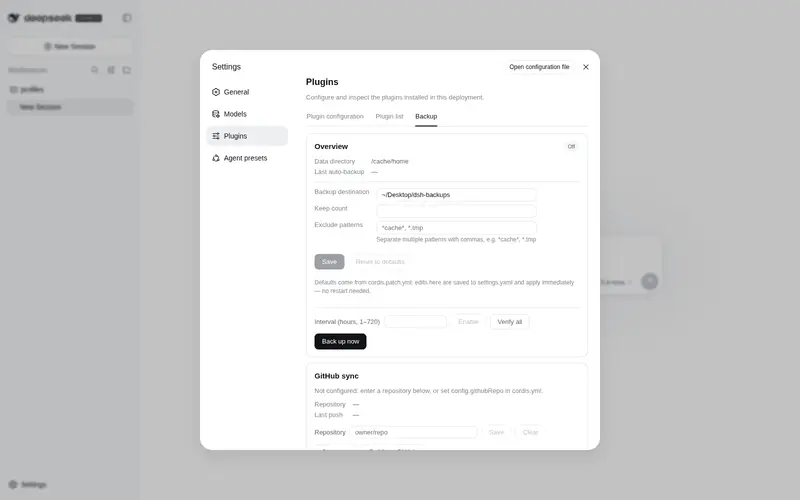
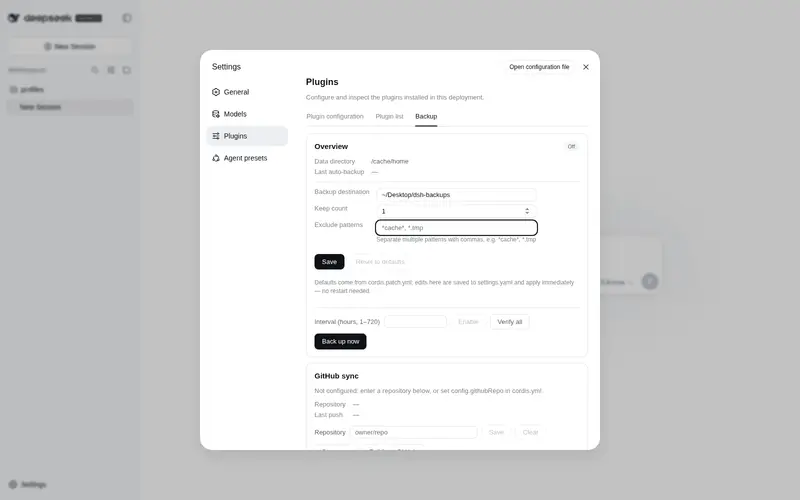
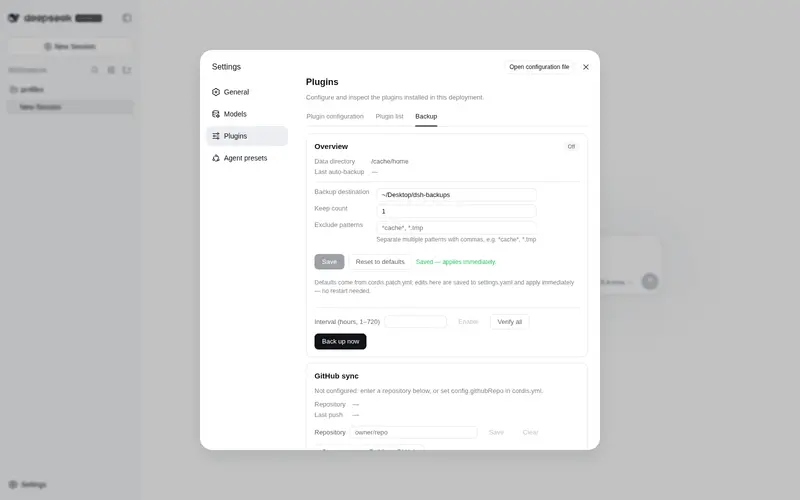
The same controls have a visual entry: a Backup tab inside Settings → Plugins
(dsh web). It shows the destination, auto-backup state, GitHub sync status, and
every archive with its size, and offers one-click back-up-now, per-archive
verify, download, restore with a dry-run preview plus explicit confirmation,
and pull from GitHub (the first step of a new-machine restore).
Downloads stream from the loopback-only route GET /backup-download/<name>.
The tab talks to the host through the backupPanel Typert Remote namespace
(/api RPC); the browser bundle ships prebuilt in lib/client.js — no build
step at install time.
How restore works
Restore is safe by construction:
- The archive’s sha256 is verified first — a corrupt archive never touches existing data.
- Entries are listed and any path outside the backup root rejects the restore (tar path-traversal guard).
- Preflight:
.meta.jsonflags a backup from another machine/home (absolute-path risks); redacted archives note that credentials come back from the local vault (or must be re-entered cross-machine). - The current
~/.dshis snapshotted, then moved aside to~/.dsh.pre-restore-<timestamp>— restore replaces rather than merges. A missing~/.dsh(data gone / first restore on a new machine) skips the snapshot and extracts directly. - The archive is extracted; redacted archives then restore credentials from the vault;
--sync-depsrunspnpm installper profile (node_modules never travel inside archives). - Restart
dshafterwards so restored sessions and settings take effect.
--dry-run shows the archive summary and preflight hints without writing anything.
Configuration (optional)
Plugin config in the active cordis profile:
- id: dsh-backup
  name: 'dsh-backup'
  config:
    destination: '~/Backups/dsh'   # default ~/Desktop/dsh-backups
    keep: 10                       # manual rotation count (default 7); when set, also the auto-backup retention — auto keeps 3 copies below 24h, 7 otherwise by default
    exclude:                       # extra tar --exclude patterns
      - '*cache*'
    redact:                        # extra redacted files (relative to ~/.dsh); false/'off' disables redaction
      - 'some-plugin/token.json'
    githubRepo: 'name/dsh-backups' # optional GitHub sync (see below)
Auto-backup state lives in <destination>/auto.json and resumes after restart — the next run is scheduled from the last auto-backup time, never reset by the restart.
Security note
Credential files are redacted by default (see above): archives and the GitHub
sync carry no plaintext credentials — plaintext lives only in the local
vault/ under the backup directory (POSIX 700/600). Archives may still contain
sensitive session content, so keep the sync repository private. Archives and
checksum sidecars are chmod 600 on POSIX (Windows relies on per-user profile
ACLs).
Storage note: the plugin writes its own data (archives, checksum sidecars,
auto.json, vault/) directly through node:fs, the same pattern as DSH’s
own session persistence — the ctx.fs capability is the model-facing sandboxed
surface and does not apply to host-owned storage.
Install
dsh plugin --profile web add @xiaoyuyu6420/dsh-backup
# or from git:
dsh plugin --profile web add github:xiaoyuyu6420/dsh-backup
⚠️ The npm package name is the scoped
@xiaoyuyu6420/dsh-backup. The unscopeddsh-backupon npm is an unrelated third-party package — don’t install it.
Quickstart
Your first backup is about 30 seconds away:
- Install the plugin —
dsh plugin --profile web add @xiaoyuyu6420/dsh-backup - Restart
dsh web— plugin discovery is cached per process. - Run
/backup— the archive and its sha256 sidecar land in~/Desktop/dsh-backups/.
Prefer clicking? The same flow lives in Settings → Plugins → Backup.
Requirements
- macOS, Linux, or Windows 10+ with
tarin PATH (Windows ships bsdtar in System32; Git Bash’s GNU tar also works — checksums prefersha256sum/shasumand fall back to an in-process hash on Windows) - DSH
0.1.0-rc.6or compatible
Troubleshooting
-
Plugin fails to load with
client api: method "backupPanel/remove" conflicts with its namespace service— you are on v0.5.0, whose delete-endpoint method name collided with a reserved name in the DSH client (issues #2, #5). v0.5.1 renamed the method toremoveEntry; upgrade withdsh plugin --profile web add @xiaoyuyu6420/dsh-backup@latestand restartdsh web. -
Which
taron Windows? Either one works — Windows ships bsdtar in System32, and Git Bash provides GNU tar. Checksums prefersha256sum/shasumwhen present and fall back to an in-process hash, so/backup verifyworks in both shells. -
Installed the wrong package — the npm package is the scoped
@xiaoyuyu6420/dsh-backup; the unscopeddsh-backupis an unrelated third-party package. Check your profile’s plugin list and reinstall with the scoped name.
Development
Zero runtime dependencies — the host plugin is lib/index.js. The browser half
lives in src/ and is bundled (zod inlined, React/Cordis external) into
lib/client.js, which is committed so git installs never build:
node scripts/build-client.mjs   # rebuild the client bundle after editing src/
node scripts/smoke.mjs          # host smoke suite (real temp dir, mocked DSH services)
node scripts/smoke-client.mjs   # client bundle: handshake, schemas, tab registration, SSR
Acknowledgements
- @beastrobin — the reserved-method-name root cause analysis in #1 that directly led to the v0.5.1 fix
- @mlosun — the thorough reproduction and root cause report in #2
- @Choi-Peng — triage help pointing affected users to the fix in #5
License
MIT
Frequently Asked QuestionsFAQ
Use the verified command dsh plugin --profile default add github:xiaoyuyu6420/dsh-backup in a DSH-enabled shell. The command resolves the public package metadata and keeps the plugin attached to the catalog identity shown on this page.
Compatibility follows the bundle and profile status shown above. If a profile is not detected, keep the plugin disabled there and check the repository documentation before enabling it in production.
The GitHub link and activity metadata are the source of truth for releases and maintenance. Revisit this page after a new release to confirm the catalog has observed the latest version.