xiaweiliang060035/dsh-opencode-go-usage
DSH (DeepSeek Harness) web plugin — floating widget showing real-time OpenCode Go subscription usage (rolling / weekly / monthly) for every API key. 悬浮实时展示 opencode-go 各 key 用量。
Listed
2
Usage
Bundle verified
Preview
What it does
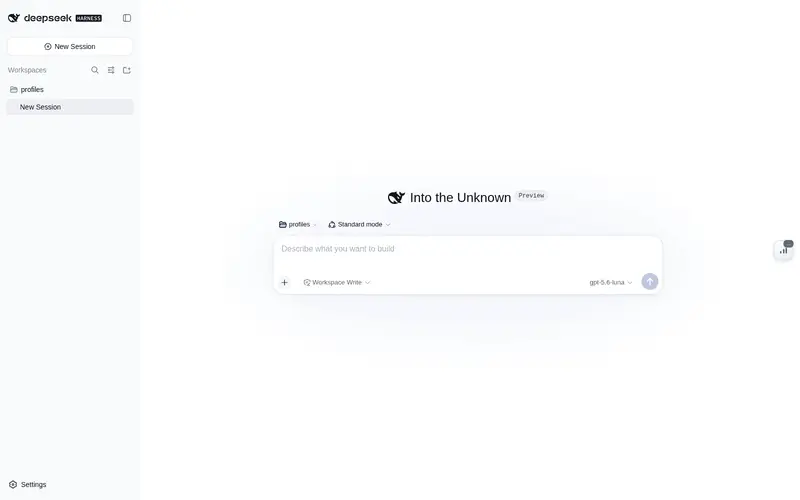
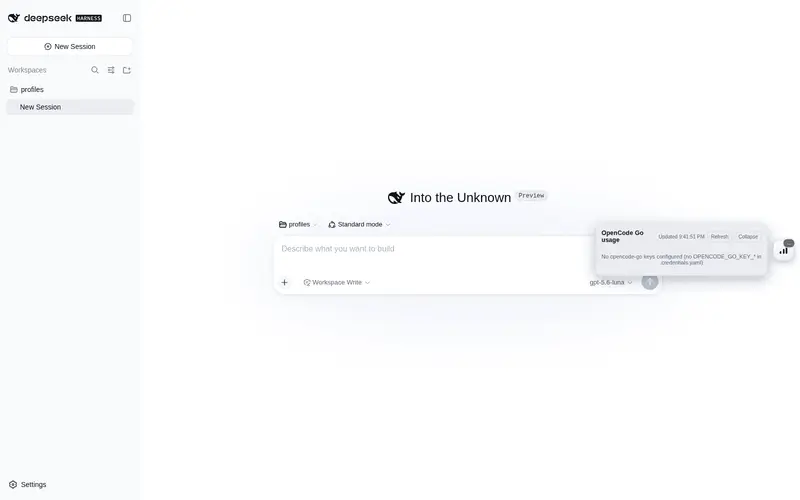
Floating widget showing real-time OpenCode Go subscription usage (rolling/weekly/monthly) for every API key, with rate-limit alerts and automatic key-pool discovery.
Best for
- DSH Web users managing multiple OpenCode Go API keys who need a single view of rolling, weekly, and monthly usage.
- Operators who want automatic key-pool discovery, reset countdowns, and early rate-limit warnings.
- Users who prefer a floating, bilingual usage panel that updates automatically without exposing keys to the browser.
Not ideal for
- Users without an OpenCode Go subscription or API key, since the plugin only reports that service's usage.
- Non-web DSH profiles lacking the required webServer, credentials, or timer services.
- Installations that can load only the Host half; the floating widget requires installation through the bundle mechanism.
- Environments that require only publicly documented APIs, because the usage endpoint is described as undocumented.
README
dsh-opencode-go-usage
简体中文 · English
A DeepSeek Harness web-GUI plugin that shows your OpenCode Go subscription usage in real time — a floating widget that tracks rolling / weekly / monthly quota for every API key in your pool, with color-coded progress bars and reset countdowns.
Features
- Floating widget — a compact button pinned to the right edge of the page. Its badge shows the worst window across all keys at a glance; the color (green / orange / pulsing red) tells you whether any key is close to its quota limit.
- Expandable panel — click the button to open a panel with one card per key (the currently active key is marked with a ★), each showing rolling / weekly / monthly usage as progress bars, percentages, and time-until-reset. Rate-limited windows are flagged with ⚠.
- Real-time — the Host polls the official usage endpoint every 60 seconds (configurable); the panel refreshes automatically and has a manual refresh button.
-
Auto key-pool discovery — reads your key pool from
$DSH_HOME/.credentials.yaml(anyOPENCODE_GO_KEY_<name>entries), so there is no hardcoded key count or name. Falls back to the single current key (OPENCODE_GO_API_KEY) when no pool exists. - i18n — Chinese / English, auto-selected from your browser language.
- Theme-aware — uses DSH theme tokens; works in both light and dark themes.
Screenshot

How it works
Host half (plain Node ESM):
- Discovers key-pool names — from
config.keyNamesif provided, otherwise by scanning.credentials.yamlforOPENCODE_GO_KEY_*entries. - Resolves each key value through the
credentialsservice (environment → credentials file →.envlayering). - Calls the official usage endpoint with
Authorization: Bearer <key>:
GET https://opencode.ai/zen/go/v1/usage
Authorization: Bearer <API_KEY>
Response example:
{
  "usage": {
    "rolling": { "status": "ok", "percent": 9,  "resetsAt": "2026-08-14T07:20:04.810Z" },
    "weekly":  { "status": "ok", "percent": 12, "resetsAt": "2026-08-17T00:00:00.810Z" },
    "monthly": { "status": "ok", "percent": 6,  "resetsAt": "2026-09-09T00:41:03.810Z" }
  }
}
The usage endpoint is not yet part of OpenCode’s public documentation; it was discovered and verified via farion1231/cc-switch#6433. Parsing is defensive.
Client half (browser bundle) registers in the shell.overlay slot and polls the Host’s web-server route /plugins/dsh-opencode-go-usage/snapshot. Keys never leave the Host.
Requirements
- Node.js + a DeepSeek Harness web profile (the default
dsh webprofile mountswebServer,credentials, andtimer, which this plugin needs).
Install
Option A — local package via file: dependency (recommended)
- Copy the package directory anywhere on disk, e.g.
D:\tools\dsh-opencode-go-usage. - In your profile’s
package.json(e.g.$DSH_HOME/profiles/web/package.json), add todependencies:
"@xiaweiliang060035/dsh-opencode-go-usage": "file:D:/tools/dsh-opencode-go-usage"
- Add the package to the profile’s bundle list (
dsh.profile.bundles):
"dsh": {
  "profile": {
    "bundles": [ "...existing...", "dsh-opencode-go-usage" ]
  }
}
- Install and restart:
cd $DSH_HOME/profiles/web
pnpm install
# restart dsh web
The bundle carries its own cordis.patch.yml (declared via dsh.bundle.patch), so the plugin row is composed automatically — no manual patch edit needed.
Option B — npm package
The package is published on npm as @xiaweiliang060035/dsh-opencode-go-usage:
cd $DSH_HOME/profiles/web
pnpm add @xiaweiliang060035/dsh-opencode-go-usage
Then add "@xiaweiliang060035/dsh-opencode-go-usage" to the profile’s dsh.profile.bundles list and restart dsh web.
The plugin registers both a Host half (fetch + webServer route) and a Client half (browser bundle). A plain copy into
plugins/with a relative patch entry loads the Host half only — the floating widget needs the bundle mechanism above.
Configuration
Tunables go in the plugin row’s config (override it in your profile’s cordis.patch.yml):
- id: opencode-go-usage
  config:
    keyNames: [go1, go2]      # optional: explicit key-pool names
    baseUrl: https://opencode.ai/zen/go/v1/usage   # optional
    refreshMs: 60000          # optional: poll interval (ms)
    timeoutMs: 15000          # optional: fetch timeout (ms)
    dshHome: ~                # optional: override the DSH home directory
    hideCordisPanel: true     # optional: hide the built-in "Cordis plugins" sidebar entry
| Key | Default | Description |
|---|---|---|
keyNames |
auto-discovered | Explicit key-pool names (OPENCODE_GO_KEY_<name> in .credentials.yaml) |
baseUrl |
https://opencode.ai/zen/go/v1/usage |
The usage endpoint |
refreshMs |
60000 |
Host poll interval in milliseconds |
timeoutMs |
15000 |
Fetch timeout in milliseconds |
dshHome |
resolveDshHome() |
DSH home directory containing .credentials.yaml
|
hideCordisPanel |
false |
Hide the built-in “Cordis plugins” sidebar entry (dynamic-plugin admin panel) |
Key pool format
Keys are read from $DSH_HOME/.credentials.yaml (the standard DSH credentials file). A pool looks like:
OPENCODE_GO_API_KEY: sk-opencode-…      # the currently active key
OPENCODE_GO_KEY_ACTIVE: go2             # which pool entry is active
OPENCODE_GO_KEY_go1: sk-opencode-…
OPENCODE_GO_KEY_go2: sk-opencode-…
OPENCODE_GO_KEY_go3: sk-opencode-…
Any OPENCODE_GO_KEY_<name> entry is discovered automatically — the number and names of keys are arbitrary. If you have only one key (no pool), just set OPENCODE_GO_API_KEY; the widget shows that single key.
Troubleshooting
| Symptom | Likely cause / fix |
|---|---|
Widget shows !
|
Snapshot fetch failed — confirm dsh web is running and /plugins/dsh-opencode-go-usage/snapshot responds |
Card shows Invalid key (401)
|
That key is invalid or expired |
Card shows Network error
|
Host cannot reach opencode.ai (proxy / offline / timeout) |
| Panel says “no keys configured” |
.credentials.yaml has neither OPENCODE_GO_KEY_* nor OPENCODE_GO_API_KEY
|
⚠ rate-limited |
That window’s quota is exhausted server-side |
License
MIT
Frequently Asked QuestionsFAQ
Use the verified command dsh plugin --profile default add github:xiaweiliang060035/dsh-opencode-go-usage in a DSH-enabled shell. The command resolves the public package metadata and keeps the plugin attached to the catalog identity shown on this page.
Compatibility follows the bundle and profile status shown above. If a profile is not detected, keep the plugin disabled there and check the repository documentation before enabling it in production.
The GitHub link and activity metadata are the source of truth for releases and maintenance. Revisit this page after a new release to confirm the catalog has observed the latest version.