xiongjiamu/dsh-atomgit
AtomGit plugin bundle for DeepSeek Harness (dsh): atomgit-skills workflows + ag CLI + platform-hosted AtomGit/GitCode MCP tools
Listed
6
Git
Bundle verified
Preview
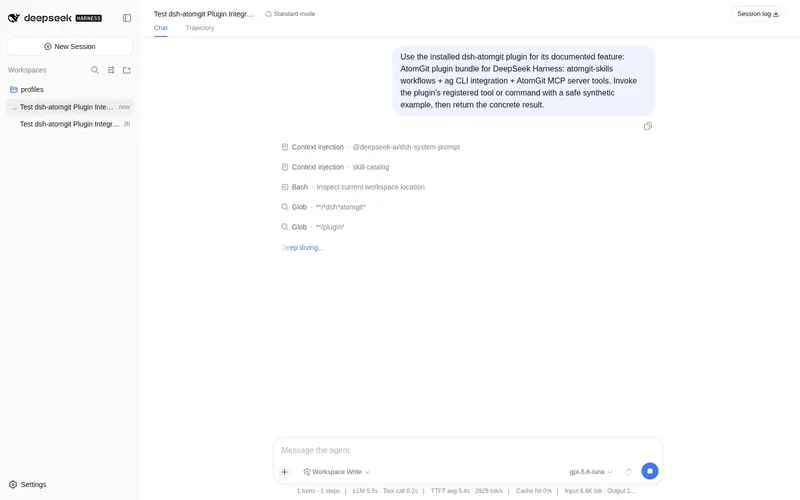
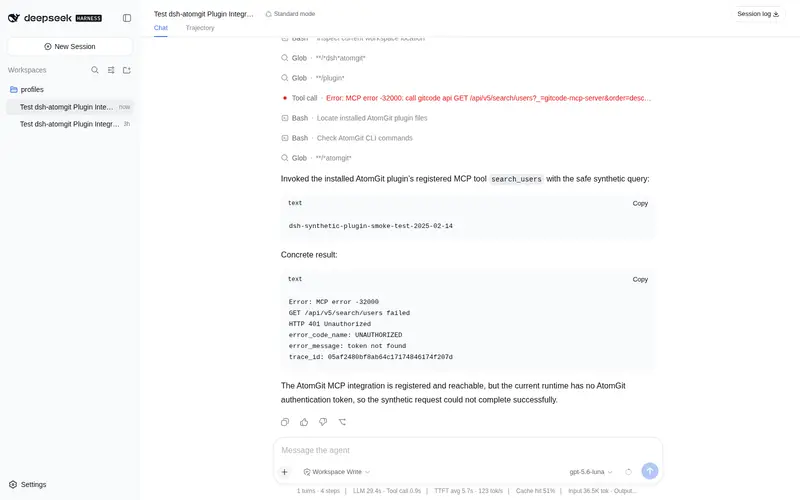
What it does
AtomGit plugin bundle for DeepSeek Harness: six built-in AtomGit skills (plan issues, implement issues, review PRs, merge PRs, publish CLI releases, mirror to GitHub) plus ag CLI integration and platform-hosted MCP tools for repos, branches, issues, PRs, and search.
Best for
- Development teams hosting code on AtomGit and wanting issue-to-PR workflows available inside DSH.
- Users who need one bundle for AtomGit planning, implementation, review, merge, CLI release, and GitHub mirroring skills.
- Agents that benefit from both ag CLI access and native MCP tools for repositories, branches, issues, pull requests, and search.
- Teams preferring one shared AtomGit PAT across the CLI, skills, and hosted MCP integration.
Not ideal for
- Teams that do not use AtomGit, since its workflows and tools are platform-specific.
- Users unwilling or unable to install ag and authenticate with an AtomGit PAT.
- Air-gapped environments that cannot reach the platform-hosted AtomGit MCP endpoint unless they configure an accessible alternative.
- Workflows requiring merges without explicit authorization; the documented merge flow requires user approval.
README
dsh-atomgit
| English | 中文 |
AtomGit plugin bundle for DeepSeek Harness (dsh): lets dsh users host and manage code on AtomGit out of the box. One package delivers all three AtomGit services:
| Layer | Source | Shape in dsh |
|---|---|---|
| Workflow | atomgit-skills | Six built-in skills in the model’s <available_skills> catalog, loaded on demand via the skill tool |
| Execution |
atomgit-cli (ag) |
The model runs ag commands directly through the built-in bash tool |
| Interaction | AtomGit platform-hosted MCP server (https://api.atomgit.com/mcp-server/v1/mcp) |
Native tools mcp__atomgit__* bridged by @deepseek-ai/dsh-mcp-client over streamable-http; no local server to run |
Built-in skills (vendored from the atomgit-skills upstream): atomgit-plan-issues, atomgit-implement-issue, atomgit-review-pr, atomgit-merge-pr, atomgit-publish-cli-release, atomgit-mirror-to-github.
Installation
Prerequisites — one authentication step covers all three modules:
# The only setup needed: install ag and log in once.
# `ag auth login` stores the AtomGit PAT at ~/.config/ag-cli/token.json.
npm install -g @hust-open-atom-club/atomgit-cli
ag auth login
That’s it. No separate token setup for the MCP endpoint or the skills.
Authentication (unified)
All three modules share one AtomGit PAT — the same credential ag auth login obtains (its OAuth token is a PAT):
| Module | How it authenticates |
|---|---|
ag CLI / skills |
Read ~/.config/ag-cli/token.json directly |
MCP endpoint (mcp__atomgit__*) |
The plugin’s atomgitAuth service resolves the token from the same ag credential file and sends it as Authorization: Bearer <PAT>; no user setup |
Optional override: to use a different token (e.g. a manually created PAT from AtomGit → Settings → Access tokens), set ATOMGIT_TOKEN in the .env of the dsh working directory — the plugin falls back to it when the ag credential file is absent.
Install the bundle (run from the directory containing this package):
dsh plugin --profile web add ./dsh-atomgit
# or from a remote: dsh plugin --profile web add github:you/dsh-atomgit#<sha>
dsh web
What the model gets
After startup the model side automatically gains:
- Six
atomgit-*skills in the<available_skills>catalog, loaded on demand via theskilltool;references/files (e.g.ag-commands.md) are read on demand through the directory resource hint. - Native
mcp__atomgit__*tools (repos / branches / issues / PRs / search) from the AtomGit platform-hosted MCP server — no local server, Docker, or Python install needed. -
agin bash (ag repo view,ag pr list,ag issue create, …).
Typical workflow: atomgit-plan-issues to plan issues → atomgit-implement-issue to implement and open a PR → atomgit-review-pr to review → atomgit-merge-pr to merge after your explicit authorization.
Configuration overrides
A patch replaces a row’s whole config; users override by row id in their profile cordis.patch.yml or a --patch overlay:
# Disable the MCP server entirely (skills + ag only):
- id: mcp-atomgit
  disabled: true

# Point at a different endpoint (e.g. a self-hosted MCP server):
- id: mcp-atomgit
  inject: [atomgitAuth]
  config:
    serverName: atomgit
    transport: streamable-http
    url: https://your-host/mcp
    headers:
      Authorization: !!js '`Bearer ${ctx.atomgitAuth.token ?? ""}`'
Syncing skills
skills/ is vendored from the atomgit-skills upstream pinned to a tag, keeping “plugin version ↔ skill version” reproducible:
npm run sync-skills            # sync main
npm run sync-skills -- v1.2.3  # sync a specific tag
License
- Plugin code and packaging of this bundle: MulanPSL-2.0.
- Built-in skills come from atomgit-skills; their license (MulanPSL-2.0) is copied with the skills at
skills/LICENSE.
Frequently Asked QuestionsFAQ
Use the verified command dsh plugin --profile default add github:xiongjiamu/dsh-atomgit in a DSH-enabled shell. The command resolves the public package metadata and keeps the plugin attached to the catalog identity shown on this page.
Compatibility follows the bundle and profile status shown above. If a profile is not detected, keep the plugin disabled there and check the repository documentation before enabling it in production.
The GitHub link and activity metadata are the source of truth for releases and maintenance. Revisit this page after a new release to confirm the catalog has observed the latest version.