yangyongzhen/dsh-scheduler
Cron/one-shot scheduled tasks: run shell commands or fire webhooks on a schedule, with optional ServerChan/DingTalk/Feishu/webhook delivery of results.
Listed
1
Workflow
Bundle verified
Preview
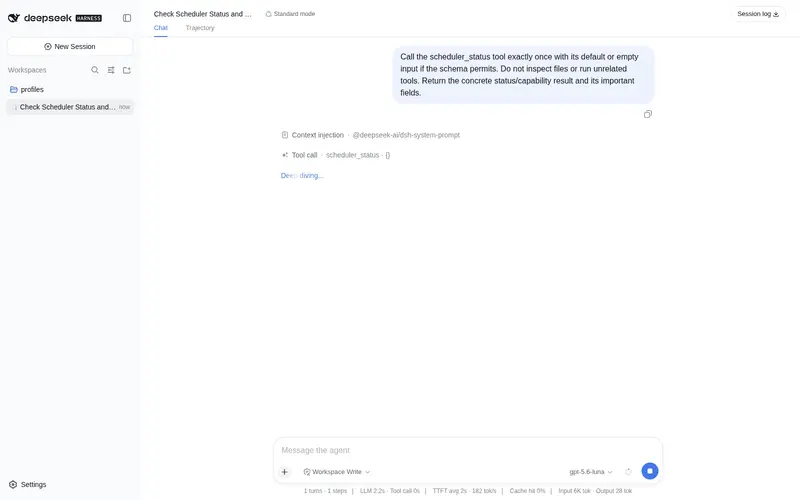
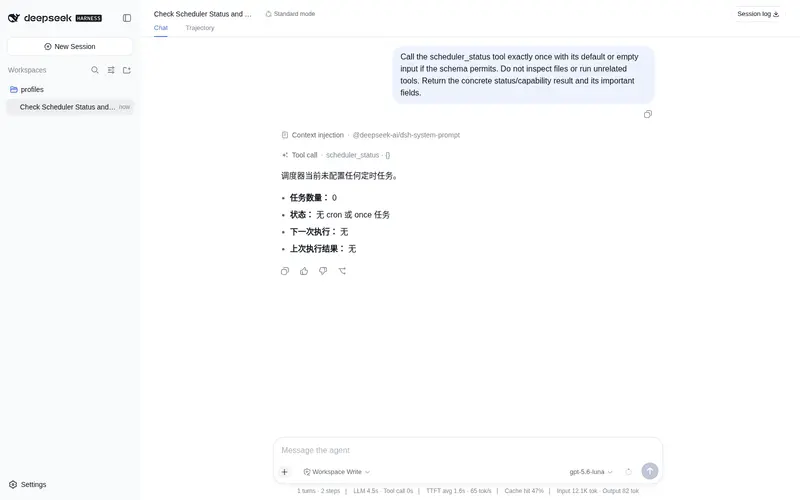
What it does
Cron/one-shot scheduled tasks: run shell commands or fire webhooks on a schedule, with optional ServerChan/DingTalk/Feishu/webhook delivery of results.
Best for
- Operators scheduling recurring shell commands with five- or six-field cron expressions and optional IANA time zones.
- Workflows that need a shell command or JSON webhook to run once at a specific ISO 8601 timestamp.
- Teams that want command results delivered through ServerChan, DingTalk, Feishu, or a generic webhook.
Not ideal for
- Commands expected to run longer than the documented 120-second execution timeout or emit more than 1 MiB of output.
- Scheduling that must backfill executions missed while the system was asleep; missed cron windows advance to the next future run.
- Workflows that require overlapping executions of the same job; per-job re-entry protection prevents them.
README
dsh-scheduler
DeepSeek Harness 定时任务插件:cron 表达式 / 一次性时间点触发,执行 shell 命令或投递 webhook,命令结果可选推送到 ServerChan / 钉钉 / 飞书 / 通用 Webhook。
安装
dsh plugin --profile <name> add dsh-scheduler
# 或从本地 checkout 安装
cd ~/dsh-scheduler && dsh plugin --profile <name> add .
配置
在 profile 的 cordis.patch.yml(或 --patch overlay)中:
- id: scheduler
  config:
    enabled: true
    jobs:
      - id: daily-report          # 每天 09:00 跑一次脚本,结果发 ServerChan
        cron: '0 9 * * *'
        timezone: 'Asia/Shanghai'
        task:
          type: command
          command: 'bash report.sh'
          channel:
            type: serverchan
            url: 'https://sctapi.ftqq.com/<SENDKEY>.send'
      - id: heartbeat             # 每 5 分钟 POST 一次心跳
        cron: '*/5 * * * *'
        task:
          type: webhook
          url: 'https://example.com/hook'
          payload: { text: 'dsh alive' }
      - id: deploy-window         # 一次性任务:到点执行
        at: '2026-08-16T09:00:00+08:00'
        task:
          type: webhook
          url: 'https://example.com/hook'
字段说明
| 字段 | 说明 |
|---|---|
jobs[].cron |
5/6 位 cron 表达式(可含秒字段);与 at 二选一 |
jobs[].at |
ISO 8601 时间戳,一次性任务;与 cron 二选一 |
jobs[].timezone |
可选,IANA 时区名(如 Asia/Shanghai),仅 cron 生效 |
jobs[].task.type |
command(执行 shell 命令)或 webhook(POST JSON) |
jobs[].task.command |
要执行的命令;cwd 可选工作目录 |
jobs[].task.channel |
可选,命令结果投递通道:serverchan / dingtalk / feishu / generic
|
jobs[].task.url / payload
|
webhook 端点与 JSON 载荷(自动附加 job 与 at 字段) |
使用
插件提供模型可见工具 scheduler_status:列出所有已配置任务、下一次执行时间、上次执行状态与结果。Agent 在对话中询问「有什么定时任务」即可自动调用;任务本身按调度自动触发,无需人工干预。
- cron 任务错过执行窗口(如系统休眠)不会回补刷屏:触发后直接推进到下一次未来时刻。
- 命令执行有 120s 超时与 1 MiB 输出上限;投递失败只记录状态,不影响插件运行。
- 单次执行有重入保护,超长命令不会造成同任务并发。
开发
pnpm install && pnpm build
node --import tsx test/scheduler.test.mjs   # 引擎单测(假时钟 + 本地 webhook sink)
License
MIT
Frequently Asked QuestionsFAQ
Use the verified command dsh plugin --profile default add github:yangyongzhen/dsh-scheduler in a DSH-enabled shell. The command resolves the public package metadata and keeps the plugin attached to the catalog identity shown on this page.
Compatibility follows the bundle and profile status shown above. If a profile is not detected, keep the plugin disabled there and check the repository documentation before enabling it in production.
The GitHub link and activity metadata are the source of truth for releases and maintenance. Revisit this page after a new release to confirm the catalog has observed the latest version.