yyb16yyb-hub/dsh-deepseek-usage
Real-time DeepSeek API usage for DeepSeek Harness: balance, token stats, estimated cost — Web UI dock + settings panel + model tool.
Listed
1
Usage
Bundle verified
Preview
What it does
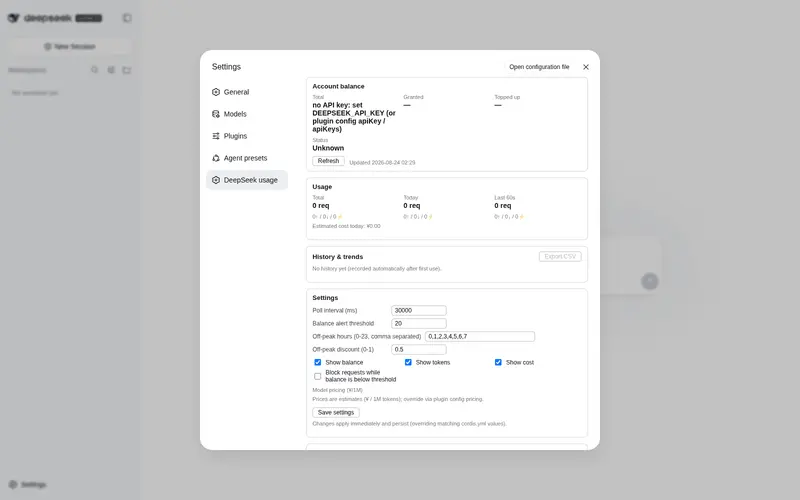
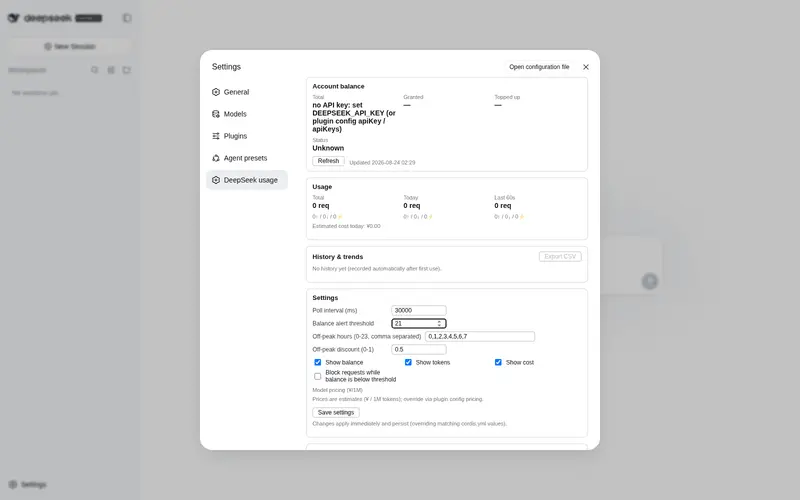
Real-time DeepSeek API usage: account balance with low-balance alerts (browser notification on threshold crossing), token & request stats (total/today/last-60s windows, per-model and per-session), estimated cost — a composer dock plus a settings-page usage panel.
Best for
- DeepSeek API users who need live balance, token, request, cache, and estimated-cost visibility inside DSH Web.
- Teams that need usage breakdowns by time window, model, session, or API key, plus persisted history and CSV export.
- Operators who want threshold-crossing browser alerts or optional request blocking when balance is low.
Not ideal for
- Users of providers other than DeepSeek; multi-provider monitoring is explicitly out of scope.
- Accounting workflows requiring exact charges; costs are estimates and the pricing table may need manual updates.
- GitHub-source installations where build-script authorization cannot be granted, because the plugin builds during first install.
README
dsh-deepseek-usage
| English | 中文 |
A DeepSeek Harness plugin that shows real-time DeepSeek API usage.
- 💰 Account balance — polls the DeepSeek
/user/balanceendpoint (default every 30s): total / granted / topped-up balance and availability, with multi-key aggregation (apiKeys) - 📊 Usage stats — real-time request counts and tokens (input / output / cache-read / cache-write / reasoning) via the
llm/streamwaterfall, in three windows: total / today / last-60s, with the cache-hit rate - 💾 Persistent history — daily usage survives restarts (
~/.dsh/deepseek-usage/usage.json), powering the trend charts and CSV exports - 💸 Estimated cost — per-model pricing (built-in
deepseek-chat/deepseek-reasonertable, overridable via config), computed per window, with peak/off-peak pricing (offPeakHours/offPeakDiscount) - 🖥️ Web UI dock — a live stats line under the composer (
conversation.composer.dock), auto-refresh + manual refresh - ⚠️ Low-balance alerts — dock turns amber below the threshold (default 20) and red below threshold/5, with one browser notification per threshold crossing; optionally block LLM requests while below the threshold (
blockOnLowBalance) - 📋 Settings usage panel —
settings.sectionseat: balance card + per-key accounts, three-window usage, in-panel config editor (writes back through the host), history heatmap & 30-day bars, per-model pricing table, per-session usage table, and CSV exports - 🛠️ Model tool —
deepseek_usage, so the agent can query balance and usage on demand - ✅ Tests & CI — vitest unit tests and a GitHub Actions pipeline (typecheck + test + build)
Install
From GitHub (recommended)
dsh plugin --profile web add github:yyb16yyb-hub/dsh-deepseek-usage
⚠️ First install requires build authorization: pnpm ≥ 10 refuses to run prepare scripts of git-hosted dependencies (the plugin builds lib/ from source at install time). The first add fails with a hint — copy the exact package key pnpm prints into that profile’s pnpm-workspace.yaml, then re-run:
allowBuilds:
  dsh-deepseek-usage: true
Pin a commit for reproducible installs: dsh plugin --profile web add github:yyb16yyb-hub/dsh-deepseek-usage#<sha>.
Local directory / tarball
dsh plugin --profile web add /path/to/dsh-deepseek-usage     # local dir (pre-built lib/)
dsh plugin --profile web add ./dsh-deepseek-usage-0.1.0.tgz  # pnpm pack output
Restart dsh web after installing — the client module table is scanned at boot.
Uninstall:
dsh plugin --profile web remove dsh-deepseek-usage
Configuration
The API key is resolved in this order (re-resolved on every poll, so changes take effect immediately):
- Plugin config
apiKey -
The dsh credentials seam (
ctx.credentials): process env →~/.dsh/.credentials.yaml→ project.env→ user.env. A DeepSeek key entered on the Web Settings → Models page lands in~/.dsh/.credentials.yaml, which this plugin picks up automatically — no extra config needed - A stored
apiKeyin the registeredllm-deepseeksettings section (if any)
Override the plugin row in the profile’s cordis.patch.yml to configure:
- id: deepseek-usage
  config:
    apiKeyEnv: DEEPSEEK_API_KEY
    apiKeys: []                # extra API keys whose balances are aggregated
    pollIntervalMs: 60000      # balance poll interval (ms, min 5000)
    balanceTimeoutMs: 10000    # balance fetch timeout (ms)
    showBalance: true
    showTokens: true
    showCost: true
    alertThreshold: 20         # low-balance alert threshold (account currency; 0 = off)
    blockOnLowBalance: false   # block LLM requests while balance < alertThreshold
    maxSessions: 200           # max sessions kept in the per-session drill-down
    offPeakHours: [0,1,2,3,4,5,6,7]   # local hours priced as off-peak
    offPeakDiscount: 0.5       # cache-miss price multiplier in off-peak hours
    pricing:
      deepseek-chat:
        input: 2               # ¥ / 1M tokens
        output: 3
        cacheRead: 0.5
      deepseek-reasoner:
        input: 4
        output: 16
        cacheRead: 1
Cost is an estimate: the built-in pricing table reflects common public pricing — always check the latest official DeepSeek prices, and override via
pricingor the settings-panel editor. Off-peak pricing applies the discount to cache-miss input/output prices only (matching DeepSeek’s policy), priced at the current hour.
Settings-panel edits (threshold, poll interval, display toggles, block toggle, off-peak window, pricing) are validated host-side and persisted — they override matching
cordis.ymlvalues until reset. Secrets (apiKey/apiKeys) are never accepted through the editor or persisted.
Web UI
-
Composer dock — balance · today’s requests · tokens (with cache-hit %) · estimated cost (today) · last-updated time, auto-refresh every 30s (follows the host
pollIntervalMs), with a manual refresh button. -
Low-balance alert — below
alertThresholdthe dock turns amber with a ⚠ mark, below threshold/5 it turns red; crossing the threshold fires one browser notification (only whenNotification.permission === 'granted'— the plugin never prompts for permission). WithblockOnLowBalanceenabled, LLM requests fail with a clear message while the balance is below the threshold. - Settings → “DeepSeek usage” panel (open the settings panel from the sidebar): balance card with per-key accounts (multi-key), three-window usage, history heatmap + 30-day bars, an in-panel config editor, per-model pricing & usage table, a per-session usage table, and CSV exports for history and sessions.
Data comes from the same-origin endpoints GET /dsh-deepseek-usage (?refresh=1 forces a balance re-poll) and POST /dsh-deepseek-usage/config (editor writes). API keys stay on the host side and never reach the browser. Daily history is persisted to ~/.dsh/deepseek-usage/usage.json.
Model tool
The agent can call deepseek_usage:
- no arguments: balance + usage summary for all windows
-
scope:total/today/rollingto pick a window
Development
pnpm install
pnpm typecheck   # tsc --noEmit
pnpm test        # vitest unit tests (stats + cost)
pnpm build       # esbuild → lib/index.js (host half) + lib/client.js (browser half)
Structure
src/
├── index.ts        # host half: apply(), llm/stream hook, block gate, tool, HTTP routes
├── balance.ts      # DeepSeek /user/balance client + multi-key poller
├── stats.ts        # usage tracking (total/today/rolling windows, per-model, per-session, restore/export)
├── cost.ts         # pure pricing/cost logic (peak/off-peak) — unit tested
├── persist.ts      # JSON persistence (atomic writes, $DSH_HOME/deepseek-usage/usage.json)
├── config.ts       # schemastery config schema
└── client/
    ├── index.ts    # browser half: locale + composer.dock / settings.section registration
    ├── api.ts      # shared: payload types, fetch, config save, CSV export, formatters
    ├── UsageDock.tsx            # composer dock (with low-balance alert)
    ├── UsageSettingsSection.tsx # settings panel (balance/accounts/usage/history/editor/sessions)
    └── locales.ts  # zh/en dictionaries
Build notes
- The host half keeps
@deepseek-ai/*external so they resolve from the profile’snode_modules(single cordis runtime identity) - The browser half externals match the platform module table in
packages/client/web/src/platform.ts(react, cordis, slots, …); everything else is inlined, and the artifact is wrapped inwindow.__ModuleLoader__.load({ id, factory })for the web shell’s module loader
Scope notes
- Theming — the UI uses inline styles that inherit the app’s text colors and adapt to dark/light themes; per-theme CSS variables are not consumed (the harness does not expose a public theme-token API to plugins today).
- Screenshots — the README has no in-UI screenshots yet; grab a few after installing if you’d like to add them.
- Multi-provider — intentionally out of scope: this plugin tracks DeepSeek usage only; OpenCode Go / Moonshot / Kimi monitoring would live in a separate plugin.
Security
Balance polling uses the same API key as LLM requests; keys are never sent to the browser and never persisted by the plugin (only non-secret config overrides are). As with any third-party plugin, review the source before installing.
Frequently Asked QuestionsFAQ
Use the verified command dsh plugin --profile default add github:yyb16yyb-hub/dsh-deepseek-usage in a DSH-enabled shell. The command resolves the public package metadata and keeps the plugin attached to the catalog identity shown on this page.
Compatibility follows the bundle and profile status shown above. If a profile is not detected, keep the plugin disabled there and check the repository documentation before enabling it in production.
The GitHub link and activity metadata are the source of truth for releases and maintenance. Revisit this page after a new release to confirm the catalog has observed the latest version.