yyyyukari/dsh-plugin-workshop
Steam Workshop-style plugin browser for the DeepSeek Harness (DSH) Web UI - zero-server: GitHub-powered search, trending windows, Chinese search & bilingual translation, plugin-signature filtering, and smart one-click install/update/uninstall with an installed-plugins manager.
Listed
25
Market
Bundle verified
Preview
What it does
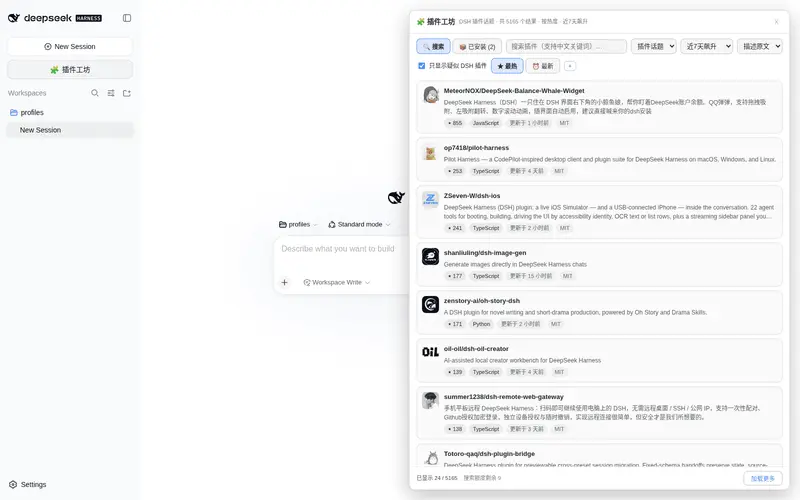
Steam Workshop-style in-app plugin browser: search, hot/newest/trending (7/30/90-day) sorting, Chinese keyword mapping, bilingual descriptions and README translation, plugin-signature filtering, and one-click install/update.
Best for
- DSH users who want to discover, compare, install, update, and remove plugins without leaving the Web UI.
- Chinese-speaking users who benefit from keyword mapping and optional translation of descriptions and README files.
- Users who want GitHub-backed hot, newest, and 7/30/90-day trending views with plugin-signature filtering.
Not ideal for
- Offline or restricted-network environments, because discovery, README retrieval, and translation depend on external services.
- High-volume anonymous browsing that cannot tolerate GitHub’s documented search limit of 10 requests per minute.
- Users expecting every repository to support unattended one-click installation; risky or unusual structures are downgraded to author-provided manual instructions.
README
🧩 DSH 插件工坊(dsh-plugin-workshop)
| 简体中文 | English |
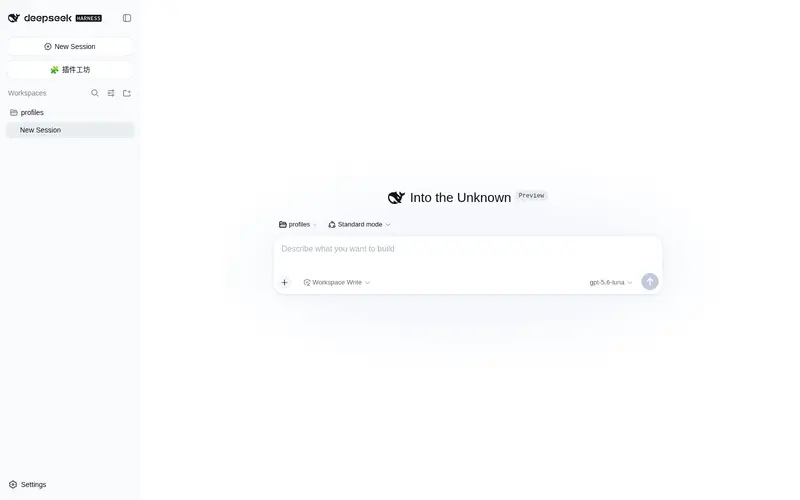
DeepSeek Harness(DSH)的创意工坊式插件浏览器——零服务器、单包开箱即用,内置在 DSH Web UI 侧栏「新会话」按钮正下方。
与 DSH_Creative_Workshop 的中心化市场平台路线不同,本项目走零基础设施路线:目录、搜索、热度、发布时间全部由 GitHub 免费提供,不部署任何控制平面或账号系统,装进 profile 即用。
✨ 特性
- 侧栏常驻入口:官方「新会话」按钮正下方,同款样式(DOM 克隆官方按钮,宽/窄侧栏自适应),刷新、重启都不丢
- 搜索与排序:关键词搜索(支持中文,自动映射英文)、★最热 / ⏰最新、飙升榜时间窗口(近 7/30/90 天新建 + 热度排序,Steam Trending 近似)
-
默认只搜 DSH 插件:默认「插件话题」(
topic:dsh-plugin);搜索结果自动排除官方 harness 等核心仓库(查询级-repo:过滤,不再占据榜首);全站模式自带插件特征验证(检查package.json的dsh字段 /cordis.yml等,走 raw CDN 不耗 API 额度),默认过滤无关仓库 - 已安装管理:工具栏「📦 已安装」视图——合并 profile 依赖/激活行/本地预设展示本机插件(类型、激活状态、安装来源),一键更新(pnpm update / git pull)与卸载
- 双语体验:描述一键切换原文/中文机翻,README 可整篇翻译(Google 翻译接口,自动缓存)
- 智能一键安装/卸载(预检分级):详情页自动预检仓库结构,给出「可直接安装 / 有风险 / 建议手动」三级评级——标准 bundle/nested/preset 一键安装照旧;特殊结构(多包 monorepo、非插件仓库、带构建脚本等)自动降级为作者给出的安装方式(从 README 提取安装命令,可复制,绝不自动执行)。卸载按安装方式逆向清理(pnpm remove 失败则不动文件、不留失效链接;成功后自动重启 dsh web 刷新插件表);缺 git 时界面明确提示
- 详情页:星数/fork/语言/许可证/创建时间、README 轻量渲染、手动安装命令、GitHub 直达
- 额度透明:实时显示 GitHub 搜索剩余额度与恢复倒计时;可选填 GitHub Token(30 次/分,仅存本机浏览器)
-
零服务器:数据全部来自 GitHub 搜索 API(浏览器直连,CORS)+ raw.githubusercontent.com(特征验证与 README);可选接入统计服务后解锁「社区装机徽章 + 真·飙升榜」(见
remote/README.md,不部署零影响)
📦 安装
以 web profile 为例:
# 一条命令即可:本包在 package.json 声明了 dsh.bundle.patch,
# dsh plugin add 会自动把它加入 profile 的 dsh.profile.bundles,
# 启动时其 cordis.patch.yml 作为 bundle 补丁层自动激活,无需手改配置。
dsh plugin --profile web add "github:yyyyukari/dsh-plugin-workshop"

# 重启 dsh web 并刷新浏览器
手动接入旧流程:把本包加进 profile dependencies,并在
$DSH_HOME/profiles/web/cordis.patch.yml添加:- insert: - id: plugin-workshop name: '@dsh-external/dsh-plugin-workshop'
激活后侧栏「新会话」下方出现「🧩 插件工坊」,点击打开浮层;设置 → 插件 区也有「插件工坊」标签页。
🧭 使用
| 需求 | 操作 |
|---|---|
| 找 DSH 插件 | 默认即「插件话题」列表(topic:dsh-plugin 收录的仓库) |
| 看飙升榜 | 时间下拉选 近7天/近30天/近90天飙升 + ★最热 |
| 中文搜索 | 直接输入「天气」「翻译」等中文词,自动映射英文关键词 |
| 看中文描述 | 工具栏「描述中文」;详情页「翻译 README」 |
| 安装/更新/卸载插件 | 详情页「一键安装(订阅)/ 更新到最新 / 卸载」,按仓库类型自动选择安装路径(需要本机 git,缺失时会提示) |
| 提高搜索额度 | 工具栏 ⚙ → 填入 GitHub Personal Access Token |
🏗️ 架构
-
宿主侧(
lib/index.js):在webServer服务上注册同源 HTTP 路由/dsh-plugin-workshop/api/{status,install,update,uninstall};智能安装(bundle/preset 类型检测)与逆向卸载(严格输入校验 + 自定义头 CSRF 防护) -
浏览器侧(
lib/client.js):React + 平台种子模块;DOM 克隆官方按钮 + MutationObserver 自愈;shell.overlay与settings.plugins.tab双挂载 - 数据流:GitHub 搜索 API(匿名 10 次/分)→ 特征验证与 README(raw CDN,无额度)→ 机翻(Google gtx)
- 安全:不执行任何第三方代码;Token 仅存 localStorage
🗺️ Roadmap
-
v1.1 一键安装/更新(宿主 API:git 探测、clone/pull 到
.agent-presets,缺失时界面提示) -
v1.2 智能安装/卸载:bundle 型走官方
dsh plugin add+ 激活行,preset 型走.agent-presets,卸载逆向清理(实测通过) -
v1.3 遵循 DSH bundle 规范:
package.json声明dsh.bundle.patch(dsh plugin add一条命令自动激活);智能安装兼容三种仓库形态(bundle / nested / preset) - v1.4 「已安装」管理视图(更新/卸载、类型与激活状态);搜索结果排除官方核心仓库;卸载安全化(失败不改动、自动重启刷新)
-
v1.5 可选统计服务(Phase A):匿名装机埋点 + 社区装机徽章 + 真·飙升榜(Cloudflare Worker 参考实现见
remote/,未部署时零影响) - 社区索引收录:✅ 三大列表全部收录——awesome-dsh-plugin(UI Enhancements 分类)/ awesome-deepseek-harness / awesome-dsh-plugins
📄 License
MIT
Frequently Asked QuestionsFAQ
Use the verified command dsh plugin --profile default add github:yyyyukari/dsh-plugin-workshop in a DSH-enabled shell. The command resolves the public package metadata and keeps the plugin attached to the catalog identity shown on this page.
Compatibility follows the bundle and profile status shown above. If a profile is not detected, keep the plugin disabled there and check the repository documentation before enabling it in production.
The GitHub link and activity metadata are the source of truth for releases and maintenance. Revisit this page after a new release to confirm the catalog has observed the latest version.