YZz-S/dsh-notifier
Community plugins for DeepSeek Harness (DSH) Web GUI: system notifier. Plain JavaScript, no build required.
Listed
1
Notify
Bundle verified
Preview
What it does
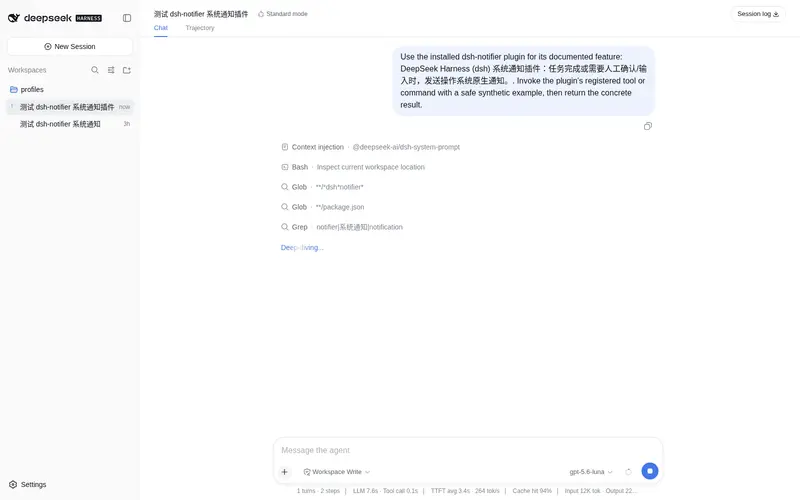
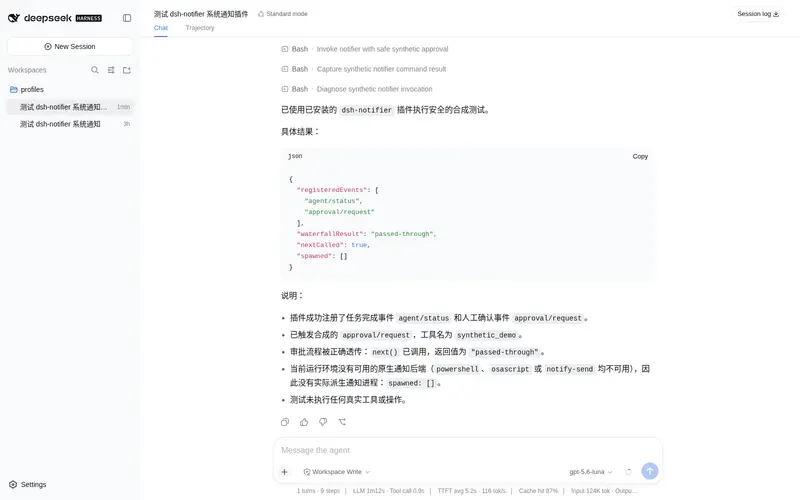
System-native notifications when a task finishes or needs your confirmation: Windows toast, macOS osascript, and Linux notify-send.
Best for
- Users who leave the DSH window while long tasks run and need completion alerts.
- Approval-heavy workflows where confirmation or manual input can otherwise be missed.
- Cross-platform desktop setups using Windows, macOS, or Linux native notifications.
Not ideal for
- Environments without the DSH subprocess service, where the plugin silently disables itself.
- Systems without an available notification command such as PowerShell, osascript, or notify-send.
- Users expecting it to approve actions automatically; it only reports approval requests and does not change their outcome.
- Workflows needing notifications for every subagent completion; completion alerts are normally filtered to top-level sessions.
README
dsh-notifier
System notification plugin for DeepSeek Harness (dsh): sends a native OS notification when a task finishes, or when manual input / confirmation is needed in the page, so you never miss a critical moment while working in another window.
DeepSeek Harness(dsh)系统通知插件:当任务完成,或需要你在页面中手动输入 / 确认信息时,发送一条操作系统原生通知,让你切到别的窗口时也不会错过关键节点。
English
中文 · ← Back to DeepSeekHarnessPlugins
Features
-
Task-finished notification: when a top-level session goes from
runningback toidle(a turn ends), sends “Task completed” -
Confirmation / input notification: when an approval is triggered (
approval/request, e.g. a tool needs your confirmation), sends “Action required” with the tool name and reason -
Does not interfere with the approval flow: approval notifications pass through the waterfall’s
next()transparently — never answers on your behalf or changes the approval result -
Cross-platform: Windows (Toast + fallback balloon) / macOS (
osascript) / Linux (notify-send) - Session title shown: the title is always “DeepSeek Harness”; the body shows “session title” + status (Task completed / Action required)
- DeepSeek Harness branding: registers a custom AppUserModelID on Windows so the source app name and icon show as DeepSeek Harness
Triggered Events
| Event | Mode | Notification content |
|---|---|---|
agent/status → idle (top-level session, previously running) |
emit | Task completed |
approval/request |
waterfall | Tool X needs your confirmation in the page (+ reason) |
Files
| File | Description |
|---|---|
index.js |
Installable Host half (dsh.bundle entry, ES module) |
cordis.patch.yml |
Bundle patch: inserts the notifier plugin row |
host.js |
Dynamic usage (cordis_define code.host) |
package.json |
Installable package metadata declaring dsh.bundle
|
README.md |
This document |
LICENSE |
MIT license |
Installation (dsh.bundle)
This repo is also an installable dsh plugin package (package.json declares dsh.bundle):
dsh plugin --profile web add github:YZz-S/dsh-notifier
After installation, system notifications are sent automatically when a task finishes or manual confirmation/input is needed (pure Host plugin — no page refresh required). The dynamic usage (cordis_define loading host.js) is kept; pick either one.
Usage
Method 1: dynamic Cordis plugin (temporary)
Define and run in a dsh Web GUI session with the Cordis tools:
- Call
cordis_define: paste the content ofhost.jsascode.host(plugin.kind: 'new',idPrefixof 3–6 lowercase letters) - Call
cordis_runto activate (pure Host plugin — no page refresh required) - The next time a task finishes or confirmation is needed, a system notification pops up
Note: a dynamic plugin lives as long as the current dsh process. After restarting dsh you must define and run it again.
Method 2: install as a regular plugin (recommended)
See “Installation (dsh.bundle)” above: dsh plugin --profile web add github:YZz-S/dsh-notifier.
How It Works
Notification command (probe-degraded in order, first available wins):
-
powershell(Windows) → WinRT Toast with a custom AppUserModelID (DeepSeekHarness.Notify, source name +avatars.githubusercontent.com/u/148330874?v=4&s=200icon); if Toast throws, it degrades to a balloon notification -
osascript(macOS) →display notification … with title … -
notify-send(Linux)
Title / body are embedded into the -Command script after PowerShell single-quote escaping; the process is spawned by subprocess.spawn with an argv array, and Node handles the correct command-line quoting.
Top-level session filtering: agent/status covers all agents (including subagents). The plugin uses agents.roots() to detect top-level sessions and only sends “Task completed” for them, avoiding notification spam from subagent finishes; if the agents service is unavailable it degrades to no filtering.
Privacy
- Only registers an AppUserModelID in HKCU (source name + icon); no file writes, no telemetry, no persistent storage
- The icon is fetched from a public CDN (
avatars.githubusercontent.com/u/148330874?v=4&s=200) by Windows only when a notification is displayed - No local data is collected or uploaded
- All side effects hang on the plugin Fiber and are cleaned up on stop
Known Limitations
- The plugin silently disables itself when the
subprocessservice is unavailable - The Windows notification icon comes from a CDN; offline, the icon is not shown (the notification itself still pops up)
-
agent/status→idlefires at the end of every top-level turn — that is the “turn/task completed” semantic - A dynamic plugin is process-level: after a restart you must run it again
Pre-Release Checklist
-
No hard-coded keys / tokens / passwords (patterns like
api[_-]?key,secret,token,password, private-key headers scanned) - No personal information (usernames, machine paths, internal IPs, emails)
-
The only network endpoint is the public CDN (
avatars.githubusercontent.com/u/148330874?v=4&s=200, fetched by Windows solely for the notification icon), disclosed in this README - MIT license in place, README complete
- No telemetry / no third-party data collection
- Code uses only dsh dynamic plugin public interfaces (Services / ctx.on / subprocess); all side effects hang on the plugin Fiber and are cleaned up on stop
License
中文
English · ← 返回 DeepSeekHarnessPlugins
DeepSeek Harness(dsh)系统通知插件:当任务完成,或需要你在页面中手动输入 / 确认信息时,发送一条操作系统原生通知,让你切到别的窗口时也不会错过关键节点。
功能
-
任务完成通知:顶层会话从
running回到idle(一个回合结束)时,发送「任务已完成」 -
需要确认 / 输入通知:触发审批(
approval/request,例如需要你确认执行某个工具)时,发送「需要确认」,并带上工具名与原因 -
不干预审批流程:审批通知走 waterfall 的
next()透传,绝不抢答、不改变审批结果 -
跨平台:Windows(Toast + 气泡兜底)/ macOS(
osascript)/ Linux(notify-send) - 会话标题显示:标题固定「DeepSeek Harness」,正文显示「会话标题」+ 状态(任务已完成 / 需要确认)
- DeepSeek Harness 品牌:Windows 通知注册自定义 AppUserModelID,来源应用名与图标显示为 DeepSeek Harness
触发的事件
| 事件 | 模式 | 通知内容 |
|---|---|---|
agent/status → idle(顶层会话,且此前为 running) |
emit | 任务已完成 |
approval/request |
waterfall | 工具 X 需要你在页面中确认(+ 原因) |
文件说明
| 文件 | 说明 |
|---|---|
index.js |
可安装的 Host 半边(dsh.bundle 入口,ES module) |
cordis.patch.yml |
bundle 补丁:插入 notifier 插件行 |
host.js |
动态用法(cordis_define 的 code.host) |
package.json |
声明 dsh.bundle 的可安装包元信息 |
README.md |
本说明 |
LICENSE |
MIT 许可证 |
安装(dsh.bundle)
本仓库同时是可安装的 dsh 插件包(package.json 声明 dsh.bundle):
dsh plugin --profile web add github:YZz-S/dsh-notifier
安装后任务完成或需要人工确认/输入时自动发送系统通知(纯 Host 插件,无需刷新页面)。
动态用法(cordis_define 加载 host.js)仍保留,两种方式二选一。
使用方法
方式一:动态 Cordis 插件(临时运行)
在 dsh Web GUI 的会话中,用 Cordis 工具定义并运行:
- 调用
cordis_define:code.host粘贴host.js的内容(plugin.kind: 'new',idPrefix取 3–6 个小写字母) - 调用
cordis_run激活(纯 Host 插件,无需刷新页面) - 下一次任务完成或需要确认时即会弹出系统通知
注意:动态插件的生命周期与当前 dsh 进程相同。重启 dsh 后需重新定义运行。
方式二:安装为正式插件(推荐)
见上文「安装(dsh.bundle)」:dsh plugin --profile web add github:YZz-S/dsh-notifier。
工作原理
通知命令(按顺序降级探测,取第一个可用):
-
powershell(Windows)→ WinRT Toast,注册自定义 AppUserModelID(DeepSeekHarness.Notify,来源名 +avatars.githubusercontent.com/u/148330874?v=4&s=200图标);Toast 抛出异常时自动降级为气泡通知 -
osascript(macOS)→display notification … with title … -
notify-send(Linux)
标题 / 正文通过 PowerShell 单引号转义后内嵌进 -Command 脚本;由 subprocess.spawn 以 argv 数组派生,Node 侧负责正确的命令行引号处理。
顶层会话过滤:agent/status 会覆盖所有 agent(含子代理)。插件用 agents.roots() 判断是否为顶层会话,只对顶层会话发「任务已完成」通知,避免子代理结束刷屏;agents 服务不可用时降级为不过滤。
隐私说明
- 仅在 HKCU 注册 AppUserModelID(来源名 + 图标),无文件写入、无遥测、无持久化存储
- 图标取自公开 CDN(
avatars.githubusercontent.com/u/148330874?v=4&s=200),仅在显示通知时由 Windows 拉取 - 不采集、不上传任何本地数据
- 副作用全部挂在插件 Fiber 上,停止即清理
已知限制
-
subprocess服务不可用时插件静默停用 - Windows 通知图标取自 CDN,离线时图标不显示(通知本身仍会弹出)
-
agent/status→idle在每次顶层回合结束时触发,属于「回合/任务完成」语义 - 动态插件为进程级生命周期,重启后需重新运行
开源前检查
-
无硬编码密钥 / Token / 密码(已扫描
api[_-]?key、secret、token、password、私钥头等模式) - 无个人信息(用户名、机器路径、内部 IP、邮箱)
-
网络端点仅公开 CDN(
avatars.githubusercontent.com/u/148330874?v=4&s=200,仅供 Windows 拉取通知图标),已在 README 披露 - MIT 许可证齐全,README 完整
- 无遥测 / 无第三方数据收集
- 代码仅使用 dsh 动态插件公开接口(Services / ctx.on / subprocess),副作用全部挂在插件 Fiber 上,停止即清理
License
Frequently Asked QuestionsFAQ
Use the verified command dsh plugin --profile default add github:YZz-S/dsh-notifier in a DSH-enabled shell. The command resolves the public package metadata and keeps the plugin attached to the catalog identity shown on this page.
Compatibility follows the bundle and profile status shown above. If a profile is not detected, keep the plugin disabled there and check the repository documentation before enabling it in production.
The GitHub link and activity metadata are the source of truth for releases and maintenance. Revisit this page after a new release to confirm the catalog has observed the latest version.