YZz-S/dsh-update-checker
DeepSeek Harness (dsh) plugins — dsh-update-checker: in-GUI version badge with npm update checks.
Listed
1
Dev
Bundle verified
Preview
What it does
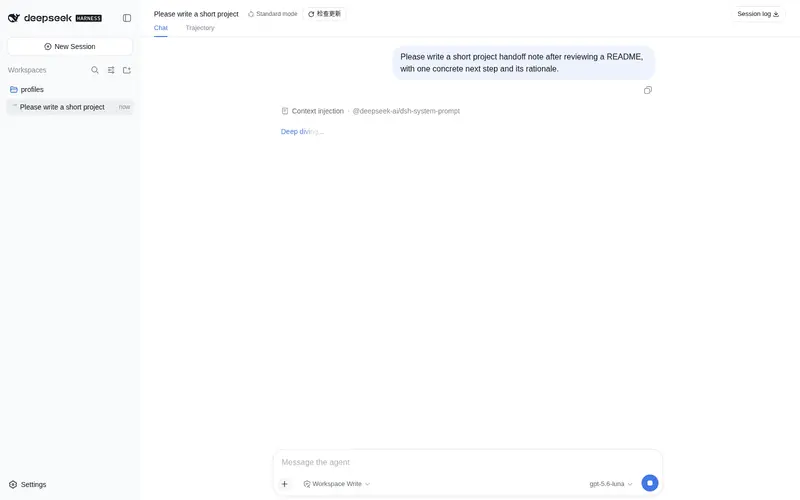
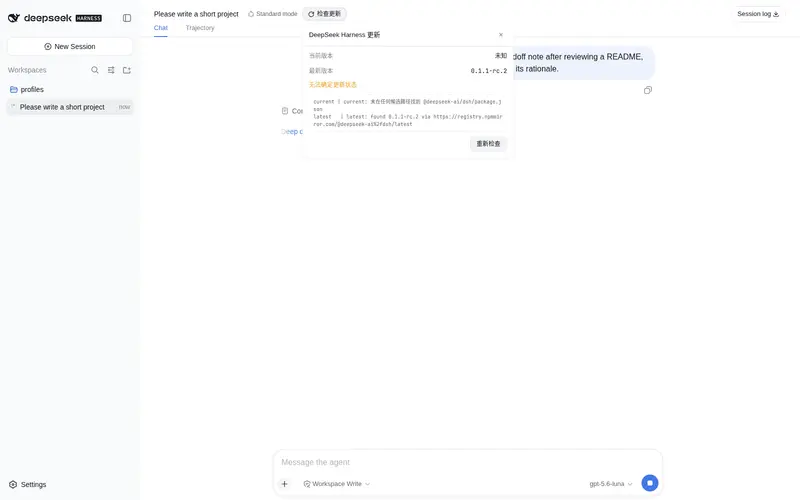
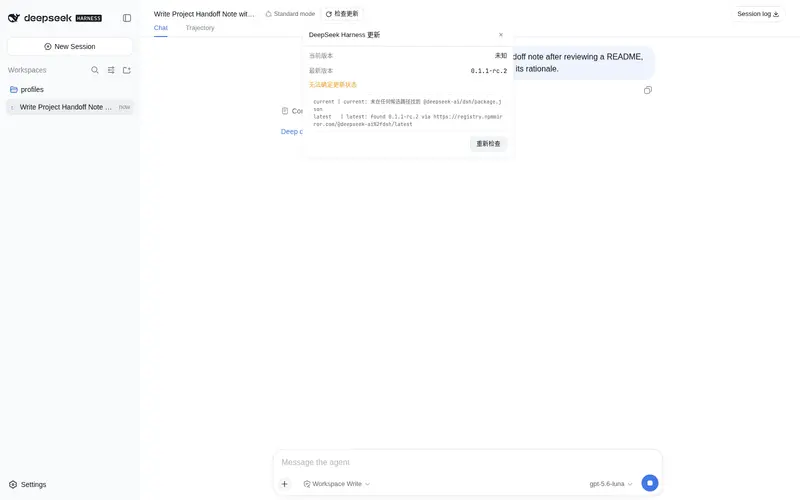
Conversation header badge showing the DeepSeek Harness version, checking npm for the latest release and prompting upgrades.
Best for
- DSH Web users who want the installed Harness version visible in each titled session.
- Administrators who want automatic npm release checks and explicit upgrade prompts.
- Troubleshooting version-detection failures through per-step diagnostics.
Not ideal for
- Blank new sessions without a title bar, where the badge is not shown.
- Users trying to track this plugin's own releases; it checks `@deepseek-ai/dsh` instead.
- Install layouts outside the detector's recognized locations when reliable current-version discovery is mandatory.
- Offline environments that cannot query either configured public npm registry.
README
dsh-update-checker
Update checker plugin for the DeepSeek Harness (dsh) Web GUI: shows the current version in the session top bar, auto-checks the latest version on npm and prompts you to upgrade when a new one is available.
DeepSeek Harness(dsh)Web GUI 的更新检查插件:在会话顶栏显示当前版本号,自动检查 npm 上的最新版本,有新版时提示升级。

English
中文 · ← Back to DeepSeekHarnessPlugins
Features
- Top-bar version badge: registered in the session top-bar action area (next to the title), additive registration — replaces no built-in UI
- Auto-check on page load: checks once on mount, no manual action needed
-
Three badge states:
- Up to date → shows “Already up to date”
- New version available → shows “Update to vX.Y.Z” with a red dot in the top-right corner
- Check failed → badge turns red and shows “Check failed”
- Comparison panel: clicking the badge re-checks immediately and opens a panel showing current version / latest version / update status / upgrade instructions
- Step-by-step diagnostics: on failure the panel shows a diagnostics block (the concrete probe record for each step of current & latest version detection) for quick troubleshooting
Files
| File | Description |
|---|---|
index.js |
Installed Host half (dsh.bundle entry): registers the /api/dsh-update-checker/check route, reads current version + queries latest version |
lib/client.js |
Installed Client half (dsh.client module): top-bar badge & comparison panel |
cordis.patch.yml |
Bundle composition patch inserting the plugin row into the profile |
package.json |
Package metadata (declares dsh.bundle + dsh.client) |
host.js / client.js
|
Dynamic cordis_define usage (mutually exclusive with the installed form) |
README.md / LICENSE
|
Docs / MIT license |
Installation (dsh.bundle)
This repo is also an installable dsh plugin package (package.json declares dsh.bundle + dsh.client). After installation, restart dsh and the “top-bar version badge” takes effect automatically.
# If published as its own repository (same inclusion style as awesome-dsh-plugin, recommended):
dsh plugin --profile web add github:<your-username>/dsh-update-checker

# If installed as a subdirectory of the DeepSeekHarnessPlugins repository:
dsh plugin --profile web add github:<your-username>/DeepSeekHarnessPlugins#path:dsh-update-checker
To update an installed plugin: re-add the latest commit (or
dsh plugin --profile web update dsh-update-checker), then restart dsh.
Usage (dynamic Cordis plugin)
Define and run in a dsh Web GUI session with the Cordis tools:
- Call
cordis_define: pastehost.jscontent ascode.hostandclient.jscontent ascode.client(plugin.kind: 'new',idPrefixof 3–6 lowercase letters) - Call
cordis_runto activate and allow authorization in the UI - Refresh the page to see the badge in the session top bar
Note: a dynamic plugin lives as long as the current dsh process. After a dsh restart you must define and run it again; for persistence use the “Installation (dsh.bundle)” method above.
How it works
Current version (installed form, degraded in order):
- Reads
process.cwd()/node_modules/@deepseek-ai/dsh/package.json(npx launch scenario) - Reads common global install paths (
/usr/local/lib,/opt/homebrew/lib) - Scans the npm cache
_npxdirectory by environment variables (npm_config_cache,LOCALAPPDATA,APPDATA,HOME)
Latest version (degraded in order):
-
fetchqueriesregistry.npmmirror.com - On failure retries
registry.npmjs.org
Results are cached for 60 seconds; clicking “Re-check” on the badge skips the cache and forces a refresh.
Privacy
- Network requests go only to public npm registries (npmmirror.com / npmjs.org) and are only issued when a check is triggered
- No local data is collected or uploaded; locally it only reads
@deepseek-ai/dsh/package.json - No telemetry, no persistent storage, no file writes
Known Limitations
- Current-version detection depends on the install location; on failure the panel diagnostics block gives the concrete reason
- The badge lives in the session top bar; blank new sessions (no title bar) do not show it
- It checks the version of DeepSeek Harness (
@deepseek-ai/dsh) itself, not this plugin
Pre-Release Checklist
- No hard-coded keys / tokens / passwords
- No personal information (usernames, machine paths, internal IPs, emails)
- Network endpoints are only public npm registries, disclosed in this README
- MIT license in place, README complete
- No telemetry / no third-party data collection
- Code uses only dsh public interfaces; all side effects hang on the plugin Fiber and are cleaned up on stop
License
中文
English · ← 返回 DeepSeekHarnessPlugins
DeepSeek Harness(dsh)Web GUI 的更新检查插件:在会话顶栏显示当前版本号,自动检查 npm 上的最新版本,有新版时提示升级。
功能
- 顶栏版本徽章:注册在会话顶栏动作区(标题旁),加法式注册,不替换任何自带 UI
- 页面加载自动检查:挂载即检查一次,无需手动操作
-
三种徽章状态:
- 已是最新 → 显示「已经是最新版本」
- 有新版本 → 显示「更新到 vX.Y.Z」并在右上角亮红点
- 检查失败 → 徽章变红显示「检查失败」
- 对比面板:点击徽章立即重新检查并弹出面板,显示当前版本 / 最新版本 / 更新状态 / 升级指引
- 逐级诊断:检查失败时面板展示诊断块(当前版本与最新版本每一步探测的具体记录),便于快速定位
文件说明
| 文件 | 说明 |
|---|---|
index.js |
安装版 Host 半边(dsh.bundle 入口):注册 /api/dsh-update-checker/check 路由,读当前版本 + 查最新版本 |
lib/client.js |
安装版 Client 半边(dsh.client 模块):顶栏徽章与对比面板 |
cordis.patch.yml |
bundle 组合补丁,把插件行插入 profile |
package.json |
包元信息(声明 dsh.bundle + dsh.client) |
host.js / client.js
|
动态 cordis_define 用法(与安装版二选一) |
README.md / LICENSE
|
说明文档 / MIT 许可证 |
安装(dsh.bundle)
本仓库同时是可安装的 dsh 插件包(package.json 声明 dsh.bundle + dsh.client)。安装后重启 dsh,「顶栏版本徽章」自动生效。
# 若插件发布为独立仓库(与 awesome-dsh-plugin 收录方式一致,推荐):
dsh plugin --profile web add github:<你的用户名>/dsh-update-checker

# 若作为 DeepSeekHarnessPlugins 仓库的子目录安装:
dsh plugin --profile web add github:<你的用户名>/DeepSeekHarnessPlugins#path:dsh-update-checker
更新已安装的插件:重新 add 最新提交(或
dsh plugin --profile web update dsh-update-checker)后重启 dsh。
使用方法(动态 Cordis 插件)
在 dsh Web GUI 的会话中,用 Cordis 工具定义并运行:
- 调用
cordis_define:code.host粘贴host.js的内容,code.client粘贴client.js的内容(plugin.kind: 'new',idPrefix取 3–6 个小写字母) - 调用
cordis_run激活,在界面上允许授权 - 刷新页面即可在会话顶栏看到徽章
注意:动态插件的生命周期与当前 dsh 进程相同。重启 dsh 后需重新定义运行;如需常驻,请使用上方「安装(dsh.bundle)」方式。
工作原理
当前版本(安装版,按顺序降级):
- 读取
process.cwd()/node_modules/@deepseek-ai/dsh/package.json(npx 启动场景) - 读取常见全局安装路径(
/usr/local/lib、/opt/homebrew/lib) - 按环境变量(
npm_config_cache、LOCALAPPDATA、APPDATA、HOME)扫描 npm 缓存_npx目录
最新版本(按顺序降级):
-
fetch查询registry.npmmirror.com - 失败再试
registry.npmjs.org
结果带 60 秒缓存;点击徽章的「重新检查」会跳过缓存强制刷新。
隐私说明
- 网络请求仅指向公开 npm registry(npmmirror.com / npmjs.org),且仅在检查触发时发出
- 不采集、不上传任何本地数据;本地仅读取
@deepseek-ai/dsh/package.json - 无遥测、无持久化存储、无文件写入
已知限制
- 当前版本探测依赖安装位置,探测失败时面板诊断块会给出具体原因
- 徽章位于会话顶栏;空白新会话(无标题栏)不显示
- 检查的是 DeepSeek Harness(
@deepseek-ai/dsh)自身的版本,不是本插件版本
开源前检查
- 无硬编码密钥 / Token / 密码
- 无个人信息(用户名、机器路径、内部 IP、邮箱)
- 网络端点仅公开 npm registry,已在 README 披露
- MIT 许可证齐全,README 完整
- 无遥测 / 无第三方数据收集
- 代码仅使用 dsh 公开接口,副作用全部挂在插件 Fiber 上,停止即清理
License
Frequently Asked QuestionsFAQ
Use the verified command dsh plugin --profile default add github:YZz-S/dsh-update-checker in a DSH-enabled shell. The command resolves the public package metadata and keeps the plugin attached to the catalog identity shown on this page.
Compatibility follows the bundle and profile status shown above. If a profile is not detected, keep the plugin disabled there and check the repository documentation before enabling it in production.
The GitHub link and activity metadata are the source of truth for releases and maintenance. Revisit this page after a new release to confirm the catalog has observed the latest version.