ZEM17/dsh-subagent-agy
Google Antigravity CLI (agy) as a DSH product subagent: delegate tasks to a Gemini coding agent with your Antigravity login (no API key), with conversation follow-ups, background streaming progress, image analysis by path, and a pop-up login window.
Listed
1
Workflow
Bundle verified
Preview
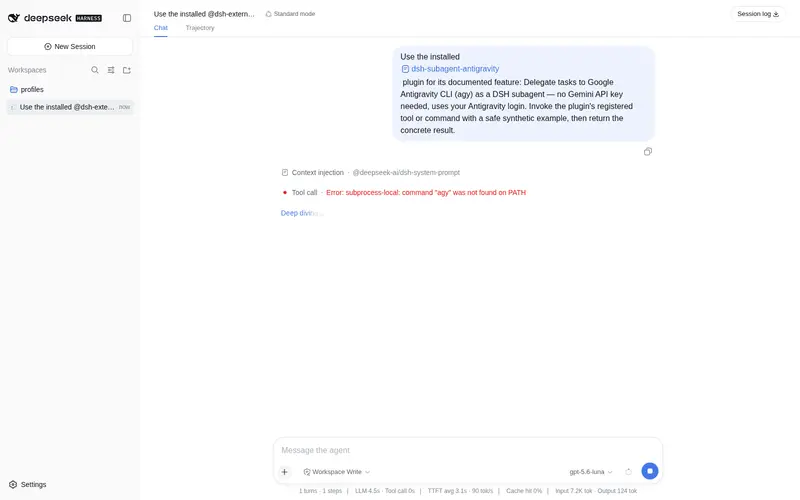
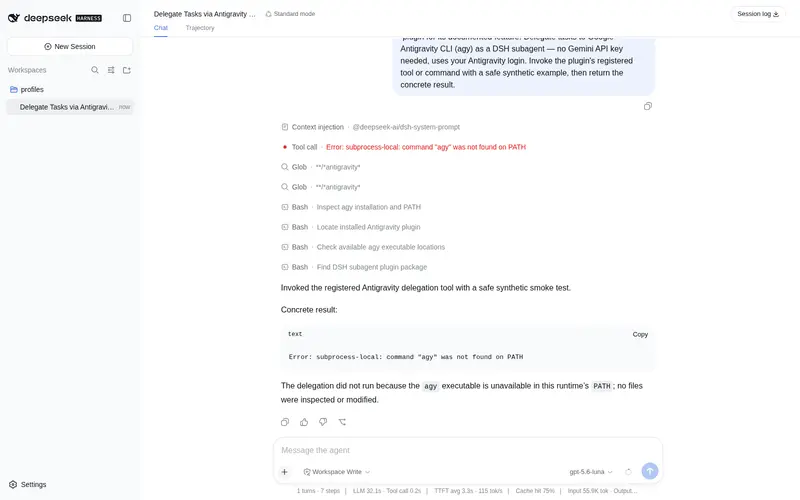
What it does
Google Antigravity CLI (agy) as a DSH product subagent: delegate tasks to a Gemini coding agent with your Antigravity login (no API key), with conversation follow-ups, background streaming progress, image analysis by path, and a pop-up login window.
Best for
- DSH users who want to delegate coding tasks to a separate Gemini-powered agent through an existing Antigravity login.
- Long-running delegated work that benefits from background progress streaming, cancellation, and later follow-ups.
- Multimodal coding workflows where the delegated agent must inspect images by filesystem path.
- Users who need conversation keys to survive DSH restarts for continued work.
Not ideal for
- Users without the `agy` CLI installed and authenticated through Antigravity.
- Regions where Antigravity access is unsupported unless an acceptable proxy is available.
- Tasks requiring direct reads of files larger than agy's 4 MB read-tool limit without restructuring the workflow.
- Browser-heavy delegated tasks when the default browser-avoidance setting must remain enabled.
README
@dsh-external/dsh-subagent-antigravity
Delegate tasks to Google Antigravity CLI (agy) — a separate
Gemini-powered coding agent on your machine — straight from DeepSeek Harness.
No Gemini API key is involved: agy authenticates through your Antigravity
login (system keyring / Google Sign-In).
中文版见 README.zh.md · Source: github.com/ZEM17/dsh-subagent-agy
Installation
Requirements
-
agyinstalled:irm https://antigravity.google/cli/install.ps1 | iex(Windows). The plugin locates it automatically (PATH →AGY_BIN→%LOCALAPPDATA%\agy\bin→~/.local/bin→~/.gemini/bin→~/go/bin). -
agylogged in once: runagyin a terminal and complete the sign-in. If a run hits “authentication required”, the plugin pops the interactive login window automatically. -
DeepSeek Harness with the standard web profile (it ships
dsh-subagent,dsh-subprocess,dsh-tools,dsh-jobs).
Install the plugin
From GitHub (recommended):
dsh plugin --profile web add github:ZEM17/dsh-subagent-agy
From a tarball: download
dsh-external-dsh-subagent-antigravity-0.2.0.tgz from the
releases page, then:
dsh plugin --profile web add /path/to/dsh-external-dsh-subagent-antigravity-0.1.0.tgz
That’s it — no restart needed. The model in any session can now use the
antigravity tools.
Usage
The model calls the tools automatically when you ask for it; you can also prompt it explicitly:
| Surface | Name | What it does |
|---|---|---|
| new task | antigravity |
delegate a self-contained task to agy (fresh conversation); returns a task key |
| follow-up | antigravity_followup |
continue a previous agy conversation via its task key — full context carries over |
| list | antigravity_tasks |
list running tasks + recent finished tasks; task keys survive DSH restarts |
| cancel | antigravity_cancel |
stop a running task by its task key (agy process tree terminated) |
| login | antigravity_login |
pop the interactive agy login window (also opens automatically on auth failures) |
Example prompts:
“Use agy to rewrite the README of
D:\projects\my-projectand list the changes.”“用 antigravity 优化这个项目的页面” (in a Chinese session)
Image analysis
agy’s model is multimodal — put an image path in the prompt and it will describe or analyze the image:
“Use agy to describe this image:
C:\projects\design\mockup.png”“用 antigravity 识别这张图片:
C:\projects\screenshots\ui.png”
Images inside the session workspace work directly; images elsewhere need the
directory in the tool’s dirs parameter (or the addDirs config).
- Tasks targeting files outside the session workspace need the target
directory: the tool takes a
dirsparameter (the model passes it when you give it the path). -
Long tasks: the model uses
background: truefor long jobs — it keeps you posted on live progress and reports the final result when done. -
Continue a task: tell the model to continue using the
taskkey from a previous call. -
Find a task again:
antigravity_taskslists running and recent finished tasks — task keys are recorded in~/.dsh/agy-conversations.jsonand survive DSH restarts, so a key can always be recovered for follow-up. -
Stop a task:
antigravity_cancelwith the running task’s key stops it (also possible viajob_killfor background jobs).
Configuration
All fields are optional; sane defaults are shown. Configure through the
plugin’s settings section (e.g. $DSH_HOME/settings.yaml):
dsh-subagent-antigravity:
  model: gemini-3.1-pro-high   # agy models; empty = agy default
  effort: high                 # low | medium | high
  printTimeoutMs: 300000       # foreground ceiling (5 min)
  backgroundTimeoutMs: 3600000 # background ceiling (1 h)
  skipPermissions: true        # auto-approve agy tool calls (headless needs it)
  addDirs: []                  # absolute dirs added to the agy workspace (--add-dir)
  proxy: ""                    # proxy URL; falls back to AGY_PROXY, then ~/.dsh/agy-proxy.txt
| Field | Default | Meaning |
|---|---|---|
providerName |
antigravity |
registry name on ctx.subagents
|
toolName |
antigravity |
new-task tool name |
followupToolName |
antigravity_followup |
follow-up tool name |
loginToolName |
antigravity_login |
login-window tool name |
tasksToolName |
antigravity_tasks |
tasks-listing tool name |
cancelToolName |
antigravity_cancel |
cancel-running-task tool name |
command |
agy |
executable (PATH name or absolute path) |
model |
'' |
--model <slug> (see agy models); empty = agy default |
effort |
'' |
--effort low\|medium\|high; empty = omit |
agent |
'' |
--agent <name>; empty = omit |
printTimeoutMs |
300000 |
foreground run ceiling (--print-timeout) |
backgroundTimeoutMs |
3600000 |
background run ceiling (1 h) |
watchdogMarginMs |
60000 |
force-kill margin after the ceiling if agy hangs |
skipPermissions |
true |
--dangerously-skip-permissions (auto-approve agy tool calls) |
sandbox |
false |
--sandbox (agy terminal-sandbox restrictions) |
avoidBrowser |
true |
append a note telling agy NOT to use headless browser tools (they can hang on some machines) |
avoidLargeReads |
true |
append a note telling agy to inspect files > 1 MB via grep/sed instead of its read tool (4 MB cap) |
outputFormat |
json |
wire format (json or text); background prefers stream-json automatically |
extraArgs |
[] |
raw extra argv appended after generated flags |
cwd |
'' |
working-directory override; empty = the session workspace |
addDirs |
[] |
absolute dirs added to the agy workspace (--add-dir) — required for targets outside the session workspace |
env |
{} |
environment overlay merged after the harness credential scrub |
proxy |
'' |
proxy URL; falls back to AGY_PROXY env, then ~/.dsh/agy-proxy.txt (re-read per call) |
registryPath |
'' |
follow-up registry file; empty = ~/.dsh/agy-conversations.json
|
disposeGraceMs |
5000 |
tree-termination grace (SIGTERM → SIGKILL) |
autoLoginWindow |
true |
on auth failure, pop the interactive login window automatically |
loginWindowMinimized |
true |
launch the login window minimized (taskbar icon only) |
How it works (short version)
Each task spawns a fresh agy -p <task> process in the session workspace
and returns the final answer. Runs use --output-format json, whose reply
carries agy’s conversation_id; the plugin records it in a durable registry
(~/.dsh/agy-conversations.json), and antigravity_followup resumes the
same conversation via --conversation <id>. Background runs use
stream-json for live progress and register with DSH’s jobs system
(job_output / job_kill). A local watchdog terminates hung runs, and all
timeouts interrupt: nothing ever waits forever.
antigravity_tasks surfaces the durable registry (restart-safe) plus live
in-flight runs, and antigravity_cancel stops a running one. The registry
self-heals: a corrupted file is backed up once (*.corrupt) and reset
instead of being silently overwritten, and all registry writes are
serialized, so concurrent runs never lose each other’s records.
Troubleshooting
| Symptom | Fix |
|---|---|
authentication required |
complete the sign-in in the popped login window (or call antigravity_login), then retry |
User location is not supported |
set a proxy (proxy config or ~/.dsh/agy-proxy.txt) |
timeout waiting for response |
raise printTimeoutMs / backgroundTimeoutMs, or use background: true
|
agy exited 0 but produced no stdout |
known agy non-TTY bug; --output-format json avoids it (default) — upgrade agy if it persists |
cannot resolve "agy" |
set AGY_BIN to the agy executable |
| task hangs on a browser tool |
avoidBrowser (default on) prevents it; set false only when a browser preview is genuinely needed |
file size (…) exceeds limit |
agy’s read tool caps at 4 MB; avoidLargeReads (default on) tells agy to use grep/sed instead — or slim the file |
| registry corrupted | the plugin backs the damaged file up once to *.corrupt and restarts the registry fresh — history is never silently overwritten |
Development
bash scripts/build.sh            # junction-link @deepseek-ai deps from the DSH runtime, then tsc src/ → lib/
npm run selftest                 # offline checks: agy presence, flag probe, registry round trip
npm run selftest:e2e             # + live PONG round trip and follow-up (needs an agy login)
Dev workflow on a local DSH (super-injector): dev_build_plugin (build +
pack) → dev_inject_plugin (runtime injection, no restart); iterate with
dev_build_plugin → dev_reload_package.
Frequently Asked QuestionsFAQ
Use the verified command dsh plugin --profile default add github:ZEM17/dsh-subagent-agy in a DSH-enabled shell. The command resolves the public package metadata and keeps the plugin attached to the catalog identity shown on this page.
Compatibility follows the bundle and profile status shown above. If a profile is not detected, keep the plugin disabled there and check the repository documentation before enabling it in production.
The GitHub link and activity metadata are the source of truth for releases and maintenance. Revisit this page after a new release to confirm the catalog has observed the latest version.