zhengjy01/dsh-ticktick
Two-way TickTick/Dida365 (滴答清单) task sync via the official OAuth Open API: pull tasks across lists, create/update/complete/delete tasks, and one-shot title-deduped sync, with a web settings panel.
Listed
0
Notify
Bundle verified
Preview
What it does
Two-way TickTick/Dida365 (滴答清单) task sync via the official OAuth Open API: pull tasks across lists, create/update/complete/delete tasks, and one-shot title-deduped sync, with a web settings panel.
Best for
- TickTick or Dida365 users who want DSH to read and manage tasks across multiple lists.
- Workflows that create, update, complete, or delete tasks from an agent or Web settings panel.
- One-shot task pushes where title-based deduplication within each list is useful.
Not ideal for
- Users unwilling or unable to create an Open API app and complete OAuth authorization.
- Workflows centered on smart-list filters or modeled time-triggered reminders, which the Open API integration does not cover.
- Deduplication workflows that require criteria more precise than matching titles within a list.
README
dsh-ticktick
English 中文
Two-way task sync with TickTick / Dida365 (滴答清单) for DeepSeek Harness, built on the official OAuth 2.0 Open API. Pull tasks across every list, create / update / complete / delete tasks, and run a one-shot dedupe sync — from the agent or the web settings panel.
Features
-
Official Open API — OAuth 2.0 authorization-code flow against the TickTick / Dida365 open platform (
/open/v1), with automatic token refresh on 401. -
Both regions — Dida365 (CN, default) and TickTick (international), selectable in the settings panel or via
ticktick_config. -
Pull —
ticktick_tasks/ticktick_synclist incomplete (or completed) tasks across all lists, sorted by due date, with list names. -
Push —
ticktick_addcreates one or more tasks (title, list by id or name, due date in ISO 8601 or bareYYYY-MM-DD, priority 0-5 or none/low/medium/high, tags, content). -
One-shot sync —
ticktick_syncwithdirection=pull(grouped summary) ordirection=push(creates missing tasks, dedupes by title within a list — re-running never duplicates). -
Maintenance —
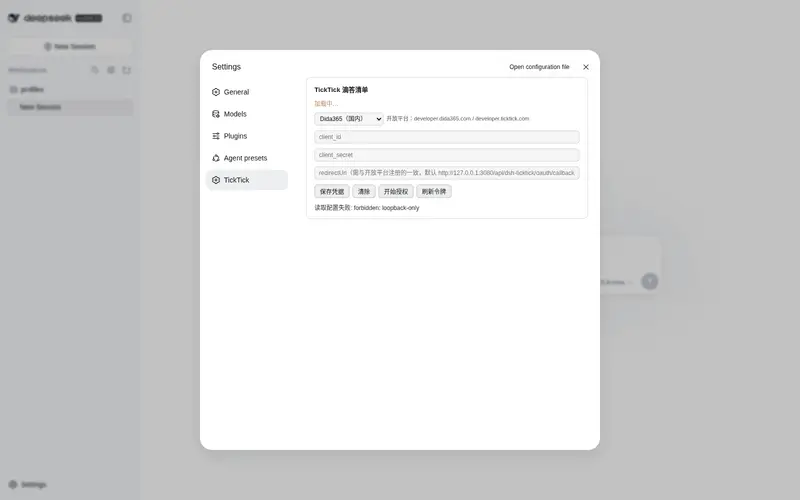
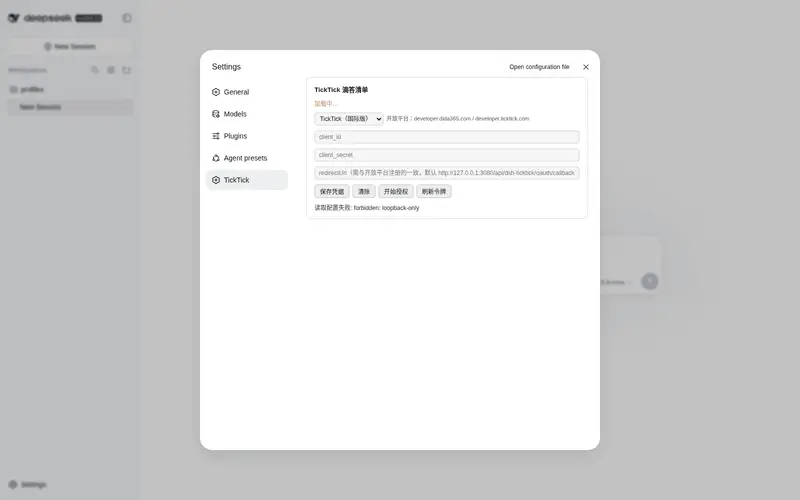
ticktick_update,ticktick_complete,ticktick_delete(project id optional; auto-resolved). - Settings panel — Settings → TickTick: configure credentials, run the authorize flow (popup + manual code paste), refresh tokens, quick-add a task, and complete today’s tasks in place.
- Credentials and tokens persist to
~/.dsh/dsh-ticktick.jsonwith mode0600;ticktick_statusnever echoes secrets. - System-prompt announcement so agents know when to use the plugin.
Install
# after publishing to GitHub (repo tagged with the `dsh-plugin` topic)
dsh plugin --profile web add github:zhengjy01/dsh-ticktick

# or from npm (prebuilt install, no build approval needed)
dsh plugin --profile web add dsh-ticktick

# local development
dsh plugin --profile web add link:/path/to/dsh-ticktick
Restart dsh web. The plugin needs no build step — lib/index.js is plain ESM.
Configuration
-
Create an app in the open platform console: https://developer.dida365.com/docs#/openapi (CN) or https://developer.ticktick.com/manage/ (international), and register the redirect URI:
http://127.0.0.1:3080/api/dsh-ticktick/oauth/callback(use your actual
dsh webport, or set a customredirectUri— it must match exactly.) -
Give the plugin your
client_id/client_secret, either in the settings panel (Settings → TickTick) or by asking the agent:帮我配置滴答清单,client_id 是 xxx,client_secret 是 yyy,区域用国内版 Dida365The agent calls
ticktick_configand persists the credentials. -
Authorize: click 开始授权 in the panel (or
ticktick_oauth_start) and log in. The callback completes automatically; if it doesn’t, paste the code back and callticktick_oauth_finish.
From then on:
把今天滴答清单里没做完的任务同步给我          → ticktick_sync (pull)
帮我把这些任务同步到滴答清单:买牛奶、写周报   → ticktick_sync (push, dedupes)
明天下午3点提醒我开会,加到「工作」清单       → ticktick_add
The
client_secretand OAuth tokens are credentials: anyone holding them can read and change your tasks. They stay in~/.dsh/dsh-ticktick.json(mode0600); useticktick_config(reset: true)to clear them if they leak.
API surface
| Tool | Purpose |
|---|---|
ticktick_status |
connection & authorization status |
ticktick_config |
set / clear clientId, clientSecret, region (cn/intl), redirectUri
|
ticktick_oauth_start |
build the authorize URL |
ticktick_oauth_finish |
exchange a pasted code / redirect URL for tokens |
ticktick_lists |
list all lists (id + name) |
ticktick_tasks |
pull tasks (by list, completed flag, limit) |
ticktick_add |
create tasks |
ticktick_update |
update a task |
ticktick_complete |
complete a task |
ticktick_delete |
delete a task |
ticktick_sync |
pull summary / push with title dedupe |
Notes
- Uses Node’s built-in
fetch(Node 22+) andcrypto— zero runtime dependencies. - The OAuth callback route is loopback-only and verifies the OAuth
state; the remaining/api/dsh-ticktick/*routes are loopback + same-origin only. - Not covered by the open API: smart-list filters and time-triggered reminders (
reminders/repeatFlagare passed through when present, but not modeled as tool parameters). - The web settings panel talks to the host through the loopback-only
/api/dsh-ticktickroute family.
License
MIT
Frequently Asked QuestionsFAQ
Use the verified command dsh plugin --profile default add github:zhengjy01/dsh-ticktick in a DSH-enabled shell. The command resolves the public package metadata and keeps the plugin attached to the catalog identity shown on this page.
Compatibility follows the bundle and profile status shown above. If a profile is not detected, keep the plugin disabled there and check the repository documentation before enabling it in production.
The GitHub link and activity metadata are the source of truth for releases and maintenance. Revisit this page after a new release to confirm the catalog has observed the latest version.