zoahdev/dsh-rule-evolve
Verification-driven self-evolution loop for DeepSeek Harness: experience -> rules -> verify. Turns failures into auditable AGENTS.md rules guarded by tests.
Listed
0
Dev
Bundle verified
Preview
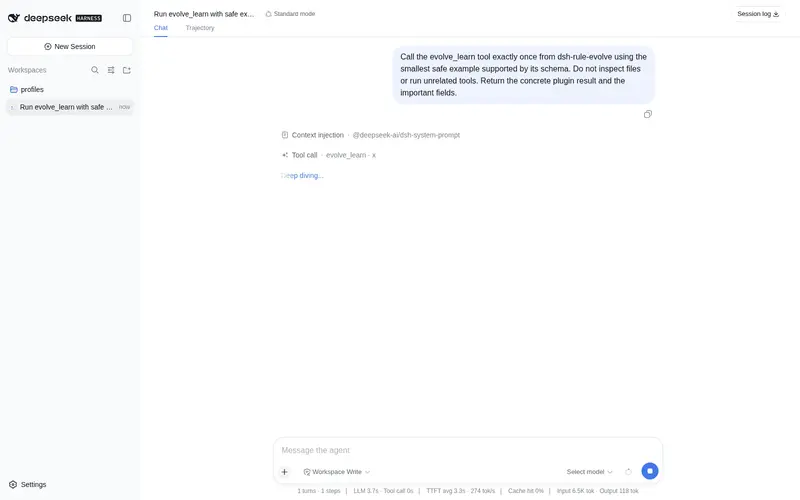
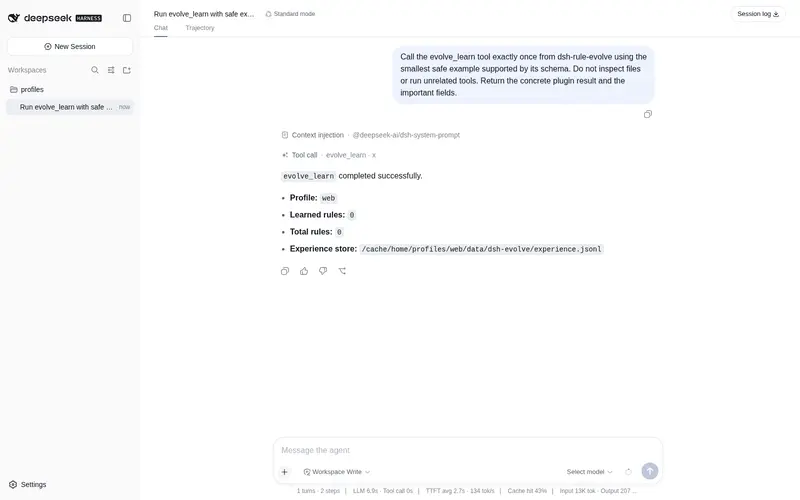
What it does
Verification-driven self-evolution loop: failure logs become verified AGENTS.md rules; in-session plugin (evolve_learn / evolve_apply / evolve_touch / evolve_recall), tool-verify gate, rule lifecycle, local recall.
Best for
- Teams that want recurring failures and retrospectives converted into traceable, verified AGENTS.md rules.
- Plugin-development workflows that gate new tools with real checks and retain failures as reusable experience.
- Local rule libraries that need recall, usage tracking, scoring, soft retirement, and duplicate management across sessions.
Not ideal for
- Workflows that want rules accepted without running a verification command or readiness gate.
- Knowledge that cannot be expressed usefully as durable AGENTS.md rules derived from experience or failure logs.
- Environments below the documented Node.js 18 minimum.
README
dsh-rule-evolve
Verification-driven self-evolution loop for DeepSeek Harness.
Renamed from
dsh-evolve(old URL redirects). Reason: another community project (william-jin-cmu/dsh-evolve) already uses that name for in-session plugin hot-mounting. Different focus: that project evolves which plugins are mounted; this project evolves which rules are trusted, with verification gates. The CLI command staysdsh-evolvefor compatibility (dsh-rule-evolveis also available).
Agents keep repeating the same expensive lessons: a crash fixed last week gets re-debugged today, a Windows quirk gets rediscovered, an install trap gets re-hit. dsh-evolve turns that loop into a traceable pipeline:
experience (markdown) → learn → rules (AGENTS.md) → verify (real checks)
Every rule carries its source and its last verification result — evolution is auditable, and nothing is ever “learned” without being checked.
Quick start
node scripts/dsh-evolve.mjs learn --from docs/troubleshooting.md --out experience.jsonl
node scripts/dsh-evolve.mjs rules --experience experience.jsonl --out AGENTS.md
node scripts/dsh-evolve.mjs verify --experience experience.jsonl --dir ./my-plugin
verify runs the real check pipeline (dsh-plugin-doctor check <dir> by
default, override with --cmd) and stamps every entry verified: true/false.
Self-improvement loop (v0.2.0)
Full evolution with reflection, profile installation and an evolution log:
# 1. reflect on a completed task/retrospective
node scripts/dsh-evolve.mjs reflect --task "make my plugin pass its own checks" --result retro.md --out experience.jsonl

# 2. evolve: verify rules against the real repo, install them into a dsh profile,
#    and append one round to EVOLUTION.md
node scripts/dsh-evolve.mjs evolve --experience experience.jsonl --dir ./my-plugin --profile web --log EVOLUTION.md
The rules land in <DSH_HOME>/profiles/web/AGENTS.md (previous file backed up),
so the next session actually starts with the lessons. Every round is logged:
## Round 1 — 2026-08-15T…
- New rules: 5
- Verified: yes ✅
- Sources: examples/doctor-experience.md
- Command: dsh-evolve evolve --experience … --dir … --profile web
Dogfood: our doctor repo now passes its own check with 5 verified rules installed
into a profile (see examples/demo/EVOLUTION.md).
Learning from failure logs (v0.3.0)
extract turns raw failure logs into conditional rules automatically — no
manual retrospective needed:
node scripts/dsh-evolve.mjs extract --task "publish to npm" --from install.log \
  --out experience.jsonl --hint "configure the credential and retry"
Every ERROR/failed/ERR_ line becomes a rule: `When “
Frequently Asked QuestionsFAQ
Use the verified command dsh plugin --profile default add github:zoahdev/dsh-rule-evolve#path:/plugin in a DSH-enabled shell. The command resolves the public package metadata and keeps the plugin attached to the catalog identity shown on this page.
Compatibility follows the bundle and profile status shown above. If a profile is not detected, keep the plugin disabled there and check the repository documentation before enabling it in production.
The GitHub link and activity metadata are the source of truth for releases and maintenance. Revisit this page after a new release to confirm the catalog has observed the latest version.