zuoyunlai/lunheng-article-pipeline-dsh
论衡(lunheng-article-pipeline)DeepSeek Harness bundle 插件(DSH 适配版)
Listed
0
Skill
Bundle verified
Preview
What it does
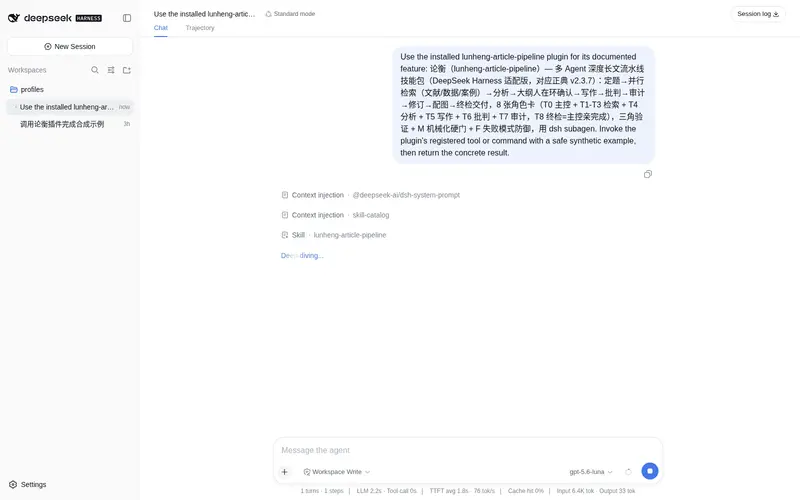
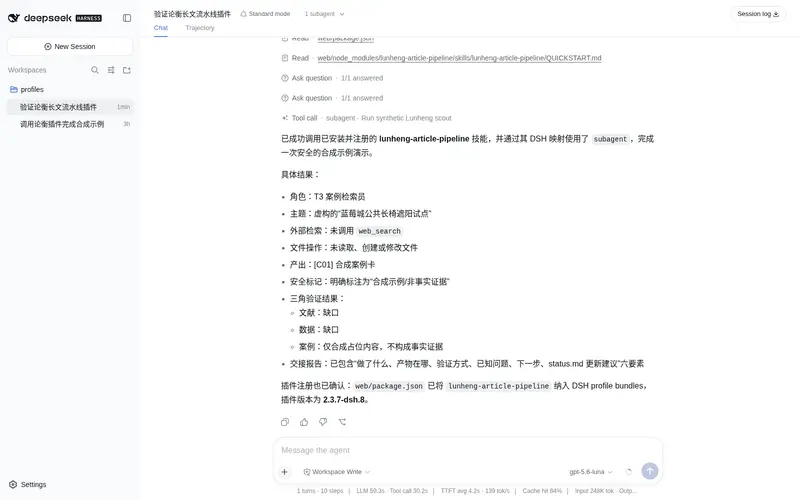
Multi-agent deep long-form article pipeline skill for DeepSeek Harness, running 7 roles across 5 phases with parallel literature/data/case retrieval, an evidence base, independent audit and human verification gates.
Best for
- Teams producing evidence-heavy long-form articles or papers that benefit from parallel literature, data, and case retrieval.
- Writing workflows that need multiple agent roles for analysis, drafting, counterargument, and independent audit.
- High-stakes deliverables that can accommodate explicit human verification gates before completion.
Not ideal for
- Short, routine writing tasks where a five-phase multi-agent pipeline would add disproportionate overhead.
- Environments without DSH subagent support, which the role orchestration depends on even when role-specific presets are omitted.
- Low-latency or tightly constrained model-budget workflows that cannot accommodate parallel retrieval, critique, and audit.
- Fully unattended publishing workflows that cannot provide the documented human verification gates.
README
论衡(lunheng-article-pipeline)— DSH bundle 插件
多 Agent 深度长文流水线技能包,DeepSeek Harness(dsh)bundle 插件版。
把一篇深度文章/论文的生产拆成 8 个角色 + 5 个阶段(Phase 1 为 T1 文献∥T2 数据∥T6 案例 三检索员三方真并行、互不干涉,T6 任何量级必 spawn 含 0 条场景空卡协议;T8 批判伙伴从反方攻击论证;G0-G13 独立审计 + M 门机械化终检),用 dsh subagent 子代理编排,产出有证据底座、反方论证、独立审计、人工核验节点的交付物。
版本:v2.2.8-dsh.1(DSH 适配版,对应正典 v2.2.8)。
安装(在目标机器上)
# 1) 装进 profile 的 node_modules
dsh plugin --profile web add lunheng-article-pipeline

# 2) 把 bundle 加入 profile 清单
#    $DSH_HOME/profiles/web/package.json
#    "dsh": { "profile": { "bundles": ["@deepseek-ai/dsh-base", "@deepseek-ai/dsh-web-app", "lunheng-article-pipeline"] } }

# 3) 重启 dsh web
安装后技能自动出现在会话的 skill 工具目录,无需手动复制到技能根。
内容
-
skills/lunheng-article-pipeline/— 技能本体(SKILL.md+AGENTS.md+references/:8 张角色卡 + 7 个模板 +_shared/共享机制(M 门/F 模式/韧化协议)+ 运行手册 + 设计文档) -
cordis.patch.yml— bundle 补丁:注册指向包内skills/的 filesystem 技能提供者
按角色分模型(可选)
默认所有角色继承会话模型。若要按角色指派不同模型(检索用便宜快模型,分析/写作/审计用强模型),用随包附带的「分档预设」:
| 工具 | 角色 | 默认模型 | 环境变量 |
|---|---|---|---|
subagent_retrieval |
T1 文献 / T2 数据 / T6 案例 | deepseek-v4-flash |
LUNHENG_RETRIEVAL_MODEL |
subagent_strong |
T3 分析 / T4 写作 / T8 批判 | deepseek-v4-pro |
LUNHENG_STRONG_MODEL |
subagent_audit |
T5 审计 | deepseek-v4-pro |
LUNHENG_AUDIT_MODEL |
# 1) 复制预设到用户预设根
cp -r examples/preset "$DSH_HOME/.agent-presets/lunheng"

# 2) 新会话在预设选择器里选「论衡分档」

# 3) 换模型:设环境变量后重启 dsh(模型挂载期求值一次)
export LUNHENG_AUDIT_MODEL=claude-opus-5
dsh web
不装预设也没关系——技能会回退到 subagent,所有角色继承会话模型。详见 examples/preset/README.md 与 docs/installation.md。
验证
dsh --profile web --dump-config   # 应能看到 skill-filesystem-lunheng 行
# 新开会话后,skill 工具目录应列出 lunheng-article-pipeline
发布
npm login     # 首次需登录
npm publish   # 或 npm publish --access public
文档
-
docs/installation.md— 安装与验证 -
docs/usage.md— 使用流程(五阶段 + 产物结构) -
docs/architecture.md— 架构(8 角色 + 三角验证 + G0-G13 审计 + M 门) -
docs/introduction.md— 插件介绍 -
docs/faq.md— 常见问题 -
CHANGELOG.md— 版本历史 -
CONTRIBUTING.md— 维护与同步指南
许可
MIT,见 LICENSE。
Frequently Asked QuestionsFAQ
Use the verified command dsh plugin --profile default add github:zuoyunlai/lunheng-article-pipeline-dsh in a DSH-enabled shell. The command resolves the public package metadata and keeps the plugin attached to the catalog identity shown on this page.
Compatibility follows the bundle and profile status shown above. If a profile is not detected, keep the plugin disabled there and check the repository documentation before enabling it in production.
The GitHub link and activity metadata are the source of truth for releases and maintenance. Revisit this page after a new release to confirm the catalog has observed the latest version.