863683348/dsh-plugin-gate
Installation safety gate & data-protection guard for DeepSeek Harness: 60 static signature rules (31 high/24 medium/5 low) scan plugin sources before dsh plugin add; 12 destructive-command patterns + workspace-boundary checks block accidental deletion. | 安装安全闸门与数据保护闸:60 条静态签名规则,12 种危险命令模式拦截误删。
已收录
0
Security
Bundle 已验证
预览
功能介绍
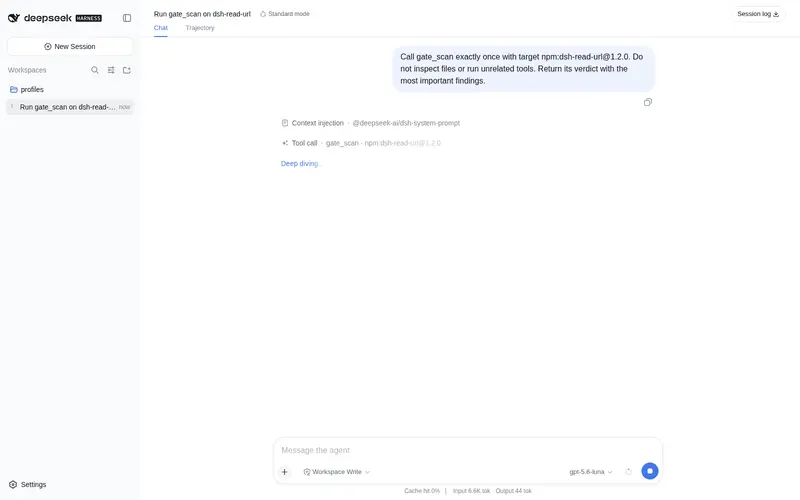
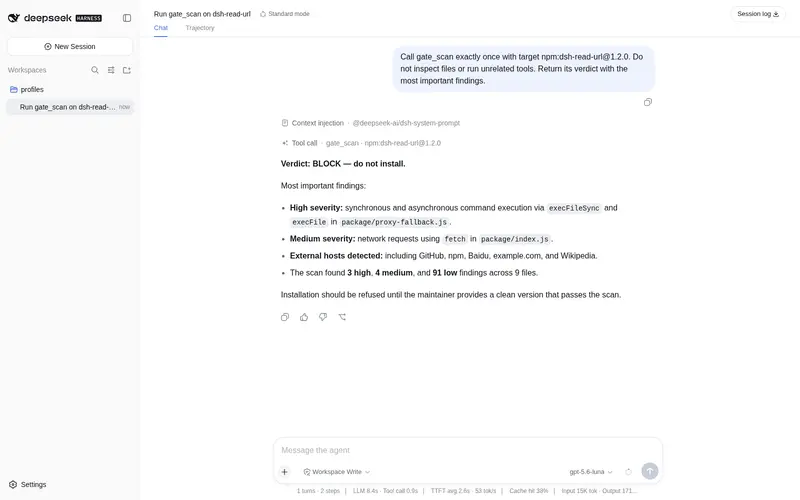
DSH 插件的安装安全闸门:在 "dsh plugin add" 前对本地目录或 npm 包做"杀毒"式扫描(安装脚本、权限、密钥、网络回连),给出 BLOCK/WARN/PASS 判定。
适合
- 希望在安装前扫描本地插件目录或 npm 包中的危险安装脚本、密钥、权限、混淆和网络回连的用户。
- 希望对破坏性 shell 命令或工作区外路径进行预检查的团队。
- 需要在不执行被扫描代码的情况下获得带证据 BLOCK、WARN 或 PASS 结果的审查人员。
不适合
- 不适合将 PASS 视为安全保证,因为签名扫描可能漏掉新型恶意代码,也可能产生误报。
- 不适合完全离线的依赖漏洞检查,因为可选的 OSV 查询需要网络,离线时会降级。
- 不适合对超大目录树进行无上限深度扫描,因为文件数、文件大小、压缩包大小和依赖检查数均有可配置上限,且默认不扫描 node_modules。
README
dsh-plugin-gate
Installation safety gate & data-protection guard for DeepSeek Harness — 60 static signature rules (31 high / 24 medium / 5 low) scan plugin sources for malicious install scripts, credential theft, obfuscation and network callbacks before you run dsh plugin add, and 12 destructive-command patterns plus workspace-boundary checks stop rm -rf-class accidents before they happen.
The plugin marketplace is growing fast (thousands of entries), and malicious code mixed into a plugin is only a matter of time. dsh-plugin-gate gives the agent a gate_scan tool that inspects a plugin source — a local directory or an npm tarball — for the classic malware shapes:
| Domain | What it checks | |
|---|---|---|
| Scripts | npm lifecycle scripts (pre/install/postinstall), exec/spawn/shell:true, curl | sh, encoded PowerShell, cmd/WSH launch, dynamic require |
| Obfuscation | eval / new Function / vm.runIn*, hex-escape floods, base64 blobs, char-array packing | |
| Permissions | credential env reads (OPENAI_API_KEY etc.), ssh/aws/npmrc file reads, writes to system/home/dotfile paths, chmod 777, sandbox-escalation requests |
|
| Network | external URLs & hosts, fetch/axios/socket/WebSocket/DNS APIs, cloud-metadata endpoints (169.254.169.254), Discord/Telegram/Slack webhooks, .onion, read-then-send exfiltration shape | |
| Secrets | hardcoded sk- keys, ghp_ tokens, AWS keys, private key blocks, bearer tokens |
|
| Supply chain | exact-version direct dependencies checked against Google OSV (ranges and official @deepseek-ai packages skipped; configurable, offline-degrades) |
The gate is read-only: it never executes scanned code and never writes files.
Install
In your DSH profile:
dsh plugin --profile <profile> add dsh-plugin-gate
# or add the bundle patch manually:
#   dsh --profile <profile> --patch ./node_modules/dsh-plugin-gate/cordis.patch.yml
Usage
Ask the agent to scan a plugin before installing it (the plugin also injects prompt guidance that tells the agent to do this automatically):
gate_scan target: "npm:dsh-plugin-some-package"
gate_scan target: "npm:dsh-plugin-some-package@1.2.3"   # pinned version
gate_scan target: "./downloaded-plugin"                 # local directory
v1.1 - Data-protection guard
Before any destructive operation, ask the agent to evaluate it with gate_guard (also injected into prompt guidance):
gate_guard command: "rm -rf ./node_modules"
gate_guard path: ".dsh-memory-setup/memory.json" action: "delete"
- BLOCK - device/root-level destruction (rm -rf /, rmdir /s /q, format, dd to a block device, mkfs, drive-root deletes): refuse.
- WARN - recursive/force deletes, targets outside the workspace, or critical files (memory.json, .git, …): confirm the exact target first.
- PASS - no destructive signature detected.
Result shape:
{
  "verdict": "BLOCK" | "WARN" | "PASS",
  "score": 254,
  "summary": { "high": 0, "medium": 1, "low": 3, "categories": { "network": 4 } },
  "network": { "hosts": [...], "unallowlisted": [...], "readAndSendFiles": [...] },
  "hits": [{ "rule": "fetch_call", "category": "network", "severity": "medium",
             "file": "lib/index.js", "line": 12, "evidence": "...", "hint": "..." }],
  "recommendations": [...]
}
Verdict semantics
- BLOCK — at least one high-severity signature. Do not install until the maintainer ships a clean rebuild you can scan again.
- WARN — medium-severity patterns that need manual review (network I/O, home-path writes, base64 blobs). Inspect every hit in context.
- PASS — no risky signatures. Heuristic only — keep normal caution with unknown maintainers.
Context-aware rules: exec()/execSync() hits are downgraded when the file does not import child_process (typical RegExp#exec false positive); code-context rules (exec, eval, curl |
sh, PowerShell…) are downgraded to low when found in comments or documentation (examples, not behavior) — while secrets and webhooks stay flagged even in comments. Dependencies installed from git/http/file URLs are flagged as risky_dependency, and >4000-char minified lines as minified_line (low). |
Configuration
| Key | Default | Meaning |
|---|---|---|
maxFiles |
1000 | hard cap on scanned files per directory walk |
maxFileBytes |
2 MiB | per-file text cap |
includeNodeModules |
false | descend into node_modules |
maxTarballBytes |
32 MiB | npm tarball download cap |
allowlistHosts |
[] | hosts never listed as unallowlisted |
osvCheck |
true | query Google OSV for known vulnerabilities on exact-version deps |
osvMaxDeps |
8 | max exact-version direct deps checked |
osvTimeoutMs |
10000 | per-dep OSV query timeout |
promptSection |
true | inject agent guidance |
sectionOrder |
5 | prompt section order |
Development
node --check lib/*.js
node test/rules.test.mjs   # main-module mode (node --test is blocked in the DSH sandbox)
node test/scan.test.mjs
Pure logic lives in lib/rules.js (signatures), lib/targz.js (in-memory tar.gz), lib/scan.js (orchestration + verdict). The Cordis plugin is lib/index.js.
Security
The gate never executes scanned content. It is a heuristic signature scanner — it can miss novel malware and over-flag innocent code. Review BLOCK/WARN hits yourself; see SECURITY.md.
License
MIT
常见问题常见问题
在启用了 DSH 的终端中执行已验证命令 dsh plugin --profile default add github:863683348/dsh-plugin-gate。命令会解析公开 package 元数据,并保持插件与本页展示的目录身份一致。
兼容性以页面上展示的 bundle 与 profile 状态为准。如果某个 profile 尚未检测到,请先保持禁用,并在生产启用前阅读仓库文档。
GitHub 链接和 activity 元数据是 release 与维护状态的来源。新版本发布后重新查看本页,确认目录已经观察到最新版本。