a903067276-rgb/dsh-file-mentions
Clickable file paths in DSH replies: Codex-style inline open, 📂 reveal in file manager, mentioned-files chip list. DSH web plugin (zero-dependency).
已收录
8
Ui
Bundle 已验证
预览
功能介绍
DSH 回复中的文件路径可点击:Codex 风格行内打开、文件管理器定位、回合尾部文件 chip 列表。
适合
- 希望点击智能体回复中反引号包裹的路径以打开文件或在系统文件管理器中定位的 DSH Web 用户。
- 适合在回合末通过自动汇总的提及文件列表预览文件的工作流。
不适合
- 在正文中使用未加反引号的裸路径的回复,因为插件有意不将此类路径设为可点击。
- 要求 Windows/Linux 行为经过验证,或需要不受限制地访问会话目录外路径的部署;这些平台尚未实测,外部根目录也必须显式加入白名单。
README
dsh-file-mentions 📎
| English | 简体中文 |


Clickable file paths in DSH replies — a DeepSeek Harness (DSH) web plugin with a Codex-style experience.
Unofficial project: independently developed and maintained by a community member, not an official DeepSeek product.
Screenshot

Inline paths wrapped in backticks (`~/...`, absolute, relative, or Chinese paths) become
click-to-open; each clickable path carries a small folder-icon button that reveals the file in your
file manager; a “📎 mentioned files” chip list at the turn tail covers the rest. URLs are
already auto-linked by the official renderer, so this plugin leaves them alone.

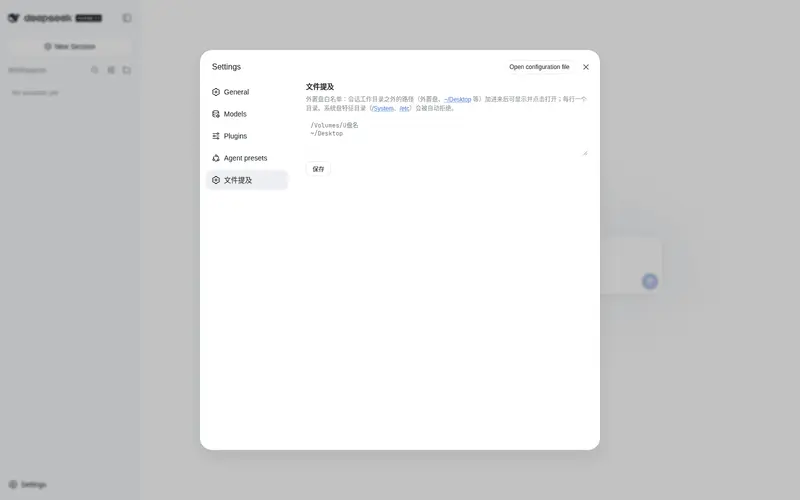
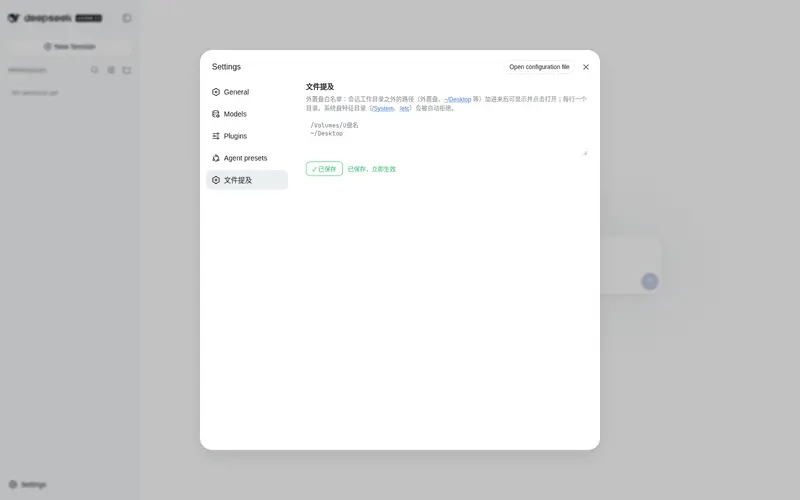
The external-drive whitelist (Settings → Plugins → file-mentions): paths outside the session
working directory (external drives, ~/Desktop, etc.) become clickable once added — one path
per line. System-disk marker directories (/System, /etc) are rejected automatically.
Features
| Where | What | Effect |
|---|---|---|
| Inline path text | click | Open with default app / open directory |
| folder icon after inline path | click | Reveal in file manager |
| “📎 mentioned files” chip | click name | Preview content inside DSH |
| folder icon in the chip list | click | Reveal in file manager |
| Inline URL | click | Browser opens it (official autolink) |
Supports ~/ expansion, relative paths (resolved against the session cwd), and absolute
paths in macOS / Linux / Windows forms. Non-existent paths silently do nothing.
Install
This repository is an official bundle plugin (dsh.bundle + dsh.client in the root
package.json), installed through the official profile manager:
dsh plugin --profile web add "github:a903067276-rgb/dsh-file-mentions#main"
Then restart dsh web (bundle layers are composed at startup; HMR does not apply).
Requires pnpm on PATH (dsh plugin forwards to pnpm).
Manual mount fallback: see docs/install.md.
Usage
Have the agent wrap paths in backticks (e.g. `~/docs/plan.md`) to make them clickable
inline. The tail chip list appears automatically — no configuration.
Paths outside the session directory (external drives, etc.)
For safety, absolute/~/ paths are only probed inside the current session’s working
directory. To make paths on an external drive (e.g. /Volumes/USB) or any other directory
outside the session working dir clickable, add that directory to the external-drive
whitelist in Settings → Plugins → file-mentions (one path per line). Saving takes effect
immediately — no restart required.
System-disk protection: whitelist roots containing system marker directories (/System,
/etc, or \Windows on Windows) are rejected automatically, so a full system disk mounted
externally can never be whitelisted by mistake.
Platform support
| Platform | Status |
|---|---|
| macOS | ✅ Fully tested (incl. Chinese paths) |
| Linux | ⚠️ Not tested — expected to work (command branching and path parsing implemented) |
| Windows | ⚠️ Not tested — expected to work (command branching and path parsing implemented) |
Requirements
- DSH web (run with
npx @deepseek-ai/dsh web) - Pure Node stdlib implementation — peer dependencies (
@deepseek-ai/dsh-settings,@deepseek-ai/schemastery) are provided by the host - Opening files uses the system default app / file manager (per-platform command branching)
How it works
-
Host (
lib/index.js): three routes —/api/file-mentions/check(existence check),/api/file-mentions/open(system open,mode: open/reveal, per-platform command) and/api/file-mentions/config(whitelist read/write for the settings page, same-origin guarded). Probe surface: absolute/~/paths are checked only inside the session cwd or user-declared whitelist roots (stored via the official settings service — immediate effect, no restart); whitelist roots are protected against system disks and symlink escapes. Pure Node stdlib;execFileavoids shell injection. -
Client (
lib/client.js): a conversationEvents collector extracts paths from each reply → publishes them to turn data → the tail list filters non-existent paths before rendering; inline clicks use a document-level click delegation (the official render entry is occupied by the official “deliverables” plugin, so DOM delegation is the only viable path); inline folder-icon buttons are inserted by a MutationObserver and restored automatically after React re-renders; a settings card (sidebar section + plugin page) edits the whitelist.
See docs/architecture.md.
Notes
- Use either the official bundle install or the manual mount — never both.
- Manual mounting needs a single entry in
~/.dsh/cordis.patch.yml; a double entry applies the plugin twice and crashes on duplicate route registration.
Compatibility notes
- Inline clicks rely on backtick-wrapped paths (the agent-output convention, same as Codex); bare paths in prose are intentionally not clickable.
- The official “produced files” list and this plugin coexist: official wins when it has output, otherwise this plugin shows.
- Windows / Linux validation via issue or PR is welcome.
License
常见问题常见问题
在启用了 DSH 的终端中执行已验证命令 dsh plugin --profile default add github:a903067276-rgb/dsh-file-mentions。命令会解析公开 package 元数据,并保持插件与本页展示的目录身份一致。
兼容性以页面上展示的 bundle 与 profile 状态为准。如果某个 profile 尚未检测到,请先保持禁用,并在生产启用前阅读仓库文档。
GitHub 链接和 activity 元数据是 release 与维护状态的来源。新版本发布后重新查看本页,确认目录已经观察到最新版本。