AKS1st/dsh-skill-manager
DSH web plugin: a Skill Manager page in the settings panel browsing system / user / workspace / preset skills, with file-tree editing, zip import/export, and delete (system skills read-only).
已收录
1
Dev
Bundle 已验证
预览
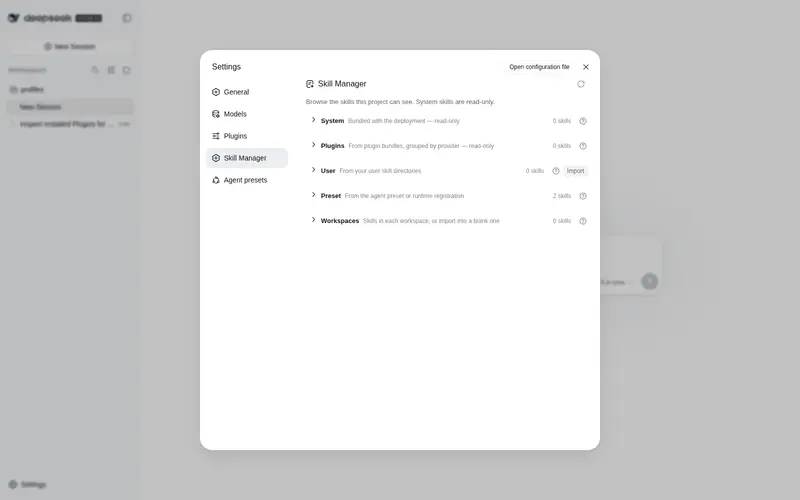
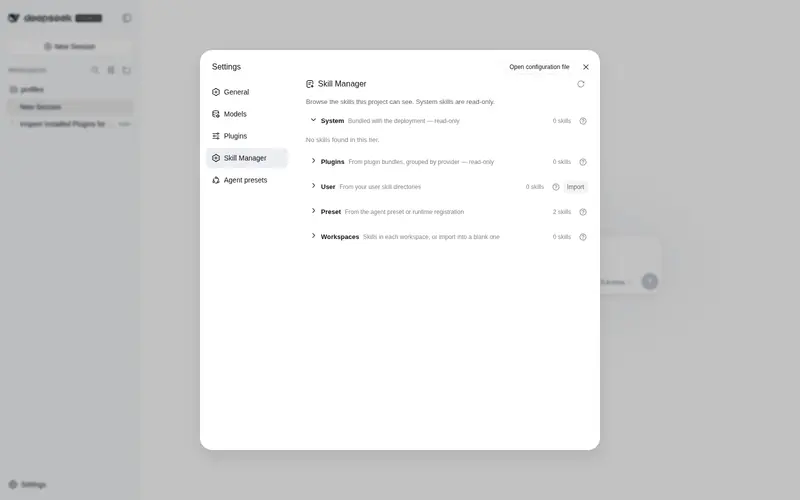
功能介绍
DSH 设置面板内的「技能管理」页面:按系统 / 用户 / 工作区 / 预设浏览技能,展开技能查看文件树、查看和编辑文件,支持从 zip 导入技能,以及导出、删除(系统技能只读)。
适合
- 希望通过 Web 设置面板浏览和管理用户及工作区技能的 DSH 管理者。
- 需要查看文件树并直接编辑文件、不想手动进入技能目录的用户。
- 以 zip 文件交换技能,并需要在浏览器中向不同工作区导入或导出的团队。
不适合
- 需要编辑或删除内置系统技能及预设技能的场景;这些层级为只读。
- 需要自动化或由模型主动维护技能的场景;文件变更由用户在浏览器界面发起。
- 使用 zip 包以外格式导入技能的工作流。
README
dsh-skill-manager

A DSH web plugin that adds a Skills page to the settings panel (opened from the sidebar-foot Settings trigger). It shows every skill the deployment can see, grouped into system / user / workspaces / preset tiers, and lets you manage them without touching the filesystem by hand:
- Browse — expand a skill to its directory file tree; system (bundled) skills are read-only, user and workspace skills are fully manageable.
- Edit — click a file to open a view/edit window and modify the skill’s content directly.
- Import — upload a zip package to install skills into your user skills directory or any workspace (blank workspaces included, sorted last).
- Export — download any skill as a zip, read-only ones included.
- Delete — remove writable skills with a two-step confirmation.
Screenshots
The Skills page inside the settings panel:

The file editor window (click a file to open it):

Install
dsh plugin --profile web add https://github.com/AKS1st/dsh-skill-manager
dsh web   # restart the web service for the profile change to take effect
Installs straight from the GitHub repository (pnpm git-source install).
How it works
The plugin has two parts that work together:
-
Server side (runs inside the dsh service,
src/index.ts): reads the skills dsh already knows about and serves them to the page, and handles the file operations the page triggers — listing a skill’s files, reading or saving a file, importing a zip, exporting a skill, and deleting a skill. Write and delete are only allowed for user and workspace skills; system skills (the ones dsh ships with) and preset-provided skills are read-only. -
Browser side (the settings page,
src/client/): shows the catalog grouped into system / user / workspaces / preset sections. Workspaces and presets appear as collapsible groups (blank workspaces included, sorted last, as import targets). Clicking a skill expands its file tree; clicking a file opens an editor. The user section and every workspace heading have an Import button (zip upload); every skill row has Export (downloads a zip); writable rows also have Delete (two-step confirm). All styling uses dsh’s theme tokens, so the page follows light/dark mode.
Everything is additive — no changes to dsh itself are needed.
Model Experience
- Token effects: the plugin adds no model-visible tokens. The page is a user-facing browser UI; it only reads the same skill catalog the model already sees, and file edits are user-initiated, not model actions.
- KV-cache: none.
Development
pnpm run check   # tsc --noEmit
pnpm run build   # tsc + tsdown (lib/index.js, lib/client.js, lib/invariant.js)
pnpm run test    # vitest
The @deepseek-ai/* packages are declared as devDependencies; at runtime they
resolve from the dsh installation that loads the plugin. The client-bundle
build scaffold (tsdown.client.ts + build/web/src/platform.ts) is a
check-in snapshot of the harness’s shared preset so the repo builds standalone.
常见问题常见问题
在启用了 DSH 的终端中执行已验证命令 dsh plugin --profile default add github:AKS1st/dsh-skill-manager。命令会解析公开 package 元数据,并保持插件与本页展示的目录身份一致。
兼容性以页面上展示的 bundle 与 profile 状态为准。如果某个 profile 尚未检测到,请先保持禁用,并在生产启用前阅读仓库文档。
GitHub 链接和 activity 元数据是 release 与维护状态的来源。新版本发布后重新查看本页,确认目录已经观察到最新版本。