AngelosZou/dsh-multi-folder
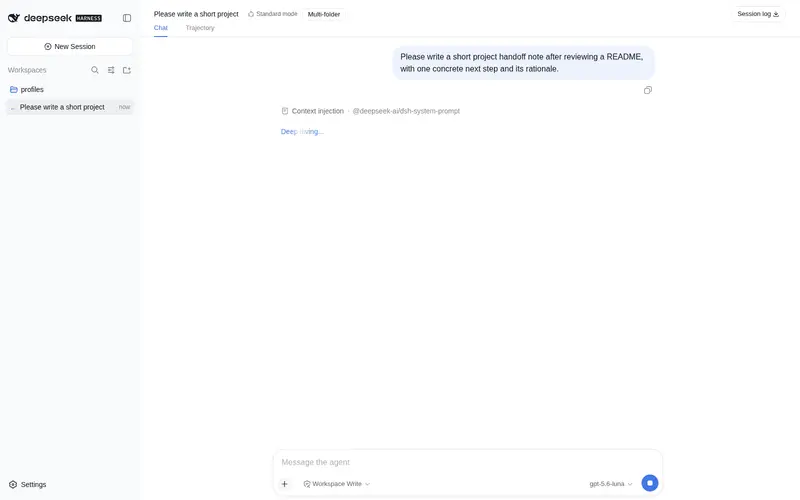
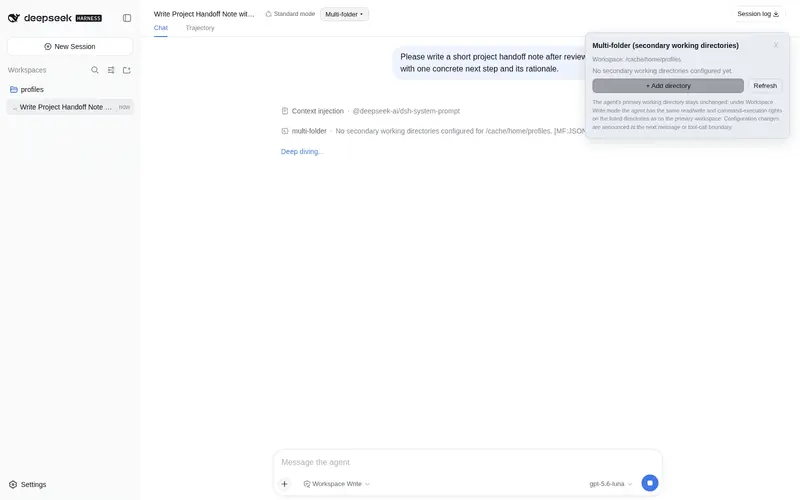
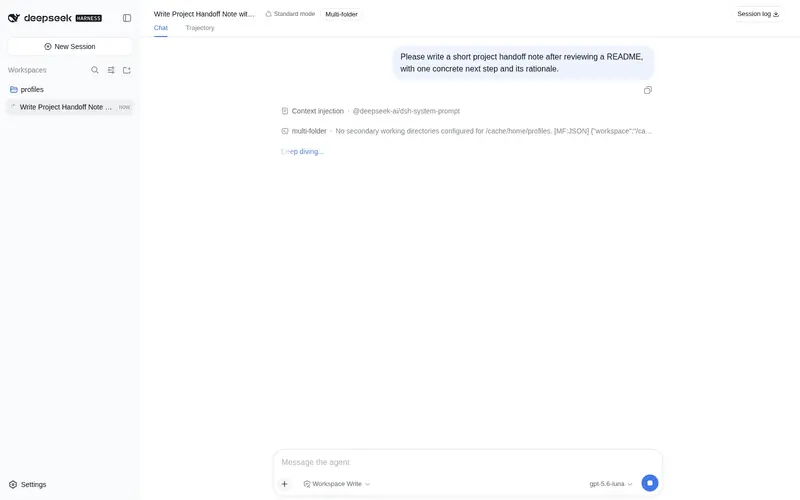
为 DSH 项目提供副工作目录:agent 保持主工作区为 cwd,同时对已配置的副目录获得同等读写/执行权限,可在会话头部与新会话页配置。
已收录
5
Tools
Bundle 已验证
预览
功能介绍
为 DSH 项目提供副工作目录:agent 保持主工作区为 cwd,同时对已配置的副目录获得同等读写/执行权限,可在会话头部与新会话页配置。
适合
- 适合源码、测试和文档位于不同目录,但需要在同一 DSH 会话中编辑的项目。
- 适合希望保持主工作区为代理 cwd,同时向指定副目录授予同等权限的用户。
- 适合希望在创建会话前配置副目录,或从会话头部调整目录且不增加代理工具的团队。
不适合
- 不适合在一次调用中同时写入主目录与副目录,或写入两个副目录的命令;每个受限命令只有一个可写根目录。
- 不适合在命令 cwd 仍位于主工作区时依赖 `git -C <secondary>` 或绝对路径写入的流程;创建文件的命令必须把目标根目录设为 `workdir`。
- 不适合未由 `@deepseek-ai/dsh-base` 与 `@deepseek-ai/dsh-web-app` 组合的 DSH profile,或低于 Node.js 20 的环境。
- 不适合始终只在单一目录工作、无需额外工作区根目录的用户。
README
dsh-multi-folder
| English | 中文 |
Secondary working directories for a DeepSeek Harness project — edit a source repo, a test repo, and a docs repo side by side without leaving the primary workspace.



A DeepSeek Harness plugin bundle that gives one project (workspace) a set of secondary working directories:
- The agent’s core
cwdand every other core attribute keep pointing at the primary workspace. - Under Workspace Write mode the agent gains the same read / write / edit / execute permissions on the configured secondary directories as on the primary workspace — enforced by re-rooting the session’s own sandbox policy, so every mode keeps its semantics (
read-onlystill denies,workspace-writeallows,danger-full-accessallows). - The directory list is injected into the system prompt and re-rendered per session assembly.
- Configuration changes notify the agent through a non-interrupting message queue — delivered at the next message boundary (user send or tool-call end), and only when the directory set actually changed.
- Configurable before the session starts: the session-creation page (new-session screen) offers a Multi-folder entry that reads and edits the same per-workspace configuration through a sessionless remote API (
multiFolder/*endpoints) — no session id required. - No new tools. Everything is a framework-level change (tool-pipeline interception) plus a UI-level change (a session-scoped header entry).
Requirements
- Node.js >= 20
- A DSH profile composed from
@deepseek-ai/dsh-base+@deepseek-ai/dsh-web-app
Install
Link this repository into a DSH profile:
dsh plugin --profile web add dsh-multi-folder
Then restart the DSH backend (host composition loads at process start) and refresh the browser page (the client bundle is served no-cache).
Usage
A Multi-folder button appears in the session header, and a second entry appears on the session-creation page (fixed launcher in the bottom-right corner while the new-session screen is shown; an inline chip beside the workspace picker once the upstream conversation.hero.workspaceExtras slot is available). The panel lets you:
| Action | Behavior |
|---|---|
| Add directory | Opens the native directory picker |
| Remove / refresh | Applies immediately |
| Switch session | The panel auto-switches to that session’s directories |
| Reopen panel | Uses the per-session cache — no redundant command rows |
Equivalent slash command for the user:
/multi-folder list
/multi-folder add "D:\path\to\repo"
/multi-folder remove "D:\path\to\repo"
/multi-folder set "D:\a" "D:\b"
The agent needs nothing extra: read / glob / grep work everywhere, and write / edit / pwsh / bash are intercepted and re-rooted automatically when the target path (or workdir) falls inside a configured secondary directory.
Permission model
Each confined command runs under exactly ONE writable root — the workspace root the call is re-rooted to (the Windows ACL runner grants a single workspace write SID per process tree). Consequences:
- A command whose cwd stays the primary workspace cannot create files inside a secondary directory.
git -C <secondary> commit,cd <secondary>inside a script,git clone <url> <secondary>, or absolute-path writes all fail with an OS-levelPermission denied(e.g.fatal: Unable to create '.../.git/index.lock': Permission denied). - Symmetrically, a command re-rooted to a secondary directory cannot write to the primary workspace (or another secondary directory) in the same invocation.
-
Rule for file-creating commands: set
workdirto the directory the command writes into. For git, run the command from inside the repository (passworkdirpointing at it) instead of usinggit -Cfrom the primary workspace. - Reads are unrestricted and need no
workdir.
When a shell run ends in such a denial and references a configured secondary directory, the plugin attaches a short diagnostic hint to the tool result explaining the workdir fix.
How it works
-
Interception — a listener on the
tools/executearound-dispatch waterfall short-circuitswrite/edit/pwsh/bashcalls whose resolved path (orworkdir) lands inside a configured secondary directory, and executes them with the session’s standing sandbox policy re-rooted to that directory ({ ...standingPolicy, workspaceRoot: secondaryDir }). The mode itself is untouched, which is what gives every sandbox mode its identical primary-workspace semantics for free. Paths are canonicalized throughfs.resolve+processPathbefore matching, so.., symlinks, and case differences behave correctly. -
Prompt injection — one ordered
systemPromptsection with a text provider evaluated per assembly, rendering only for sessions whose workspace has configured directories. -
Notifications — a pending notice armed by the command handler (only on actual change) is consumed at the next boundary by either the
agent/pre-stepwaterfall (prepend into the entering message batch) or thetools/post-executewaterfall (attach asadditionalContexts), whichever fires first — the framework’s native plugin-sourcednoticecontext. -
Configuration & security boundary — per-workspace config lives in a host-owned store outside every agent sandbox root (
<DSH_HOME>/storages/multi-folder/<workspace-key>.json). Directwrite/editattempts against the config file are rejected with an explicit message — the agent can never self-grant directories; configuration is user-managed by design. See SECURITY.md. -
Sessionless remote API — a
multiFoldernamespace registered throughctx.typert.register(hand-writtensrc-jsondescriptors) plus a plain-object service provided asmultiFolder. Itslist/add/remove/setmethods are keyed by workspace path and share one validated core with the/multi-foldercommand, so the creation page can configure directories before any session exists. -
Client — a hand-maintained factory bundle (
window.__ModuleLoader__.load), no build toolchain required. The panel drives the host through two channels: the Remote BFF (ctx.remote.commands.execute) for sessions, and the shared/apiRPC channel (ctx.connection.rpc.call) for the sessionless endpoints.
Project layout
| Path | Purpose |
|---|---|
cordis.patch.yml |
Profile patch layer inserting the dsh-multi-folder row |
lib/index.js |
Host plugin: config store, tool-pipeline interception, prompt injection, dual-channel notifications, /multi-folder command, sessionless multiFolder/* remote API |
lib/client.js |
Client plugin (factory bundle): session-header button + overlay panel + session-creation page entry (hero launcher / upstream hero chip) |
test/ |
Runtime-free behavior tests (see Development) |
docs/ |
Design and analysis documents |
Development
No build step: the host half is plain ESM and lib/client.js is a hand-maintained factory bundle in the DSH client-modules format. Tests run with Node directly:
node test/smoke-host.mjs    # host apply smoke test + remote API behavior
node test/intercept.mjs     # interception / command / notification behavior
node test/smoke-client.mjs  # client bundle + panel flows (React shim)
Before modifying lib/client.js, see docs/design.md for the bundle contract.
Documentation
- docs/design.md — architecture and security model
-
docs/upstream-hero-slot.md — the upstream
conversation.hero.workspaceExtrasslot change (B1) and its plugin-side consumption
Contributing
See CONTRIBUTING.md. Issues and pull requests are welcome.
License
常见问题常见问题
在启用了 DSH 的终端中执行已验证命令 dsh plugin --profile default add github:AngelosZou/dsh-multi-folder。命令会解析公开 package 元数据,并保持插件与本页展示的目录身份一致。
兼容性以页面上展示的 bundle 与 profile 状态为准。如果某个 profile 尚未检测到,请先保持禁用,并在生产启用前阅读仓库文档。
GitHub 链接和 activity 元数据是 release 与维护状态的来源。新版本发布后重新查看本页,确认目录已经观察到最新版本。