asdf17128/dshp
Manage DeepSeek Harness profiles — list, create, clone, diff, and share a whole dsh setup as one portable file.
已收录
1
Dev
Bundle 已验证
预览
功能介绍
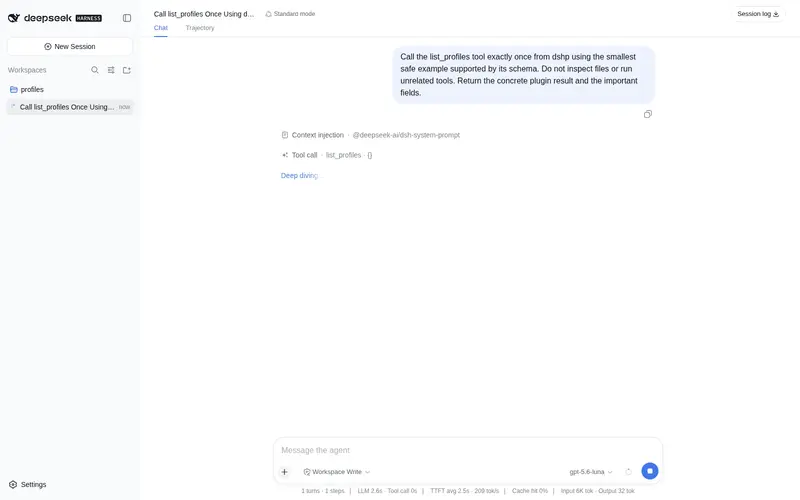
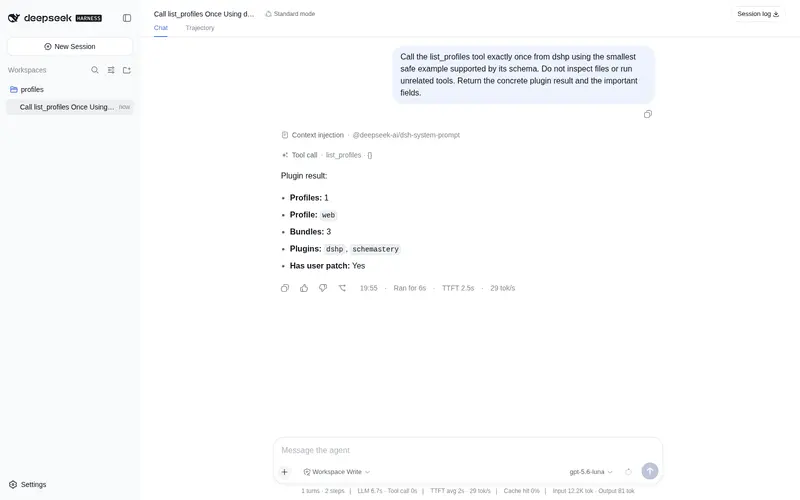
注册 `list_profiles` 与 `export_profile`:让 agent 列出本机有哪些配置,并把整套 profile(bundle 顺序、插件版本、patch)导出成一个可直接分享的文件。只读。
适合
- 需要在会话中列出本机 DSH profile 的智能体。
- 希望把 bundle 顺序、插件版本和原始 patch 整体导出为单个可移植文件的用户。
- 希望在不执行配置的情况下分享或归档可复现 DSH 环境的团队。
不适合
- 希望已安装的智能体工具创建、克隆、导入、对比或删除 profile 的用户;它只暴露 list_profiles 和 export_profile。
- 需要在会话中修改 profile 的工作流,因为插件工具是只读的。
- 低于 Node 18,或 profile 布局与文档所述 DSH 0.1.0-rc.5 结构不兼容的环境。
README
dshp
Share a whole DeepSeek Harness setup as one file.
| English | 中文 |
npx dshp ls
Why
dsh boots profiles and forwards installs to pnpm. It cannot create an empty profile, list the ones you have, copy a working setup before you experiment on it, or hand a setup to someone else — that is all manual work under ~/.dsh/profiles today.
Which matters, because “everything is a plugin” means your setup is a stack of layers, and the useful unit to share is the whole stack, not one plugin at a time.
Share a setup
dshp export web -o my-setup.dshp
# dsh profile — reproduce with: dshp import <this-file>
dshp: 1
name: web
bundles:
  - @deepseek-ai/dsh-base
  - @deepseek-ai/dsh-web-app
  - dsh-cloudflare-browser-run
plugins:
  dsh-cloudflare-browser-run: "^0.1.1"
patch: |
  - id: session-title
    config:
      fallbackMaxWords: 12
Short enough to paste into a forum post. On the other machine:
dshp import my-setup.dshp
That writes the profile, installs the plugins through dsh’s own pnpm, and you boot it with dsh --profile web. Verified end-to-end: a fresh $DSH_HOME reproduced a 132-entry tree identical to the original, patch included.
Experiment safely
dshp clone web web-试验田      # instant, keeps node_modules
dsh plugin --profile web-试验田 add some-experimental-plugin
dshp diff web web-试验田
web -> web-试验田

plugins
  + some-experimental-plugin@^0.2.0
If it goes wrong, dshp rm web-试验田 --yes. Your working profile was never touched.
Commands
dshp ls |
profiles, with bundle/plugin counts and disk size |
dshp show <name> |
bundles in load order, plugins, patch |
dshp new <name> [--web\|--headless] |
create a profile — dsh itself cannot make an empty one |
dshp clone <from> <to> |
copy a working setup, node_modules and all |
dshp export <name> [-o FILE] |
portable file (stdout by default) |
dshp import <file> [--as NAME] [--no-install] |
recreate a profile |
dshp diff <a> <b> |
what differs |
dshp rm <name> --yes |
delete |
What a profile actually is
Under $DSH_HOME/profiles/<name>:
-
package.json—dependenciesare the plugins,dsh.profile.bundlesis the ordered layer stack -
cordis.patch.yml— your own id-targeted overrides -
cordis.yml,pnpm-workspace.yaml— boilerplate, regenerated
So three things reproduce a setup: plugin versions, bundle order, and the patch. That is exactly what the portable file carries.
Bundle order is part of the format: it decides which layer patches which, so a reordering is reported by diff as a real difference.
The patch block is copied byte-for-byte rather than re-serialised, because it may hold !!js expressions (root: !!js dshHomePath('sessions')) that a YAML round-trip would mangle or evaluate. Nothing here ever evaluates your config.
Install and uninstall
As a CLI: npx dshp ls — nothing to install.
As a plugin:
dsh plugin --profile web add github:asdf17128/dshp   # install
dsh plugin --profile web remove dshp                 # uninstall
Removing it drops the list_profiles and export_profile tools. Your profiles
are untouched — the plugin only reads.
Compatibility
Verified against @deepseek-ai/dsh 0.1.0-rc.5. The profile layout it reads
(package.json with dsh.profile.bundles, cordis.patch.yml) is dsh’s own; a
change there is what would break it first.
Requirements
Node 18+. import needs a working dsh (local node_modules/.bin/dsh preferred, otherwise on PATH) because it installs through dsh’s own pnpm; every other command is pure filesystem work.
See also
dsh-doctor — checks a profile for patches that silently stopped applying.
License
MIT
常见问题常见问题
在启用了 DSH 的终端中执行已验证命令 dsh plugin --profile default add github:asdf17128/dshp。命令会解析公开 package 元数据,并保持插件与本页展示的目录身份一致。
兼容性以页面上展示的 bundle 与 profile 状态为准。如果某个 profile 尚未检测到,请先保持禁用,并在生产启用前阅读仓库文档。
GitHub 链接和 activity 元数据是 release 与维护状态的来源。新版本发布后重新查看本页,确认目录已经观察到最新版本。