Asher-2000/dsh-expert-mode
DSH (DeepSeek Harness) 专家模式 agent preset — 首席协调官 + 11 位领域专家子代理 Expert-mode preset for DeepSeek Harness
已收录
5
Tools
Bundle 已验证
预览
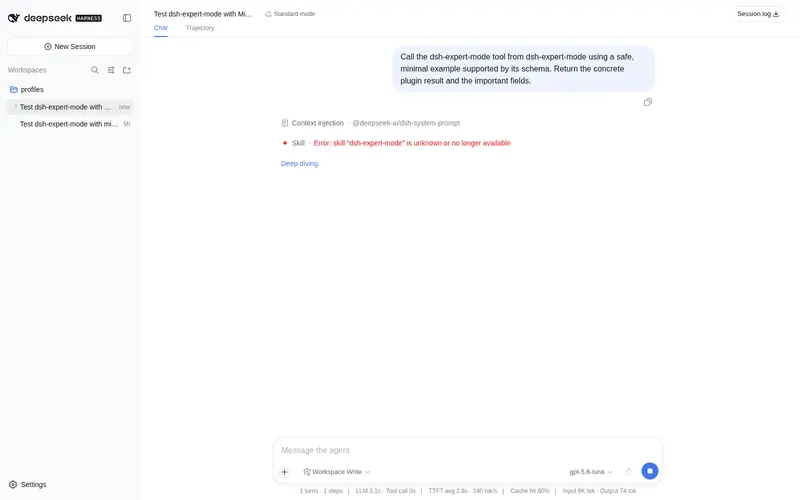
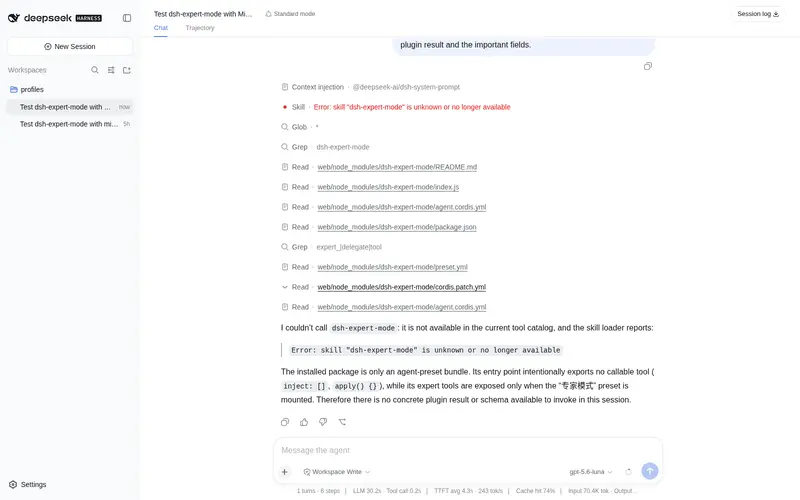
功能介绍
专家模式 agent preset(v0.3.0,双语双份):首席协调官 + 11 位领域专家子代理,按任务特性自动委派。新增:三锚约束(每轮回顾/收敛/反跑题自检)+ 近距离引导(身份/任务/输出格式模板)。专家:数据分析/文案/法务/产品/前端/UI-UX/架构/社交运营/增长/量化/财务。
适合
- 希望使用双语协调官 preset、并自动向 11 位指定领域专家委派任务的 DSH 用户。
- 横跨数据分析、产品、前端、UI/UX、架构、法务、增长或财务等领域的任务。
- 能从多个专家子代理以及每轮回顾、收敛和反跑题约束中获益的复杂工作流。
不适合
- 偏好直接手动控制单一智能体、不希望自动委派的用户。
- 协调官加专家 preset 价值有限的简单任务,即使协调官可以直接处理这些任务。
- 超出权威 preset 描述所列 11 个领域的专业工作流。
README
🧠 DSH Expert Mode
1 Coordinator + 16 Experts — Full-Stack Multi-Agent Team
首席协调官 + 16 位领域专家 — 全栈多智能体团队




✨ What it does
Install this preset and DSH automatically becomes a “Chief Coordinator” mode:
| Scenario | Behavior |
|---|---|
| Receives task | Identifies domain → delegates to the best expert |
| Complex tasks | Dispatches multiple experts in parallel |
| Simple tasks | Coordinator handles directly — no forced delegation |
| Task complete | Experts stay online for follow-up modifications |
No custom prompts to write. No multi-config to maintain. Just install and use.
🖼️ Demo

Select the “Expert Mode” preset in DSH workspace to use

5 expert subagents working in parallel, with real-time token usage and timing
🧩 16 Experts
🎯 Full-Stack Core (6)
| Expert | Tool | Domain |
|---|---|---|
| 🖥️ Frontend Dev | expert_frontend_dev |
Web frontend, React/Vue, CSS/UI |
| 🖥️ Backend Dev | expert_backend_dev |
API, server logic, authentication |
| 🗄️ Database | expert_database |
Schema design, SQL, optimization |
| 🏗️ Architect | expert_architect |
System design, tech selection |
| 🛠️ DevOps | expert_devops |
CI/CD, Docker, K8s, deployment |
| 🧪 QA Engineer | expert_qa_engineer |
Testing strategy, automation |
🔒 Security & Data (3)
| Expert | Tool | Domain |
|---|---|---|
| 🔒 Security | expert_security |
Code audit, vulnerabilities, hardening |
| 📊 Data Analyst | expert_data_analyst |
Statistics, visualization, insights |
| 🎨 UI/UX Design | expert_uiux_design |
Interface design, design systems |
💼 Business (7)
| Expert | Tool | Domain |
|---|---|---|
| 📋 Product Manager | expert_product_manager |
PRD, requirements, competitor research |
| ✍️ Copywriter | expert_copywriter |
Marketing copy, content creation |
| ⚖️ Legal Review | expert_legal_review |
Contract review, legal risk |
| 📱 Social Media | expert_social_media |
Multi-platform distribution |
| 🚀 Growth Hacker | expert_growth |
Growth strategy, A/B testing |
| 💹 Quant Finance | expert_quant_finance |
Quantitative models, risk |
| 💰 Finance | expert_finance |
Financial analysis, budget |
🛡️ Features
| Feature | Description |
|---|---|
| 🎯 Smart Delegation | Auto-identifies task domain and routes to the best expert |
| 🚀 Fast Track | Simple tasks handled directly — no forced delegation |
| 🔄 Five-Anchor Constraint | Prevents topic drift with per-turn self-check |
| 🤝 Cross Review | High-risk tasks get multi-expert independent review |
| 💾 Experience Pool | Lessons learned are saved and injected next time |
| 💬 Subagent Communication | Experts can communicate via send_message (continuable mode) |
| ⚡ Fault Recovery | Auto-retry on timeout, strategy switch on failure |
| 📉 Progressive Disclosure | Methodology injected on-demand, 28% token savings |
| 🌐 Bilingual | Complete EN/ZH documentation |
📦 Installation
# In DSH workspace
dsh plugin add @deepseek-ai/dsh-expert-mode
Then select “专家模式” in the workspace preset selector.
🚀 Quick Start
- Install the plugin
- Select “专家模式” preset
- Ask any question — the coordinator auto-delegates to the right expert
Example
User: 帮我设计一个用户认证系统

Coordinator:
  → 识别领域: 后端开发 + 安全
  → 委派 Backend Dev: API 设计、JWT 实现
  → 委派 Security: 安全审计、漏洞防护
  → 汇总输出完整方案
🏗️ Architecture
┌─────────────────────────────────────────────────────────────────┐
│                    Expert Mode Architecture                      │
├─────────────────────────────────────────────────────────────────┤
│                                                                  │
│  ┌──────────────────────────────────────────────────────────┐   │
│  │              Chief Coordinator (协调官)                    │   │
│  │  • Task analysis    • Domain identification               │   │
│  │  • Expert routing   • Result aggregation                  │   │
│  └──────────────────────────────────────────────────────────┘   │
│                           │                                      │
│           ┌───────────────┼───────────────┐                     │
│           ▼               ▼               ▼                     │
│  ┌─────────────┐  ┌─────────────┐  ┌─────────────┐            │
│  │  Frontend   │  │  Backend    │  │  DevOps     │            │
│  │  Database   │  │  Security   │  │  QA         │            │
│  │  Architect  │  │  ...        │  │  ...        │            │
│  └─────────────┘  └─────────────┘  └─────────────┘            │
│                                                                  │
└─────────────────────────────────────────────────────────────────┘
📚 Documentation
| Document | Description |
|---|---|
| User Guide | Installation and usage |
| Expert Methods | Detailed methodology for each expert |
| Architecture | System design details |
| Changelog | Version history |
🤝 Contributing
- Fork the repository
- Create a feature branch
- Commit your changes
- Push to the branch
- Open a Pull Request
📄 License
MIT License - see LICENSE for details.
🙏 Acknowledgments
- DeepSeek Harness - The core framework
- Cordis - Plugin system
- Awesome DSH Plugin - Community listing
常见问题常见问题
在启用了 DSH 的终端中执行已验证命令 dsh plugin --profile default add github:Asher-2000/dsh-expert-mode。命令会解析公开 package 元数据,并保持插件与本页展示的目录身份一致。
兼容性以页面上展示的 bundle 与 profile 状态为准。如果某个 profile 尚未检测到,请先保持禁用,并在生产启用前阅读仓库文档。
GitHub 链接和 activity 元数据是 release 与维护状态的来源。新版本发布后重新查看本页,确认目录已经观察到最新版本。