BeiZi6/dsh-theme-plugin
DSH Web GUI theme studio: presets + per-mode customization (accent, background, foreground, fonts, translucent sidebar, contrast) via the official webServer.tapIndex seam
已收录
2
Theme
Bundle 已验证
预览
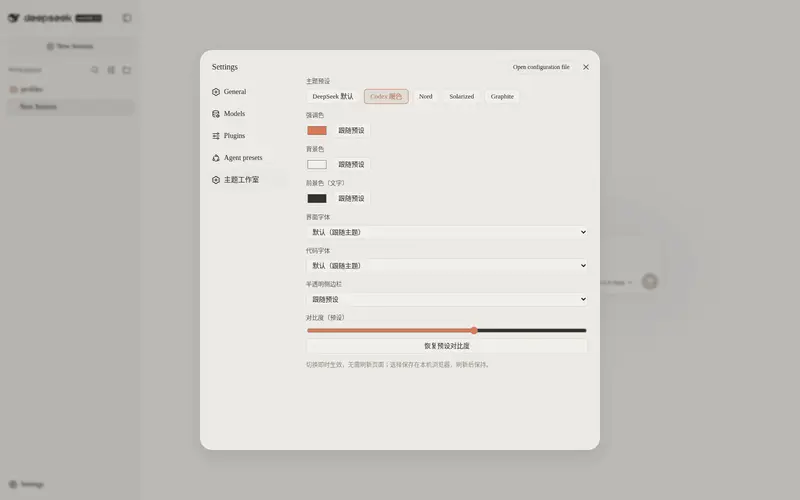
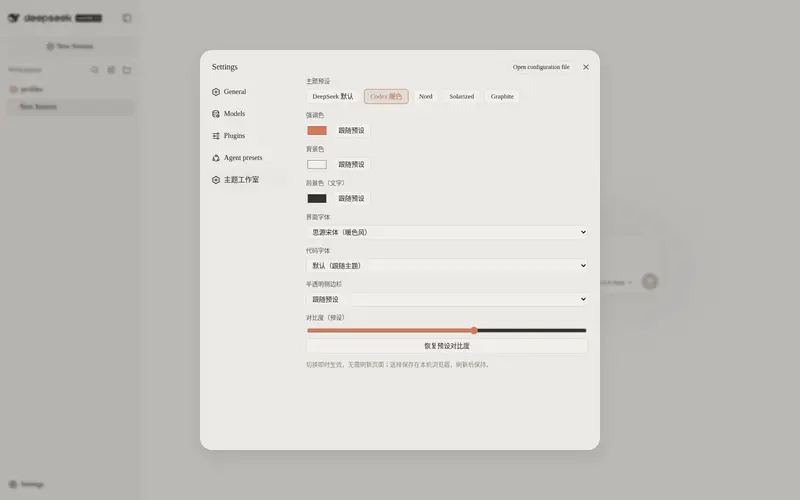
功能介绍
DSH Web GUI 主题工作室:5 套内置预设 + 完全可自定义的浅/深配色(强调色、背景、前景、UI 与代码字体、半透明侧栏、对比度),即时热切换并持久化到 localStorage。
适合
- 希望使用预设主题或细调明暗配色,且不修改厂商文件的 DSH Web 用户。
- 需要即时且持久地自定义颜色、字体、对比度和侧栏透明效果的用户。
不适合
- 非 Web 的 DSH 环境;该插件专门面向 Web GUI。
- 需要跨浏览器集中强制主题的组织;GUI 选择保存在各浏览器的 localStorage 中,并优先于宿主配置。
README
dsh-theme-plugin
Theme studio for the DeepSeek Harness (DSH) Web GUI: five built-in presets plus fully customizable light/dark palettes — accent, background, foreground, UI and code fonts, translucent sidebar and contrast — applied instantly, with no page refresh.
Features
- 🎨 5 built-in presets —
codex-warm,nord,solarized,graphite, plus the stock DeepSeek theme - 🖌️ Full customization — per-mode (
light.*/dark.*) accent, background, foreground, UI font, code font, translucent sidebar and contrast;custommode starts from scratch - ⚡ Instant hot-swap — a Settings GUI (“Theme Studio”) applies changes immediately through the official
ctx.theme.overrideTokensAPI; light/dark follow the system preference - 💾 Persistent — the selection is saved in browser
localStorageand survives reloads - 🧮 70+ derived tokens — three colors plus a contrast value expand into the whole semantic token set (borders, layers, scrollbar, tooltip, code blocks, bubbles, sidebar states…)
- 🪟 Translucent sidebar — real frosted sidebar via the
--dsw-specific-sidebar-fillvariable - 🔌 Official seams only — host-side injection through
webServer.tapIndex, no patched vendor files
Installation
Requires DeepSeek Harness with the web profile enabled. Install from the official registry:
dsh plugin --profile web add github:BeiZi6/dsh-theme-plugin
Restart dsh web for the plugin to take effect.
To remove:
dsh plugin --profile web remove dsh-theme-plugin
Usage
Settings GUI (recommended)
After a restart, open Settings → Theme Studio:
- Preset — one-click chips: DeepSeek default / Codex warm / Nord / Solarized / Graphite / Custom
- Colors — color pickers for accent, background and foreground, with a “follow preset” reset
- Fonts — dropdowns for the UI font and the code font (common stacks included)
- Translucent sidebar — follow preset / on / off
- Contrast — slider 0–100 with preset restore
Every change applies instantly and persists locally; GUI selections take priority over host config.
The
stockpreset derives no palette: color controls are disabled and only fonts can be overridden.
Config reference
| Field | Type | Description |
|---|---|---|
preset |
enum |
stock · codex-warm · nord · solarized · graphite · custom (default codex-warm) |
light.accent |
color | accent for light mode (primary buttons, links, …) |
light.background |
color | light-mode background |
light.foreground |
color | light-mode primary text |
light.uiFont |
CSS font-family
|
UI font stack |
light.codeFont |
CSS font-family
|
code font stack |
light.translucentSidebar |
enum |
preset · on · off
|
light.contrast |
number | 0–100; -1 = keep preset value |
dark.* |
— | same fields for dark mode |
Empty strings mean “keep the preset value”; unset fields are not overridden at all.
Example — merge into the web profile patch ($DSH_HOME/profiles/web/cordis.patch.yml):
- id: theme-plugin
  config:
    preset: codex-warm
    light:
      accent: '#FF6B35'
      background: '#FFFAF0'
      foreground: '#1A1A1A'
      uiFont: '"Inter", "PingFang SC", sans-serif'
      codeFont: '"JetBrains Mono", Consolas, monospace'
      translucentSidebar: off
      contrast: 70
    dark:
      accent: '#FFB07A'
      background: '#1A1A1A'
      foreground: '#F5F5F5'
      uiFont: '"Inter", "PingFang SC", sans-serif'
      codeFont: '"JetBrains Mono", Consolas, monospace'
      translucentSidebar: on
      contrast: 70
Only set the fields you want to change; leave the rest blank ('' / preset / -1).
Presets
| Preset | Style | Light bg / fg / accent | Dark bg / fg / accent |
|---|---|---|---|
stock |
DeepSeek default | — (no override) | — (no override) |
codex-warm |
Codex warm |
#F5F3EE / #1D1B16 / #DA7756
|
#2D2D2B / #F9F9F7 / #CC7D5E
|
nord |
Nord cool |
#ECEFF4 / #2E3440 / #5E81AC
|
#2E3440 / #ECEFF4 / #88C0D0
|
solarized |
Solarized |
#FDF6E3 / #657B83 / #B58900
|
#002B36 / #839496 / #268BD2
|
graphite |
Grayscale minimal |
#FAFAFA / #171717 / #525252
|
#171717 / #FAFAFA / #A3A3A3
|
custom starts from the codex-warm palette and takes every value from light.* / dark.*.
How it works
-
Host half (
index.js) — registers awebServer.tapIndexhook so every servedindex.htmlgets a<style>block injected before</head>, after the stylesheet links, letting the overrides win by cascade order. This is the same official seam the built-in UI theme uses. -
Specificity — selectors are written as
html body/html body[data-ds-dark-theme]to outrank the theme’s static CSS variables. - Token derivation — from background / foreground / accent plus a contrast factor, a small functional engine derives 70+ semantic tokens (border levels, layers, scrollbar, tooltip, markdown code blocks, bubbles, sidebar states…). Status colors (success / error / warn) keep their stock meaning.
-
Translucent sidebar —
--dsw-specific-sidebar-fillis emitted asrgba(mix(bg, fg, 3%), 0.65)when enabled; AppFrame / SidebarRoot / WorkspaceBrowser / TrajectoryTable consume that variable directly. -
Client half (
client.js) — a web-shell module that registers a “Theme Studio” section under Settings and writes every change viactx.theme.overrideTokens; the theme presenter emits the tokens inline on<body>, so the effect is instant and survives until the next selection. Selections persist inlocalStorage.
Compatibility
- DeepSeek Harness Web GUI (
dsh web) - Node.js >= 22.19
- Peer dependencies:
@deepseek-ai/cordis(^4),@deepseek-ai/dsh-host-webserver(^0.1.0-rc.6)
License
MIT © Xu Yuanshan
Links
- Repository: https://github.com/BeiZi6/dsh-theme-plugin
- Issues: https://github.com/BeiZi6/dsh-theme-plugin/issues
中文简介
为 DeepSeek Harness (DSH) Web GUI 打造的主题工作室插件:5 套内置预设(Codex 暖色 / Nord / Solarized / Graphite / 默认)+ 完全自定义;设置页内热切换、立即生效并持久化;通过官方 webServer.tapIndex 接缝向 index.html 注入主题 CSS,由背景/前景/强调三色与对比度函数式推导 70+ 语义令牌,并支持半透明侧边栏。
常见问题常见问题
在启用了 DSH 的终端中执行已验证命令 dsh plugin --profile default add github:BeiZi6/dsh-theme-plugin。命令会解析公开 package 元数据,并保持插件与本页展示的目录身份一致。
兼容性以页面上展示的 bundle 与 profile 状态为准。如果某个 profile 尚未检测到,请先保持禁用,并在生产启用前阅读仓库文档。
GitHub 链接和 activity 元数据是 release 与维护状态的来源。新版本发布后重新查看本页,确认目录已经观察到最新版本。