causebefore/dsh-pomodoro
DeepSeek Harness Web 番茄钟插件:可配置专注与休息时长,提供侧栏入口和可拖动浮动面板
已收录
3
Ui
Bundle 已验证
预览


功能介绍
DSH Web 番茄钟:提供可配置专注/休息循环、可拖动迷你面板,以及站内提醒、提示音和浏览器通知。
适合
- 希望在现有 DSH Web 工作界面内使用专注与休息循环的用户。
- 需要可配置时长、自动切换、暂停/重置/跳过控制,以及浏览器重开后恢复计时的用户。
- 适合使用可拖动迷你计时器,并需要站内、声音及可选系统通知的人群。
不适合
- 不提供所需 UI 的 DSH headless profile。
- 低于 DSH 0.1.0-rc.7、不满足 Node.js ^22.19.0 或 >=24.0.0,或缺少 pnpm 的环境。
- 不采用番茄工作法,或更偏好与 DSH 独立的外部计时器的用户。
README
🍅 dsh-pomodoro
A Pomodoro plugin that adds focus and break cycles to the DeepSeek Harness Web UI.
English · 简体中文






Interface Preview · Highlights · Quick Start · Usage · Settings and Notifications · Troubleshooting
Compatibility: Requires DeepSeek Harness
>=0.1.0-rc.7. Harness is still in developer preview, so recheck plugin compatibility after upgrading DSH.
Interface Preview
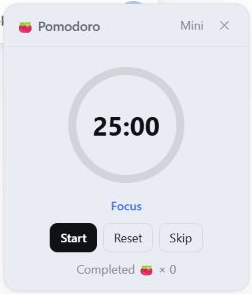
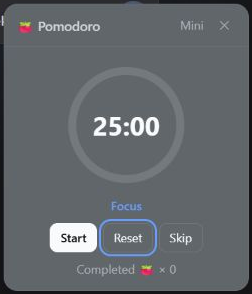
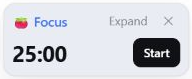
Supports light and dark themes, a compact mini mode, and configuration through DSH plugin settings.
| Light theme | Dark theme |
|---|---|
 |
 |
Mini mode
Settings
Highlights
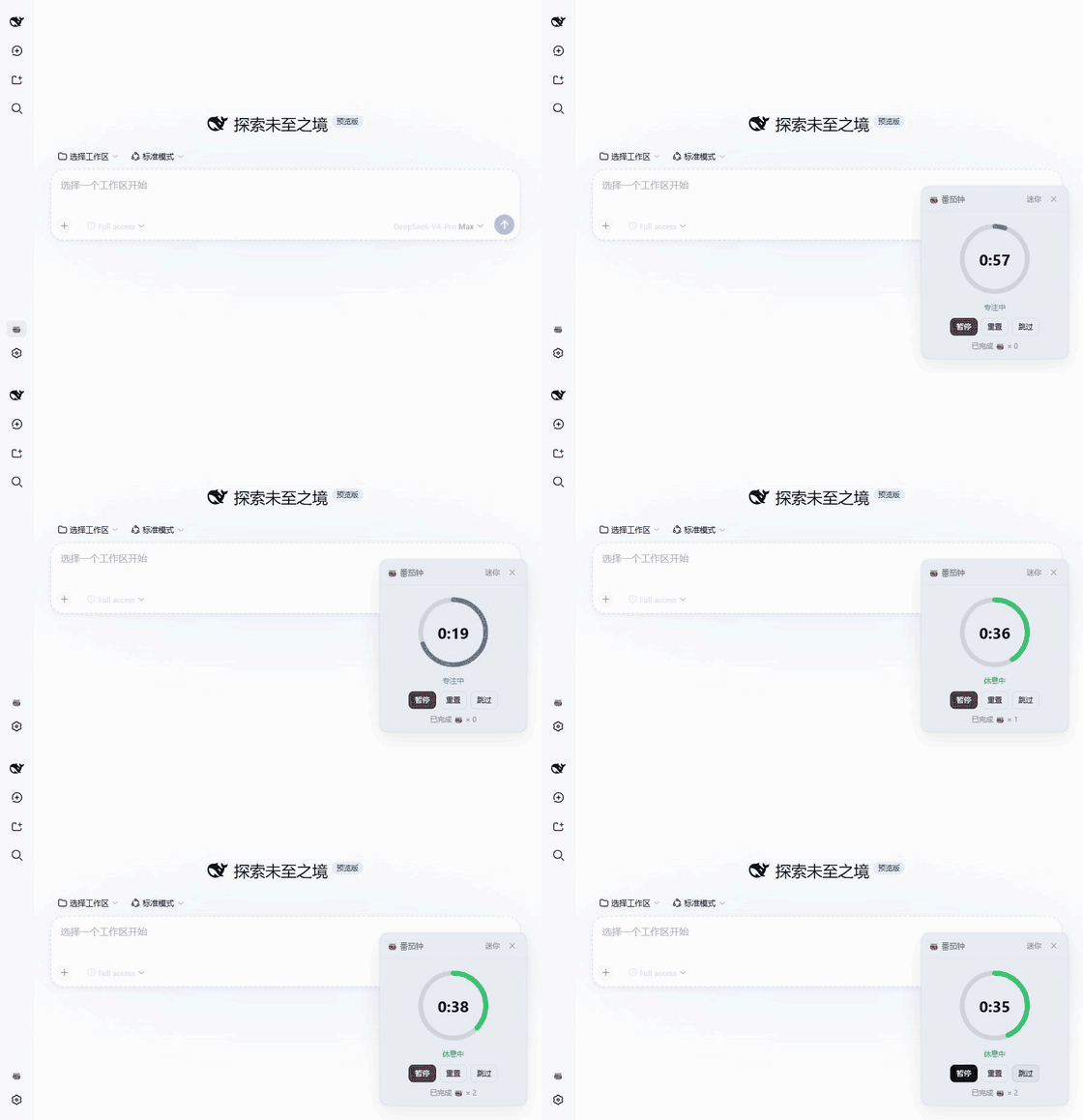
- Native DSH integration: Open Pomodoro from the sidebar and manage its options from the DSH plugin settings page.
- Complete timer controls: Start, pause, reset, or skip a phase, with a circular progress indicator, phase status, and completed-focus count.
- Cross-session recovery: Reloading DSH—or reopening it after closing a tab or restarting the browser—resumes from the original deadline. If the active phase expired while DSH was closed, it is settled once.
- Low-distraction mini mode: Collapse the panel to the phase, countdown, and primary control while retaining drag, expand, and close actions.
- Configurable cycles: Set focus and break durations independently, and choose whether breaks or the next focus session start automatically.
- Completion feedback: Always receive an in-app DSH reminder when a phase ends, with optional sound and background system notifications.
- DSH language support: Follows the DSH global locale for Chinese and English. Switching languages updates the mounted plugin UI without resetting the timer or unsaved settings draft.
- Interface-aware: Adapts to DSH light and dark themes, keyboard operation, and the reduced-motion preference.
Requirements
| Component | Requirement |
|---|---|
| DeepSeek Harness | >=0.1.0-rc.7 |
| Node.js |
^22.19.0 or >=24.0.0
|
| DSH profile |
web; headless profiles do not provide the UI |
| pnpm | Available from the command line |
Quick Start
Install the plugin into the web profile:
dsh plugin --profile web add dsh-pomodoro
Then start or restart DSH Web:
dsh web
The plugin is loaded when the 🍅 button appears at the bottom of the sidebar.
Install from the DSH UI
Prefer staying in the Web UI? Two community companions can install this plugin for you:
-
dsh-market — install it once with
dsh plugin --profile web add dshmarketand restartdsh web, then open Settings → Plugin Market, search fordsh-pomodoro, and install it with one click. The plugin goes live after a page refresh. -
dsh-find-plugin — install it once with
dsh plugin --profile web add dsh-find-pluginand restartdsh web, then just tell the agent: “install the dsh-pomodoro plugin for DSH”. It finds the plugin and runs the install for you; refresh the browser when it finishes.
Usage
Click the sidebar 🍅 button to open or close the panel. Drag the title bar to reposition it. Use Mini in the title bar to hide secondary information, and Expand to restore the full panel.
| Control | Behavior |
|---|---|
| Start / Pause | Start or pause the current phase |
| Reset | Restore the current phase to its full duration and pause it |
| Skip | Move to the next phase and keep it paused |
| Mini / Expand | Switch between the low-obstruction layout and full controls |
Settings and Notifications
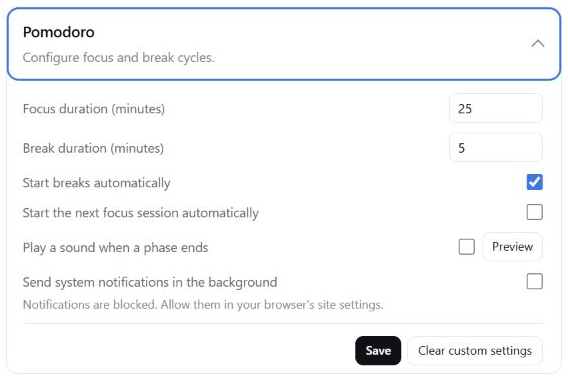
Open Settings → Plugins → Plugin configuration → Pomodoro in DSH to configure:
| Setting | Default | Behavior |
|---|---|---|
| Focus duration | 25 minutes | Full duration of each focus phase; accepts an integer from 1 to 240 minutes |
| Break duration | 5 minutes | Full duration of each break phase; accepts an integer from 1 to 240 minutes |
| Start breaks automatically | On | Start the break when a focus phase ends naturally |
| Start the next focus session automatically | Off | Start the next focus session when a break ends naturally |
| Play a sound when a phase ends | Off | Play the completion sound three times; a preview is available |
| Send system notifications in the background | Off | Send a browser notification while the DSH page is in the background |
If the current phase has not started, a new duration takes effect immediately. Once timing has started, the new duration applies from the next phase.
Completion feedback
- In-app DSH reminder: Always enabled. It appears when a focus or break phase ends naturally, even if the Pomodoro panel is closed, and indicates whether the next phase started automatically.
- Sound: Off by default. After enabling and saving it, each naturally completed phase plays the sound three times. Preview works without saving first.
- System notification: Off by default. When enabling it for the first time, allow notifications in the browser prompt and then select Save. Notifications are sent only while the DSH page is in the background or does not have focus.
When every DSH page is closed, the browser cannot play the sound or send a notification at the exact deadline. The next DSH launch restores the timer and settles and reports the expired active phase once.
System notifications require DSH to be served from localhost, 127.0.0.1, or HTTPS, and the DSH page must remain open. The in-app reminder continues to work if sound or system notifications are unavailable.
Updating and Removing
# Update the plugin
dsh plugin --profile web update dsh-pomodoro

# Remove the plugin
dsh plugin --profile web remove dsh-pomodoro
Restart dsh web after either command.
Troubleshooting
| Symptom | Fix |
|---|---|
'pnpm' is not recognized during install or update |
dsh plugin forwards to pnpm on PATH: run npm install -g pnpm and retry |
dsh web fails to start because port 3080 is in use |
A previous instance is still running: find the PID with netstat -ano \| findstr :3080, end it with taskkill /PID <pid> /F, then restart |
| No 🍅 button in the sidebar | Confirm you are on the web profile and ran dsh plugin --profile web add dsh-pomodoro, then restart dsh web
|
| System notifications never arrive | Check browser notification permission and keep the DSH page open; see Completion feedback |
Links
License
MIT. See THIRD_PARTY_NOTICES.md for the licenses covering React/ReactDOM and third-party assets such as the CC0 completion sound.
Development and Maintenance
常见问题常见问题
在启用了 DSH 的终端中执行已验证命令 dsh plugin --profile default add github:causebefore/dsh-pomodoro。命令会解析公开 package 元数据,并保持插件与本页展示的目录身份一致。
兼容性以页面上展示的 bundle 与 profile 状态为准。如果某个 profile 尚未检测到,请先保持禁用,并在生产启用前阅读仓库文档。
GitHub 链接和 activity 元数据是 release 与维护状态的来源。新版本发布后重新查看本页,确认目录已经观察到最新版本。