Cheng-cheng9669/dsh-deepseek-vision
DeepSeek web vision bridge plugin for DeepSeek Harness (DSH)
已收录
1
Vision
Bundle 已验证
预览
功能介绍
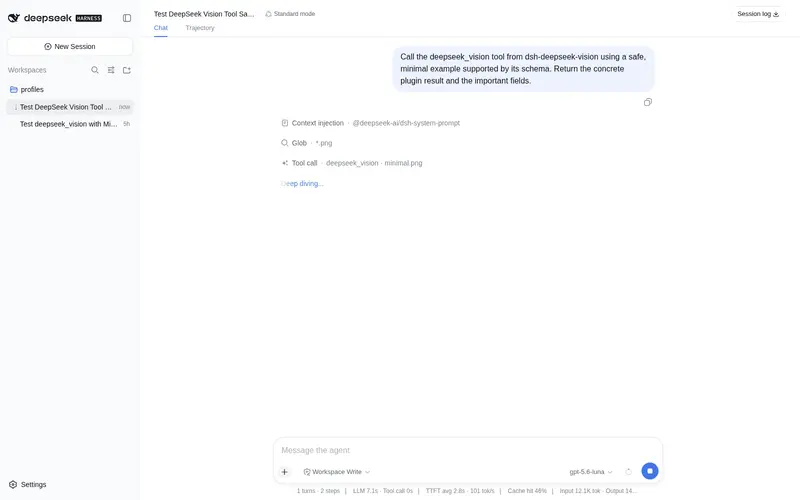
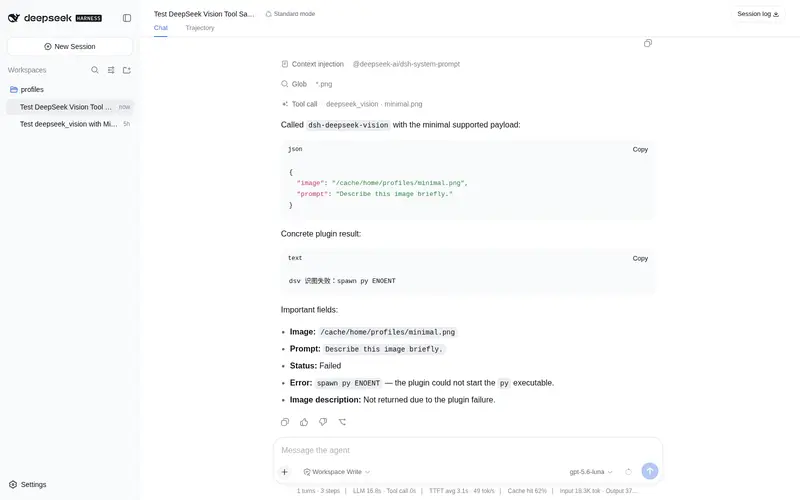
复用 DeepSeek 网页端识图模式给纯文本模型补上看图能力:deepseek_vision 工具调用本地 deepseek-vision-cli 浏览器自动化(手动登录助手、自动开启深度思考、用后自动关窗),把图片描述以文字返回给模型。
适合
- 需要识别或分析本地 PNG、JPG、WebP 或 GIF 图片的纯文本 DeepSeek 模型用户。
- 可使用本地浏览器自动化 CLI 和已登录 DeepSeek 网页会话的 DSH Web 工作流。
- 只需将网页识图结果以文本返回的低频图片分析任务。
不适合
- 必须始终留在本地的敏感或私密图片;图片会上传到 DeepSeek 网页端点。
- HEIC 输入;该格式明确不受支持。
- 要求稳定、高频或无人值守的生产工作流;该集成依赖非官方网页接口、浏览器自动化和已保存的登录会话。
README
dsh-deepseek-vision
A DSH plugin that gives text-only DeepSeek models image recognition.
It registers the deepseek_vision tool, which calls the local
deepseek-vision-cli
(browser automation driving chat.deepseek.com’s vision mode) and returns the
image description as text to the model.
Tool
-
deepseek_vision(image, prompt?)-
image: absolute path to a local image (PNG/JPG/WebP/GIF; HEIC is not supported) -
prompt: optional question or analysis request for the image
-
Installation
dsh plugin --profile web add D:/Dsh/tools/dsh-deepseek-vision
Or use the release tarball:
dsh plugin --profile web add dsh-deepseek-vision-0.0.1.tgz
First login
DeepSeek web vision requires a web login session. The current web UI uses password / third-party login, so the recommended way is the manual login helper:
py -3.13 D:\Dsh\tools\deepseek-vision-cli\dsv_manual_login.py
It opens an Edge window to the DeepSeek login page. After you log in manually,
the helper saves the token to D:\Dsh\.cache\dsv_token.
Token login (alternative)
If you already have a DeepSeek web session in your normal browser, you can copy the token directly:
- Open
https://chat.deepseek.comand log in. - Press
F12→Application→Local Storage→https://chat.deepseek.com. - Find
userToken, copy itsvaluefield. - Save it to
D:\Dsh\.cache\dsv_token(no quotes, no newline):
[IO.File]::WriteAllText(
  'D:\Dsh\.cache\dsv_token',
  'PASTE_TOKEN_HERE',
  (New-Object Text.UTF8Encoding($false))
)
The token is only stored locally in D:\Dsh\.cache\dsv_token; it is never
committed to this repository.
Configuration
Default configuration for this machine:
-
pythonCommand:py -
pythonVersion:-3.13 -
dsvScript:D:/Dsh/tools/deepseek-vision-cli/dsv.py -
timeoutMs:180000 -
maxOutputChars:20000
These can be overridden in a profile patch.
Security notes
- The tool only accepts local file paths and invokes the external CLI through
the DSH
subprocessservice with an argv array, never through a shell. - Images are sent to DeepSeek’s web endpoint; this is not local recognition.
- This relies on non-official web interfaces and may be subject to risk control. Use a secondary account and keep usage low-frequency.
- Static security audit reports
criticalfor spawning a subprocess; this is inherent to wrapping an external CLI. The code has been manually reviewed: it only runs the fixeddsv.py, with no command concatenation or extra exfiltration.
License
MIT
常见问题常见问题
在启用了 DSH 的终端中执行已验证命令 dsh plugin --profile default add github:Cheng-cheng9669/dsh-deepseek-vision。命令会解析公开 package 元数据,并保持插件与本页展示的目录身份一致。
兼容性以页面上展示的 bundle 与 profile 状态为准。如果某个 profile 尚未检测到,请先保持禁用,并在生产启用前阅读仓库文档。
GitHub 链接和 activity 元数据是 release 与维护状态的来源。新版本发布后重新查看本页,确认目录已经观察到最新版本。