DamonKoy/dsh-plugin-toggle
DSH plugin switchboard: Settings tab with descriptions, fuzzy search, and runtime start/stop
已收录
4
Dev
Bundle 已验证
预览
功能介绍
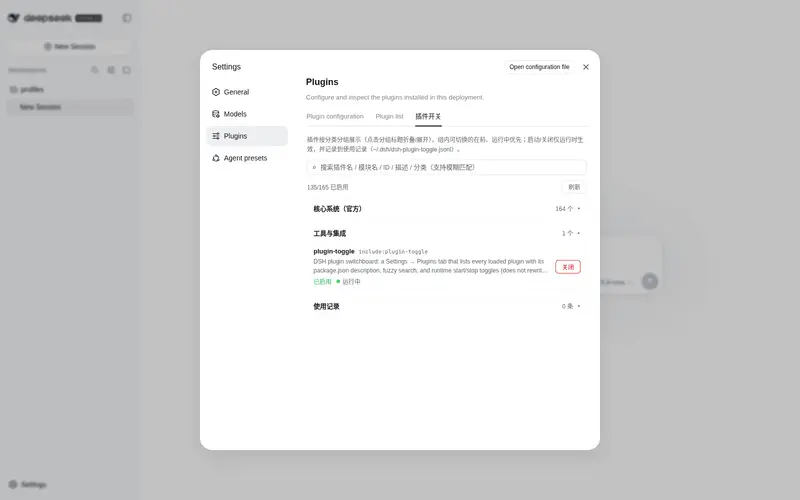
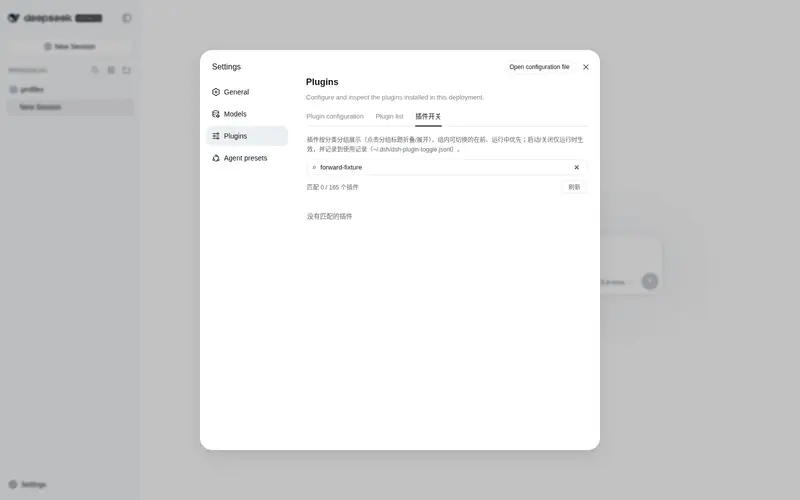
设置→插件开关面板:每个已加载插件的卡片显示简述与运行阶段,支持模糊搜索与运行时启动/关闭(不改写配置文件)。
适合
- 管理大量已加载插件,并希望在同一设置页搜索和查看说明、状态及运行阶段的 DSH 用户。
- 希望临时启动或停止非核心插件、同时不改写配置文件的操作者。
- 需要在本地查看近期插件开关操作记录的用户。
不适合
- 需要把启停变更永久写入 `cordis.yml` 的用户;该面板仅进行运行时切换。
- 需要从界面停止受保护核心插件或表层插件的工作流。
- 插件数量很少且稳定、不需要运行时切换或搜索的用户。
README
dsh-plugin-toggle
| English | 中文 |
A DeepSeek Harness (DSH) plugin switchboard for the web GUI.
Open Settings → Plugins → Plugin Switch. Every loaded plugin is a card with:
- a short description (from that package’s
package.jsondescription) - enabled / disabled + fiber phase (running / pending / failed / …)
-
Start / Stop (runtime only — does not rewrite
cordis.yml) - fuzzy search (name / module / id / description; subsequence match)
Core / surface plugins (webserver, connection, session, agent, …) are marked Core and cannot be stopped from this UI, so the page cannot take itself down.
Install
dsh plugin --profile web add github:DamonKoy/dsh-plugin-toggle
Restart dsh web, then open Settings → Plugins → Plugin Switch.
Or add the repo as a profile dependency and include the bundle:
{
  "dependencies": {
    "dsh-plugin-toggle": "github:DamonKoy/dsh-plugin-toggle"
  },
  "dsh": {
    "profile": {
      "bundles": ["dsh-plugin-toggle"]
    }
  }
}
Then pnpm install in the profile directory and restart dsh web.
What you get
| Feature | Notes |
|---|---|
| Plugin cards | Title, entry id, description, enabled tag, phase |
| Categories | Grouped sections (core / UI / theme / tools / fun / other), collapsible |
| Sorting | Within a group: togglable plugins first, then by status (running first), then name |
| Fuzzy search | Tokens match as substring or subsequence across fields incl. category |
| Start / Stop |
entry.update({ disabled }) — runtime only, no tree.write()
|
| Core guard | Surface/runtime entries cannot be stopped (id- and module-name-based); others need a two-step confirm |
| Usage history | Every toggle is persisted to ~/.dsh/dsh-plugin-toggle.jsonl (last 1000), shown in a collapsible “使用记录” section |
| Persistence | Installed as a composition plugin — survives dsh web restarts |
HTTP API (same origin)
| Method | Path | Role |
|---|---|---|
GET |
/plugin-toggle/list |
{ entries: [...] } |
GET |
/plugin-toggle/logs |
{ records: [...] } (recent usage history, newest first) |
POST |
/plugin-toggle/set |
{ entryId, enabled } → { ok, entry? \| message? }
|
POST is same-origin only.
Layout
dsh-plugin-toggle/
  lib/index.js          Host: list + set routes over the Cordis Loader
  client/client.js      Client: Settings tab (ModuleLoader factory)
  cordis.patch.yml      Bundle insert (`id: plugin-toggle`)
The client exports.inject is the service name slots (not a package name). Using package names here parks the client fiber forever.
License
MIT
常见问题常见问题
在启用了 DSH 的终端中执行已验证命令 dsh plugin --profile default add github:DamonKoy/dsh-plugin-toggle。命令会解析公开 package 元数据,并保持插件与本页展示的目录身份一致。
兼容性以页面上展示的 bundle 与 profile 状态为准。如果某个 profile 尚未检测到,请先保持禁用,并在生产启用前阅读仓库文档。
GitHub 链接和 activity 元数据是 release 与维护状态的来源。新版本发布后重新查看本页,确认目录已经观察到最新版本。