DamonKoy/dsh-projection-guard
DSH plugin: guards the persisted session-projection cache with per-row JSON degradation + startup title self-heal. · 会话投影缓存守卫:逐行 JSON 降级 + 启动自愈补全标题
已收录
0
Session
Bundle 已验证
预览
功能介绍
会话投影缓存守卫:逐行 JSON 降级,单个违规投影单元(如第三方插件存储 Map)不再拖垮会话标题与整个缓存;启动自愈自动补全缺失标题。
适合
- 因第三方投影写入非 JSON 数据,导致正常会话投影无法持久化的 DSH 部署。
- 重启后遇到对话标题消失或退化为工作区文件夹名称的用户。
- 需要启动时修复缺失缓存标题,并查看丢弃或修复行只读指标的操作者。
不适合
- 未出现投影缓存序列化失败或持久化标题缺失问题的部署。
- 需要通用会话备份、恢复或数据迁移工具的用户。
- 根因与会话投影中的非无损 JSON 值无关的情况。
README
dsh-projection-guard
A DeepSeek Harness (DSH) plugin that guards the persisted session-projection cache against misbehaving projection units — so session titles (and every other projection) survive restarts no matter what third-party plugins do.
The bug it fixes
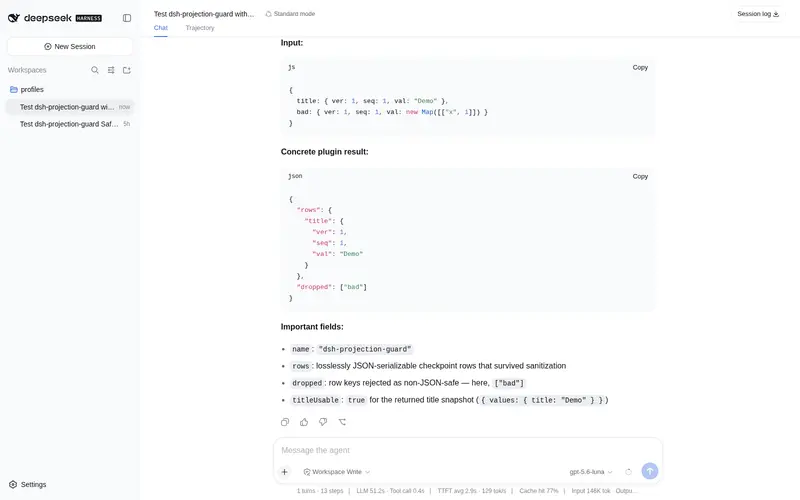
DSH persists per-session projection checkpoints (session titles, stats, permissions, …) into session_projcache.json. The write path serializes the whole per-session checkpoint in one JSON pass: if a single projection unit stores a non-JSON value (a Map, Set, class instance, cyclic or non-finite value — e.g. some third-party plugins), the entire write fails. The failure is fail-soft (log-only), so the cache silently stops updating. After a restart, every cold session loses its title projection and the UI falls back to showing the workspace folder name instead of the conversation title.
What this plugin does
-
Per-row degradation (runtime wrapper). It wraps
sessionProjectionCache.put()and drops only the rows that are not lossless JSON, keeping every healthy row durable. One bad unit can no longer stall the whole cache — titles,sessionListMetadata, stats etc. keep writing normally. -
Startup self-heal. On startup it scans persisted sessions whose cached title is missing and cold-reads their logs to backfill the
titleprojection, so an already-stale cache recovers automatically. -
Observability. A read-only
GET /projection-guard/statusroute reports wrapped-put call counts, dropped rows, and repaired titles (also shown as a small card in Settings when the client half is mounted).
No official or third-party files are modified — the guard is a pure runtime wrapper, so it survives dsh upgrades and works on any deployment.
Install
dsh plugin --profile web add github:DamonKoy/dsh-projection-guard
Restart dsh web. That’s it.
Or add the repo as a profile dependency and include the bundle:
{
  "dependencies": {
    "dsh-projection-guard": "github:DamonKoy/dsh-projection-guard"
  },
  "dsh": {
    "profile": {
      "bundles": ["dsh-projection-guard"]
    }
  }
}
Then pnpm install in the profile directory and restart dsh web.
Configuration
| Key | Default | Meaning |
|---|---|---|
repairOnStart |
true |
Backfill missing cached titles from persisted logs at startup. |
logDropped |
true |
Warn per dropped non-JSON row (key + session id). |
Example (profile cordis.patch.yml overlay):
- id: projection-guard
  config:
    repairOnStart: true
    logDropped: true
Development
npm test # unit tests for the guard core
License
MIT
常见问题常见问题
在启用了 DSH 的终端中执行已验证命令 dsh plugin --profile default add github:DamonKoy/dsh-projection-guard。命令会解析公开 package 元数据,并保持插件与本页展示的目录身份一致。
兼容性以页面上展示的 bundle 与 profile 状态为准。如果某个 profile 尚未检测到,请先保持禁用,并在生产启用前阅读仓库文档。
GitHub 链接和 activity 元数据是 release 与维护状态的来源。新版本发布后重新查看本页,确认目录已经观察到最新版本。