Dariandai/dsh-starter-pack
精选插件启动包:从设置页或 /setup 命令一键批量安装并配置 4 组共 15 个经过筛选的社区插件。
已收录
2
Market
Bundle 已验证
预览
功能介绍
精选插件启动包:从设置页或 /setup 命令一键批量安装并配置 4 组共 15 个经过筛选的社区插件。
适合
- 不想逐一评估数百个社区插件、希望获得精选起步组合的 DSH 新用户。
- 希望通过设置页或 `/setup` 命令按能力组安装插件的用户。
- 愿意为 15 个精选插件采用该启动包推荐的合并式配置的团队。
不适合
- 需要在安装前逐包审查依赖并手动配置的用户。
- 不允许启动包调用 `dsh plugin` 或修改 profile 配置的受限环境。
- 在托管插件构建被阻止时,不愿接受启动包自动修改 `allowBuilds`(包括通配符兜底)的环境。
README
dsh-starter-pack
One-click curated plugin starter pack for DeepSeek Harness (dsh). Install this one plugin, and it installs and configures a batch of the most useful community plugins for you.
中文说明见 README.zh.md。
Why
New DSH users face 400+ community plugins and no idea which to install. dsh-starter-pack is the “essentials bundle”: a vetted, grouped list of the plugins worth having, installed in one click.
Install
Published to npm — installs from the prebuilt npm package, so no pnpm build approval is needed:
dsh plugin --profile web add dsh-starter-pack
Install from GitHub source (optional):
dsh plugin --profile web add github:Dariandai/dsh-starter-pack
Restart dsh web, then open Settings → Starter Pack, or run /setup.
Usage
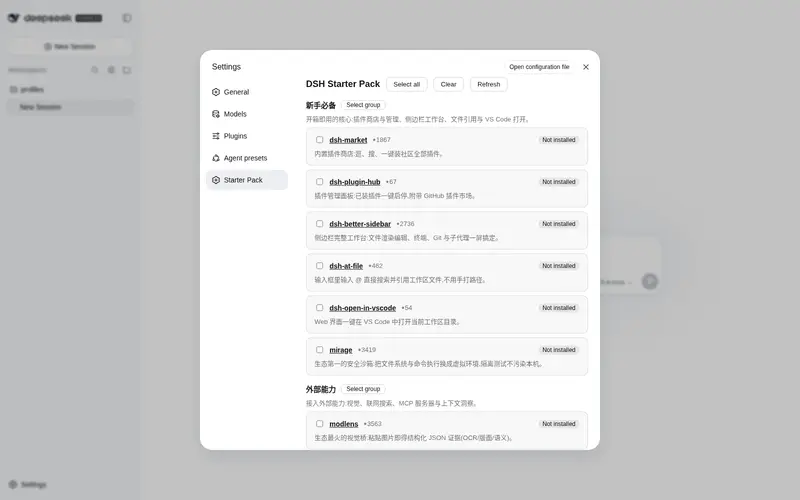
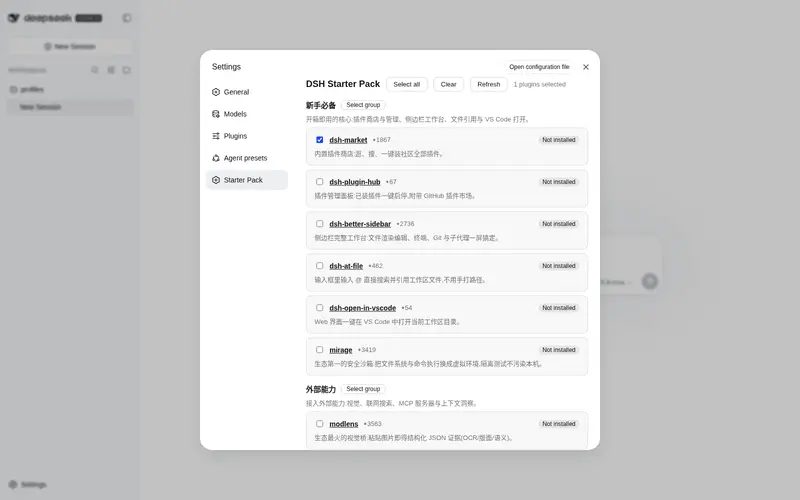
Settings → Starter Pack — pick groups and hit Install selected:

Slash command — no UI needed:
/setup                    # list groups and per-plugin status
/setup essentials         # install one group
/setup external efficiency  # install several groups
/setup all                # install everything
Installed plugins appear with an “Installed” badge and are skipped on re-runs. New plugins take effect after a restart of dsh web.
The curated groups
-
新手必备 (Essentials) — plugin store & manager, sidebar workbench,
@filementions, VS Code open, and a security sandbox (mirage). - 外部能力 (External Capabilities) — vision (modlens), web search (modsearch), an MCP bundle, and a context-insight panel.
- 记忆与技能 (Memory & Skills) — persistent cross-session memory (dsh-mnemon) and a skill manager.
- 效率与外观 (Productivity & Look) — a multi-provider spend wallet, turn notifications, and a skin switcher.
Each entry lists why it’s recommended, with a link to its repo. The list is curated by necessity, practicality and authority — plugins that fail to install reliably (e.g. dsh-toolkit, whose dependency @deepseek-ai/dsh-type-meta is missing from npm, harness discussion #984) are deliberately excluded.
How it works
- The pack ships a curated registry (
src/registry.ts). On install it callsdsh plugin --profile <profile> add <target>for each selected plugin — npm packages when prebuilt,github:owner/repootherwise — skipping anything already present. -
Build scripts: git-hosted plugins often ship a
preparestep that pnpm blocks by default. The pack treats itself as the trust decision: on the first blocked build it setsallowBuilds(including a'*': truecatch-all) in the profile’spnpm-workspace.yamland retries. You can edit that file later to restore pnpm’s defaults. -
Recommended config: plugins that expose a verified host-side config key get a patch written into the profile’s
cordis.patch.yml(merge-only, idempotent). Most curated plugins run on their defaults, which is the recommendation. - Installs run through
child_processre-invoking the runningdshbinary, mirroring howdsh-marketinstalls plugins.
Development
pnpm install
pnpm run check      # typecheck (host + client) + build
npm pack            # produce the publishable tarball
The client bundle is built with tsdown and wraps into the harness __ModuleLoader__ contract (scripts/normalize-client-banner.mjs, guarded by scripts/preflight.mjs).
License
MIT
常见问题常见问题
在启用了 DSH 的终端中执行已验证命令 dsh plugin --profile default add github:Dariandai/dsh-starter-pack。命令会解析公开 package 元数据,并保持插件与本页展示的目录身份一致。
兼容性以页面上展示的 bundle 与 profile 状态为准。如果某个 profile 尚未检测到,请先保持禁用,并在生产启用前阅读仓库文档。
GitHub 链接和 activity 元数据是 release 与维护状态的来源。新版本发布后重新查看本页,确认目录已经观察到最新版本。