hkkz9522/dsh-session-manager
Session manager for DeepSeek Harness: delete conversations with confirmation and manage archives.
已收录
1
Session
Bundle 已验证
预览
功能介绍
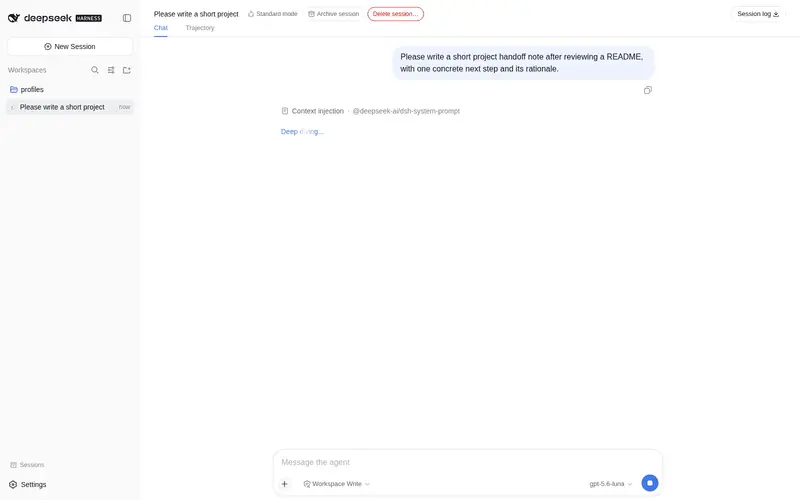
在 DeepSeek Harness Web 中删除对话(二次确认),并管理归档会话(移入/移出归档)。
适合
- 需要在 DSH Web 中经确认后从界面和磁盘删除对话的用户。
- 经常归档会话,并需要专门面板查找、打开、取消归档或删除会话的用户。
- 需要让归档与删除状态在多个已打开浏览器标签页之间同步的团队。
不适合
- 需要可恢复删除的用户;会话文件的物理删除不可逆。
- 无法接受删除和取消归档依赖 DSH 宿主内部实现的环境;未来重构后可能需要适配。
- 文件已被外部删除的归档会话;取消归档可能只恢复列表记录,无法恢复可显示的会话数据。
README
dsh-session-manager — conversation manager (delete + archive)
| 中文 | English |


Adds two capabilities that are missing from DeepSeek Harness Web:
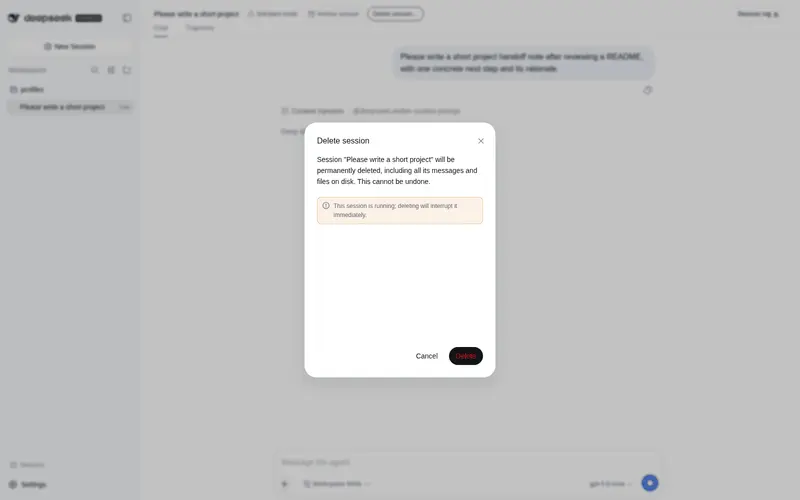
- Delete conversations (with an explicit confirmation dialog): physically deletes a session — stops and disposes its agent, detaches the session store entry (every tab drops the row), removes the JSONL directory from disk, and cleans up workspace accounting and the archive set.
-
Archive management: archive (
workspace.archiveSession, built in) and unarchive (missing in rc.6 — this plugin implements it on the host side through the workspace registry’s own persistence queue, withhost/archived-sessions-changedframes keeping every client in sync).
Features
- 🗑 Delete sessions: a “Delete session…” button in the conversation header plus a per-row delete in the manager panel — every path requires confirmation.
- 📦 Archive / unarchive: header button + per-row actions in the panel.
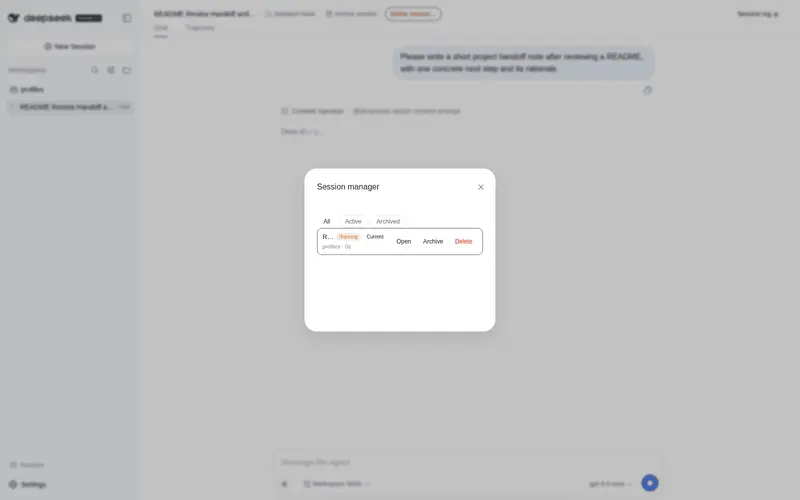
- 📋 Session manager panel (sidebar footer entry): filter by All / Active / Archived (archived sessions are invisible in the sidebar — the panel is where you find them again), with per-row Open / Archive / Unarchive / Delete.
- 🏷 Status badges: archived / running / current; relative time and workspace directory.
- ⚠️ The delete dialog shows the session title and an “irreversible” warning; for a running session it warns that deletion will interrupt it immediately.
Where the UI lives
| Location | Content |
|---|---|
| Conversation header (next to the session title) | “Archive / Unarchive” and “Delete session…” (red, confirmation dialog) buttons |
| Sidebar footer | “会话管理” button that opens the full manager panel |
Install
From npm (recommended)
dsh plugin --profile web add dsh-session-manager
Restart the web app to activate (profile bundle auto-assembles; lib/ is the runtime
artifact, no build step).
From GitHub (alternative)
dsh plugin --profile web add github:hkkz9522/dsh-session-manager
Local development / runtime injection
After cloning, inject in a web session that has dsh-super-injector resident (activates immediately, no restart):
dev_inject_plugin {"dir": "<absolute path to the repo>"}
Uninstall
- Installed via
dsh plugin add: remove the entry fromdsh.profile.bundlesanddependenciesin~/.dsh/profiles/web/package.json, then restart. - Installed via runtime injection:
dev_uninject_plugin {"name": "dsh-session-manager"}
Compatibility (DSH upgrades)
-
Client UI uses only the official plugin surface (slot contracts
conversation.session.header.actions/sidebar.footer.action, the standard toolkituseSessions/useWorkspaces/t, locale, client bundle format) — upgrades are very likely seamless. -
Host side imports no
@deepseek-aipackage (only Node built-ins), so it never fails at load time after an upgrade. Delete/unarchive rely on a few internals that rc.6 does not expose publicly (accessed defensively); if a future version refactors them, you get a runtime error rather than a crash — adapt per the error message. -
peerDependenciesdeclares only thecordisrange; no hard-coded DSH version. - After an upgrade, self-check once: create a blank session and delete it (end-to-end,
30 s), or run
node scripts/smoke-test.mjs(read-only smoke checks of the two host endpoints; touches no real session).
Development & maintenance
-
No build step:
lib/is the runtime artifact (host is ESM; client is a hand-written loader-factory bundle). -
Smoke test:
node scripts/smoke-test.mjs [baseUrl](needs a running dsh web). -
CI (
.github/workflows/ci.yml):node --checkon both files +npm pack --dry-runcontent assertion. - Changes are tracked in CHANGELOG.md.
Implementation notes
-
Host (
lib/index.js): a cordis plugin injectingwebServer / workspaceRegistry / sessions / agents / sessionPersistence, exposing two HTTP endpoints:POST /session-manager/api/delete { sessionId }POST /session-manager/api/unarchive { sessionId }
-
Client (
lib/client.js): a loader-factory bundle registering two slots:-
conversation.session.header.actions(per-session actions + delete confirmation) -
sidebar.footer.action(manager panel entry)
-
Delete of a live session: agent.cancel (interrupt) → agent.scope.dispose (quietly
dispose the agent fiber, 3 s cap) → drop the zombie entry from the agents registry →
sessions.flush → detach the session store entry (session/disposed → all clients
remove the row) → workspace accounting cleanup → archive-set cleanup → remove the on-disk
directory.
Risks & limitations
- Deletion is irreversible (physical file removal); the UI always asks for confirmation.
- Deleting a live session touches host internals (session store / agent registry instance fields); a future DSH refactor may require adapting the plugin (all access is defensive).
- An archived session whose files were removed externally will just reappear in the list on unarchive (the row may not display).
License
Free to use, modify, copy, and distribute (including commercially) as long as the copyright notice and this license text are retained. The project is provided “as is”, without warranty of any kind, express or implied. See LICENSE for the full terms.
常见问题常见问题
在启用了 DSH 的终端中执行已验证命令 dsh plugin --profile default add github:hkkz9522/dsh-session-manager。命令会解析公开 package 元数据,并保持插件与本页展示的目录身份一致。
兼容性以页面上展示的 bundle 与 profile 状态为准。如果某个 profile 尚未检测到,请先保持禁用,并在生产启用前阅读仓库文档。
GitHub 链接和 activity 元数据是 release 与维护状态的来源。新版本发布后重新查看本页,确认目录已经观察到最新版本。