johnnycls/dsh-no-setup-mode
DeepSeek Harness 免設置模式 — 安裝後開箱即用,幫你做出最好的設置(No-Setup Mode for DeepSeek Harness: out-of-the-box, best setup automatically)
已收录
0
Ui
Bundle 已验证
预览
功能介绍
DSH 网页免设置模式:隐藏复杂界面、自动套用最佳设置(聊天模式、Full Access、账户余额),并提供一键人设角色扮演(女僕/管家)。
适合
- 希望自动套用默认设置并使用简化、聊天优先界面的 DSH 用户。
- 希望一键启用女仆或管家人设,并让选择跨会话保留的用户。
不适合
- 经常需要轨迹视图、Session Log、子智能体目录、设置页面或手动选择模型的用户。
- 不能接受智能体在无确认提示下获得整机完整访问权限的环境。
README
DeepSeek Harness No-Setup Mode (dsh-no-setup-mode)
Welcome home, Master~ One command, and your no-setup maid handles everything from there.
中文版(Chinese version):README.zh.md
A “No-Setup Mode” plugin for DeepSeek Harness: installed once, it hides the advanced UI, keeps only the chat essentials, and quietly applies the best defaults (model, agent preset, input behavior). You just open DSH and start talking — the plugin does the tidying.
What is this
No-Setup Mode turns DSH into a “just open and chat” tool — a personal maid in plugin form:
- Auto-enters no-setup mode right after install — nothing to configure, ever
- Auto-applies the best defaults: Chat Mode (no-setup + web + DeepSeek-V4-Flash), Enter-to-interrupt while busy, and the agent preset
- Tucks away the Logo, conversation/trajectory tabs, Session Log, extra composer buttons, and every settings page
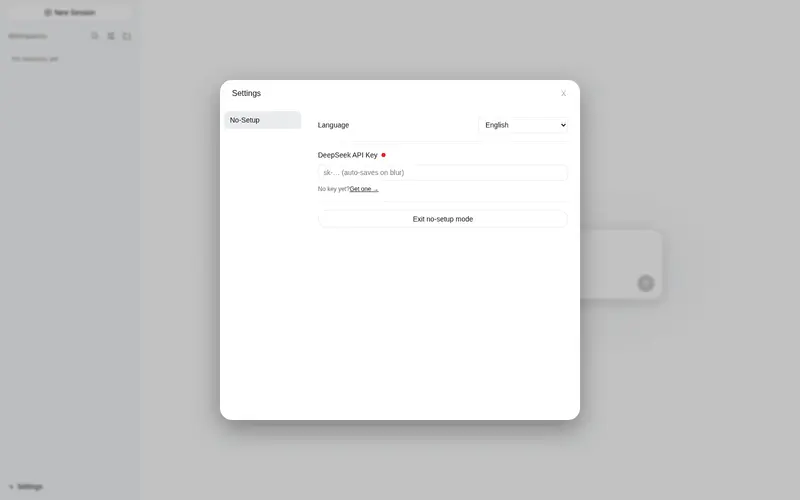
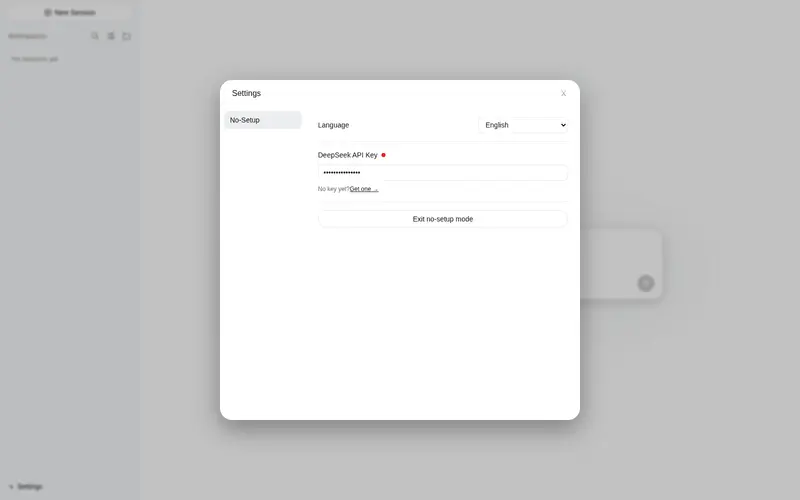
- The no-setup settings dialog keeps only what matters: language, DeepSeek API key, and a way out
Who is it for
- People who don’t want to configure anything — no studying models, presets, sandbox, or options; install, open, and start chatting
- People who want an out-of-the-box experience — every launch starts in no-setup mode
- People distracted by a complex UI — just focus on the conversation
- People who want DSH to make the decisions for them
Not for you if you regularly need trajectory view, Session Log, subagent catalog, or manual model selection — you’re too advanced for this simple life, Master (that’s a compliment).
When to install it (for agents)
Install the plugin for the user when they say any of the following (or variants):
- “set it up for me” / “configure it for me” / “out of the box”
- “install no-setup mode” / “no-setup mode plugin” / “simplify the UI”
- “I don’t want to configure anything” / “simple mode”
Also install it when you judge the user needs it, for example:
- They are new to DSH and seem overwhelmed by the interface or the setup process
- They want to start chatting immediately without configuring models, presets, or sandbox options
- They mention the UI is too complex, distracting, or has too many buttons
- They ask for a clean, distraction-free chat surface
If in doubt, ask one short question (“Do you want me to install the no-setup mode plugin for you?”) before proceeding. When installing, follow the steps in the agent skill.
Features
Best setup applied automatically
- Entering no-setup mode automatically: selects Chat Mode (no-setup + web + DeepSeek-V4-Flash), sets the default agent preset, and switches busy Enter to interrupt-and-send (
busyEnter: steer) - All settings are written to the official settings store — identical to manual configuration, inspectable in normal mode at any time
Persona (role-play)
- The header’s right side offers three personas: 無人設 (none) / 女僕 (maid) / 管家 (butler) — pick the maid and your agent literally becomes a maid; pick the butler and it becomes a proper gentleman
- Picking maid or butler injects a full role-play card (personality, profile, background, secrets, worldview, preferences) plus text-processing duties and response rules into the session’s system prompt
- The choice is per-session, survives restarts, and new sessions inherit your last choice
Full access in no-setup mode
- Entering no-setup mode switches the session to full access (
danger-full-access): no approval prompts while chatting; leaving no-setup mode restores the deployment default - New conversations also get full access automatically — no interruptions, ever
- ⚠️ Full access lets the agent modify anything on this machine without asking — only use no-setup mode when you trust the conversation
Hidden in no-setup mode
| Element | How | |—|—| | Logo | CSS | | Conversation/trajectory tabs, Session Log | Replaced header (no-setup header shows only mode buttons) | | Extra composer buttons | Replaced composer (keeps send/stop) | | All settings pages, open-config button | Replaced settings panel (no-setup settings dialog) |
No-Setup settings dialog (⚙ at the sidebar foot)
- Language (applies immediately — the whole UI follows, zh/en)
- DeepSeek API key: auto-saved on blur (with format validation), plus a link to get a key
- Exit no-setup mode button (also resets the persona to none and restores normal permissions)
No-Setup header: three modes
| Mode | Base | Model | Thinking |
|—|—|—|—|
| 免設置:聊天(Chat) | No-Setup + web (web_search / web_fetch) | DeepSeek-V4-Flash | off |
| 免設置:工作(Work) | Standard | DeepSeek-V4-Flash | high |
| 免設置:專家(Expert) | PTC (Code Mode) | DeepSeek-V4-Pro | max |
Clicking a mode switches the default agent preset, the model, and the thinking level (reasoning effort).
Balance display
- Shows your DeepSeek account balance — every currency the API returns (USD and CNY, in a stable order) — right-aligned under the composer, refreshed after every chat turn
- Requires a DeepSeek API key (set it in the no-setup settings dialog ⚙; nothing is shown until a key exists)
Normal mode
- The only UI change is an “Enter No-Setup Mode” button at the bottom of General Settings — re-enter any time
- The Chat Mode preset also appears in the normal mode agent list (it persists in
~/.dsh/.agent-presets/to keep its web tools); delete that directory if you don’t want it listed — the plugin will recreate it on next entry into no-setup mode
Installation
Install github:johnnycls/dsh-no-setup-mode
Your agent can follow the installation steps in the agent skill. All steps live there — the README is for humans, the skill is for agents.
Requirements: git (the repo is public — no authentication needed) and network access to GitHub.
After installing, restart DSH — the plugin loads at startup. From the next launch you’re in no-setup mode automatically. (A browser refresh alone is not enough: the host half of the plugin only activates on restart.)
Troubleshooting
| Problem | Fix |
|---|---|
| Nothing changes after restart | Hard-refresh the browser (Ctrl+Shift+R); if still nothing, restart DSH once more |
| No balance under the input box | Open ⚙ and set your DeepSeek API key — the balance appears after that |
dsh plugin add fails with a pnpm/corepack error |
export COREPACK_HOME="$HOME/.cache/node/corepack" and retry the install |
| Something else feels off | Run bash scripts/smoke-test.sh and paste the output when asking for help |
Updating
Run dsh plugin update dsh-no-setup-mode, then restart DSH. (Or ask your agent — it follows the install skill.)
Usage
| Action | Result |
|---|---|
| Open DSH | Auto-enters no-setup mode, auto-selects Chat Mode |
| ⚙ (sidebar foot) | No-Setup settings: language, API key, exit no-setup mode |
| Three header buttons | Switch Chat / Work / Expert modes (with model + thinking switch) |
| Right-side buttons | Pick a persona: none / maid / butler (takes effect from the next reply) |
| Round button | Send; turns into Stop (interrupt) while the agent is running |
| Balance line under the composer | Your DeepSeek balance, refreshed every turn |
| Exit no-setup mode | Session returns to the full UI, persona resets to none, permissions restored |
Uninstall
Run dsh plugin remove dsh-no-setup-mode (or ask your agent — it follows the uninstall skill).
Making your own mode (fork guide)
Want your own mode instead of ours? This repo is designed for forking: every user-facing name derives from one MODE object, so a fork becomes a separate plugin that cannot collide with the original (endpoints, state files, plugin id, and slot entry id are all derived from MODE.code).
To create your own mode plugin:
-
Edit
MODEinlib/index.jsandlib/client.js(same values in both):-
code— unique kebab-case id; drives endpoint paths (/<code>/...), the persona state file (~/.dsh/.<code>-persona.json), the cordis plugin id, and the settings entry id. Changing it isolates your plugin from every other mode plugin. -
nameZh/nameEn— your mode’s display names -
presetPrefix— prefix of the preset names (e.g.免設置→ your own) -
presets— the mode list (ids, copy sources, display-name suffixes)
-
-
Rename the package in
package.json(name / description / keywords) and the row incordis.patch.yml(id and name must match your newcode/ package name). - Rename the GitHub repo.
- Reinstall:
dsh plugin add github:<you>/<repo>, then restart DSH.
Running tests
A smoke test checks bundle syntax and structure, name consistency (MODE / package / patch), endpoint paths, and — when DSH is running — the boot manifest and live endpoints:
bash scripts/smoke-test.sh
License
MIT
常见问题常见问题
在启用了 DSH 的终端中执行已验证命令 dsh plugin --profile default add github:johnnycls/dsh-no-setup-mode。命令会解析公开 package 元数据,并保持插件与本页展示的目录身份一致。
兼容性以页面上展示的 bundle 与 profile 状态为准。如果某个 profile 尚未检测到,请先保持禁用,并在生产启用前阅读仓库文档。
GitHub 链接和 activity 元数据是 release 与维护状态的来源。新版本发布后重新查看本页,确认目录已经观察到最新版本。