kaixinbaba/dsh-vision-recognizer
DeepSeek Harness 识图插件:保持 DeepSeek 对话,15+ 供应商视觉模型把图片转译为文字,可在 设置→插件 配置
已收录
0
Vision
Bundle 已验证
预览
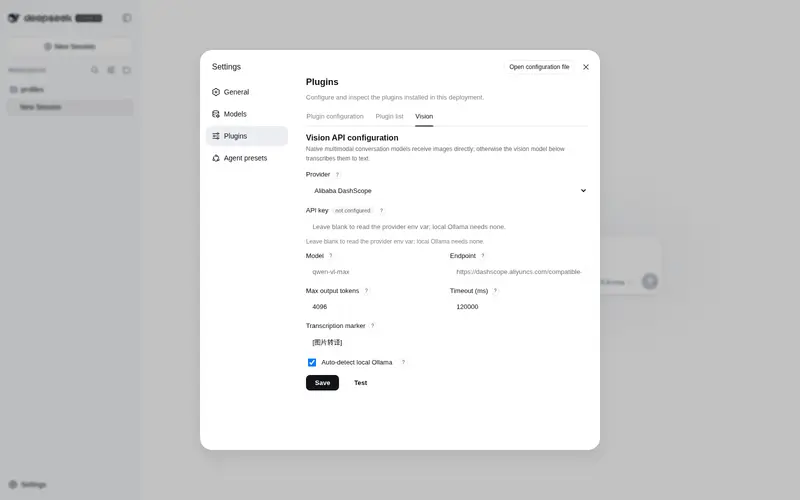
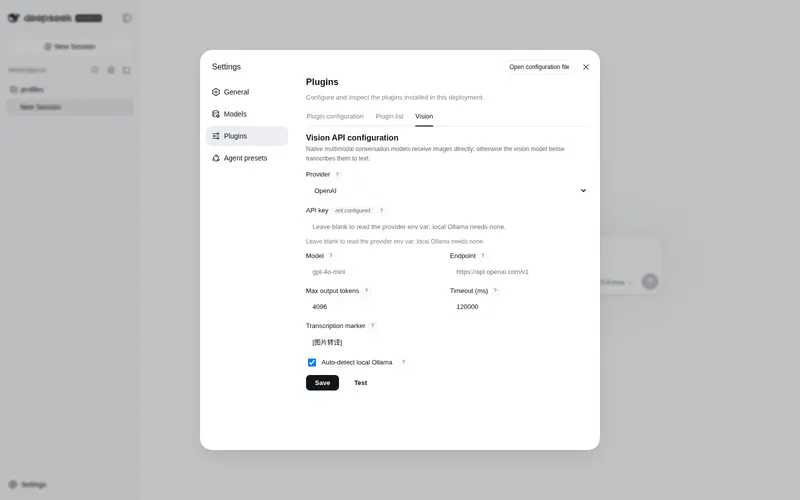
功能介绍
视觉模型路由:把附加图片经可配置模型(15+ OpenAI 兼容与 Anthropic 供应商)转译为文字,对话仍由 DeepSeek 作答。
适合
- 希望继续由 DeepSeek 作答,同时用独立视觉模型转译附件图片的 DSH 用户。
- 需要在 OpenAI 兼容、Anthropic、云端或本地 Ollama 视觉供应商之间选择的团队。
- 受益于顺序回退模型和进程内内容哈希缓存的图片工作流。
不适合
- 既未配置视觉服务凭据,也没有运行本地 Ollama 的环境。
- 不能把敏感图片字节发送到所配置远程端点的工作流;此类场景需要可信的本地端点。
- 要求 DeepSeek 原生处理图片,而不是读取其他模型生成的文字转译的工作流。
README
dsh-vision-recognizer
| English | 简体中文 |
Keep DeepSeek as the conversation brain, attach images anyway, and switch the image-recognition provider any time from Settings → Plugins. A vision plugin for DeepSeek Harness.
It registers a new provider route (default vision-recognizer, shown as DeepSeek + 识图 in the model picker) that wraps the real DeepSeek adapter: it declares image input (so the attachment preflight and the read_image gate admit images) and, in the request stream, transcribes every attached image to text through the vision model you select, then delegates the text-only conversation to DeepSeek. DeepSeek still answers; recognition is an add-on.
attached image ──▶ vision-recognizer route ──▶ vision-model transcription (OCR + layout + detail)
                     │                          │
                     ▼                          ▼
              DeepSeek answers ◀── text-only conversation (image replaced by [图片转译] text)
Features
-
One-click install:
dsh plugin --profile web add dsh-vision-recognizer— no build scripts, nosharpapproval (no native dependencies at all). - Configure from Settings → Plugins → Vision: pick a provider, enter an API key, override model / endpoint / token cap / timeout / marker. Saved changes take effect immediately, no restart.
- 15+ providers, domestic and international: OpenAI, Anthropic Claude, Google Gemini, OpenRouter, Azure OpenAI, Ollama (local), plus Alibaba DashScope, QwenCloud (Intl), Zhipu GLM, Baidu Qianfan, iFlytek Spark, Moonshot Kimi, Tencent Hunyuan, Volcengine Doubao, SiliconFlow. Any OpenAI-compatible endpoint works via the custom provider.
-
Two wire protocols: OpenAI-compatible (
/chat/completions) and native Anthropic Messages — Claude works out of the box. - No hangs: local/anonymous endpoints get a hard 20s timeout cap, HTTP 429 fails fast, failed endpoints cool down for 60s; without a key and without local Ollama it fails fast with actionable guidance.
-
Fallback chain: after the primary model fails, each
fallbackModelsentry is tried in order (each may target a different vendor); only after all fail does the request fail, listing every attempt. - Content-hash cache: the same image is transcribed at most once per process (in-process, capped at 200).
-
Zero-config local path:
autoLocalOllama(default on) probeshttp://localhost:11434and prepends a running Ollama to the chain — images never leave your machine.
Quick start
dsh plugin --profile web add dsh-vision-recognizer
Slow npm registry?
dsh plugin --profile web add dsh-vision-recognizer --registry=https://registry.npmmirror.com
Install from a local checkout (development):
dsh plugin --profile web add file:/path/to/dsh-vision-recognizer
Use the
file:prefix (copies the package intonode_modules). A bareadd .oradd link:…makes pnpm symlink the package, in which case the plugin’sschemasterydependency resolves from the source checkout and is not found — a general pnpm symlink-install gotcha, not a bug in the plugin.
Restart dsh web, then:
- Pick DeepSeek + 识图 in the model selector;
- Open Settings → Plugins → Vision, choose a provider, enter an API key, save;
- Paste an image into any conversation → you should see the
[图片转译]marker followed by a DeepSeek answer.
With no key and no local Ollama, a turn fails fast in a few seconds with guidance — that is the intended anti-hang behavior.
Supported providers
| Provider | baseURL | Default model | Key env var | Protocol |
|---|---|---|---|---|
| OpenAI | https://api.openai.com/v1 |
gpt-4o-mini |
OPENAI_API_KEY |
OpenAI |
| Anthropic Claude | https://api.anthropic.com/v1 |
claude-3-5-sonnet-latest |
ANTHROPIC_API_KEY |
Anthropic |
| Google Gemini | https://generativelanguage.googleapis.com/v1beta/openai |
gemini-2.0-flash |
GEMINI_API_KEY |
OpenAI |
| OpenRouter | https://openrouter.ai/api/v1 |
qwen/qwen-2.5-vl-72b-instruct |
OPENROUTER_API_KEY |
OpenAI |
| Azure OpenAI | user-supplied (…/openai/deployments/<deployment>) |
gpt-4o-mini |
AZURE_OPENAI_API_KEY |
OpenAI |
| Ollama (local) | http://localhost:11434/v1 |
auto-detected | none | OpenAI |
| Alibaba DashScope | https://dashscope.aliyuncs.com/compatible-mode/v1 |
qwen-vl-max |
DASHSCOPE_API_KEY |
OpenAI |
| QwenCloud (Intl) | https://dashscope-intl.aliyuncs.com/compatible-mode/v1 |
qwen-vl-plus |
DASHSCOPE_API_KEY |
OpenAI |
| Zhipu GLM | https://open.bigmodel.cn/api/paas/v4 |
glm-4v-flash |
ZHIPU_API_KEY |
OpenAI |
| Baidu Qianfan | https://qianfan.baidubce.com/v2 |
ernie-4.5-vl-8k |
QIANFAN_API_KEY |
OpenAI |
| iFlytek Spark | https://spark-api-open.xf-yun.com/v1 |
generalv3.5 |
SPARK_API_KEY |
OpenAI |
| Moonshot Kimi | https://api.moonshot.cn/v1 |
moonshot-v1-8k-vision-preview |
MOONSHOT_API_KEY |
OpenAI |
| Tencent Hunyuan | https://api.hunyuan.cloud.tencent.com/v1 |
hunyuan-vision |
HUNYUAN_API_KEY |
OpenAI |
| Volcengine Doubao | https://ark.cn-beijing.volces.com/api/v3 |
doubao-1.5-vision-pro-32k-250115 |
ARK_API_KEY |
OpenAI |
| SiliconFlow | https://api.siliconflow.cn/v1 |
Qwen/Qwen2.5-VL-72B-Instruct |
SILICONFLOW_API_KEY |
OpenAI |
Model ids drift over time; the defaults are starting points — override
Modelin the settings UI. Key resolution order: key entered in the UI → the provider env var →$VISION_API_KEY/$DASHSCOPE_API_KEY.
Configuration storage
Config saved from the UI is written to $DSH_HOME/vision-recognizer.json and merged over the bundle defaults at startup. cordis.patch.yml only carries factory defaults; a user cordis.patch.yml override still works as the composition-time fallback.
⚠️ patch semantics: the bundle’s
- insert:appends this row to the entry list. Writing a second- insert:with the same id in your owncordis.patch.ymlwould register the adapter twice (undefined behavior). To override individual keys, write a single top-level- id: dsh-vision-recognizerentry; better yet, use the Settings UI.
Implementation notes (for plugin authors)
Only stable rc.6 public interfaces are used:
-
ctx.llm.registration(innerProvider).adapter— fetch the wrapped adapter; -
ctx.llm.registerAdapter([providerId], proxyAdapter)— register the new route; - proxying
resolveModeloverridesinputModalitiesto['text', 'image']; - proxying
streamtranscribes image blocks ({ type: 'image', attachment }, bytes read viactx.get('attachments').readImage(ref)), thenyield*forwards the inner adapter’s stream; - the settings UI rides the
settings.plugins.tabslot plus customwebServerroutes, persisting config to its own JSON file (independent of the api-proxy settings allowlist).
Privacy
Transcription sends image bytes (base64, HTTPS) to the vision endpoint you configure — image data leaves your machine unless the endpoint is local (e.g. Ollama). Nothing beyond the harness’s own attachment storage persists any image. For sensitive images, use your own endpoint or a local model, or don’t install this plugin.
License
MIT
常见问题常见问题
在启用了 DSH 的终端中执行已验证命令 dsh plugin --profile default add github:kaixinbaba/dsh-vision-recognizer。命令会解析公开 package 元数据,并保持插件与本页展示的目录身份一致。
兼容性以页面上展示的 bundle 与 profile 状态为准。如果某个 profile 尚未检测到,请先保持禁用,并在生产启用前阅读仓库文档。
GitHub 链接和 activity 元数据是 release 与维护状态的来源。新版本发布后重新查看本页,确认目录已经观察到最新版本。