KLRSL/dsh-packer
配置打包器 for DeepSeek Harness: pack your agent config (skills/sessions/profiles/settings/memory) into zip for migration or sharing, with privacy scanning, diff restore, pack management
已收录
1
Tools
Bundle 已验证
预览
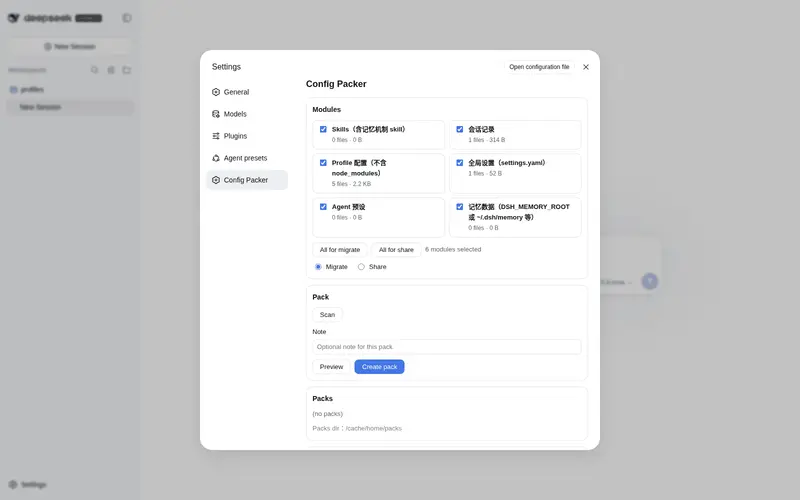
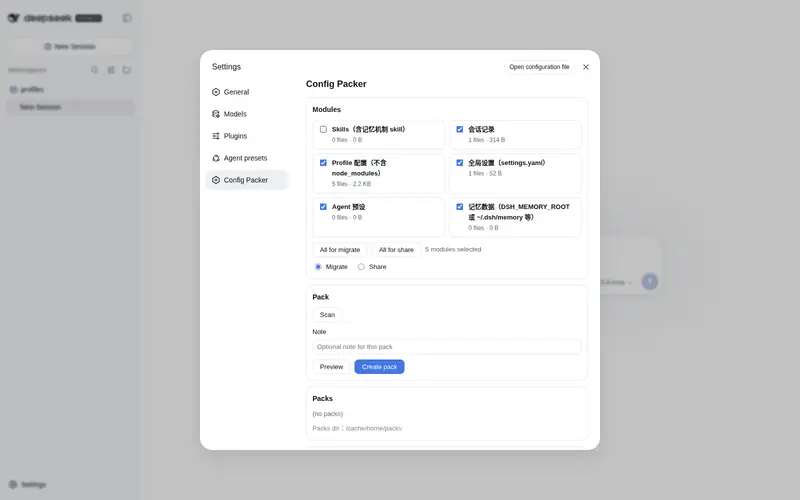
功能介绍
为 DeepSeek Harness 打造的 Agent 配置打包器:把本地 Agent 资产(Skills/会话/Profile/全局设置/记忆)打包成 zip,用于迁移或分享;带隐私安全扫描、恢复差异对比、包管理与设置面板。
适合
- 需要将 DSH Skills、会话、Profile、设置、预设和记忆迁移到新机器或重装环境的用户。
- 需要严格隐私扫描和自动包说明文件来分享仅含 Skills 包的团队。
- 需要文件级恢复预览,并明确选择覆盖、跳过或追加式合并策略的管理员。
不适合
- 希望分享会话、Profile、设置、预设或记忆的场景;Share 预设有意只包含 Skills。
- 无法清除全部敏感痕迹的分享流程;隐私扫描出现任何命中都会阻止创建包。
- 期望结构化冲突合并的用户;文本合并仅追加内容,非文本文件则回退为覆盖。
README
dsh-packer
dsh-packer is a configuration packer plugin for DeepSeek Harness (DSH). It packs your local Agent assets into zip archives, module by module, for two purposes:
- Migration — move your whole setup to a new machine or after a reinstall.
- Sharing — hand your Skills (and other assets) to other people.
Version v0.1.0 · MIT License
Features
Packable modules (all optional)
| Module | Contents | Migrate preset | Share preset |
|---|---|---|---|
skills |
Skills (including the memory-mechanism skill), under ~/.dsh/skills
|
✅ | ✅ |
sessions |
Session records (.zstd format), under ~/.dsh/sessions
|
✅ | ❌ |
profiles |
Profile configs (excluding node_modules), under ~/.dsh/profiles
|
✅ | ❌ |
settings |
Global settings (settings.yaml) |
✅ | ❌ |
presets |
Agent presets (.agent-presets) |
✅ | ❌ |
memory |
Memory data (DSH_MEMORY_ROOT or ~/.dsh/memory, excluding backups/) |
✅ | ❌ |
Two built-in presets
- Migrate — every module checked (the default).
-
Share — only
skillsis checked; sessions and memory data are automatically excluded. Personal skill subdirectories are also excluded when sharing.
Core capabilities
- Privacy & security scan — before packing, automatically detects local absolute paths, user-profile directory paths, suspected credentials, and personal nicknames. In share mode a hit hard-blocks the pack (returns an error); in migrate mode it is reported only.
- File-level operation manifest — previews every file before packing; before a restore it produces a diff report (added / changed / same / skipped).
- Package management — lists generated packages (time / size / modules / note), delete, rename.
-
Restore — import zip → validate
manifest.json(schemaVersion + SHA-256 fingerprints) → diff report → pick a conflict strategy: overwrite / skip / merge (merge appends, never overwrites). -
Share packs ship with a README — a generated
README.mdexplaining the pack contents is attached automatically. - Package notes — write a usage note when packing.
Installation
Install as a local bundle from the project directory:
dsh plugin add .     # add the local bundle
# or, during development
pnpm link
Then add dsh-packer to the dsh.profile.bundles list of your profile. Restart DSH and open the Settings → “Config Packer” tab (or use the /pack command).
Usage
Packing flow
- Open the Settings → “Config Packer” tab, or run
/pack create. - Pick the modules — or use a preset (Migrate = everything, Share = Skills only).
- The privacy scan runs automatically before packing; in share mode it hard-blocks on any hit.
- Confirm the file list (use
--dry-runto preview without generating a zip). - The zip is written to the packs directory (default
~/.dsh/packs); share packs get an automaticREADME.md.
Restore flow
- Import the zip (pick the file in the Settings tab, or
/pack restore <zip>). -
manifest.jsonis validated (schemaVersion + SHA-256 fingerprints). - Review the diff report: added / changed / same / skipped.
- Choose a conflict strategy: overwrite / skip / merge (merge appends text content without overwriting).
- Apply, and restart DSH if needed.
/pack command reference
/pack list                                      # list existing packs (time/size/modules/note)
/pack create [--modules skills,memory] [--mode migrate|share] [--note note] [--dry-run]
/pack create --share                            # --share is shorthand for --mode share
/pack restore <zip-path> [--strategy overwrite|skip|merge]
/pack scan                                      # privacy-scan every packable module
Details:
-
list— shows generated packs with creation time, size, modules and note. -
create— without--modules, modules are chosen by the mode preset (migrate = all; share = Skills only).--dry-runonly previews the file list and scan results; no zip is generated. -
restore— import zip → validate → diff report → apply with the chosen strategy. Files identical to the pack are skipped automatically under every strategy. -
scan— runs the privacy scan over every packable module and reports sensitive traces.
Package notes are written at pack time and shown in the package list. In the Settings tab you can also delete or rename packages.
Privacy & security
-
Never packed:
.credentials.yamland.anonymous-user-idare skipped in every module’s file walk. -
Scan rules (text files only):
- local absolute paths (drive-letter style)
- user-profile directory paths (paths under the OS user profile)
- suspected credentials/tokens (
api_key,secret,password,token,bearer,authorizationassignments) - personal nicknames
- Windows user-name paths
- Share mode: any hit returns an error and the pack is blocked.
-
Migrate mode: hits are reported only — inspect them with
/pack scanor--dry-run. - Every file’s SHA-256 fingerprint is recorded in
manifest.jsonfor integrity checks on restore. - Packs are built with the system bsdtar (libarchive), producing standard zip files with zero native dependencies.
Compatibility
- Node.js >= 22.19.0
-
DSH packages
@deepseek-ai/dsh-*0.1.0-rc.5 or later (peer deps:@deepseek-ai/cordis^4.0.1,@deepseek-ai/dsh-tools,@deepseek-ai/dsh-session) -
bsdtar: Windows 10+ ships
tar.exe(bsdtar/libarchive); macOS ships bsdtar astar. No npm native modules are used.
FAQ
The zip won’t open / looks corrupted?
Packs are standard zip archives created by the system bsdtar — Windows Explorer and common unzip tools can open them. If a pack fails validation, do not hand-edit its contents (that breaks the SHA-256 fingerprints in manifest.json); regenerate it with /pack create. Check ~/.dsh/packs (or your DSH_PACKS_DIR) with /pack list to see what is there.
Manifest validation fails on restore?
Usually one of: the zip was not created by dsh-packer (no manifest.json inside), manifest.json is missing or its schemaVersion is incompatible with the current version, or the pack was modified after creation. Redistribute the original pack or regenerate it.
My share pack got blocked — what now?
Share mode is deliberately strict: any hit (absolute path, user-profile path, suspected credential, nickname, …) aborts the pack with an error. Run /pack scan to see which files match, clean or replace the sensitive content, then retry. For personal backups you can use migrate mode (report-only), but never distribute such packs to others.
How does the merge strategy work?
For text files, the pack’s content is appended to the target file behind a separator comment — existing content is never overwritten. Non-text files fall back to overwrite. Files already identical to the pack are skipped under every strategy.
Where are packs stored?
~/.dsh/packs by default, overridable via the DSH_PACKS_DIR environment variable.
License
MIT
常见问题常见问题
在启用了 DSH 的终端中执行已验证命令 dsh plugin --profile default add github:KLRSL/dsh-packer。命令会解析公开 package 元数据,并保持插件与本页展示的目录身份一致。
兼容性以页面上展示的 bundle 与 profile 状态为准。如果某个 profile 尚未检测到,请先保持禁用,并在生产启用前阅读仓库文档。
GitHub 链接和 activity 元数据是 release 与维护状态的来源。新版本发布后重新查看本页,确认目录已经观察到最新版本。