lussey820/dsh-http-tools
HTTP/API debugging toolset for DeepSeek Harness: http_request, curl_parse, request_history
已收录
0
Tools
Bundle 已验证
预览
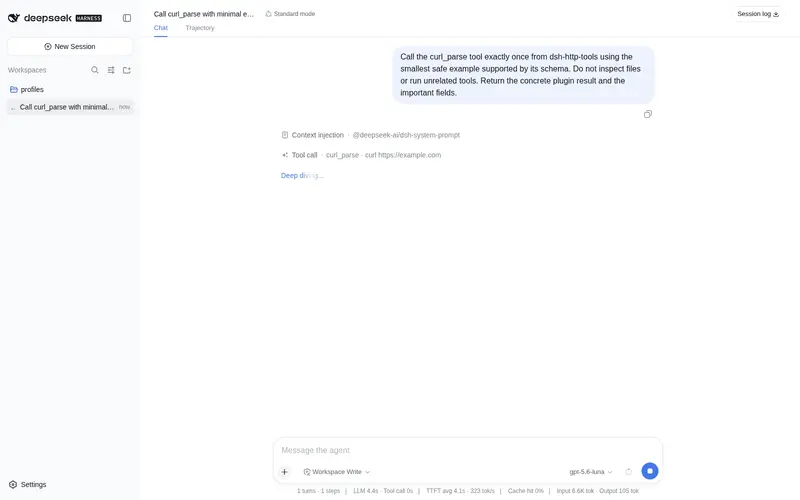
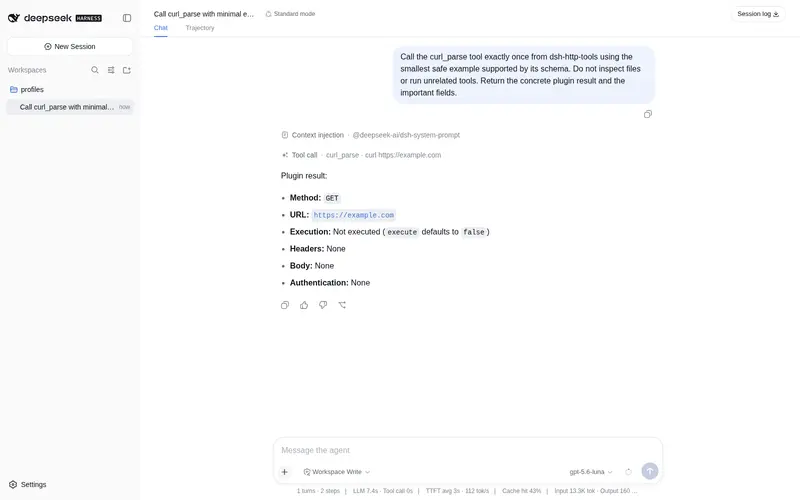
功能介绍
HTTP/API 调试工具集:全参数 HTTP 请求(method/headers/body/auth)、curl 命令解析与一步执行、会话内请求历史与响应并排对比、分页 Link 头透出;配合可选 dsh-http-tools-ui 提供 DeepSeek 风格工具卡片。
适合
- 希望在 DeepSeek Harness 对话中调试 REST API 的开发者。
- 从现有 curl 命令出发,需要解析、修改或立即执行的工作流。
- 需要比较同一会话内请求响应,或跟随 Link 头分页的用户。
- 需要配置目标限制、超时、响应上限及脱敏 curl 输出的团队。
不适合
- 运行 Node.js 22 以下版本的环境,因为插件要求 Node.js 22 或更高版本。
- 要求请求历史跨会话保留的工作流;其历史记录仅限当前会话。
- 要求无论大小都返回完整响应正文的用户,因为正文有上限,日志也只保留预览。
- 需要品牌化工具卡片但不愿安装独立可选 UI 包的用户。
README
dsh-http-tools
HTTP / API debugging tools for DeepSeek Harness (DSH).
dsh-http-tools gives your DeepSeek Harness agent a complete REST client: send any request with full control over method, headers, body, and auth, paste a curl command and let the agent run or tweak it, and review or compare past requests — all inside the chat.
Comes with an optional UI companion package (dsh-http-tools-ui) that renders every http_request / curl_parse call as a DeepSeek-branded card in the web UI.
Features
-
http_request— full REST client: GET/POST/PUT/PATCH/DELETE/HEAD, custom headers, body, basic/bearer auth. Returns status, duration, size, response headers, truncated body, and an equivalent redactedcurlcommand. -
curl_parse— parse acurlcommand into structured parts, or execute it in one step (execute: true). -
request_history— query in-session requests, inspect one, or diff two responses. -
Pagination-aware — the
Linkresponse header is surfaced to the model, so it can followrel="next"/rel="last"without re-reading raw headers. - Preview-slimmed logging — persisted session logs carry a 6000-char body preview, so logs stay readable as request volume grows.
-
DeepSeek-branded UI cards (with
dsh-http-tools-ui) — fish logo, brand-colored method badge, official state dot (running chase animation), theme-aware colors, collapsible JSON body (JsonTree), and copy-body / copy-curl buttons.
Tools
| Tool | Description |
|---|---|
http_request |
Send an HTTP request (GET/POST/PUT/PATCH/DELETE/HEAD) with custom headers, body, and auth. Returns status, duration, size, response headers, truncated body, and an equivalent curl command. |
curl_parse |
Parse a curl command into its structured parts (method, URL, headers, body, auth). Optionally execute it in one step with execute: true. |
request_history |
Query requests made in the current session, inspect one in detail, or compare two responses side by side. |
Install
dsh plugin --profile web add dsh-http-tools
# optional: DeepSeek-branded UI cards for the web client
dsh plugin --profile web add dsh-http-tools-ui
Works out of the box with zero configuration. Node.js >= 22 is required (uses the native fetch).
UI cards
dsh-http-tools-ui is a separate package that registers keyed tool views for http_request and curl_parse. Once installed, each call renders as a card in the conversation:
- Fish logo + brand-colored method badge (
GET/POST/ …) - Official state dot: green on success, amber on non-2xx, red on error, animated chase while running
- Status · duration · size · truncated summary on the row head
- Expandable response: key headers inline, JSON body as a collapsible tree (with copy actions), non-JSON bodies as text
-
Copy / Copy curl buttons, all colors theme-aware (
--dsw-*tokens)
Try it
Tell your agent things like:
用 http_request 调 https://api.github.com/repos/deepseek-ai/deepseek-harness 看看 star 数
POST https://httpbin.org/post,body 传 {"hello":"world"},看看返回什么
粘贴这个 curl 命令解析一下,然后改个 header 再重发:
curl -X POST https://api.example.com/v1/users -H "Content-Type: application/json" -d '{"name":"ada"}'
用 request_history 对比 #1 和 #3 两次请求的响应差异
Configuration
All options are optional. Set them in your profile’s cordis.patch.yml:
- id: http-tools
  name: dsh-http-tools
  config:
    maxBodyChars: 524288   # cap on response body characters returned to the model
    timeoutMs: 10000       # per-request timeout in milliseconds
    blockedHosts: []       # hostnames the plugin refuses to contact (e.g. ['169.254.169.254'])
    localOnly: false       # true = only loopback / private-network targets
    historyLimit: 50       # in-session request history retention
    auditHeader: true      # tag every request with an X-DSH-Request audit header
Security model
- By default every URL is allowed; the request is tagged with an
X-DSH-Requestaudit header so the server can identify agent traffic. -
blockedHostsrejects exact hostnames and their subdomains before any network I/O (e.g. block cloud metadata endpoints like169.254.169.254). -
localOnly: truerestricts requests to loopback and private networks — a one-switch “local debugging mode”. - Response bodies are capped at
maxBodyChars(default 512 KB) and timeouts attimeoutMs(default 10 s) so a runaway call can never flood the model context. - Credentials (Bearer tokens, basic-auth pairs) are sent only as request headers. Generated
curlcommands redactauthorization,cookie,proxy-authorization, andx-api-keyvalues as***, so secrets do not leak into session logs or request history.
Development
pnpm install
pnpm test          # vitest unit tests
pnpm run typecheck
pnpm run build     # tsdown -> lib/
pnpm --filter dsh-http-tools-ui run build   # UI client bundle -> ui/lib/
To smoke-test against a local DeepSeek Harness checkout, mount the built plugin with a patch overlay that references the built file:
pnpm run build

# http-tools.patch.yml — reference the built entry
# (on Windows, absolute paths must be file:// URLs, percent-encoded)
- insert:
  - id: http-tools
    name: /absolute/path/to/dsh-http-tools/lib/index.js   # POSIX
    # name: file:///C:/Users/.../dsh-http-tools/lib/index.js   # Windows

# from the deepseek-harness repo root:
pnpm dsh web --patch /absolute/path/to/http-tools.patch.yml
License
MIT
常见问题常见问题
在启用了 DSH 的终端中执行已验证命令 dsh plugin --profile default add github:lussey820/dsh-http-tools。命令会解析公开 package 元数据,并保持插件与本页展示的目录身份一致。
兼容性以页面上展示的 bundle 与 profile 状态为准。如果某个 profile 尚未检测到,请先保持禁用,并在生产启用前阅读仓库文档。
GitHub 链接和 activity 元数据是 release 与维护状态的来源。新版本发布后重新查看本页,确认目录已经观察到最新版本。