MichengAI/dsh-agency-agents
DSH agency agents 基于 DeepSeek Harness 的全行业智能体
已收录
2
Skill
Bundle 已验证
预览
功能介绍
增加可召唤的领域专家名单,专家以子代理运行,主会话保留任务和最终答复。
适合
- 希望调用领域专家视角、但仍由主会话掌控任务的 DSH Web 用户。
- 适合搜索、筛选并按需启用大量专家角色的工作流。
- 需要由父 agent 保留上下文、判断和最终答复的一次性子任务。
不适合
- 需要专家维持长期独立会话,而非一次性子代理的工作流。
- 需要嵌套委派的任务,因为专家子代理不能继续召唤其他专家。
- 没有可用 DSH Web 环境的安装;源码开发还要求 Node.js 22+ 和 pnpm。
README






DSH Agency Agents is a community-maintained DeepSeek Harness (DSH) plugin, not an official DeepSeek AI product.
Features
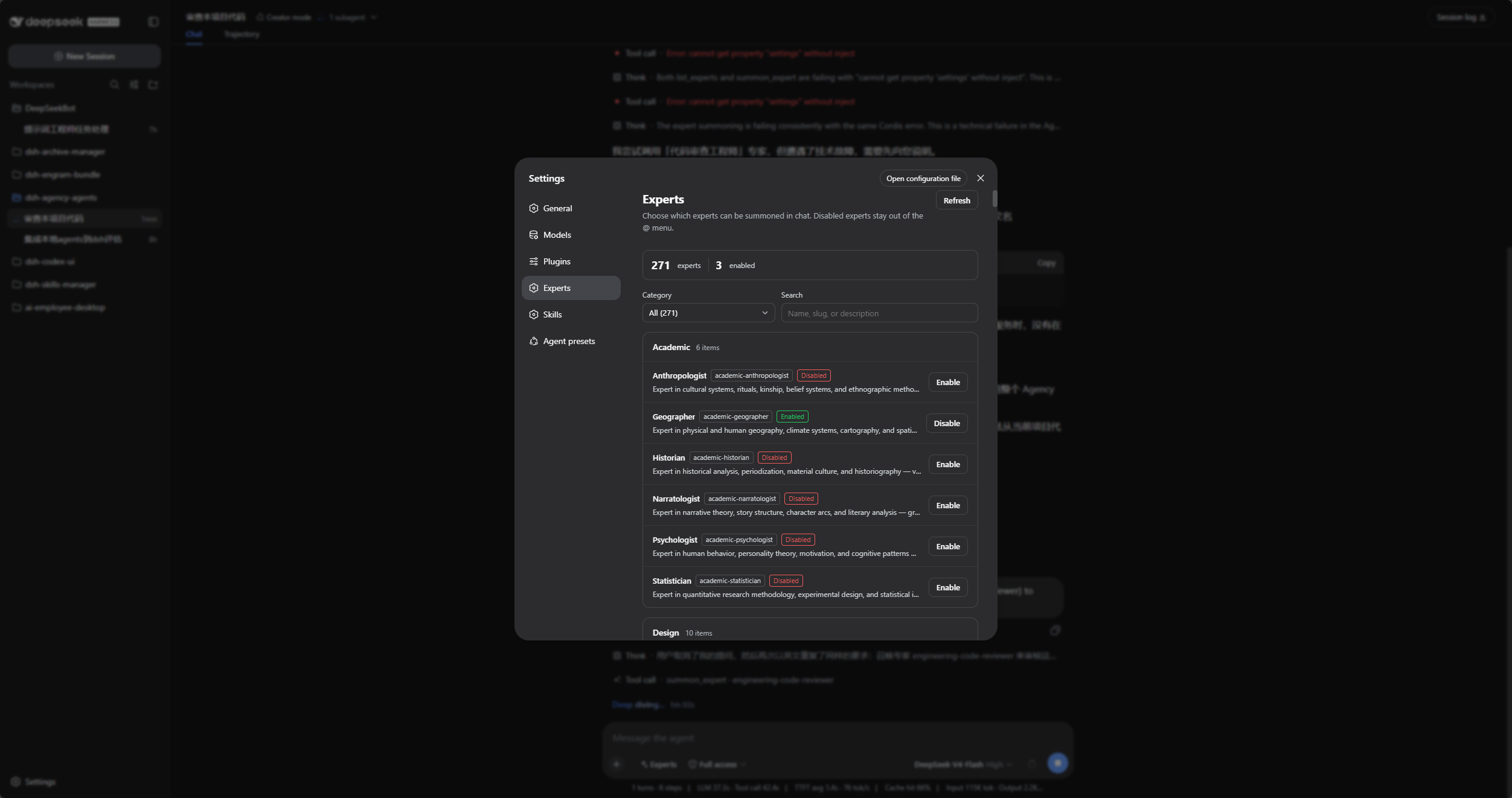
- Filter by category or search, then enable or disable bundled experts in Settings → Experts.
- Summon enabled experts by name or slug from the composer’s Experts picker.
- Use
list_expertsto discover experts andsummon_expertto start a one-shot specialist subagent. - Use 271 bundled personas immediately, or connect a separately synchronized expert directory.
- Paste one sentence into DSH, Codex, or WorkBuddy and let that agent install the plugin locally.
The parent session keeps task context, judgment, and the final answer. Expert children provide a specialist perspective only and cannot summon further experts.
Screenshots
Filter by category or search in Settings → Experts, then enable the experts you need:
Use @ or the composer’s Experts picker to choose an enabled expert:
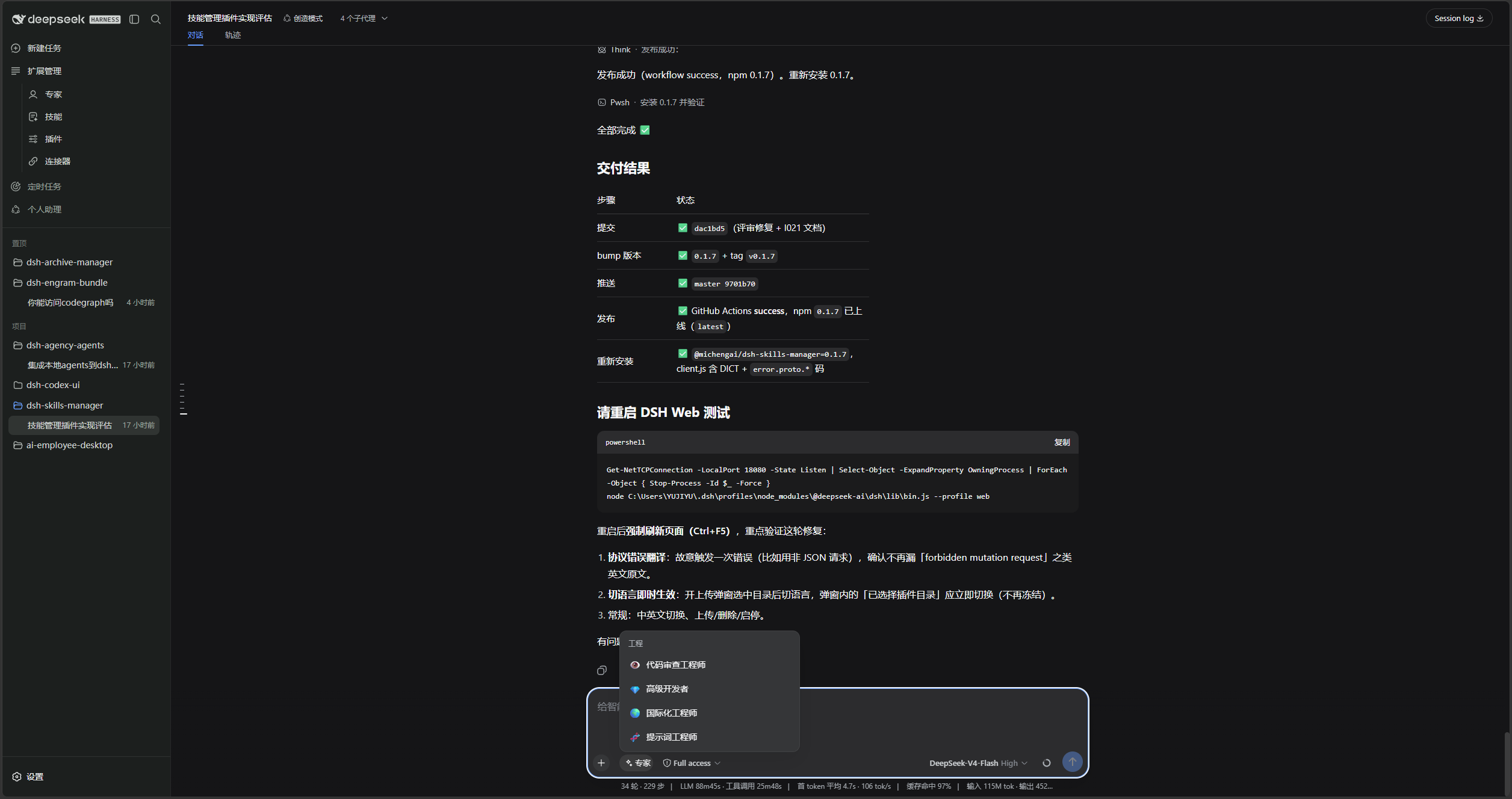
The name and slug are filled in; write the complete task next:

Prerequisites
- A working DeepSeek Harness Web installation with
dshavailable in PowerShell. - Examples use the
webprofile; replace it with the target profile. - Source installation and development require Node.js 22+ and pnpm. npm installation does not require running
pnpm installseparately.
Installation
dsh plugin add forwards to pnpm add in the profile directory. Without a version and official registry, a local mirror or minimum-release-age policy can leave you on an older build.
Ask another agent to install it
This plugin runs inside DeepSeek Harness Web. Copy one of the sentences below into DSH, Codex, or WorkBuddy and let that agent install it into your local web profile.
From npm:
Install the latest DSH plugin @michengai/dsh-agency-agents into my local web profile using the official npm registry: dsh plugin --profile web add @michengai/dsh-agency-agents@latest --registry=https://registry.npmjs.org/. Then run dsh --profile web --dump-config, confirm agency-agents is mounted, and remind me to restart DSH Web and hard-refresh the browser.
From source:
Install the DSH plugin from source at https://github.com/MichengAI/dsh-agency-agents: clone it, run pnpm install --frozen-lockfile and pnpm build, then run dsh plugin --profile web add . from that directory. Do not copy lib by itself. Then run dsh --profile web --dump-config, confirm agency-agents is mounted, and remind me to restart DSH Web and hard-refresh the browser.
| Product | How to use it |
|---|---|
| DSH | Send one of the sentences above to the current session. |
| Codex | Send one of the sentences above to Codex and let it install locally. |
| WorkBuddy | Send one of the sentences above to WorkBuddy; for a source install you can also paste https://github.com/MichengAI/dsh-agency-agents. |
Codex and WorkBuddy only install the plugin. After that, open DSH Web and use Settings → Experts.
You can also run the same npm command yourself:
dsh plugin --profile web add @michengai/dsh-agency-agents@latest --registry=https://registry.npmjs.org/
If dsh is not on PATH, replace the leading dsh with npx --yes @deepseek-ai/dsh.
Install the latest package from the official npm registry
Run this from any PowerShell directory:
[Console]::OutputEncoding = [System.Text.Encoding]::UTF8
$OutputEncoding = [System.Text.Encoding]::UTF8
dsh plugin --profile web add @michengai/dsh-agency-agents@latest --registry=https://registry.npmjs.org/
dsh --profile web --dump-config
To pin a release, replace @latest with a version such as @0.1.17.
The configuration output should contain agency-agents and agency-agents-remote. Restart DSH Web and hard-refresh the browser. Do not copy client files manually: the Settings page needs the mounted Remote service.
Install from source
Use this for debugging or unpublished changes. The cloned directory becomes the plugin source path:
[Console]::OutputEncoding = [System.Text.Encoding]::UTF8
$OutputEncoding = [System.Text.Encoding]::UTF8
Set-Location D:\Repository\deepseek-harness-plugin
git clone https://github.com/MichengAI/dsh-agency-agents.git
Set-Location .\dsh-agency-agents
pnpm install --frozen-lockfile
pnpm build
dsh plugin --profile web add .
dsh --profile web --dump-config
Restart DSH Web and hard-refresh the browser. dsh plugin ... add . reads the package metadata and cordis.patch.yml; do not install by copying lib directly.
Usage
- Open Settings → Experts and enable the needed experts.
- Use
@or the composer Experts picker to choose an enabled expert. - Name the expert and slug, then provide the complete task.
Summon the "Code Review Engineer" expert (engineering-code-reviewer) for this task:
Review the changes in the current workspace and list reproducible issues by severity.
The parent session can also call list_experts(division?), then delegate with summon_expert(expert, task). Use a slug when a name is ambiguous.
Configuration and limits
| Key | Default | Purpose |
|---|---|---|
root |
Bundled expert assets | External expert root; an explicit value takes priority. |
provider |
spawn |
DSH subagent provider; fork also works when it supports persona and tool filtering. |
divisions |
17 standard divisions | Top-level divisions to scan. |
maxDepth |
Unset | Positive absolute subagent-depth limit. |
Set AGENCY_AGENTS_ROOT to use an external expert directory. Persona bodies from that directory are injected as the child system prompt, so load them only from a trusted source. The provider must support persona and tool filtering. summon_experts accepts at most 8 experts with a concurrency of 4 and still returns successful answers when some experts fail.
Secondary development
- src\index.ts: host entry point for catalog loading, tools, and settings.
- src\remote-contract.ts and src\remote.ts: Remote contract and implementation.
-
src\client\index.ts: Settings page, composer button, and
@trigger. -
assets\agency-agents: bundled personas; retain its MIT license and NOTICE attribution.
After changing src or assets, rebuild, test, and install from the local directory:
[Console]::OutputEncoding = [System.Text.Encoding]::UTF8
$OutputEncoding = [System.Text.Encoding]::UTF8
pnpm build
pnpm test
pnpm verify
dsh plugin --profile web add .
Handoff and iteration notes stay in the local docs directory and are not tracked in Git; a fresh clone will not include that handover entry.
The published package includes lib, assets, the patch, and the root README/license files. Do not publish node_modules or local development files.
Validation
[Console]::OutputEncoding = [System.Text.Encoding]::UTF8
$OutputEncoding = [System.Text.Encoding]::UTF8
pnpm build
pnpm test
pnpm verify
prepublishOnly runs these build, test, and package-integrity checks before publishing.
License and attribution
This project’s TypeScript source, build scripts, and documentation use Apache License 2.0. Bundled personas originate from The Agency and remain MIT-licensed; see assets\agency-agents\LICENSE.
常见问题常见问题
在启用了 DSH 的终端中执行已验证命令 dsh plugin --profile default add github:MichengAI/dsh-agency-agents。命令会解析公开 package 元数据,并保持插件与本页展示的目录身份一致。
兼容性以页面上展示的 bundle 与 profile 状态为准。如果某个 profile 尚未检测到,请先保持禁用,并在生产启用前阅读仓库文档。
GitHub 链接和 activity 元数据是 release 与维护状态的来源。新版本发布后重新查看本页,确认目录已经观察到最新版本。