PAKIKNOWLEDGE/dsh-notify-skill
DSH skill: email reminders from your agent when you're away — fires at goal completion / blockage / when your decision is needed
已收录
0
Notify
Bundle 已验证
预览
功能介绍
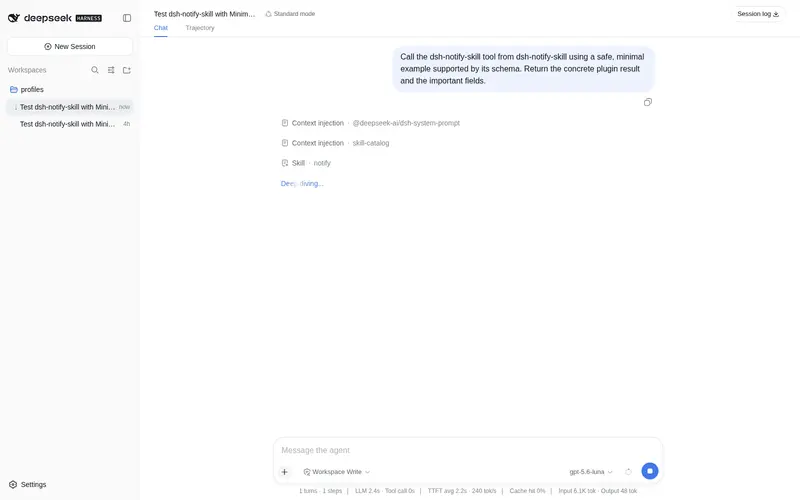
你不在电脑前时由 agent 邮件提醒你:goal 完成、阻塞、向你提问决策前、长任务节点时触发,自带零依赖 Node SMTP 发送器。
适合
- 会离开长时间运行的 agent 任务、希望在完成或阻塞时收到邮件的用户。
- 需要 agent 在请求用户决策前或到达里程碑时发送提醒的工作流。
- 需要仅使用 Node.js 内置模块的轻量 SMTP 发送器的环境。
不适合
- 需要双向远程控制或邮件回复能力的用户;该插件只提供单向通知。
- 没有 SMTP 服务、收件邮箱或所需授权码配置的用户。
- 用户始终停留在当前会话、无需邮件提醒的工作流。
README
dsh-notify-skill
| English | 中文 |
Email reminders from your DSH agent when you’re away from the computer.
You start a long-running goal in DSH (or any AI coding agent), then walk away. When the agent finishes, gets blocked, or needs your decision, it sends an email to your phone mailbox — you see it and come back. One-way ping, no remote control.
Design: bundle a sender, teach the fallback
The skill ships one zero-dependency implementation — sender.mjs (~70 lines, only Node built-ins tls/net), so the agent sends mail deterministically in every normal DSH session (DSH runs on Node). The SKILL.md still carries the full contract:
- when to notify (goal done / blocked / before asking you a decision / long-task milestone),
- what to write (specific, in your language, short),
- the config contract (
config.json: sender, SMTP authorization code, recipient; auto-inferred hosts for QQ/163 mail), - how to guide the user through getting an SMTP authorization code when the config is missing,
- failure handling and security rules.
If Node is genuinely unavailable (rare), the skill’s instructions tell the agent to implement the ~15-line SMTP call itself with whatever the environment provides — Python smtplib, curl, mail, … — so the skill stays cross-platform (Windows/Linux/macOS) and future-proof.
How it works
| Moment | Suggested marker |
|---|---|
| Goal completed | done |
| Goal blocked / stuck | block |
| About to ask the user a decision | question |
| Long task milestone | info |
The agent sends via the bundled sender:
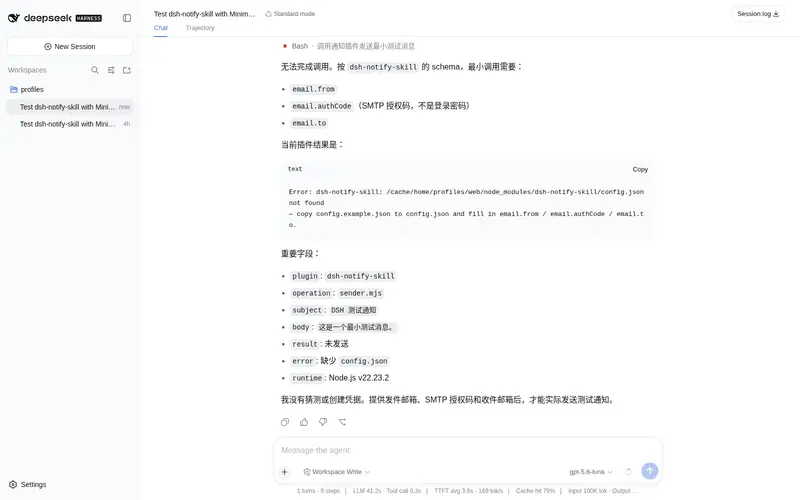
node sender.mjs "subject" "body" # reads config.json next to it
Knowledge note (Windows): .NET
SmtpClienthas a known hang on implicit-TLS port 465 — the bundled sender usesnode:tlsinstead, which has no such issue.
Install (DSH)
Plugin install (recommended) — the skill ships as a DSH plugin and registers on ctx.skills:
dsh plugin --profile web add dsh-notify-skill
Or from GitHub: dsh plugin --profile web add github:PAKIKNOWLEDGE/dsh-notify-skill. Restart dsh web once after installing, then the skill appears in the session skill catalog.
Manual install (no plugin) — DSH also discovers skills from <dshHome>/skills/<name>/SKILL.md (default ~/.dsh/skills), hot-reloaded by a filesystem watcher:
git clone https://github.com/PAKIKNOWLEDGE/dsh-notify-skill.git "$HOME/.dsh/skills/notify"
Or copy the folder manually to ~/.dsh/skills/notify/. New sessions pick it up immediately.
Setup (one-time, ~5 minutes)
The agent will also walk you through this if you just ask it to use the skill.
- Get an SMTP authorization code (not your login password):
- QQ Mail: web QQ Mail → 设置 → 账户 → enable “POP3/SMTP 服务” → generate a 16-char 授权码
- 163 Mail: web 163 Mail → 设置 → POP3/SMTP/IMAP/SMTP → enable → create 授权码
- Copy
config.example.jsontoconfig.jsonand fill it in:{ "email": { "smtpHost": "", "smtpPort": 465, "useSsl": true, "from": "your-address@qq.com", "authCode": "16-char authorization code", "to": "recipient@example.com" } }smtpHostmay be left empty — it is inferred (@qq.com→smtp.qq.com,@163.com→smtp.163.com, port 465 SSL). - Test: ask your agent to send a test notification (it will implement the sender itself).
Other agents (Claude Code, Codex, …)
No compatibility work needed — modern agents are smart. Point them at SKILL.md and the config contract; they implement the sender themselves.
Security
-
config.json(contains your SMTP authorization code) andnotify.logare gitignored — never force-commit them. A leaked authorization code lets anyone send mail as your mailbox. - The skill instructs agents to never print or commit the authorization code.
License
常见问题常见问题
在启用了 DSH 的终端中执行已验证命令 dsh plugin --profile default add github:PAKIKNOWLEDGE/dsh-notify-skill。命令会解析公开 package 元数据,并保持插件与本页展示的目录身份一致。
兼容性以页面上展示的 bundle 与 profile 状态为准。如果某个 profile 尚未检测到,请先保持禁用,并在生产启用前阅读仓库文档。
GitHub 链接和 activity 元数据是 release 与维护状态的来源。新版本发布后重新查看本页,确认目录已经观察到最新版本。