QT-Chen/dsh-mic-input
DSH Web ?????????:??? Web Speech API ????,????/??????????????????Microphone voice input plugin for the DeepSeek Harness Web UI (browser Web Speech API).
已收录
3
Voice
Bundle 已验证
预览
功能介绍
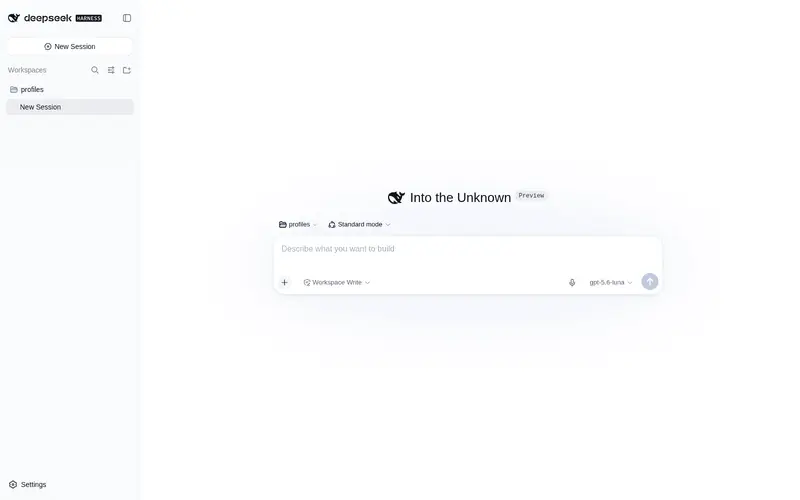
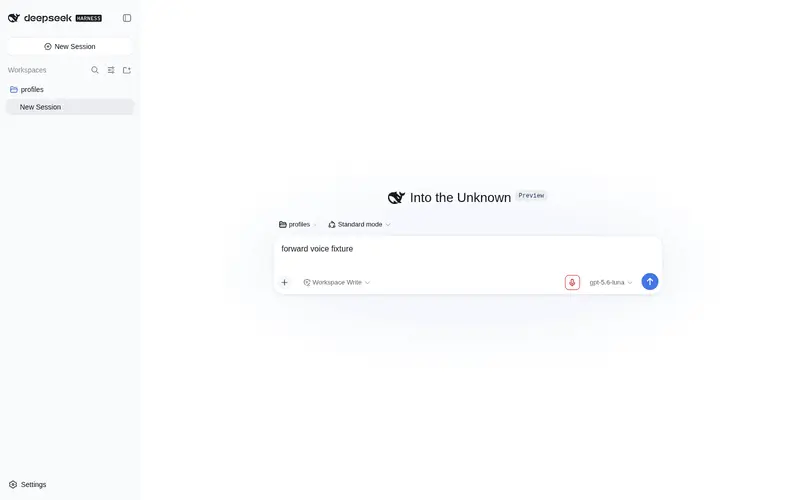
输入框麦克风语音输入:浏览器 Web Speech API 实时转写,自动去重/续听、智能标点,支持语言与自动发送设置。
适合
- 希望通过麦克风口述提示、减少键盘输入的 DSH Web 用户。
- 需要实时转写、停顿后自动续听、去重与标点控制的 Chrome 或 Edge 用户。
- 需要选择跟随系统、中文或英文识别,并可选自动发送的双语工作流。
不适合
- 不支持 Web Speech API,或无法授予麦克风权限的浏览器环境。
- 要求离线转写或不依赖浏览器语音服务的工作流;识别由浏览器使用的 Microsoft 或 Google 服务提供。
- 要求不同浏览器间识别质量保持一致的工作流;准确度受各浏览器内置引擎限制。
README
dsh-mic-input
Microphone voice input for the DeepSeek Harness (DSH) Web UI — in the browser, no server, no keys.
中文说明见 README.zh.md
A pure client plugin that adds a microphone button to the composer tool row of the DSH Web GUI. Click to start dictating; recognized speech is transcribed live into the input box. Everything runs in your browser through the built-in Web Speech API:
- Microsoft Edge → Microsoft Azure speech service
- Google Chrome → Google/Chrome speech service
Zero server components, zero API keys, zero model downloads. Audio never leaves the browser (except to the browser’s own speech service).
Features
- Mic button in the composer tool row (right side, next to send) — click to start/stop; red pulsing ring while listening
- Live transcription — interim results fill the input while you speak
- No duplicated text — the draft is always rebuilt from the text that was in the input when recording started, and interim echo prefixes are deduplicated (fixes the classic “重复文字” bug of Web Speech plugins)
- Auto-continue on silence — if the browser stops listening after a pause, the plugin silently reconnects and keeps the session (up to 6 silent ends), so long sentences are not cut off
-
Smart punctuation (default) — auto-completes sentence-ending punctuation:
?after 吗/呢 questions,!after 吧/啊/呀/哦/嘛/啦/哇/哈,。otherwise (English:.); modes: 自动补全 / 保留原样 / 去除 - Language selection — 跟随系统 (auto, follows browser language) / 中文 (zh-CN) / English (en-US); wrong language matching is the #1 cause of garbled recognition
- Auto-send — optional: submit the message automatically when dictation ends
- Settings row under 设置 → 通用 → 语音输入
- Clear errors — permission-denied / network errors show bilingual hints on the button tooltip
Install
dsh plugin --profile web add github:QT-Chen/dsh-mic-input
or from npm (prebuilt, no build approval needed):
dsh plugin --profile web add dsh-mic-input
Restart dsh web (or refresh the page), then click the mic button to the right of the input box. The first time you use it, the browser asks for microphone permission — allow it (127.0.0.1 / localhost is a secure context, so it works).
Note: if you installed from the GitHub source, pnpm ≥ 10 may ask you to allow the build once (
allowBuilds). The npm install has no such step.
Usage tips
- Recording starts a session; click the button again to stop and keep the transcript in the input (auto-send only if enabled)
- If recognition produces gibberish, check the language setting — it must match what you speak (system language ≠ spoken language is the usual cause)
- Recognition quality is bounded by the browser’s built-in engine; Edge (Azure) and Chrome (Google) may differ noticeably
Privacy
No server, no storage: audio is processed by the browser’s speech service (Microsoft/Google), and only the resulting text ever enters DSH. Nothing is written to disk by this plugin.
License
MIT
常见问题常见问题
在启用了 DSH 的终端中执行已验证命令 dsh plugin --profile default add github:QT-Chen/dsh-mic-input。命令会解析公开 package 元数据,并保持插件与本页展示的目录身份一致。
兼容性以页面上展示的 bundle 与 profile 状态为准。如果某个 profile 尚未检测到,请先保持禁用,并在生产启用前阅读仓库文档。
GitHub 链接和 activity 元数据是 release 与维护状态的来源。新版本发布后重新查看本页,确认目录已经观察到最新版本。