s3yf1337/dsh-easyvision
DeepSeek Harness plugin: describe images through a dedicated vision model from the dsh model list, called over the harness's own LLM runtime
已收录
0
Vision
Bundle 已验证
预览
功能介绍
让纯文本模型拥有视觉:describe_image 工具调用 dsh 模型列表中的视觉模型描述图片,走 harness 自身的 LLM 运行时。
适合
- 偏好纯文本对话模型、但偶尔需要查看附件图片或本地图片文件的用户。
- 模型列表中已有视觉模型,并希望复用 harness LLM 运行时与凭证的 DSH 环境。
- 需要把图片内容转换为文字描述再交给主模型处理的工作流。
不适合
- 没有配置任何声明支持图片输入模型的环境。
- 主模型已能直接处理图片、无需委托生成文字描述的用户。
- 无法应用所需 host 补丁,或无法在 dsh 升级后重新维护补丁的安装环境。
README
dsh-easyvision


Give your text-only agent eyes — with one command and zero extra APIs.
A DeepSeek Harness (dsh) plugin that lets a text-only conversation model “see” images by delegating them to a vision model from your own dsh model list, called over the harness’s own LLM runtime.
Why
Your main model (e.g. deepseek-v4-flash) is text-only, so dsh’s built-in
read_image tool refuses to send image blocks to it. dsh-easyvision fixes
that in two complementary ways:
- Attached images in the web chat just work. When you drop an image into the composer and send it, the message is admitted and the image is described through the vision model — no more “The current model does not support images; switch to a model that does” refusal. This happens only while the plugin is active, configured, and resolves a vision-capable model; if anything is wrong with the plugin you get an actionable “configure EasyVision” error instead.
-
describe_imagetool — the model can also inspect image files on its own by calling the tool, which hands the picture to the vision-capable model and returns the description as plain text.
No external API keys. No extra plumbing. Just a model that can see, picked from the models you already have.
Features
- One command install — idempotent, safe to re-run
-
Zero external APIs — the vision call goes through
ctx.llm, the exact same runtime the agent loop uses: your keys, your retry policy, your middleware - Any vision model — pick anything from your dsh model list in Settings → EasyVision; no vendor lock-in
- Live configuration — model changes apply immediately, no restart
-
Multiple images per call — validated PNG/JPEG/WebP/GIF, same
attachment pipeline as
read_image - Composer image drops — images attached to a chat message are described automatically when the conversation model is text-only
Screenshots
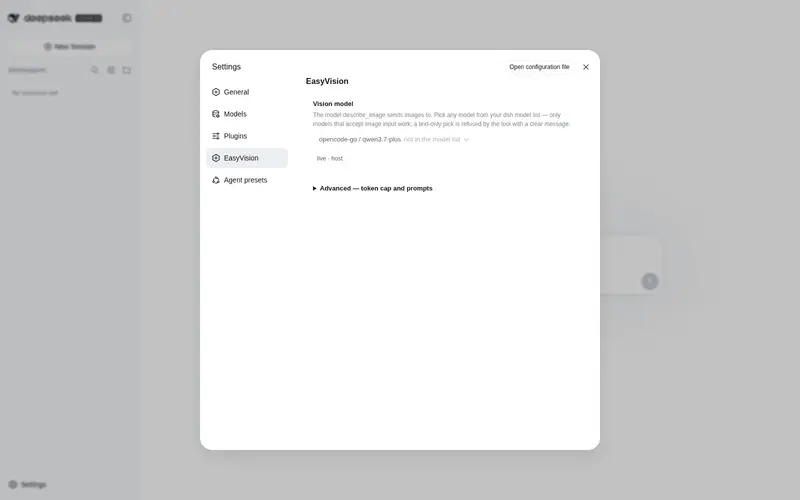
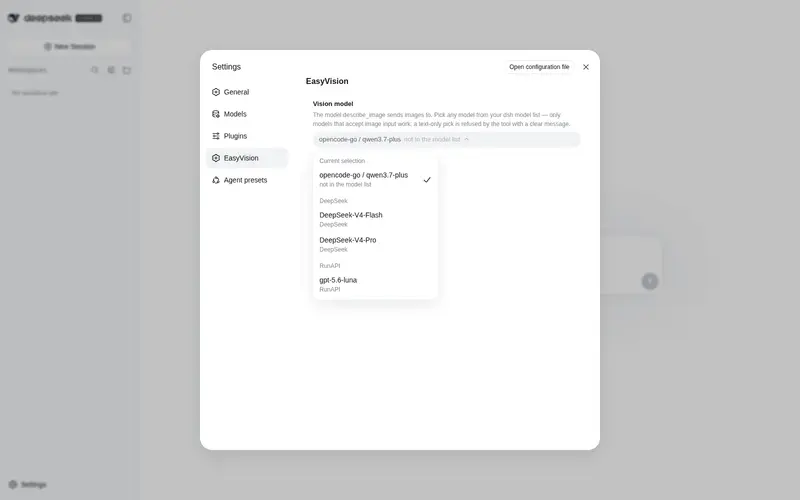
Configure the vision model in the dsh Settings UI — no file editing:

Quick start
curl -fsSL https://raw.githubusercontent.com/s3yf1337/dsh-easyvision/main/install.sh | bash
That’s it. Then open Settings → EasyVision and pick a vision-capable
model from your list (the default is qwen3.7-plus on opencode-go).
Only models that declare image input work — a text-only pick is refused by the tool with a clear message.
Demo
$ dsh "what's in testpics/1.jpg?"

  ✦ describe_image(file_paths=["testpics/1.jpg"])
  ✓ qwen3.7-plus (opencode-go) · 1024×1024

  A futuristic cityscape at night — glowing cyan and blue towers
  under three moons, rendered in a digital painting style.
How it works
Two entry points, one pipeline:
composer: drop an image into the chat ──▶ host session.prompt admission
                                              │  model text-only?
                                              ▼
                          easyvision bridge (ctx service, health check)
                                              │  admitted AS-IS: the message
                                              ▼  keeps its real image blocks
                        the chat shows the picture; the model request is
                        transformed at dispatch time (llm prepareCall/stream):
                                              │
                         ctx.llm.stream(provider, model, messages=[image blocks + prompt])
                                              │
                                   vision model (e.g. qwen3.7-plus)
                                              │
                    description text replaces the image blocks in the request
                                              │
                               text-only model reads the description

model turn: describe_image(paths, prompt?) ──▶ same vision pipeline, called as a tool
The install.sh / scripts/patch-dsh-host.mjs host patch changes the
session.prompt admission: when the conversation model is text-only and the
message carries images, the host asks the plugin’s easyvision service to
confirm it can take them instead of refusing outright. The prompt is admitted
only while the service is present (plugin active) and the configured
model resolves and declares image input (plugin configured and healthy) —
and the message keeps its real image blocks, so the web chat shows the
picture. The describing itself happens at dispatch time: the plugin wraps the
shared LLM runtime’s prepareCall/stream, and any request whose model is
text-only has its user-message image blocks replaced by the EasyVision
description before the adapter sees them. Otherwise the client gets an
actionable error naming the fix (see Troubleshooting).
The plugin validates the configured model against your dsh model list and
refuses to run when it is missing or does not declare image input — before
any image bytes are accepted.
Configuration
Everything is optional — the defaults work out of the box.
| Control | Meaning |
|---|---|
| Vision model (picker) | Any model from your dsh model list, grouped by provider — the same catalog the composer’s picker uses. |
| Advanced → Max tokens | Optional output cap for the vision call. |
| Advanced → System prompt | System prompt sent to the vision model before every call. |
| Advanced → Default prompt | Question used when describe_image is called without a prompt. |
Profile-level defaults live in the plugin’s entry config
(cordis.patch.yml) and act as the base layer: Settings overrides inherit
from it, and “Reset to default” restores it.
Tool
describe_image(file_paths: string[], prompt?: string) — sends one or more
image files to the vision model and returns its description, plus the
resolved provider/model, per-image dimensions, and whether the response hit
the token limit.
Troubleshooting
常见问题常见问题
在启用了 DSH 的终端中执行已验证命令 dsh plugin --profile default add github:s3yf1337/dsh-easyvision。命令会解析公开 package 元数据,并保持插件与本页展示的目录身份一致。
兼容性以页面上展示的 bundle 与 profile 状态为准。如果某个 profile 尚未检测到,请先保持禁用,并在生产启用前阅读仓库文档。
GitHub 链接和 activity 元数据是 release 与维护状态的来源。新版本发布后重新查看本页,确认目录已经观察到最新版本。