Smalldy/godot-bridge
DSH (DeepSeek Harness) plugin that launches and drives a running Godot 4.x game through its in-game TCP interaction server — replaces the godot-mcp MCP server with native agent tools.
已收录
10
Tools
Bundle 已验证
预览
功能介绍
DSH↔Godot 引擎运行时控制桥:通过游戏内置 TCP 交互服务器启动并操控运行中的 Godot 4.x——16 个工具(约 130 条运行时命令、场景/UI 检查、GDScript eval、输入模拟、截图、headless 静态操作、项目编辑、导出、脚本编译检查、引擎路径设置),替代 godot-mcp。
适合
- 希望由 DSH Agent 启动、检查、测试并操控运行中游戏的 Godot 4.x 开发者。
- 希望替代 godot-mcp,同时保留其游戏内换行分隔 JSON 交互服务器和命令工作流的团队。
- 需要结合运行时场景/UI 检查、输入模拟、截图、无头项目编辑、校验和导出的 Godot 自动化工作流。
不适合
- 非 Godot 4.x 项目,因为该桥接器面向这一引擎版本和协议。
- 没有让 `McpInteractionServer` autoload 监听 `127.0.0.1:9090` 的项目;运行时命令依赖该服务。
- 只提供版本管理器 shim、而非真实 Godot 可执行文件的环境,因为进程生命周期判断可能失准。
README
| English | 中文 |
godot-bridge

Native DeepSeek Harness (DSH) plugin that launches and drives a running Godot 4.x game through its in-game TCP interaction server — replacing the godot-mcp MCP server with first-class agent tools.
No MCP protocol, no Python server, no editor addon. The game side is untouched: McpInteractionServer (the mcp_interaction_server.gd autoload) already listens on 127.0.0.1:9090 and speaks newline-delimited JSON — godot-bridge speaks the same protocol natively from inside the DSH host.
Tools
| Tool | Replaces (godot-mcp) | Purpose |
|---|---|---|
godot_run_project |
run_project |
Launch the project in debug mode (godot -d --path …), wait for port 9090 |
godot_stop_project |
stop_project |
Terminate the game process (tree-scoped kill) |
godot_get_debug_output |
get_debug_output |
Incremental stdout/stderr of the launched process |
godot_command |
all game_* (~130) |
Send any interaction-server command: get_scene_tree, get_ui_elements, eval, get/set_property, call_method, click, key_press, screenshot, raycast, serialize_state, ui_*, … |
godot_screenshot |
game_screenshot |
Viewport capture as base64 PNG |
godot_ping |
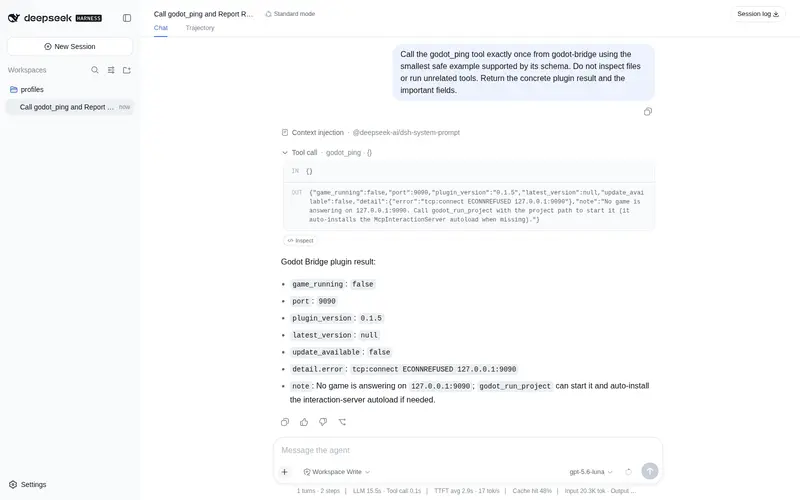
— | Probe whether the game answers on 9090 (also reports installed/latest plugin version) |
godot_set_engine_path |
— | Persist the Godot engine executable path into settings (the model asks the user for it, then saves it here; hot-reloaded) |
godot_headless_op |
read_scene, modify_scene_node, remove_scene_node, attach_script, create_resource, save_scene, create_scene, add_node, get_uid, manage_scene_signals, … |
Headless static operations (godot --headless --script godot_operations.gd): 16 ops, no running game needed |
godot_validate_script |
validate_script |
Headless GDScript compile-check via validate_script.gd → {valid, errors}
|
godot_set_project_setting |
modify_project_settings, set_main_scene, manage_layers, manage_plugins, manage_translations
|
Set a typed key in any project.godot section (PackedStringArray(...) / Vector2i(...) / bool / …) |
godot_manage_autoloads |
manage_autoloads |
List / add / remove autoload singletons (Name="*res://…") |
godot_manage_input_map |
manage_input_map |
List / add / remove input actions — correct Godot 4 keycodes (fixes godot-mcp’s Godot 3 baseline bug) |
godot_manage_export_presets |
manage_export_presets |
List / add / remove export presets (export_presets.cfg) |
godot_create_script |
create_script |
GDScript template (extends / class_name / method stubs / source) |
godot_create_project |
create_project / create_csharp_script
|
Project scaffold, optional Godot .NET .csproj
|
godot_export_project |
export_project |
Headless export (--export-release / --export-debug <preset> <output>) |
The remaining godot-mcp tools were implemented in the MCP server’s own Node process: pure file/editor operations are covered by DSH’s native file tools, while a handful carry Godot-specific write logic (manage_input_map, manage_export_presets, modify_project_settings, project/script templates) that a generic edit replaces only with format knowledge — see COVERAGE.md for the full breakdown.
How it works
DSH session
  └─ godot-bridge (Host plugin)
       ├─ godot_run_project ──────► subprocess.spawn(Godot -d --path <project>)
       ├─ godot_get_debug_output ─► collect-mode output (incremental offsets)
       └─ godot_command / godot_screenshot / godot_ping
            └─ subprocess.spawn(node -e <bridge> <command> <paramsJson>)
                 └─ TCP 127.0.0.1:9090 ◄── in-game McpInteractionServer autoload
- The in-game protocol (
{command, params, id}+ newline) is identical to godot-mcp, so the game side and any existing workflows keep working. - Each command spawns a one-shot
node -ebridge that connects, sends one line, prints the first response line, and exits. The game server is single-connection/single-command (_busy), so short-lived connections are a perfect fit. - Spawning uses the harness’s raw
subprocessservice (not the sandboxed shell executor), so Godot can write itsuser://files without the DSH file sandbox killing it (see Pitfalls).
Requirements
- DeepSeek Harness (a session with a host runtime)
- A Godot 4.x project with the
McpInteractionServerautoload registered. If your project does not have it yet, copyplugin/mcp_interaction_server.gdto the project root and register it as an autoload namedMcpInteractionServer(godot-mcp projects already have this).godot_run_projectalso auto-installs it when missing (copies the vendored file intoautoload/and registers it inproject.godot), so no manual setup is needed — and non-Godot projects are completely unaffected. -
nodeon PATH - Godot executable — resolved in this order: the
godot_pathtool argument → thegodotPathsetting (the Web plugin-config page, or thegodot-bridge:section ofsettings.yaml) → thegodotcommand on PATH. Nothing to configure whengodotis on PATH; otherwise set your engine path in settings (the plugin author does not preset it — Godot is a portable exe that can live anywhere). Use the real exe full path, never a version-manager shim (see Pitfalls).
Install
Recommended — one command (requires the dsh CLI):
dsh plugin --profile web add github:Smalldy/godot-bridge
dsh plugin is a pnpm forwarder: it installs the package into the profile’s node_modules and — because the package declares dsh.bundle (its cordis.patch.yml inserts the tool-godot-bridge row) — appends it to the profile’s dsh.profile.bundles layer list. The web profile is the standard one the Web app already boots from, so this simply adds the tools to standard mode — no new profile is created. After a restart, the sixteen godot_* tools are available in every session on that profile. Listed in the awesome-dsh-plugin community registry (topic: dsh-plugin).
The same command installs a local checkout or tarball (dsh plugin --profile web add ./path/to/godot-bridge).
The plugin is a standard DSH bundle module: it imports
defineToolfrom@deepseek-ai/dsh-toolsand registers viactx.tools.register. It must be installed through the bundle mechanism above — the harness heals the shared@deepseek-ai/*dependency layer inside the profile’snode_modules, which is what makes the import resolve. Do not copy the file into a user agent preset (~/.dsh/.agent-presets/...); Node cannot resolve@deepseek-ai/dsh-toolsfrom that location.
Uninstall
dsh plugin --profile web remove godot-bridge
Removes the package and its godot-bridge bundle layer from the profile — after a restart the sixteen godot_* tools are gone from sessions on that profile. The standard web profile itself is untouched (this never creates or removes a profile). Stop any running game first with godot_stop_project; the plugin’s unload cleanup also terminates a Godot child it started. Reinstall any time with the add command above.
Update notices
On load the plugin does a best-effort version check: it fetches the repo’s main-branch package.json (raw.githubusercontent.com, 5s timeout, silent on failure/offline) and compares it with the installed version. When a newer version exists it registers a system-prompt section, so the model surfaces “godot-bridge update available: installed X, latest Y” in every session until the plugin is updated (dsh plugin --profile web update godot-bridge, then restart DSH). godot_ping additionally reports plugin_version / latest_version / update_available for on-demand checks.
To publish an update: bump version in package.json (the release marker) and push — an unchanged version triggers no notice. Forks: set repository in package.json and the check follows the fork automatically.
Known limitations: the notice is a system-prompt section, so presets whose persona is complete/suppressing (e.g. 极简模式 / minimal) do not show it; the check needs network access at boot.
Usage
godot_run_project            # start the game (default: current workspace)
godot_ping                   # confirm 9090 answers
godot_command get_scene_tree # inspect the scene graph
godot_command get_ui_elements
godot_command eval {code: "return get_tree().current_scene.name"}
godot_command click {x: 576, y: 300}
godot_screenshot             # view the game
godot_get_debug_output       # read the boot log
godot_stop_project           # done
Godot executable resolution: per-tool godot_path argument → the godotPath setting (the Web plugin-config page, or the godot-bridge: section of settings.yaml) → the godot command on PATH. Nothing to configure when godot is on PATH; otherwise set the engine path in settings and point at the real exe, never a shim.
Pitfalls (learned the hard way)
-
DSH file sandbox vs Godot
user://: launching Godot through the sandboxed shell executor (pwsh/bash tool) propagates a restricted token and Godot crashes at startup (Failed to open 'user://logs/…', signal 11). godot-bridge spawns via the rawsubprocessservice, which is not file-confined — this is why it works. -
node -eargv: withnode -e <script> <cmd> <json>, extra args land atprocess.argv[1]/[2](not[2]/[3]). -
eval in debug mode: a compile error in
evalcode pauses the game at the debugger (same as godot-mcp). Use dynamic access (p.get("global_position")) to dodge static typing, andgodot_stop_project+godot_run_projectto recover. - Real exe, not a version-manager shim: a shim exits immediately and orphans the real Godot; process management misjudges it as dead.
Project layout
plugin/godot-bridge.mjs           # the plugin (standard DSH module, named exports name/inject/apply)
plugin/mcp_interaction_server.gd  # vendored from godot-mcp (MIT) — in-game TCP server autoload
plugin/godot_operations.gd        # vendored from godot-mcp (MIT) — headless ops script
plugin/validate_script.gd         # vendored from godot-mcp (MIT) — GDScript compile-check
package.json                      # dsh.bundle manifest (for `dsh plugin add`)
cordis.patch.yml                  # bundle patch layer (inserts the tool row)
install.md / install.zh-CN.md     # detailed install & maintenance
ARCHITECTURE.md / ARCHITECTURE.zh-CN.md  # how it replaces godot-mcp + protocol details
COVERAGE.md / COVERAGE.zh-CN.md   # full tool-by-tool comparison vs godot-mcp
CHANGELOG.md / CHANGELOG.zh-CN.md  # release history
mcp_interaction_server.gd, godot_operations.gd and validate_script.gd are vendored from godot-mcp (MIT). The plugin locates the headless scripts relative to the module (import.meta.url); pass an explicit ops_script / validate_script argument to override.
License
MIT
常见问题常见问题
在启用了 DSH 的终端中执行已验证命令 dsh plugin --profile default add github:Smalldy/godot-bridge。命令会解析公开 package 元数据,并保持插件与本页展示的目录身份一致。
兼容性以页面上展示的 bundle 与 profile 状态为准。如果某个 profile 尚未检测到,请先保持禁用,并在生产启用前阅读仓库文档。
GitHub 链接和 activity 元数据是 release 与维护状态的来源。新版本发布后重新查看本页,确认目录已经观察到最新版本。