text2future/flowix · dsh-flowix-memory
Notes for you, Memory for your agents. / 内置 Deepseek harness Agent / 适用 办公 & 写作 & Coding
已收录
316
Memory
Bundle 已验证
预览
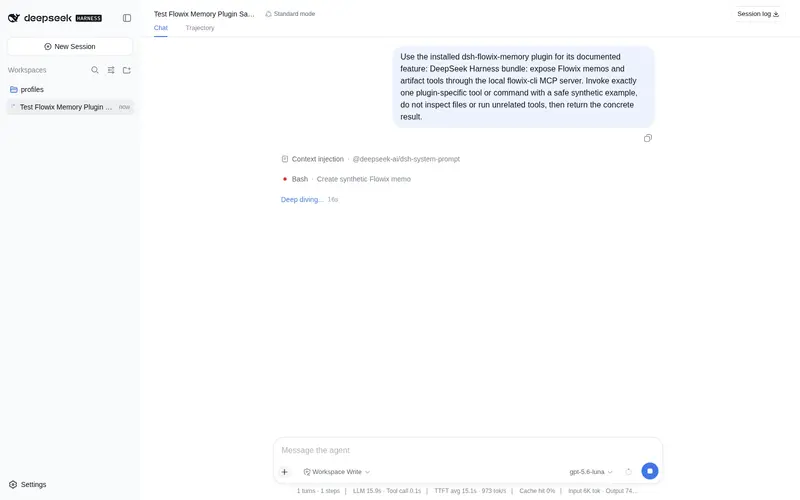
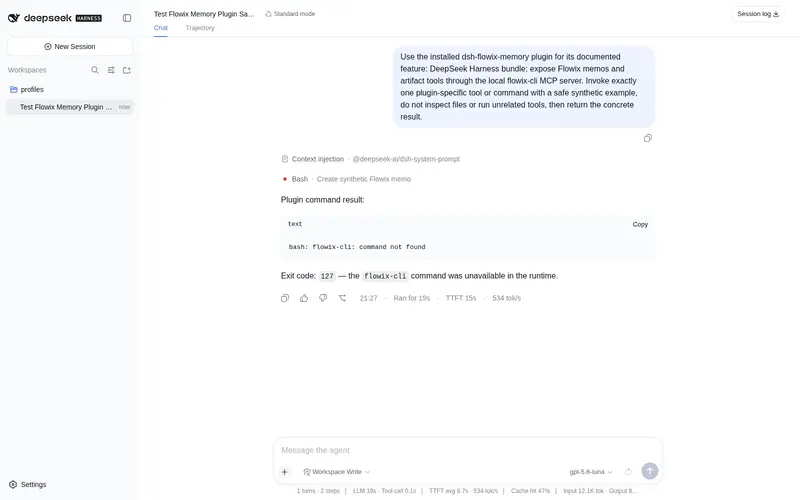
功能介绍
将本地 flowix-cli 注册为 MCP 服务,让 agent 可以搜索、读取、创建和编辑 Flowix 备忘与思维导图产物。
适合
- 适合希望 DSH agent 搜索、读取、创建和编辑本地 Markdown 备忘的 Flowix 用户。
- 适合在多个 agent 之间复用持久上下文的产品、开发、研究和个人知识工作流。
- 适合通过共享本地 Flowix 笔记本管理备忘和思维导图产物的用户。
- 适合让多个支持 MCP 或 CLI 的 agent 使用同一批选定笔记的团队。
不适合
- 不适合没有 Flowix 笔记本,或无法通过 PATH、FLOWIX_CLI_PATH 使用 flowix CLI 的用户。
- 不适合必须从 npm 已发布包安装的环境;该插件目前从 Flowix 源码 checkout 安装。
- 若事实来源不在 Flowix,且无需本地备忘或思维导图操作,则价值有限。
README
| 简体中文

Notes for you,
Memory for your agents.
The Markdown notebook where your words seamlessly become durable context for AI agents.
Markdown · Open Source · Multi Agent · MCP & CLI

Flowix turns notes into working memory
Write in Markdown, point an agent to the context it needs, and save the result back to the same note — ready to review, edit, and reuse next time.

Keep work moving
Keep product work, development, research, and personal knowledge together, so agents can continue without starting over.
| Use case | What it does |
|---|---|
| Product work | Keep requirements, feedback, decisions, and PRDs up to date. |
| Software development | Give coding agents the context to continue your project. |
| Research | Keep sources, analysis, and conclusions together and reusable. |
| Personal knowledge | Turn notes, plans, and preferences into useful agent context. |

Connect every agent to the same memory
Use agents inside Flowix or connect Codex, Claude Code, OpenCode, Hermes, and other MCP or CLI tools — all working from the same notes and context.

dsh-flowix-memory plugin
dsh-flowix-memory is a DeepSeek Harness plugin that connects any Harness agent to your local Flowix notes through the bundled flowix-cli MCP server: the agent gets the mcp__dsh-flowix-memory__flowix_memo tool to search, read, create, and edit Flowix memos (including mind maps).
Install it into a Harness profile (--profile <name> is required; shipped profiles: web, headless), from the flowix-main checkout (not yet published to npm):
dsh plugin --profile <name> add ./app/flowix-dsh-host/bundles/dsh-flowix-memory
Requires the flowix CLI on PATH (or set FLOWIX_CLI_PATH) with access to your notebook data (~/.flowix). See the plugin README for details.
Your notes stay local and under your control
Flowix keeps your work as plain Markdown files on your device. You choose what agents can access, when context is sent, and how your files are synced, backed up, or versioned.
- Files you can open anywhere — Your notes are saved as plain Markdown on your device, so you can read and edit them with other apps.
- Agents see only what you choose — Share a single note, a folder, or a whole notebook — only when you want an agent to use it.
- Use the agents you already trust — Connect Codex, Claude Code, OpenCode, or another external agent. Flowix shares only the context you choose, when you start a task.
- Sync and back up your way — Use the sync, backup, or version-control tools you already trust. There’s nothing to export.
Product preview
 Note library with tags |
 Note detail with agent presets |
 Agent model picker |
 Full-text and file search |
 Provider and MCP configuration |
 Code file browsing and editing |
Quick start
- Download and install Flowix from the website.
- Create a new local folder, or register an existing folder as a notebook.
- Create a document and write down the task background, reference materials, goals and constraints.
- Call an agent from within the document, or keep organizing content with tags and properties.
Local development
git clone https://github.com/text2future/flowix.git
cd flowix
npm install

npm run tauri dev
npm run dev
npm run tauri build
The development environment requires Node.js 20+, Rust 1.75+ and Tauri v2; the desktop app supports macOS 14+ and Windows 10+.
License
Flowix is open source under the MIT License.
常见问题常见问题
在启用了 DSH 的终端中执行已验证命令 dsh plugin --profile default add github:text2future/flowix#path:/app/flowix-dsh-host/bundles/dsh-flowix-memory。命令会解析公开 package 元数据,并保持插件与本页展示的目录身份一致。
兼容性以页面上展示的 bundle 与 profile 状态为准。如果某个 profile 尚未检测到,请先保持禁用,并在生产启用前阅读仓库文档。
GitHub 链接和 activity 元数据是 release 与维护状态的来源。新版本发布后重新查看本页,确认目录已经观察到最新版本。