Tkingxiao/dsh-any-background
一个自定义主题插件,包括背景图(大小和位置),主界面和设置界面(透明度,色轮全色主题色)插件
已收录
9
Theme
Bundle 已验证
预览
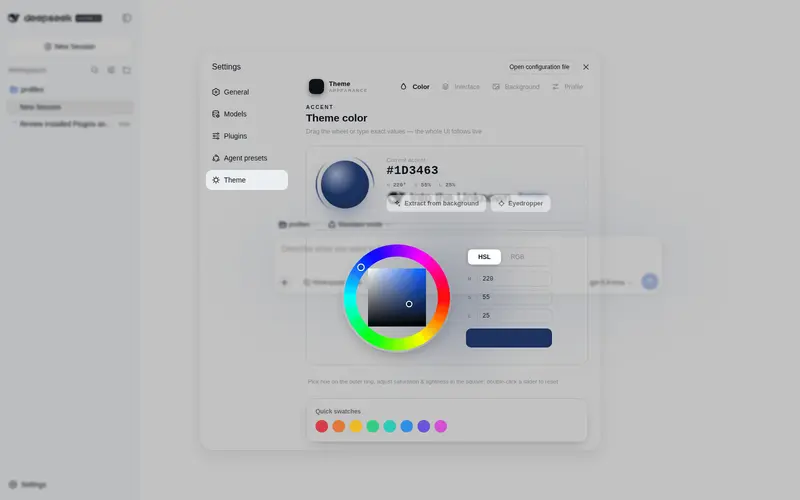
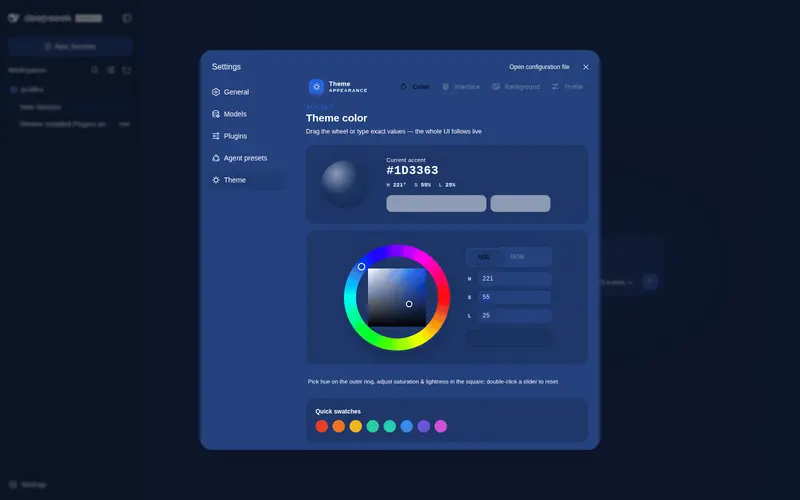
功能介绍
一个主题外观插件,让你完全自定义 Web 端的主题色、背景壁纸,以及主页分部位精细的透明度与模糊度控制,还可导出导入主题设置进行分享。
适合
- 希望深度自定义 DeepSeek Harness Web 界面的用户。
- 使用图片、视频或生成式动态壁纸,并需要精确调整位置的用户。
- 需要通过导入导出分享完整主题(包括内嵌壁纸媒体)的个人或团队。
不适合
- 只需要固定成品主题、不打算细调外观的用户。
- 要求桌面端透明度表现完全一致的用户;已知 Electron 打包问题可能使侧栏与中央区域的透明度呈反向效果。
- 不希望在本机 DSH 主目录下保存主题设置和媒体文件的环境。
README
dsh-any-background

| English | 中文 |
A DeepSeek Harness appearance plugin that lets you fully customize the Web UI — custom theme color, background wallpaper, and fine-grained per-part opacity & blur controls.
Screenshots

Custom homepage · wallpaper + theme color applied

Theme color picker · PS-style wheel + precise HSL/RGB inputs

Per-part opacity and blur · main background, sidebar, cards, settings

Background editor · image/video wallpapers support drag-to-pan and scroll-to-zoom

Generated dynamic background · mesh gradient / Shader / geometric presets

Generated dynamic background · geometric low-poly mode preview

Export and import configs to share
Features
- PS-style Color Wheel — Pick hue on the ring, adjust saturation & lightness in the inscribed square. Generates 30+ CSS design tokens in real time.
- Precise HSL / RGB Input — Enter exact color values numerically with instant bidirectional sync to the wheel.
- Smart Color Extraction — One click derives a theme color from your wallpaper by sampling the visible region, quantizing, and filtering out gray / near-black / near-white pixels. Video wallpapers contribute via an auto-captured frame. Fully client-side.
- Eyedropper — Hover the wallpaper to preview a color and click to pick it as the theme color.
- Background Wallpaper — Upload any image as your wallpaper. Drag to pan and scroll to zoom inside a viewport-proportional editor.
- Video Wallpaper — Use a video as a live wallpaper: muted looping playback that survives refreshes (file persistence + HTTP streaming with Range seek), with an auto-captured frame powering the preview, theme-color extraction, and the position editor.
- Position Editor — One shared editor for images and videos: drag to pan, scroll to zoom, one-click reset. Image and video placements are stored separately and never overwrite each other.
- Layout Modes — Fit / Fill / Stretch / Tile / Center for both images and videos; in Fit mode the editor-committed framing stays consistent across window resizes and cross-monitor moves.
- Generated Dynamic Backgrounds — Choose mesh gradient, Shader, or geometric patterns with adjustable spread, intensity, and seed locking.
- Per-part Interface Opacity — Independent sliders for main background, sidebar, cards & panels, plus the settings panel and wallpaper.
-
Per-part Interface Blur — Frosted-glass
backdrop-filterblur (0–60 px) for each interface part. - Conversation View Cards — The message list is wrapped in a translucent card automatically, and the trajectory page gets whole-page opacity & blur controls, letting the wallpaper shine through the content.
-
Theme Export / Import — One-click export to a self-contained
dsh-any-theme.json(config + wallpaper, video embedded as a data URL) and import to restore it anywhere. -
File-based Persistence — All settings are stored on the filesystem under
~/.dsh/.dsh-any-background-data/, notlocalStorage. - Bilingual — Full Chinese / English UI with automatic locale detection.
- Theme Watchdog — Re-asserts the custom theme if the host resets it.
Recent Optimizations
-
Video wallpaper end-to-end — Videos are stored under MIME-derived names (
wallpaper.mp4/webm/...) and streamed over the plugin’s own HTTP route; they restore automatically after refresh or restart and travel inside exported configs. - Binary upload for large videos — Uploads stream raw bytes over an HTTP POST straight to disk instead of a base64 detour through RPC (no channel body limit, any size works); aborted transfers clean up after themselves.
- Video position editing — The placement editor works on a captured frame reference with zoom/pan, adapted to all five layout modes; image and video framings persist independently.
- Conversation view cards — The message column gains an automatic card (border/radius/padding) and the trajectory page gets whole-page opacity & blur; switching views restores the previous host.
-
Boot flicker eliminated — Theme tokens are injected through a dedicated
!importantstylesheet instead of inlinebodystyles, surviving host theme service resets. - Color wheel overlap fixed — The hue ring is drawn on top of the saturation/lightness square so the square corners no longer cover the ring.
- Inspiration palette selection cleared — Picking a theme color from the wheel deselects any previously selected inspiration swatch.
-
Debug telemetry removed — Temporary boot-time logging and
MutationObserverinstrumentation have been cleaned out. -
Per-part blur isolated — Blur is applied on
::beforeunderlays so it never traps the host’s fixed-position settings dialog.
Installation
Method 1: npm install (Recommended)
dsh plugin --profile web add github:Tkingxiao/dsh-any-background
# or, if published to the registry:
dsh plugin --profile web add dsh-any-background
Then launch:
dsh web
The plugin appears as a “Theme” section in Settings.
Method 2: npx (No Global Install)
npx @deepseek-ai/dsh plugin --profile web add github:Tkingxiao/dsh-any-background
npx @deepseek-ai/dsh web
Method 3: Local Build (Development)
The lib/ directory is committed, so installs need no build step. To rebuild after editing src/:
git clone https://github.com/Tkingxiao/dsh-any-background.git
cd dsh-any-background
pnpm install
pnpm run bundle
pnpm dsh plugin --profile web add "dsh-any-background"
pnpm dsh web
Compatibility
-
dsh web— Full support. - deepseek-harness-desktop — Supported; a known Electron packaging issue makes the left sidebar and center area opacity appear inverted — awaiting a desktop-client update to fix it.
Star History
License
MIT
常见问题常见问题
在启用了 DSH 的终端中执行已验证命令 dsh plugin --profile default add github:Tkingxiao/dsh-any-background。命令会解析公开 package 元数据,并保持插件与本页展示的目录身份一致。
兼容性以页面上展示的 bundle 与 profile 状态为准。如果某个 profile 尚未检测到,请先保持禁用,并在生产启用前阅读仓库文档。
GitHub 链接和 activity 元数据是 release 与维护状态的来源。新版本发布后重新查看本页,确认目录已经观察到最新版本。