0nt-one/dsh-neo-skin
Neo-brutalism skin for the DeepSeek Harness Web UI — hard borders, high contrast, two switchable schemes (Blue Command / Aged Newspaper), works in light and dark themes.
Listed
1
Theme
Bundle verified
Preview
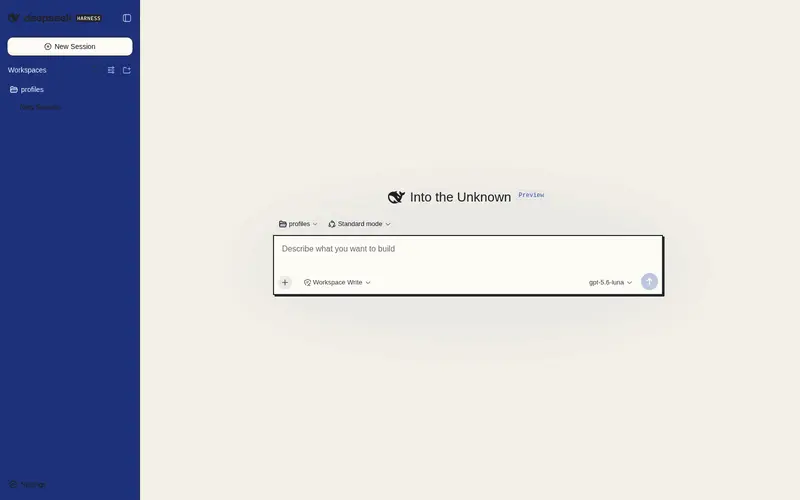
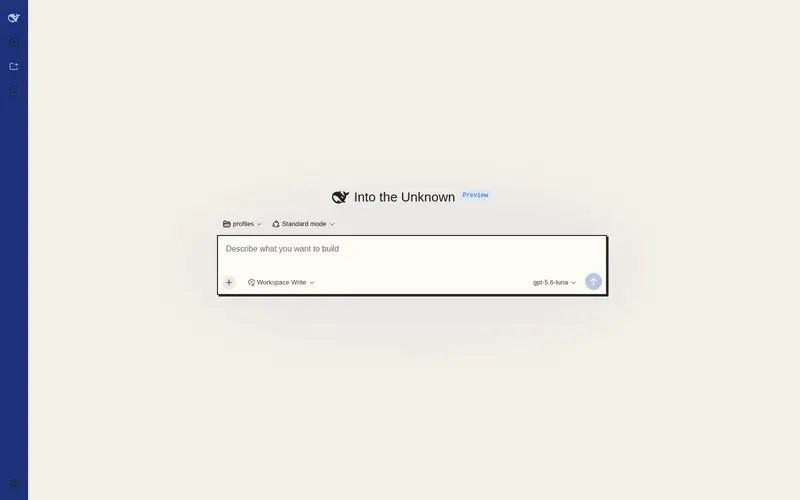
What it does
Neo-brutalism skin with two switchable schemes (Blue Command / Aged Newspaper), hard shadows, sharp corners, and light/dark theme support.
Best for
- DSH Web users who want a high-contrast neo-brutalist interface with hard shadows, sharp corners, and two live-switchable visual schemes.
- Users who want the skin to follow the existing light, dark, or system appearance setting and optionally style the voice-input UI consistently.
Not ideal for
- Non-Web workflows or users seeking functional changes rather than a visual skin.
- Deployments that cannot tolerate maintenance after major DSH UI changes; part of the structural styling depends on component class-name suffixes.
README
dsh-neo-skin 🧱
Neo-brutalism skin for DeepSeek Harness Web UI — 新粗野主义换肤插件:硬边框、高对比、色块分明的粗野主义风格,内置两套方案可随时切换。




Screenshots / 预览
| 浅色 · 蓝统治 | 深色 · 蓝统治 | 做旧报纸 |
|---|---|---|
 |
 |
 |
截图放
screenshots/目录,文件名对应上表;开发期也可打开仓库里的preview.html交互对比两套方案 × 浅/深色。
| 方案 | Light 浅色 | Dark 深色 |
|---|---|---|
| 蓝统治 Blue Command(默认) | 深蓝侧栏 + 米白纸感 | 蓝黑画布 |
| 做旧报纸 Aged Newspaper | 泛黄纸 + 墨字 + 衬线报头 | 报纸夜间版 |
English — What is this?
A zero-dependency client skin plugin for the DeepSeek Harness Web UI. It stacks a
neo-brutalism palette and structure over the built-in light/dark themes via the official
theme service — it never replaces the built-in theme, so the Appearance row
(light / dark / system) keeps working and your skin applies to both palettes.
Features
- 🎨 Two built-in schemes, switchable live from Settings → General → Neo 皮肤
(persisted in
localStorage, no reinstall):- Blue Command — deep-blue sidebar & buttons, blue-black dark mode
- Aged Newspaper — yellowed paper, ink text, serif editorial type, masthead red
- 🧱 Structure layer — hard offset shadows (theme-aware black/white), sharp corners, 2px borders, button press feedback
- 🎛️ On/off toggle + scheme picker in the settings row
- 🎙️ Adapts
dsh-voice-inputUI (popover, pills, states) to the skin - 🌗 Fully theme-aware: light/dark/system all work
Quick install (offline / dev)
# 1. build the bundle (zero deps, no npm install)
npm run build

# 2. install into the web profile
dsh plugin --profile web add <path\to\dsh-neo-skin>

# 3. register the roster row in .dsh/profiles/web/cordis.patch.yml:
#    - insert:
#        - id: dsh-neo-skin
#          name: 'dsh-neo-skin'

# 4. restart `dsh --profile web`
On the first install the host must restart to mount the plugin; afterwards a browser hard-refresh is enough to pick up rebuilt bundles.
中文 — 详细介绍
它怎么工作
DSH 官方主题插件(@deepseek-ai/dsh-client-ui-theme)提供 theme 服务,
ui-layout 把当前主题快照的 token 以 inline CSS 变量写到 <body>。
本插件调用 ctx.theme.overrideTokens(source, tokens),把 --dsw-alias-* 语义 token 的
{ light, dark } 双配色表叠加到官方浅色/深色之上——右上角外观里的
浅色 / 深色 / 跟随系统 三档照常工作。
功能清单
-
开关(v0.2.0):设置 → 常规 → Neo 皮肤,开启/关闭胶囊按钮,持久化在
localStorage: dsh-neo-skin.enabled(默认开启);关闭即回到官方配色。 -
双方案(v0.6.0):同一行「方案」选择器(蓝统治 / 做旧报纸),持久化在
dsh-neo-skin.scheme,实时切换整套配色 + 结构覆写。 -
结构层(v0.3.0):硬偏移阴影(浅色黑 / 深色白,随主题)、关键面板直角化
(
_card/_bubble/_panel/_code/_option…)、2px 粗边框、按钮按下位移反馈。 -
语音插件适配(v0.5.0):
dsh-voice-input弹层/按钮/状态色主题化(它引用了 不存在的--dsw-alias-*token,走 fallback 会在浅色下黑底黑字,皮肤里已修正)。 - 对比度纪律:所有色面文字对比逐一校验(”推荐”徽章蓝底蓝字、深色主按钮蓝底黑字 这类事故已修复)。
注意:结构层通过
[class*="_xxx"]可读后缀选择器命中组件(哈希变化不碎), DSH 大版本重构类名时可能需要微调;圆形小元素(状态点、头像、spinner)保持圆形。为什么用
localStorage而不是dsh-settings命名空间:host apiproxy 只对白名单 (WEB_SETTINGS_NAMESPACES)开放settings.describe,第三方插件注册的命名空间会得到settings-not-exposed;官方把”让插件自行暴露配置”列为 deferred work。用 localStorage 保证插件自包含、可直接发布,无需改 DSH 核心。
安装(离线开发)
cd <path\to\dsh-neo-skin>
npm run build
dsh plugin --profile web add <path\to\dsh-neo-skin>
# 然后在 .dsh/profiles/web/cordis.patch.yml 注册:
#   - insert:
#       - id: dsh-neo-skin
#         name: 'dsh-neo-skin'
# 重启 dsh --profile web
调色 / 加新方案
- 每个方案一个目录项:
src/schemes/<name>.tokens.json(light/dark 配色表)、<name>.meta.json(显示名)、<name>.css(方案专属结构覆写)。 - 改完跑
npm run build,浏览器硬刷新即可(无需重启 host)。 - token 命名对齐官方
design-platform.css:--dsw-alias-bg-*/border-*/label-*/button-*/interactive-*/state-*,--dsw-specific-*局部专用。
目录结构
dsh-neo-skin/
├── client.js              # 构建产物:浏览器 bundle(__ModuleLoader__ 格式)
├── package.json           # dsh.client 元数据声明自己是 web 客户端插件
├── preview.html           # 开发期方案对比预览页(不打包)
├── src/
│   ├── bundle.template.js # bundle 模板(占位符注入)
│   └── schemes/           # ★ 换肤核心:每方案 token 表 + 结构覆写
│       ├── blue.tokens.json      # 「蓝统治」light/dark 配色表
│       ├── blue.meta.json        # 方案显示名
│       ├── blue.css              # 深蓝侧栏文字覆写
│       ├── newspaper.tokens.json # 「做旧报纸」light/dark 配色表
│       ├── newspaper.meta.json
│       └── newspaper.css         # 衬线报头 / 徽章解耦
└── scripts/
    └── build.mjs          # 零依赖构建:编译 schemes → client.js
License
MIT
Frequently Asked QuestionsFAQ
Use the verified command dsh plugin --profile default add github:0nt-one/dsh-neo-skin in a DSH-enabled shell. The command resolves the public package metadata and keeps the plugin attached to the catalog identity shown on this page.
Compatibility follows the bundle and profile status shown above. If a profile is not detected, keep the plugin disabled there and check the repository documentation before enabling it in production.
The GitHub link and activity metadata are the source of truth for releases and maintenance. Revisit this page after a new release to confirm the catalog has observed the latest version.