AKS1st/dsh-archived-conversations
Show archived conversations in the DSH Web sidebar footer with read-only message previews.
Listed
0
Session
Bundle verified
Preview
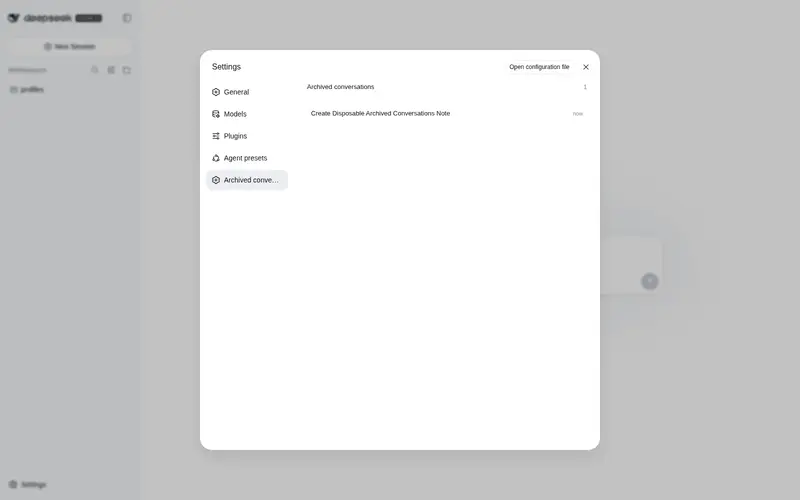
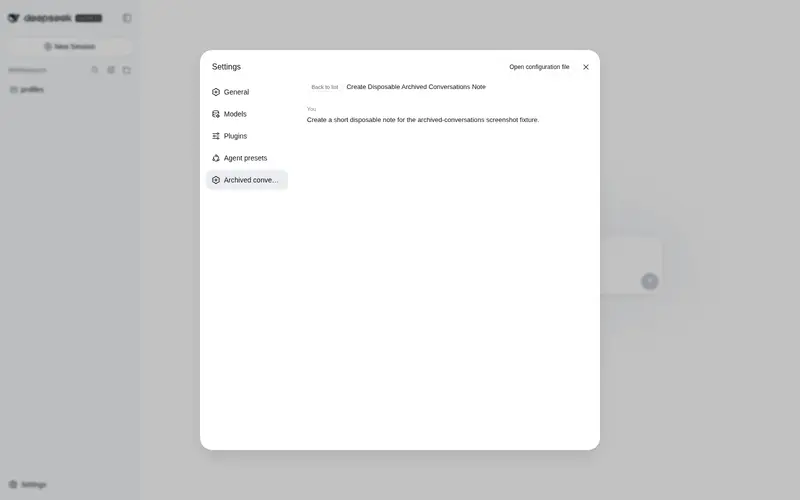
What it does
Archived conversations list in the sidebar footer with read-only previews of the most recent messages, for sessions the product deliberately keeps hidden and unreopenable.
Best for
- Users who need to find archived DSH conversations that are otherwise hidden from the normal session list.
- Users who want a quick, read-only reminder of the latest user and assistant exchanges without changing the active session.
Not ideal for
- Anyone who needs to reopen, continue, restore, or unarchive a conversation; DSH provides no unarchive API and deliberately prevents archived sessions from remaining open.
- Auditing or full-history review; previews include only the latest six user/assistant text messages, each truncated to 400 characters.
- Workflows that need reasoning traces, tool calls, files, or complete logs in the preview.
README
dsh-archived-conversations
在 DSH Web 设置页显示已归档对话列表,点击条目可只读预览最近的用户/助手消息。独立插件,通过 dsh plugin 安装进 web profile。
为什么是”只读预览”
DSH 产品有意禁止打开归档会话:客户端 workspaces 服务有一条强制规则——归档会话一旦成为当前会话就被立即清除回”新对话”状态(”隐藏的行不能保持打开”),且当前 Host 端没有取消归档(unarchive)API。因此本插件不尝试打开或恢复归档会话,而是提供安全的只读预览:
- 入口在设置面板(
settings.section,idarchived-conversations,导航项”已归档对话”); - 页面列出所有已归档对话(标题 + 相对时间 + 数量徽标);
- 点击某条 → Host 读取该会话日志,提取最近 6 条用户/助手文本消息(每条截断 400 字符)返回展示;
- 完全不切换当前会话、不修改任何状态、不暴露完整日志。
工作方式
-
Host 半部(
src/index.ts):注册 webServer 精确路由GET /__archived-conversations/preview?sessionId=<id>,通过sessionQuery.readSession(live-preferred,冷会话走持久化)读取日志,只提取user/message(真实用户来源)与assistant/message的纯文本块,限量返回 JSON。 -
Client 半部(
src/client/index.js):window.__ModuleLoader__.load静态 bundle,require('react'),注册settings.section条目,用 fetch 调 Host 预览路由;列表数据来自槽位标准 props(useSessions/useWorkspaces)。
安全设计
本插件的预览路由在发布前经过独立安全审核,并做了如下加固:
-
IDOR 防护:预览路由只在
sessionId属于 registry 归档集合(workspaceRegistry.archivedSessionIds)时才响应,活动会话、子代理会话一律不可读(404); -
会话 id 校验:
sessionId必须是 DSH 会话 id 形态(session-前缀 + UUID/计数器),否则拒绝; - 最小数据:只返回最近 6 条、每条 ≤400 字符的纯文本消息;不返回推理内容、工具调用、文件内容或完整日志;
-
XSS 安全:消息文本在浏览器端以 React 文本节点渲染(自动转义,无
innerHTML/dangerouslySetInnerHTML); - 固定错误文案:错误响应使用固定文本,不泄露内部错误细节、堆栈或路径;
-
响应头:
Cache-Control: no-store+X-Content-Type-Options: nosniff; - 不携带凭据:插件不读取、不发送任何文件、凭据或系统信息;路由只读、同源。
说明:路由本身是 DSH 静态插件与 Host 通信的标准模式(
webServer.register+ fetch,与dsh-mermaid等社区插件一致)。DSH web 服务默认绑定127.0.0.1(仅本机可达)。若部署方将 web 端口暴露到局域网/公网,请确保访问层有独立的认证与网络策略。
安装
从 GitHub 仓库安装(构建在 prepare 脚本里自动执行):
dsh plugin --profile web add github:AKS1st/dsh-archived-conversations
dsh web   # 重启 web 服务使 profile 生效
若 pnpm 提示 git 依赖需要执行构建脚本(
ERR_PNPM_GIT_DEP_PREPARE_NOT_ALLOWED), 按提示把包加入 profile 的pnpm-workspace.yaml的allowBuilds后重试即可。
本地开发(先构建再安装):
npm install
npm run build
dsh plugin --profile web add .
dsh web
卸载:
dsh plugin --profile web remove archived-conversations
许可
MIT
Frequently Asked QuestionsFAQ
Use the verified command dsh plugin --profile default add github:AKS1st/dsh-archived-conversations in a DSH-enabled shell. The command resolves the public package metadata and keeps the plugin attached to the catalog identity shown on this page.
Compatibility follows the bundle and profile status shown above. If a profile is not detected, keep the plugin disabled there and check the repository documentation before enabling it in production.
The GitHub link and activity metadata are the source of truth for releases and maintenance. Revisit this page after a new release to confirm the catalog has observed the latest version.