AKS1st/ikun-theme-skin
IKUN 主题皮肤 for DeepSeek Harness — ikun 应援主题、全屏壁纸轮播、基尼太美音乐盒、发送自动播「你干嘛~哎哟」
Listed
3
Theme
Bundle verified
Preview
What it does
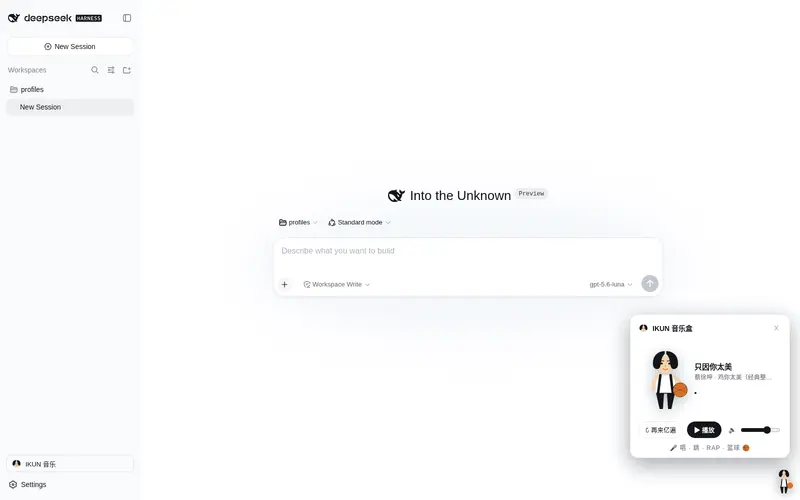
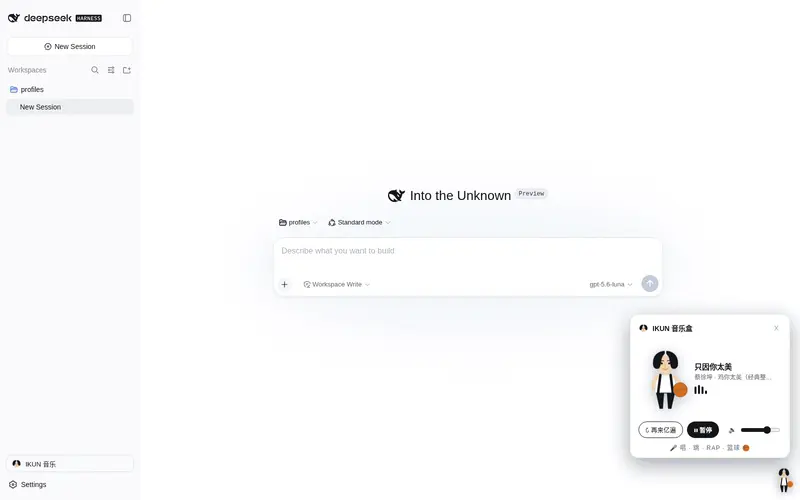
IKUN fandom skin for the DSH Web UI: star-blue and black-gold palettes in the system theme list, full-screen photo wallpaper rotation, a music box, and a send-button voice line.
Best for
- IKUN fans who want a strongly themed DSH Web experience with dedicated palettes, wallpapers, music, and a send sound.
- Personal or entertainment-focused DSH setups where rotating photos and fandom effects are desirable.
- Users who want the fandom palettes integrated into the normal system theme selector.
Not ideal for
- Professional or distraction-free environments where full-screen wallpapers, music, animations, and reply decorations would interfere with the workflow.
- Offline or reliability-sensitive deployments; several image and audio assets are hotlinked and have no availability guarantee.
- Organizations unable to accept third-party fan-media licensing or attribution uncertainty; the README states that media rights remain with their original owners.
README
🏀 IKUN 主题皮肤(DeepSeek Harness)
一位虔诚的 ikun 收集与整理 · 唱跳RAP篮球 · 整活向主题皮肤
为 DeepSeek Harness 制作的 ikun 主题皮肤插件(标准安装为静态 bundle,也可作为动态插件运行)。集成主题、全屏壁纸、音乐盒、发送音效与坤坤彩蛋,一键把整个界面变成坤味十足的样子。
✨ 功能一览
| 功能 | 说明 |
|---|---|
| 🎨 三套主题 | 星蓝·昼(浅色,默认)/ 星蓝·夜(深蓝舞台)/ 背带裤黑金;已插入系统外观主题列表(设置 → 通用),与系统浅色/深色/跟随系统并列,互不冲突 |
| 🖼 全屏壁纸轮播 | 蔡徐坤真实照片(Wikimedia Commons)+ 经典模因图铺满整个界面作为底图,每 7 秒自动切换,图片加载失败自动落到渐变底色 |
| 📨 发送音效 | 点击「发送」或按回车发送消息时,自动播放坤坤「你干嘛~哎哟」经典台词 |
| 🎵 音乐盒 | 基尼太美主题音乐:播放/暂停/再来亿遍/音量,播放时坤坤跳舞 + 手里篮球旋转 |
| 💃 右下角小坤坤 | 常驻右下角,平时轻晃,播放音乐时狂舞转球 |
| ✨ 回复彩蛋 | 每条 AI 回复后随机出现坤坤脸 / 小鸡 / 🏀 / ⭐ / 🎤 |
| ⚙️ 设置页 | 设置面板新增「IKUN 主题」页:主题切换、壁纸手动切换、音乐控制、设计说明 |
📦 安装
方式一:远程仓库安装(标准,推荐)
纯 JS、零构建、即装即用,通过 dsh plugin 安装到 web profile 并自动登记为 bundle 层:
dsh plugin --profile web add github:AKS1st/ikun-theme-skin
dsh web   # 重启 web 服务使 profile 生效
本地安装(clone 后直接指向仓库目录):
git clone https://github.com/AKS1st/ikun-theme-skin.git
dsh plugin --profile web add /path/to/ikun-theme-skin
dsh web
卸载:
dsh plugin --profile web remove ikun-theme-skin
若 pnpm 提示需要执行构建脚本(
ERR_PNPM_GIT_DEP_PREPARE_NOT_ALLOWED/ERR_PNPM_IGNORED_BUILDS),按提示把包加入 profile 的pnpm-workspace.yaml的allowBuilds后重试即可(本插件无构建脚本,通常不需要)。
方式二:动态插件(进程内运行,无需安装)
- 在会话中让模型执行
cordis_define,code.client粘贴src/client.js的函数体(return { apply(ctx) {...} }整段) -
cordis_run激活,在界面中允许运行 - 完成!界面自动应用浅色主题并开始壁纸轮播
动态方式适合快速体验(不写入 profile,重启后需重新运行);标准方式适合长期使用。两种方式功能一致。
详细步骤见 docs/INSTALL.md。
🔧 自定义
所有可调参数集中在 src/client.js 顶部的常量区:
const AUDIO_SRC = '...'            // 音乐源(默认基尼太美)
const SEND_SRC = '...'             // 发送音效源(默认「你干嘛~哎哟」)
const SEND_START = 0               // 发送音效起点(秒)
const WALLPAPER_INTERVAL = 7000    // 壁纸轮播间隔(毫秒)
const SEND_DEDUPE_MS = 800         // 发送音效去抖窗口(毫秒)
const AUTO_OPEN_DELAY = 900        // 激活后自动弹出音乐盒延迟(毫秒)
壁纸清单 WALLPAPERS 数组可直接增删替换;主题配色在三段 tokens(DAY / NIGHT / GOLD)中修改。
📂 仓库结构
ikun-theme-skin/
├── package.json          # dsh.bundle 清单 + exports(./client 指向浏览器半)
├── cordis.patch.yml      # cordis 组合补丁(插入插件加载条目)
├── index.js              # host 半(无操作加载条目)
├── client.js             # 浏览器半(模块加载器包,全部功能所在)
├── src/client.js         # 动态插件版源码(可直接粘贴 cordis_define)
└── docs/INSTALL.md       # 安装指南
🧱 实现要点
-
纯 Client 插件,全部用
React.createElement+ 内联 SVG,无 JSX/TS/import -
全屏壁纸:主题底色做成半透明(
--dsw-alias-bg-base: rgba(...)),在body层铺background-image轮播——照片从整个界面底层透出,文字保持可读;只在 ikun 主题激活时生效,切回系统主题自动撤下 -
发送检测:在
conversation.input.dock挂隐藏监视器,用「输入相位跳变 + 发送队列增长」双信号检测发送动作(单一相位信号会被 React 批处理漏掉),带 800ms 去抖 -
系统主题列表:接管
settings.general.item的appearance席位,渲染 6 选项(系统 3 项 + ikun 3 项),保留系统功能,卸载自动还原 -
生命周期:所有副作用(theme 注册、样式、插槽、定时器、壁纸)都收集进
ctx.effect的 disposers,停止/卸载时全部清理
📚 素材来源与版权
- 壁纸/头像照片:Wikimedia Commons - Category:Cai Xukun
- 坤坤/小鸡模因图与「你干嘛~哎哟」音频:dreamhunter2333/ikun-whacamole(经 jsDelivr CDN 引用)
- 打篮球 GIF:MNTMDEV/cxk_gif
- 音乐与音效:耳聆网(淘声网索引)
- 手绘 SVG 角色(坤坤全身/脸、白色中分小黄鸡)为本仓库原创
⚠️ 本插件为整活向设计,仅供娱乐。所有图片/音频版权归原作者所有,仅作粉丝文化展示;热链素材无 SLA,加载失败会自动降级为渐变底色,不影响使用。理性追星,快乐玩梗。
📄 许可
Frequently Asked QuestionsFAQ
Use the verified command dsh plugin --profile default add github:AKS1st/ikun-theme-skin in a DSH-enabled shell. The command resolves the public package metadata and keeps the plugin attached to the catalog identity shown on this page.
Compatibility follows the bundle and profile status shown above. If a profile is not detected, keep the plugin disabled there and check the repository documentation before enabling it in production.
The GitHub link and activity metadata are the source of truth for releases and maintenance. Revisit this page after a new release to confirm the catalog has observed the latest version.