AnacondaKC/dsh-douyin
DSH WebUI 侧栏短视频插件:原生播放器、系列导航、直链解析与精确历史回放
Listed
4
Fun
Bundle verified
Preview
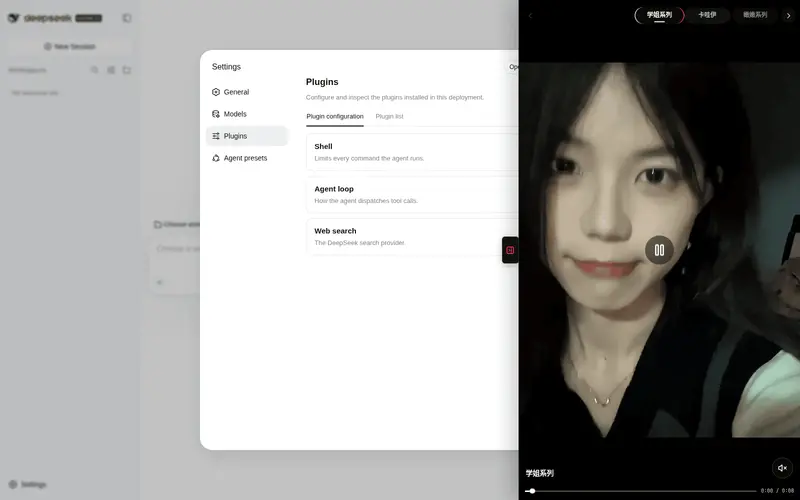
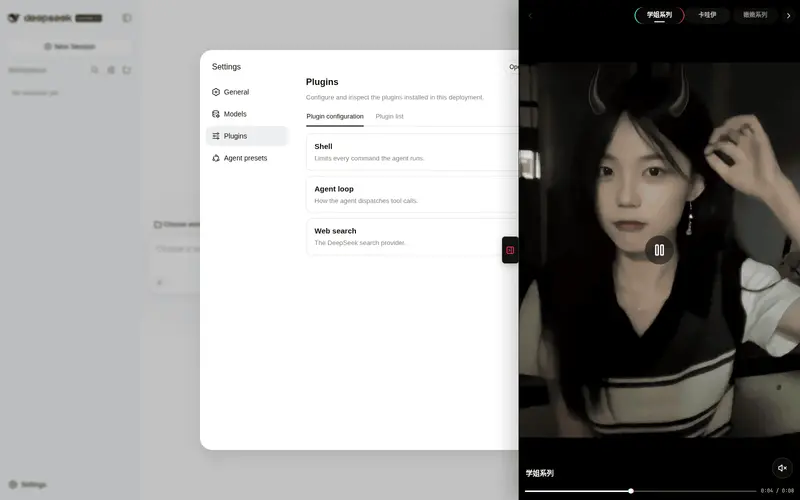
What it does
Short-video sidebar: native player, series navigation, precise history replay.
Best for
- DSH Web users who want a short-video player alongside coding sessions without leaving the interface.
- Users who value category navigation, autoplay, keyboard or gesture controls, and exact replay of previously resolved clips.
- Setups using dsh-better-sidebar, or users who can use the plugin's standalone floating dock.
Not ideal for
- Headless or TUI workflows, because the feature is a Web UI media player.
- Users who need selected or editorially controlled feed content; the built-in feeds return random entertainment clips.
- Offline or reliability-critical use, because feed playback depends on a third-party API with no stated availability guarantee.
- Users who require uncropped horizontal or square video; `object-fit: cover` can crop those formats.
README
dsh-douyin
DSH WebUI 侧栏短视频插件:原生播放器直接解析视频直链播放。顶部可选择学姐、甜妹、COS、舞蹈等 21 个系列,支持自动连播、滚轮切换与精确历史回放。

原理
聚合视频源来自 api.yujn.cn 的分类接口。每次请求会 302 到随机 mp4 直链;插件通过 host resolver 读取 Location,再交给原生 <video> 播放。历史栈保存真实直链,因此向上滚动能回到同一段视频。
安装
dsh plugin --profile web add /path/to/DSH-douyin
# 重启 dsh web 后生效
使用
模式一:dsh-better-sidebar(装了它时自动生效)
自动注册侧栏 tab「刷视频」(单实例),在侧栏 + 菜单打开。
模式二:自带浮动 dock(未装 better-sidebar 时)
页面右侧边缘播放按钮可展开/收起全黑沉浸式播放面板。零额外插件依赖。
播放操作
- 点击暂停:点击视频画面暂停,再点画面或中央播放按钮继续;暂停时中央按钮常驻显示
- 播放进度:底部显示当前时间 / 总时长,拖动进度条可定位;固定视频播完后可从头重播
- 音量调节:点击右下角音量按钮弹出滑块(0–100%),拖动实时调节并自动取消静音;图标按音量分档(静音 / 低 / 高)
- 短视频手势:手机视频区上滑 → 下一段,下滑 → 上一段;滑动后不会误触暂停
- 视频滚轮:桌面视频区向下滚 → 下一段,向上滚 → 上一段(400ms 防抖;顶部悬浮栏空白处滚轮同样切视频)
-
键盘控制:空格 /
K播放暂停,M静音,左右方向键快退/快进 5 秒,上下方向键切换视频 - 系列导航:在顶部轨道滚轮或触控横滑,也可使用左右箭头、键盘方向键和点击切换系列
-
精确回放:每段先经 host 路由(
/dsh-douyin/resolve)用 Node fetch 解析出 302 后的真实 mp4 直链再播放——历史栈存的是直链,上滚回放的就是刚才那段(同一 URL),而非接口重新随机 - 自动连播:feed 源每段播完自动前进(优先走历史,末尾才请求新段)
- 失败自愈:单段加载/解码失败会递增退避并自动跳过;连续失败 3 次后停止请求并显示错误界面
界面
视频上方是抖音式横向系列导航轨道。当前系列固定居中,采用白字与红/青双侧强调;相邻项随距离逐渐淡化。轨道支持滚动与居中吸附,停止滚动后加载对应分类、清空上一分类的播放历史,并持久化选择。
沉浸式短视频播放器:视频铺满整个面板,顶部系列栏以透明黑色悬浮,底部显示系列名称、播放进度与音量控制。暂停时中央出现播放按钮;播放状态下按钮仅在桌面悬停时显示。竖屏 9:16 内容在默认面板比例下几乎零裁切。
界面以手机短视频播放器为基准:全屏黑底、顶部轻量分类、底部媒体控制,红 #fe2c55 与青 #25f4ee 仅用于选中和焦点状态;控件使用 Lucide 图标。
宽度自适应:面板宽度 = 屏幕高度 × 9/16,并限制不超过视口宽度(min(100vw, clamp(380px, 100vh×9/16, 700px)))。1080p 全屏浏览器约 607px 宽;窄屏自动铺满,关闭按钮移至左上角。视频使用 cover 填充。
按需加载:浮动 dock 关闭时不挂载播放器或 iframe,不会在后台解析、下载或播放媒体;收起时立即卸载面板。
展开时自动压缩会话区:面板打开时 #root 右侧让出面板宽度(margin-right 同公式 + 200ms 平滑动画),会话区实时变窄不被遮挡;收起自动还原。
源接口(三模式,数据驱动)
type SourceKind = 'feed' | 'direct' | 'web'

interface VideoSource {
  id: string          // 稳定 id(自定义源 custom-<timestamp>)
  name: string
  kind: SourceKind    // 播放方式,见下
  url: string
  custom?: boolean    // 用户添加的源
}
| kind | URL 含义 | 播放方式 |
|---|---|---|
feed |
内置的随机视频接口(302 到 mp4) | host 白名单解析后由原生播放器连播 |
direct |
固定一个视频文件(mp4/webm/…) | 原生播放器播放一次,可暂停和重播;不响应上下切段 |
web |
允许被嵌入的网页 | iframe 渲染 |
内置系列
选择器内置 21 个经 HTTPS 302 验证的 feed 系列,包括:学姐、卡哇伊、嫩嫩、丝滑舞蹈、完美身材、慢摇、清纯、COS、街拍、甜妹、热舞、穿搭、章若楠、鞠婧祎等。
feed resolver 只接受上述内置 HTTPS 端点及 _t 缓存参数,不会替浏览器请求任意 URL、环回地址或内网服务。
架构
src/index.ts              host half:通过 `ctx.webServer` 注册 `/dsh-douyin/resolve` 路由
src/client/index.ts       browser half:沉浸式面板 + 双模式挂载 + 源管理
src/client/MediaPlayer.ts 原生播放器(播放暂停 / 进度与音量 / 手势导航 / 直链历史 / 失败自愈)
tests/*.spec.ts           源配置、播放器策略、resolver 与构建门禁测试
cordis.patch.yml          bundle 挂载声明
构建与验证
pnpm install
pnpm build     # tsc + tsdown + 产物校验(loader banner / .ts 残留)
pnpm test      # vitest(23 用例)
dsh plugin --profile web add .   # 挂载
浏览器验证(DevTools):
window.__DSH_BOOT__.entries       // 应含 id: "dsh-douyin"
document.querySelector('video.vf-video')  // 原生播放器存在且 paused === false
已知限制
- feed 源依赖第三方接口的可用性;单段失败会退避重试,连续失败 3 次后停止并提示
-
api.yujn.cn接口内容为随机泛娱乐短视频,非自选内容 - 视频
object-fit: cover铺满面板:9:16 竖屏内容零裁切,横屏/方形内容居中裁切左右 - headless 自动化环境(如 agent-browser)软解码可能对个别视频报 Format error——真实浏览器有硬件解码,不受影响(播放器仍会自动跳过)
Frequently Asked QuestionsFAQ
Use the verified command dsh plugin --profile default add github:AnacondaKC/dsh-douyin in a DSH-enabled shell. The command resolves the public package metadata and keeps the plugin attached to the catalog identity shown on this page.
Compatibility follows the bundle and profile status shown above. If a profile is not detected, keep the plugin disabled there and check the repository documentation before enabling it in production.
The GitHub link and activity metadata are the source of truth for releases and maintenance. Revisit this page after a new release to confirm the catalog has observed the latest version.