Awu12277/dsh-stock-watch
A股自选股实时行情盯盘插件 - DeepSeek Harness Web 右上角可折叠弹窗
Listed
46
Fun
Bundle verified
Preview
What it does
A-share watchlist real-time market monitoring plugin: a collapsible popup in the top-right corner of the DeepSeek Harness (DSH) web interface for real-time quote monitoring, group switching, intraday and candlestick (K-line) charts, and buy/sell target price settings.
Best for
- A-share investors who want a live watchlist inside the DSH Web interface.
- Users monitoring grouped symbols, intraday moves, daily/weekly/monthly candlesticks, moving averages, and buy or sell targets.
- DSH workflows that launch stock analysis, daily review, limit-up analysis, or company research conversations from the market panel.
Not ideal for
- Users monitoring non-A-share markets, because the documented stock pool, trading sessions, conventions, and data source are A-share-specific.
- Headless or non-Web DSH profiles, because the primary experience is a browser overlay.
- Offline or network-restricted deployments, because quotes and charts depend on Tencent Finance endpoints and the chart library may load from a CDN.
README
dsh-stock-watch



A 股自选股实时行情盯盘插件:在 DeepSeek Harness(DSH)Web 界面的右上角显示一个可折叠弹窗,实时监控自选股行情、切换分组、查看分时与 K 线、设置买卖目标价。
数据源与原终端 CLI 项目 stocking 同源(腾讯财经),配色沿用 A 股红涨绿跌惯例。
安装
已发布到 npm,一条命令安装到你的 web profile:
dsh plugin --profile web add dsh-stock-watch
- 本地开发安装:
dsh plugin --profile web add file:D:\projects\github\dsh-stock-watch - 或直接通过 git:
dsh plugin --profile web add github:Awu12277/dsh-stock-watch - 安装后重启
dsh web生效;卸载:dsh plugin --profile web remove dsh-stock-watch
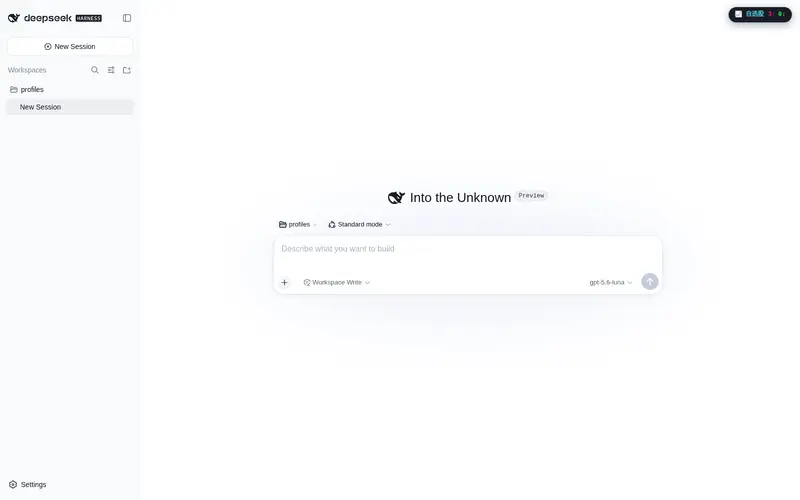
安装完成后,刷新页面,右上角出现「📈 自选股」药丸。
截图
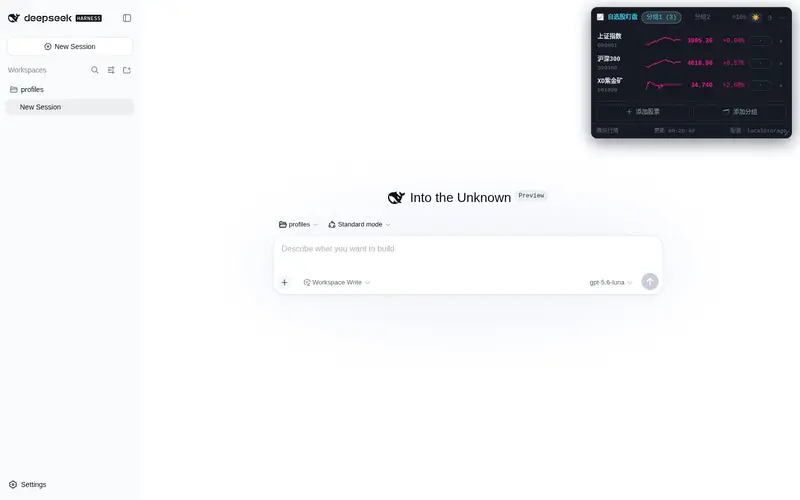
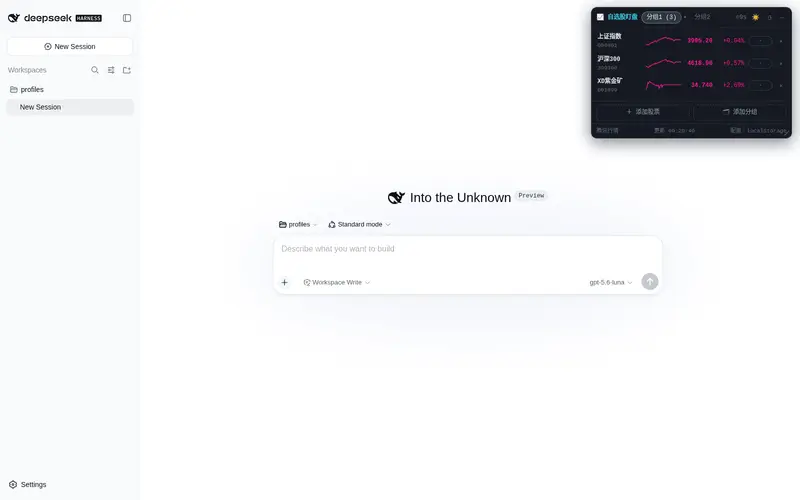
| 折叠药丸(右上角实时涨跌家数) | 暗色列表(分组 + 分时迷你折线 + 目标价触发) |
|---|---|
 |
 |
| 暗色·分时(价格线 / 均价线 / 昨收基准) | 暗色·日 K(TradingView Lightweight Charts) |
|---|---|
 |
 |
| 浅色主题 |
|---|
 |
功能特性
- 右上角可折叠弹窗:折叠时显示自选股实时涨跌家数药丸;展开为完整列表,点击任意行进入详情
-
胶囊可拖动:按住「📈 自选股」药丸可拖到屏幕任意位置,面板随之跟随(右边缘对齐);展开后按住面板头部也可拖动;位置持久化到 localStorage。拖到屏幕四边自动吸附,贴边后胶囊变为半球(屏幕边缘显示涨/跌家数,如
3↑0↓),点击仍可展开面板 -
多分组自选股:分组 tab 切换(分组名 + 股票数),配置存浏览器
localStorage(首次自动从~/.stocking/settings.json迁移) - 实时行情列表:名称 / 代码、现价、涨跌幅、分时迷你折线、目标价触发标记(买入 / 卖出 / 等待 / -),每 10s 自动刷新(带倒计时)
- 分时视图:全天分钟价格线(红涨绿跌)+ 黄色均价线(VWAP)+ 昨收虚线基准,时间轴按 A 股交易时段(北京时间 09:30–11:30 / 13:00–15:00) 标注,午间休市留白
-
K 线视图:日 K / 周 K / 月 K 前复权蜡烛图 + 成交量柱 + MA 均线(MA5 白 / MA10 黄 / MA20 紫 / MA60 绿,A 股配色,右上角可自定义隐藏/显示,配置存 localStorage),支持
+ / − / 重置按钮缩放 K 线(位于 MA 均线配置左侧),基于 TradingView Lightweight Charts(CDN 懒加载,失败自动降级为自绘 SVG) - 目标价可编辑:详情页点击「买入目标 / 卖出目标」进入输入框(数字 + 两位小数、留空清除、回车确认 / Esc 取消),即时重算触发标记并持久化
-
一键投资研究报告:详情页「📈 投资研究报告」按钮——新建一个 DSH 对话并发送简短消息
分析{公司名}(代码),由会话中的 agent 自动使用investment-research完成投资研究、frontend-design生成介绍网站(技能指令由 host 端条件式系统提示注入,仅对「分析某家上市公司」类请求生效);按钮带防抖(进行中禁用,防连点重复建会话) -
胶囊悬浮扇形菜单:鼠标移到胶囊(含贴边吸附态)触发 GSAP 扇形动画,展开 📊 行情分析 / 📅 每日复盘 / 🚀 涨停分析 三个选项(方向按胶囊位置自动选择象限、不越出屏幕;鼠标在扇形区域内不收起,移出才收回)。点击选项同样新开一个 DSH 对话并发送简短关键词(如
每日复盘),完整提示词(A股短线复盘框架 / 行情分析 4 项 / 涨停分析 4 项)由 host 端条件式系统提示注入、不暴露在消息里;「每日复盘」仅在 15:00–次日 9:00 可点击,交易时段置灰并提示”还未收盘”;拖动/吸附后扇形自动归位重开 -
安装时自动注入技能:插件首次启动时把自带的
investment-research、frontend-design两个技能复制到用户技能目录~/.agents/skills/(已存在则跳过、不覆盖用户版本;DSH_STOCK_WATCH_NO_SKILLS=1可禁用,DSH_STOCK_WATCH_SKILLS_DIR可改目标目录) - 暗色 / 浅色主题:CSS 变量两套配色,默认暗色,☀️/🌙 一键切换(图表配色联动)
架构
┌─────────────── Web 浏览器 ───────────────┐
│  client.js(客户端插件模块)              │
│  · shell.overlay 槽位 → 右上角弹窗        │
│  · React + Lightweight Charts + SVG 降级  │
│  · 配置存 localStorage(stocking.config.v1)│
│          │ fetch(同源 /dsh-stock-watch/*)│
└──────────┼────────────────────────────────┘
           ▼
┌─────────────── DSH Host(index.js)───────┐
│  cordis 插件:webServer 注册 5 个路由      │
│  · /config   读取 ~/.stocking/settings.json│
│  · /stocks   全 A 股搜索(本地池检索)     │
│  · /quotes   实时行情(腾讯分钟接口)      │
│  · /kline    日/周/月 K 线(fqkline)      │
│  · /minute   分时详情(分钟点 + 昨收)     │
└───────────────────────────────────────────┘
数据源
- 行情快照 + 分时:
https://web.ifzq.gtimg.cn/appstock/app/minute/query?code={code}&r=0.1 - 日/周/月 K 线:
https://web.ifzq.gtimg.cn/appstock/app/fqkline/get?param={code},{period},,,{count},qfq
解析逻辑(字段索引、K 线 [date, open, close, high, low, volume] 列序、昨收由 现价/(1+涨跌幅%) 反推)与 stocking 的 market.ts 保持一致。Host 端使用 Node 原生 fetch 直连(部署即使未挂载 web fetch provider 或沙箱封锁网络,本插件也不受影响)。
目录结构
dsh-stock-watch/
├── index.js           # node 端 cordis 插件(webServer 路由 + 技能注入 + 系统提示指令)
├── client.js          # 浏览器端客户端模块(__ModuleLoader__ + shell.overlay 槽位)
├── cordis.patch.yml   # 组合补丁:插入 host 插件行(dsh.bundle.patch)
├── package.json       # dsh.bundle + dsh.client 声明
├── data/              # 全 A 股股票池(a_stocks.json,5549 只)
├── skills/            # 随包技能(investment-research / frontend-design,启动时注入用户技能目录)
├── scripts/           # 本地测试脚本(smoke / probe / skills 注入验证)
├── screenshots/       # 运行截图
└── README.md
dsh plugin add 即 profile 目录内的 pnpm add:安装后按 package.json 的 dsh.bundle.patch 自动并入 profile 层栈,dsh.client 声明自动挂载浏览器端模块。
交互说明
| 状态 | 操作 |
|---|---|
| 药丸 | 点击展开 · 按住拖动(拖到屏幕边缘自动吸附为半球,显示涨/跌家数)· 悬停弹出扇形菜单(行情分析/每日复盘/涨停分析,新开对话执行) |
| 列表 | 分组 tab 切换 · 点击行进详情 · ⟳ 手动刷新 · — 折叠 · ☀️/🌙 切主题 |
| 详情 | ← 返回 · 分时 / 日K / 周K / 月K 切换 · 📈 投资研究报告(新建对话一键分析)· 点击买入/卖出目标编辑 · K线 +/−/重置 缩放 |
配置与持久化
- 自选股配置(分组、代码、买卖目标价)存浏览器
localStorage(key:stocking.config.v1) - 首次打开自动从
~/.stocking/settings.json一次性迁移(失败则用默认分组),之后 localStorage 为唯一数据源 - 重置:
localStorage.removeItem('stocking.config.v1')后刷新页面
License
MIT
Frequently Asked QuestionsFAQ
Use the verified command dsh plugin --profile default add github:Awu12277/dsh-stock-watch in a DSH-enabled shell. The command resolves the public package metadata and keeps the plugin attached to the catalog identity shown on this page.
Compatibility follows the bundle and profile status shown above. If a profile is not detected, keep the plugin disabled there and check the repository documentation before enabling it in production.
The GitHub link and activity metadata are the source of truth for releases and maintenance. Revisit this page after a new release to confirm the catalog has observed the latest version.