BeiZi6/dsh-theme-plugin
DSH Web GUI theme studio: presets + per-mode customization (accent, background, foreground, fonts, translucent sidebar, contrast) via the official webServer.tapIndex seam
Listed
2
Theme
Bundle verified
Preview
What it does
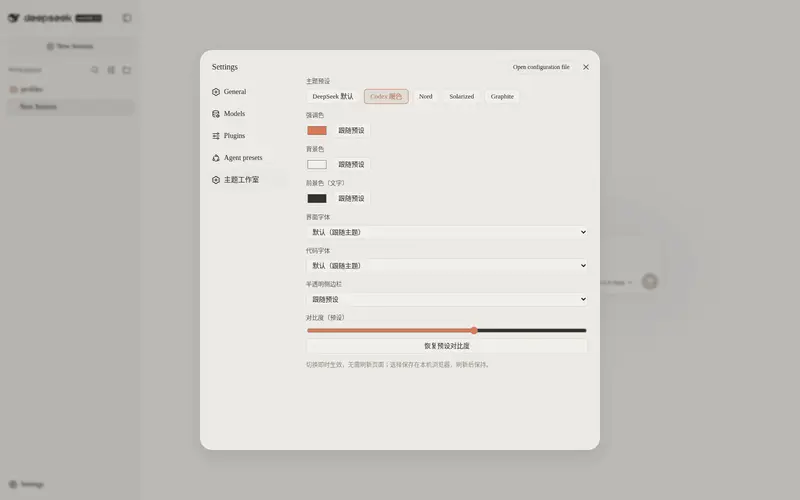
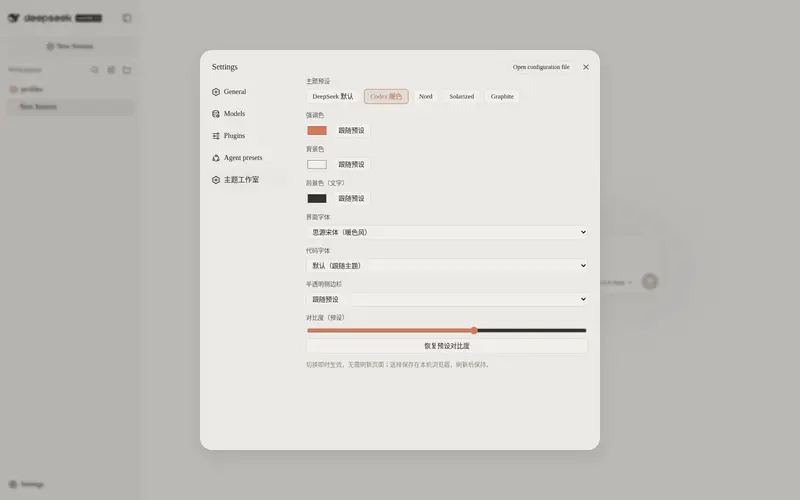
Theme studio for the DSH Web GUI: five built-in presets plus fully customizable light/dark palettes (accent, background, foreground, UI and code fonts, translucent sidebar, contrast), hot-swapped instantly and persisted in localStorage.
Best for
- DSH Web users who want preset themes or detailed light and dark palette control without editing vendor files.
- Users who need instant, persistent customization of colors, fonts, contrast, and sidebar translucency.
Not ideal for
- Non-Web DSH environments, since the plugin specifically targets the Web GUI.
- Organizations that require centrally enforced themes across browsers; GUI selections are stored in each browser's localStorage and override host configuration.
README
dsh-theme-plugin
Theme studio for the DeepSeek Harness (DSH) Web GUI: five built-in presets plus fully customizable light/dark palettes — accent, background, foreground, UI and code fonts, translucent sidebar and contrast — applied instantly, with no page refresh.
Features
- 🎨 5 built-in presets —
codex-warm,nord,solarized,graphite, plus the stock DeepSeek theme - 🖌️ Full customization — per-mode (
light.*/dark.*) accent, background, foreground, UI font, code font, translucent sidebar and contrast;custommode starts from scratch - ⚡ Instant hot-swap — a Settings GUI (“Theme Studio”) applies changes immediately through the official
ctx.theme.overrideTokensAPI; light/dark follow the system preference - 💾 Persistent — the selection is saved in browser
localStorageand survives reloads - 🧮 70+ derived tokens — three colors plus a contrast value expand into the whole semantic token set (borders, layers, scrollbar, tooltip, code blocks, bubbles, sidebar states…)
- 🪟 Translucent sidebar — real frosted sidebar via the
--dsw-specific-sidebar-fillvariable - 🔌 Official seams only — host-side injection through
webServer.tapIndex, no patched vendor files
Installation
Requires DeepSeek Harness with the web profile enabled. Install from the official registry:
dsh plugin --profile web add github:BeiZi6/dsh-theme-plugin
Restart dsh web for the plugin to take effect.
To remove:
dsh plugin --profile web remove dsh-theme-plugin
Usage
Settings GUI (recommended)
After a restart, open Settings → Theme Studio:
- Preset — one-click chips: DeepSeek default / Codex warm / Nord / Solarized / Graphite / Custom
- Colors — color pickers for accent, background and foreground, with a “follow preset” reset
- Fonts — dropdowns for the UI font and the code font (common stacks included)
- Translucent sidebar — follow preset / on / off
- Contrast — slider 0–100 with preset restore
Every change applies instantly and persists locally; GUI selections take priority over host config.
The
stockpreset derives no palette: color controls are disabled and only fonts can be overridden.
Config reference
| Field | Type | Description |
|---|---|---|
preset |
enum |
stock · codex-warm · nord · solarized · graphite · custom (default codex-warm) |
light.accent |
color | accent for light mode (primary buttons, links, …) |
light.background |
color | light-mode background |
light.foreground |
color | light-mode primary text |
light.uiFont |
CSS font-family
|
UI font stack |
light.codeFont |
CSS font-family
|
code font stack |
light.translucentSidebar |
enum |
preset · on · off
|
light.contrast |
number | 0–100; -1 = keep preset value |
dark.* |
— | same fields for dark mode |
Empty strings mean “keep the preset value”; unset fields are not overridden at all.
Example — merge into the web profile patch ($DSH_HOME/profiles/web/cordis.patch.yml):
- id: theme-plugin
  config:
    preset: codex-warm
    light:
      accent: '#FF6B35'
      background: '#FFFAF0'
      foreground: '#1A1A1A'
      uiFont: '"Inter", "PingFang SC", sans-serif'
      codeFont: '"JetBrains Mono", Consolas, monospace'
      translucentSidebar: off
      contrast: 70
    dark:
      accent: '#FFB07A'
      background: '#1A1A1A'
      foreground: '#F5F5F5'
      uiFont: '"Inter", "PingFang SC", sans-serif'
      codeFont: '"JetBrains Mono", Consolas, monospace'
      translucentSidebar: on
      contrast: 70
Only set the fields you want to change; leave the rest blank ('' / preset / -1).
Presets
| Preset | Style | Light bg / fg / accent | Dark bg / fg / accent |
|---|---|---|---|
stock |
DeepSeek default | — (no override) | — (no override) |
codex-warm |
Codex warm |
#F5F3EE / #1D1B16 / #DA7756
|
#2D2D2B / #F9F9F7 / #CC7D5E
|
nord |
Nord cool |
#ECEFF4 / #2E3440 / #5E81AC
|
#2E3440 / #ECEFF4 / #88C0D0
|
solarized |
Solarized |
#FDF6E3 / #657B83 / #B58900
|
#002B36 / #839496 / #268BD2
|
graphite |
Grayscale minimal |
#FAFAFA / #171717 / #525252
|
#171717 / #FAFAFA / #A3A3A3
|
custom starts from the codex-warm palette and takes every value from light.* / dark.*.
How it works
-
Host half (
index.js) — registers awebServer.tapIndexhook so every servedindex.htmlgets a<style>block injected before</head>, after the stylesheet links, letting the overrides win by cascade order. This is the same official seam the built-in UI theme uses. -
Specificity — selectors are written as
html body/html body[data-ds-dark-theme]to outrank the theme’s static CSS variables. - Token derivation — from background / foreground / accent plus a contrast factor, a small functional engine derives 70+ semantic tokens (border levels, layers, scrollbar, tooltip, markdown code blocks, bubbles, sidebar states…). Status colors (success / error / warn) keep their stock meaning.
-
Translucent sidebar —
--dsw-specific-sidebar-fillis emitted asrgba(mix(bg, fg, 3%), 0.65)when enabled; AppFrame / SidebarRoot / WorkspaceBrowser / TrajectoryTable consume that variable directly. -
Client half (
client.js) — a web-shell module that registers a “Theme Studio” section under Settings and writes every change viactx.theme.overrideTokens; the theme presenter emits the tokens inline on<body>, so the effect is instant and survives until the next selection. Selections persist inlocalStorage.
Compatibility
- DeepSeek Harness Web GUI (
dsh web) - Node.js >= 22.19
- Peer dependencies:
@deepseek-ai/cordis(^4),@deepseek-ai/dsh-host-webserver(^0.1.0-rc.6)
License
MIT © Xu Yuanshan
Links
- Repository: https://github.com/BeiZi6/dsh-theme-plugin
- Issues: https://github.com/BeiZi6/dsh-theme-plugin/issues
中文简介
为 DeepSeek Harness (DSH) Web GUI 打造的主题工作室插件:5 套内置预设(Codex 暖色 / Nord / Solarized / Graphite / 默认)+ 完全自定义;设置页内热切换、立即生效并持久化;通过官方 webServer.tapIndex 接缝向 index.html 注入主题 CSS,由背景/前景/强调三色与对比度函数式推导 70+ 语义令牌,并支持半透明侧边栏。
Frequently Asked QuestionsFAQ
Use the verified command dsh plugin --profile default add github:BeiZi6/dsh-theme-plugin in a DSH-enabled shell. The command resolves the public package metadata and keeps the plugin attached to the catalog identity shown on this page.
Compatibility follows the bundle and profile status shown above. If a profile is not detected, keep the plugin disabled there and check the repository documentation before enabling it in production.
The GitHub link and activity metadata are the source of truth for releases and maintenance. Revisit this page after a new release to confirm the catalog has observed the latest version.