bill9109/dsh-conversation-share
分享任意段落的 DSH 对话
Listed
1
Session
Bundle verified
Preview
What it does
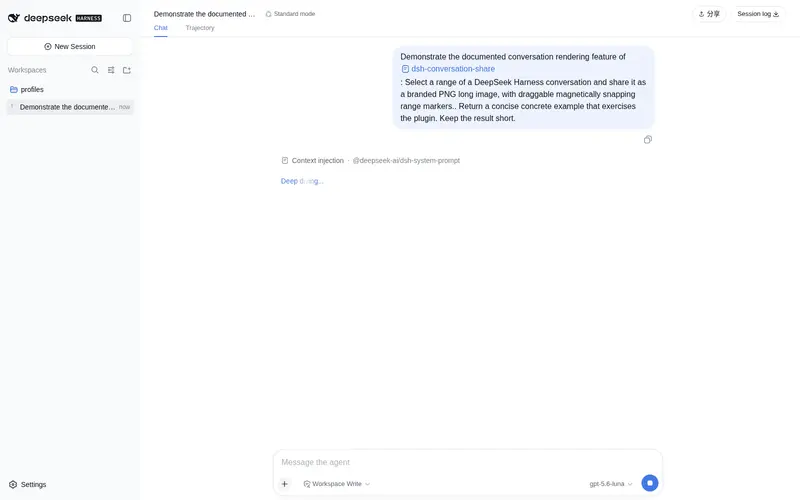
Share any excerpt of a conversation.
Best for
- Users who need to share an exact contiguous excerpt from a DSH conversation.
- Workflows that require a single PNG long image instead of manually stitched screenshots.
- People who want draggable semantic range selection, preview, download, and clipboard copying in DSH Web.
Not ideal for
- Sharing an editable, searchable, or machine-readable conversation transcript; the output is a PNG image.
- Sharing an entire live session with ongoing synchronization or collaboration controls.
- Non-web DSH profiles; the documented integration is a client bundle for the web profile.
README
dsh-conversation-share




Install: dsh plugin --profile web add github:bill9109/dsh-conversation-share
Render a selected range of a DeepSeek Harness conversation into a PNG long image with a branded footer, ready to share.
| English | 中文 |
Why this exists
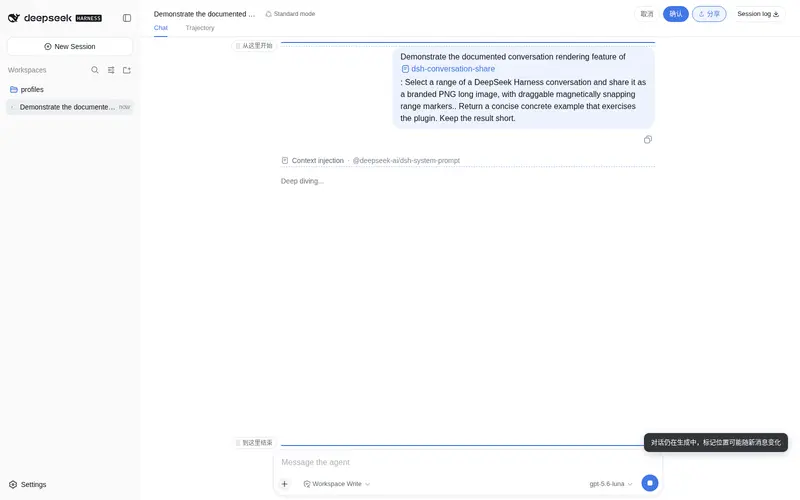
Conversation history lives inside the DSH Web UI, and sharing a meaningful part of it usually means screenshots spliced by hand — cropped, misaligned, with no brand or context. This plugin lets you pick an exact range of a conversation with two draggable, magnetically snapping markers and render it into a single polished PNG long image with a DeepSeek Harness branded footer.
Screenshots
Features
-
Share capsule to the left of the Session log button in the top-right corner (same style as log; clicking activates a blue highlight, with
[Cancel][Confirm]expanding to its left) -
Two draggable range markers (horizontal labels: “Start here” / “End here”) with magnetic snapping
- Snap points = semantic message rows + markdown blocks (p/pre/ul/li/table/headings) + visual boxes (code blocks/cards) + content-level buttons (artifact file chips) + every text line inside paragraphs
- The start handle snaps to an element’s top edge, the end handle to its bottom edge; the two handles cannot cross
- Snap hint = light blue translucent rounded-rect fill (flat style)
- Scrolling model: handles follow the pointer 1:1 within the viewport without scrolling; only when the pointer enters the top/bottom edge zones (64px) does the page scroll (clamped penetration depth, frame-rate independent), stopping when it leaves; clicking does not scroll (a real drag of ≥8px is required)
- Capture: 40pt theme-background padding (symmetric on all sides) + a DeepSeek Harness brand icon at the bottom (with the BETA badge text); extra-long content is rendered in chunks and stitched together to bypass the canvas height limit
- Preview modal: image width adapts, vertical scroll to review, download PNG, copy image
Usage
- Click the share capsule next to the Session log button in the top-right corner; it activates (blue highlight) and the
[Cancel][Confirm]controls appear - Drag the two range markers to select the conversation range — they snap to message rows, markdown blocks, and line-level text; the start handle snaps to a top edge, the end handle to a bottom edge
- Click Confirm to render the selection into a PNG long image (extra-long content is chunked and stitched automatically)
- Review the result in the preview modal: download the PNG or copy the image to the clipboard
Install
Install into the web profile with the standard dsh plugin mechanism (no source changes, no manual package.json edits):
dsh plugin --profile web add github:bill9109/dsh-conversation-share

# Or pin a branch/commit
dsh plugin --profile web add github:bill9109/dsh-conversation-share#main

# Or install from a local checkout (development — rebuild and it takes effect)
dsh plugin --profile web add /path/to/your/dsh-conversation-share
Internally the command runs pnpm add <spec> in the profile directory and automatically appends packages that declare dsh.bundle to dsh.profile.bundles. The repository ships its build output (lib/), so no consumer-side build is needed.
After installing, restart web and hard-refresh the browser (Cmd+Shift+R) — old tabs do not load the new bundle.
Upgrade
dsh plugin --profile web update github:bill9109/dsh-conversation-share
For a local-path installation, run add again against the replacement checkout, then restart web and hard-refresh.
Uninstall
dsh plugin --profile web remove @bill9109/dsh-conversation-share
The command runs pnpm remove <pkg> in the profile directory and removes it from dsh.profile.bundles. After uninstalling, restart web and hard-refresh the browser.
Troubleshooting
| Symptom | Resolution |
|---|---|
| Share capsule does not appear | The plugin only loads after restarting web and hard-refreshing the browser; verify the bundle row exists in the profile (dsh --profile web --dump-config | grep conversation-share) |
| Handles cannot cross or snap oddly | That is by design — the start handle snaps to top edges, the end handle to bottom edges, and they cannot cross; drag past an element to flip which edge binds |
| The page scrolls while dragging | Scrolling only happens in the 64px top/bottom edge zones; drag within the viewport to move the handle 1:1 without scrolling |
| Confirm does nothing / blank image | Ensure the selection covers at least one message; the capture pipeline chunks and stitches extra-long content, so very long ranges may take a moment |
| Copied image is missing from the clipboard | The browser may have blocked clipboard image writes; use Download PNG instead |
Directory structure
dsh-conversation-share/
├── src/
│   ├── index.ts              # host half of the plugin (no-op)
│   ├── client/               # browser half (client bundle entry src/client/index.ts)
│   │   ├── index.ts          # apply(ctx): mounts the share flow
│   │   ├── controller.ts     # share button / cancel-confirm / mode switching / capture orchestration
│   │   ├── markers.ts        # range marker handles (snapping, scrolling, state machine)
│   │   ├── snap-targets.ts   # snap-target collection (rows/blocks/line-level text/content buttons + position dedup)
│   │   ├── capture.ts        # capture pipeline (chunking, cropping, stitching, branded footer)
│   │   ├── brand.ts          # brand SVG clone (var() baking + clip-path neutralization)
│   │   ├── modal.ts          # preview modal + download/copy
│   │   └── dom.ts / theme.ts / icons.ts / toast.ts
│   └── vendor/html-to-image/ # vendored html-to-image 1.11.13 (MIT, see its LICENSE)
├── scripts/build.mjs         # build script (links DSH checkout deps → tsc → tsdown)
├── lib/                      # build output (client.js is the browser bundle, committed)
├── package.json              # dsh.bundle + dsh.client declarations
├── cordis.patch.yml          # bundle patch (inserts the conversation-share plugin)
└── tsconfig.json / tsdown.config.mjs
Build
Requires a DSH checkout (the official repository or a snapshot directory both work):
DSH_CHECKOUT=/path/to/dsh-checkout node scripts/build.mjs
# or via pnpm:
DSH_CHECKOUT=/path/to/dsh-checkout pnpm run build
The script temporarily symlinks the DSH checkout’s node_modules into this directory (cleaned up automatically when the build ends) and runs tsc (type check) then tsdown (producing lib/index.js + lib/client.js).
Development and verification
pnpm run check     # tsc --noEmit
DSH_CHECKOUT=/path/to/dsh-checkout pnpm run build   # -> lib/ (committed)
lib/ is committed so consumers install without building. Changes to the share flow (markers, snapping, capture, preview) should be exercised against a live web profile and the built bundle committed in the same change.
Release
-
Make sure the build output is up to date:
DSH_CHECKOUT=/path/to/dsh-checkout node scripts/build.mjs -
Bump the version, update
CHANGELOG.md, commit and push tomain, and tag the release:git add . && git commit -m "release v0.1.x" && git push origin main git tag v0.1.x && git push origin v0.1.x
Community and About
- Use GitHub Issues for reproducible bugs, focused feature requests, and usage questions.
- Read CONTRIBUTING.md before proposing changes; report vulnerabilities privately via SECURITY.md.
- Follow releases and compatibility notes in CHANGELOG.md.
License
BSD-3-Clause (the vendored html-to-image is MIT, see src/vendor/html-to-image/LICENSE).
Frequently Asked QuestionsFAQ
Use the verified command dsh plugin --profile default add github:bill9109/dsh-conversation-share in a DSH-enabled shell. The command resolves the public package metadata and keeps the plugin attached to the catalog identity shown on this page.
Compatibility follows the bundle and profile status shown above. If a profile is not detected, keep the plugin disabled there and check the repository documentation before enabling it in production.
The GitHub link and activity metadata are the source of truth for releases and maintenance. Revisit this page after a new release to confirm the catalog has observed the latest version.